
Deploy Jupyter Notebook
Deploy Jupyter Lab | Jupyter Notebook on Railway
Jupyter Notebook
Just deployed
/data
Deploy and Host Jupyter Notebook on Railway
Jupyter Notebook is an interactive web-based environment for writing and running code, analyzing data, creating visualizations, and documenting workflows. It is widely used by data scientists, researchers, students, and developers for machine learning, data analysis, experimentation, and educational projects through an intuitive browser interface.
About Hosting Jupyter Notebook
Railway makes it easy to deploy a persistent Jupyter Notebook server without managing infrastructure. This template runs JupyterLab inside a Docker container and exposes it through a secure HTTPS endpoint. Notebook files are stored on a Railway Volume mounted at /data, ensuring your work persists across deployments and restarts. The service listens on port 8889 and is accessible through a generated Railway domain. Railway automatically manages networking, SSL certificates, and infrastructure, allowing you to focus on your notebooks while providing the ability to scale your deployment as your workloads grow.
Common Use Cases
- Data science and machine learning development
- Research, experimentation, and educational notebooks
- Interactive Python development and data visualization
Dependencies for Jupyter Notebook Hosting
| Dependency | Required | Purpose |
|---|---|---|
| Railway Volume | Yes | Stores notebooks and persistent user data |
Deployment Dependencies
| Resource | Link |
|---|---|
| Jupyter Documentation | https://jupyter.org/documentation |
| Jupyter Docker Stack | https://hub.docker.com/r/fuglelucas/juplabtest |
Implementation Details
Docker
This template deploys the following Docker image:
fuglelucas/juplabtest:latest
Public Networking
| Setting | Value |
|---|---|
| Proxy Type | HTTP Proxy |
| Target Port | 8889 |
Start Command
Use the following Railway start command:
jupyter-lab \
  --ip=0.0.0.0 \
  --port=8889 \
  --allow-root \
  --notebook-dir=/data \
  --no-browser
Environment Variables
No additional environment variables are required.
Persistent Storage
A Railway Volume is required.
- Open your Railway service.
- Go to Settings → Volumes.
- Add a new Volume.
- Mount it at:
/data
This directory stores all notebooks and user files so they remain available after redeployments.
Build & Start
No custom build command is required because the template uses a prebuilt Docker image.
Accessing the Application
After deployment:
- Open Settings → Networking.
- Generate a Railway Domain.
- Visit your generated URL in a browser.
When Jupyter starts, it requires a login token.
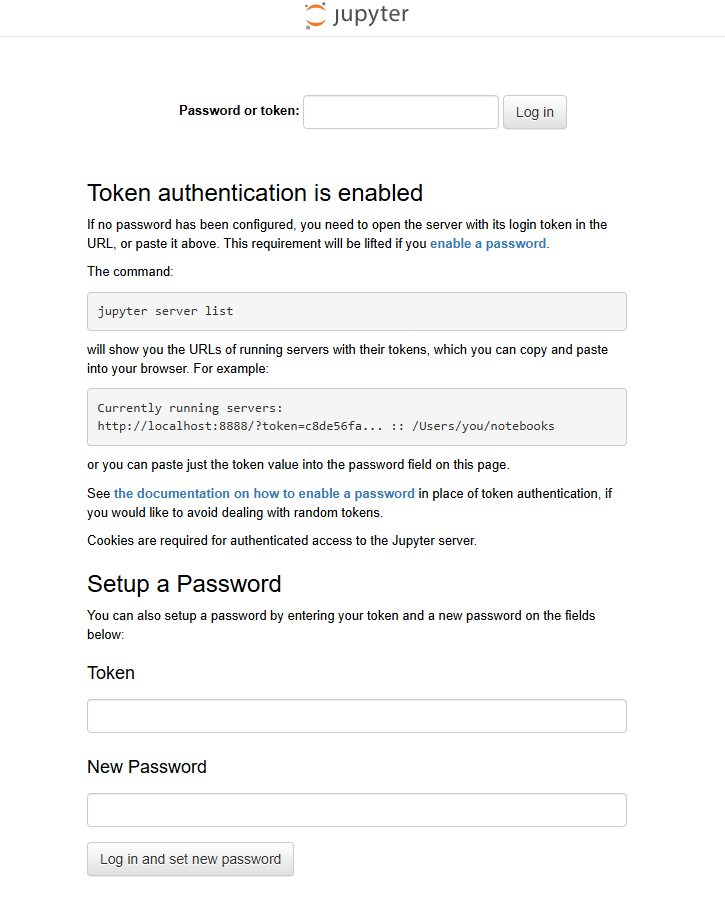
How to get the token
After the deployment finishes:
- Open your Railway service.
- Select Deploy Logs.
- Look for a line similar to:
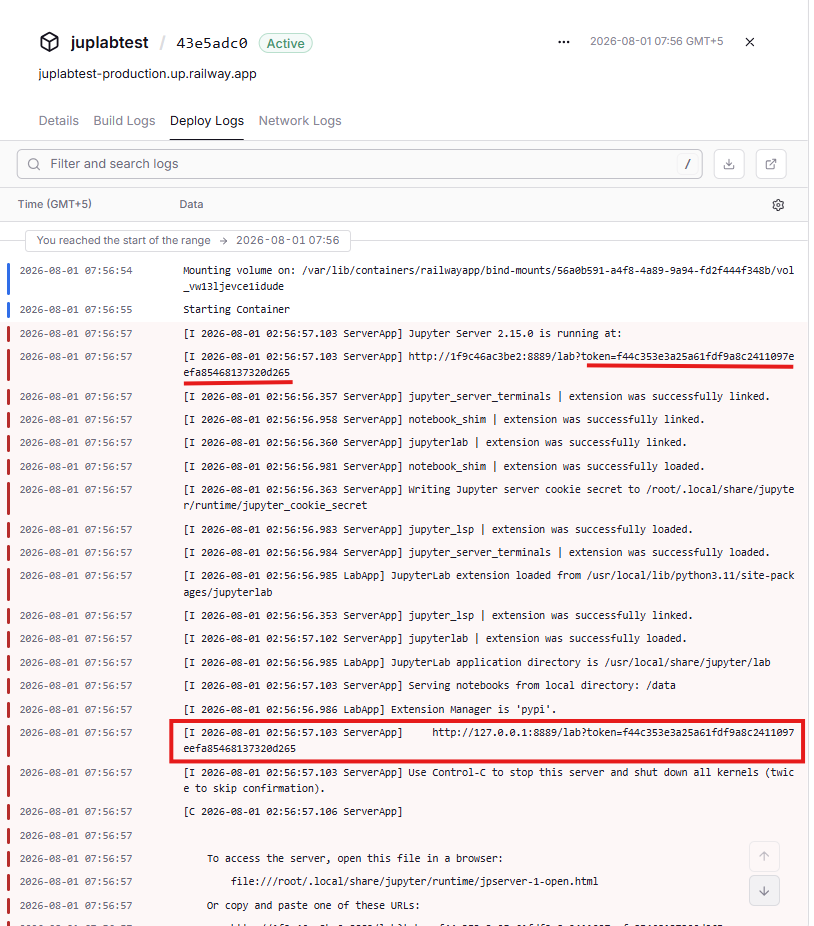
http://:8889/lab?token=f44c353e3a25a61fdf9a8c2411097efea85468137320d265
Copy only the value after token=:
f44c353e3a25a61fdf9a8c2411097efea85468137320d265
Then:
- Open your Railway Jupyter URL.
- Paste the copied token into the Password or token field.
- Click Log in.
You can also set a permanent password on the same page by entering the token and a new password, so future logins won't require the token.
Token location example
The deployment logs show the full login URL containing the token, while the browser login page asks you to paste that token into the login field. The highlighted token=... value in your deployment logs is exactly what you should copy and use.
Why Deploy Jupyter Notebook on Railway?
Railway is a singular platform to deploy your infrastructure stack. Railway will host your infrastructure so you don't have to deal with configuration, while allowing you to vertically and horizontally scale it.
By deploying Jupyter Notebook on Railway, you are one step closer to supporting a complete full-stack application with minimal burden. Host your servers, databases, AI agents, and more on Railway.
Template Content
Jupyter Notebook
fuglelucas/juplabtest:latest

