
Deploy JupyterHub
Multi-user Jupyter notebook server with per-user workspaces

Just deployed
/var/lib/postgresql/data
jupyterhub
Just deployed
/home
Deploy and Host JupyterHub on Railway
JupyterHub is the multi-user front door to Jupyter notebooks. Rather than everyone running jupyter lab on their own laptop against their own half-installed Python, it gives each person a login, a home directory and a JupyterLab server the hub starts on demand and stops when they go idle. Project Jupyter maintains it under a BSD licence; it runs course servers, research clusters and internal data platforms.
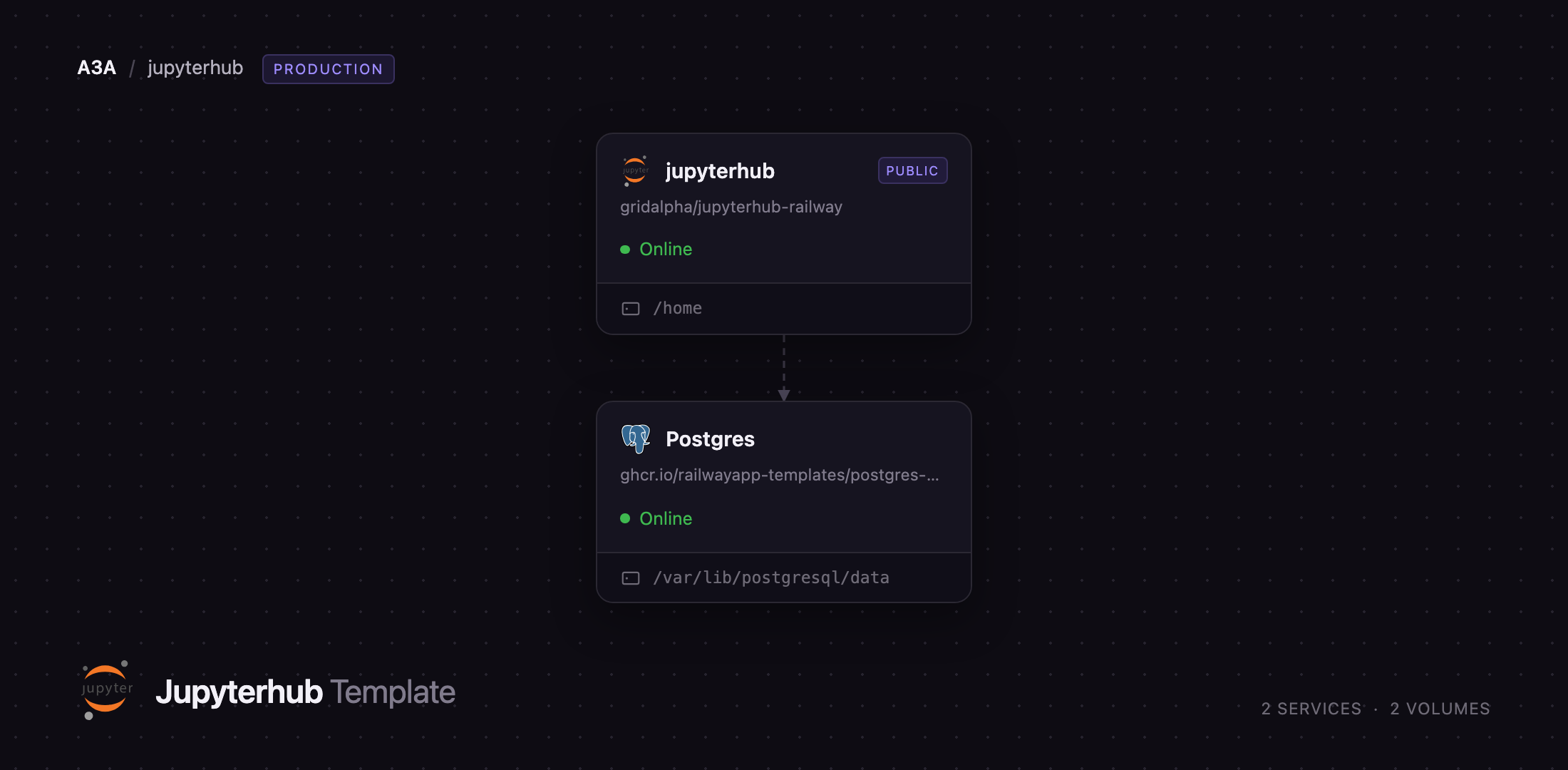
Self-host JupyterHub with this template and the parts that normally take an afternoon are already wired together. The jupyterhub service runs the hub, its configurable-http-proxy router and every notebook server in one container, built from gridalpha/jupyterhub-railway on quay.io/jupyterhub/jupyterhub:5. A managed Postgres service holds the hub database; a 5 GB volume at /home holds user files. Deploy JupyterHub on Railway and you get sign-up with admin approval, JupyterLab with the SciPy stack, and idle servers stopped automatically.
Getting Started with JupyterHub on Railway
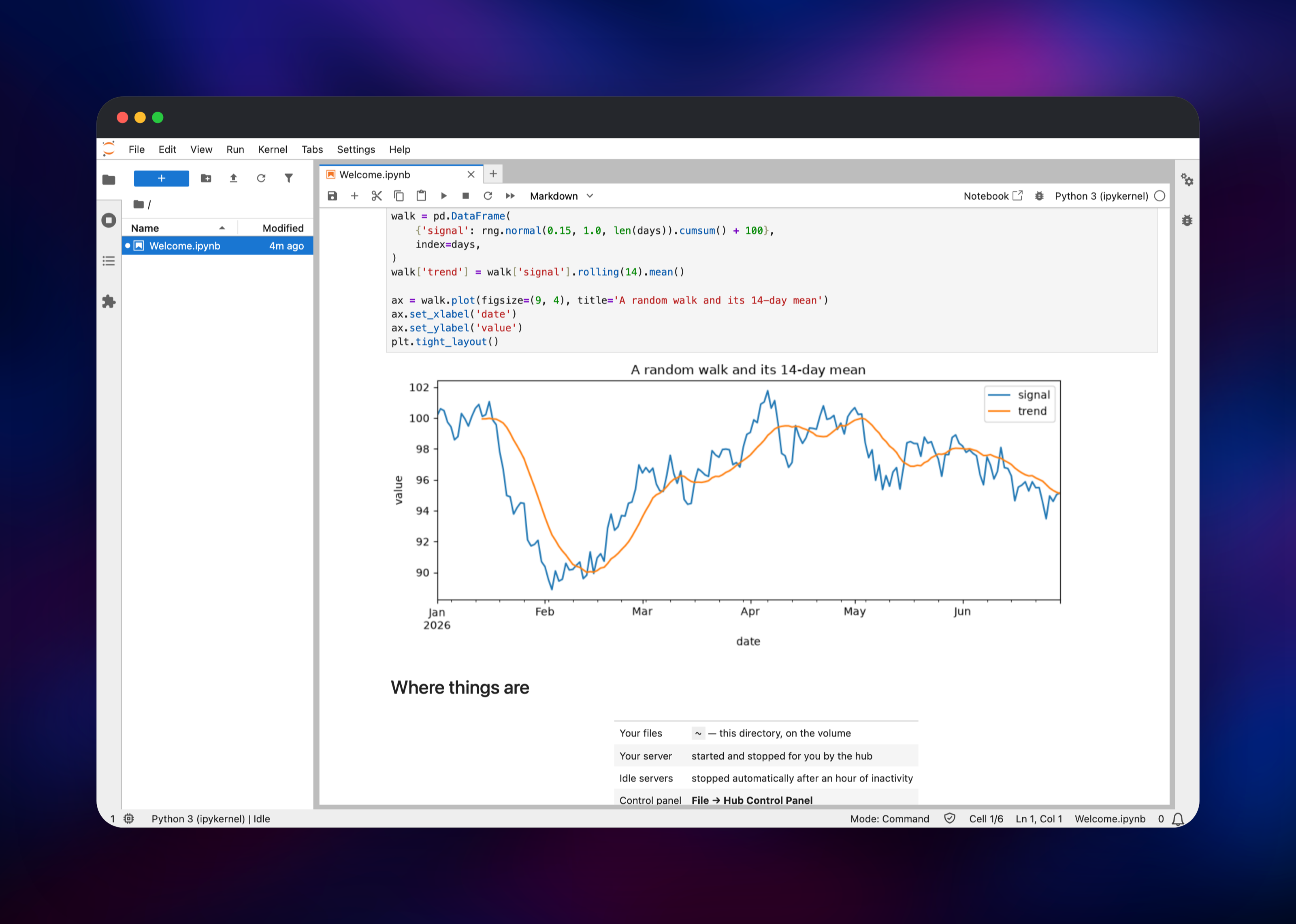
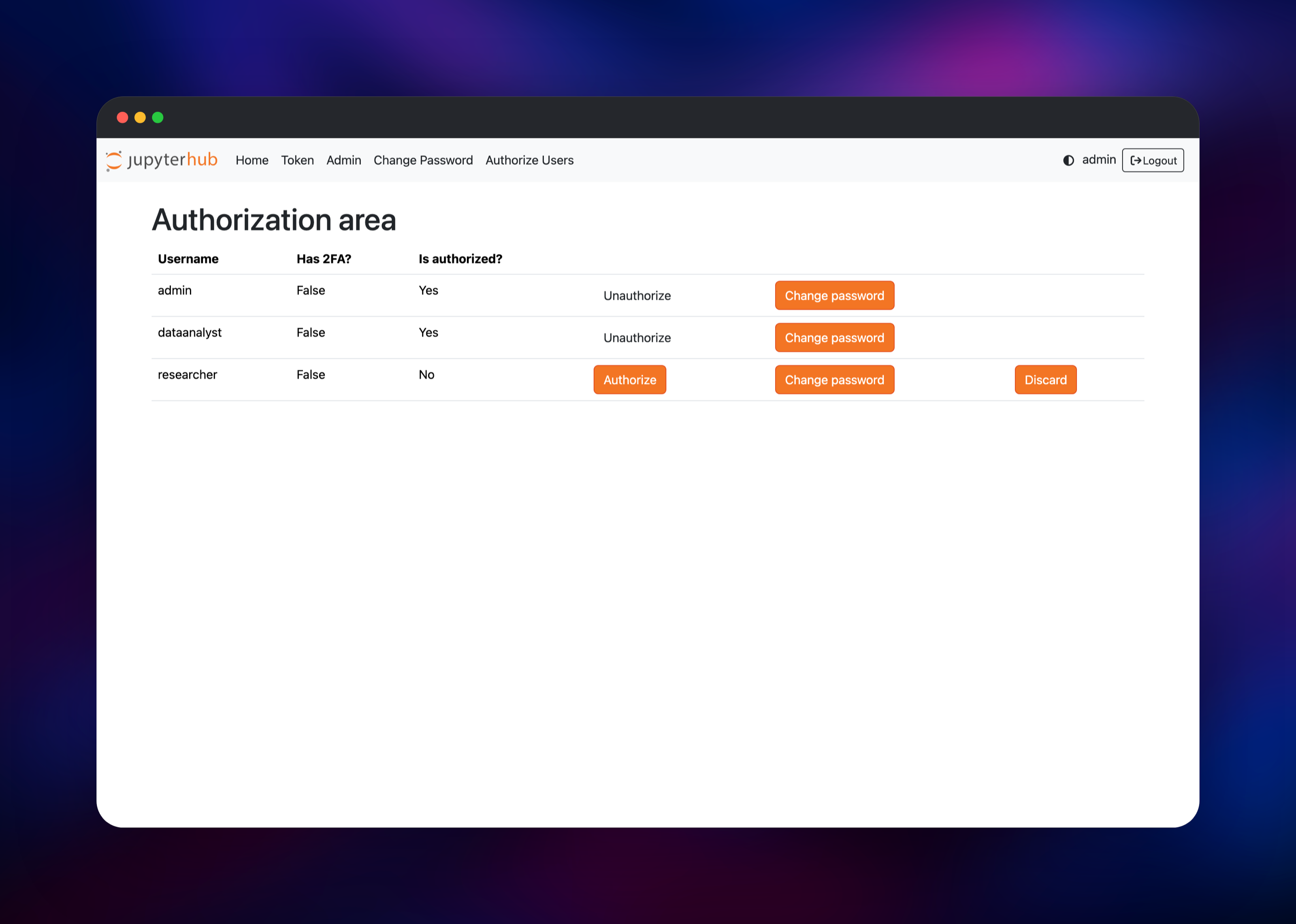
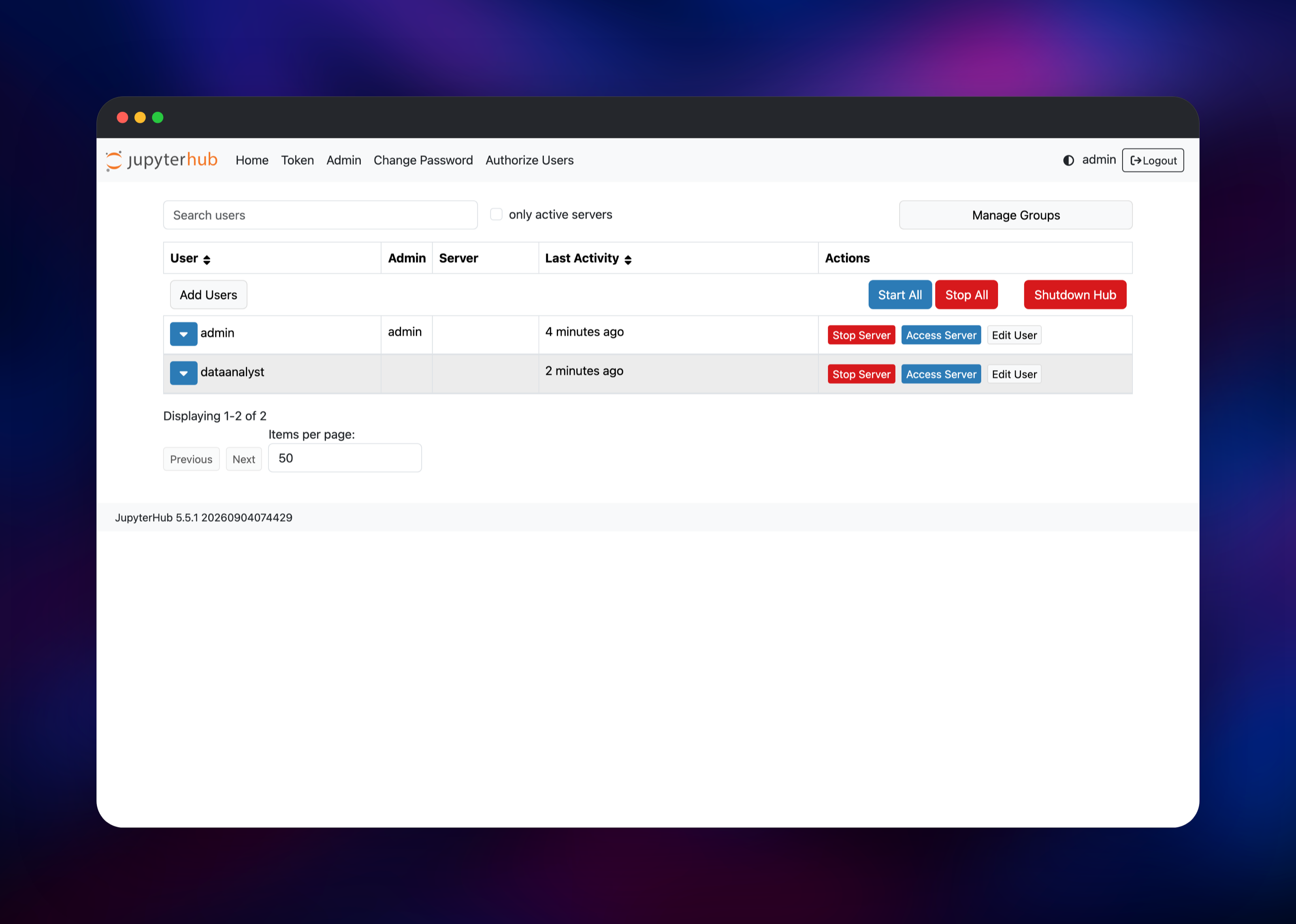
Set JUPYTERHUB_ADMIN_PASSWORD at deploy time — the only value you must choose — and optionally JUPYTERHUB_ADMIN_USER, default admin. That account is created the first time the hub boots, so there is no setup wizard and no window in which a stranger can claim the name. Open the deployment URL, sign in at /hub/login, and the hub starts your server and drops you into JupyterLab with a Welcome.ipynb in your home directory; run its first cell to confirm NumPy, pandas and Matplotlib work. Everyone else registers at /hub/signup, and their account stays inert until you approve it under Authorize Users. The Admin page lists users, shows which servers are running and lets you stop one. Files under /home/ survive redeploys, as do pip install --user packages.
About Hosting JupyterHub
A single-user Jupyter server has no concept of accounts: whoever reaches the port owns the kernel and the filesystem. JupyterHub adds the missing tier. configurable-http-proxy owns the public port, routing /hub/* to the hub and /user//* to that person's server; the hub keeps no state on disk, so a redeploy leaves everyone signed in and only notebook files need the volume.
- Per-user JupyterLab servers, started and stopped on demand
- Password accounts with an approval queue, strength rules and lockout on repeated failures
- Home directories on a persistent volume, isolated by UNIX permissions
- An admin console for listing users and stopping servers
- Idle culling, so an abandoned notebook stops billing memory
- JupyterLab, Notebook 7, NumPy, pandas, Matplotlib, SciPy and ipywidgets preinstalled
Why Deploy JupyterHub on Railway
- No Dockerfile, proxy config or volume plumbing
- Private networking to Postgres, no exposed database
- Managed TLS, a public URL and custom domains
- A persistent volume for user files, already mounted
- Redeploys from Git when you customise the image
- Idle notebook servers stopped for you
Common Use Cases
- Teaching a course or workshop. Students get a URL and a password each, with an identical Python environment and no installs.
- A shared environment for a data team. Notebooks sit beside warehouse credentials.
- Internal tooling for non-engineers. Analysts open a notebook that already knows how to query the read replica.
- Reproducible research. Notebooks, data and dependencies outlive any machine.
JupyterHub vs JupyterLab and Google Colab
| JupyterHub | JupyterLab alone | Google Colab | |
|---|---|---|---|
| Multi-user | Yes, one server each | No | Yes |
| Self-hostable | Yes | Yes | No |
| Open source | BSD-3-Clause | BSD-3-Clause | No |
JupyterLab is the notebook interface; JupyterHub makes it multi-user, launching JupyterLab for each person. Colab is the closest hosted product, and the trade is control: it gives free GPUs, a self-hosted hub keeps your data on your own hardware.
Dependencies for JupyterHub
- jupyterhub — hub, proxy and notebook servers, built from gridalpha/jupyterhub-railway on
quay.io/jupyterhub/jupyterhub:5. Public on port 8000, 5 GB volume at/home. - Postgres — managed PostgreSQL,
ghcr.io/railwayapp-templates/postgres-ssl:18. Holds accounts, server records, roles and OAuth tokens. Private.
Environment Variables Reference
| Variable | Description | Required |
|---|---|---|
JUPYTERHUB_ADMIN_PASSWORD | Password for the admin created on first boot | Yes |
JUPYTERHUB_ADMIN_USER | Administrator username, default admin | No |
JPY_COOKIE_SECRET | 64 hex characters signing the session cookie; keep stable | Yes |
DATABASE_URL | PostgreSQL connection string, wired to Postgres | Yes |
NATIVE_AUTH_ENABLE_SIGNUP | Serve the self-registration page, default true | No |
NATIVE_AUTH_OPEN_SIGNUP | Skip admin approval, default false; leave off | No |
JUPYTERHUB_IDLE_TIMEOUT | Seconds before an idle server is stopped, default 3600 | No |
Deployment Dependencies
- Python 3.12 and Node.js from the base image; JupyterHub 5.x, JupyterLab 4.x
- Source:
- Upstream: , docs at
Server Requirements to Self-Host JupyterHub
Memory decides the size of a hub. The hub, proxy and culler stay under 512 MB together; the rest is notebook servers — roughly 300 MB idle per user, 1 GB or more with a dataset loaded. Project Jupyter's guidance is (concurrent users × memory per user) + 1 GB.
| Minimum | Recommended | |
|---|---|---|
| CPU | 1 vCPU | 4+ vCPU |
| RAM | 1 GB (2–3 users) | 8 GB (8–10 concurrent users) |
| Storage | 5 GB volume | 20 GB+, sized on user data |
| Database | PostgreSQL 13+ | PostgreSQL 18 |
| Runtime | Python 3.9+, Node 18+ | Python 3.12, Node 20 |
How to Self-Host JupyterHub Outside Railway
The official image contains the hub only, so a working deployment adds the single-user server and an authenticator:
FROM quay.io/jupyterhub/jupyterhub:5
RUN python3 -m pip install --no-cache-dir \
      jupyterlab notebook \
      jupyterhub-nativeauthenticator \
      jupyterhub-idle-culler \
      psycopg2-binary
COPY jupyterhub_config.py /srv/jupyterhub/jupyterhub_config.py
A minimal jupyterhub_config.py, spawning local processes with state in PostgreSQL:
c.JupyterHub.bind_url = "http://:8000"
c.JupyterHub.db_url = "postgresql://user:pass@postgres:5432/jupyterhub"
c.JupyterHub.upgrade_db = True
c.JupyterHub.authenticator_class = "nativeauthenticator.NativeAuthenticator"
c.Authenticator.allow_all = True
c.Authenticator.admin_users = {"admin"}
c.JupyterHub.spawner_class = "jupyterhub.spawner.LocalProcessSpawner"
Then docker run -p 8000:8000 -v jhub-home:/home your-image. It must run as root so the hub can create each user's account, and /home must be a volume or notebooks vanish on restart. On a plain VM, The Littlest JupyterHub installs the same stack under systemd; Zero to JupyterHub does it on Kubernetes.
How Much Does JupyterHub Cost to Self-Host?
JupyterHub is free and open source under a BSD-3-Clause licence, with no paid edition and no seat limit. On Railway you pay for infrastructure only — the hub container, PostgreSQL and the volume — sized by concurrent notebook users, not headcount. Hosted alternatives such as Google Colab Pro, Deepnote and Saturn Cloud charge per seat.
FAQ
What is JupyterHub? An open-source multi-user server for Jupyter notebooks. It authenticates people, gives each one their own JupyterLab server and home directory, and starts and stops those servers for them. Project Jupyter maintains it under BSD-3-Clause.
What does this Railway template deploy?
Two services: jupyterhub, running the hub, its proxy and every notebook server in one container with a 5 GB volume at /home, and Postgres, the managed PostgreSQL holding the hub database.
Why does the template include a PostgreSQL database? The hub stores accounts, authorization state, running-server records, roles and OAuth tokens there. SQLite is the default, but upstream recommends PostgreSQL beyond a personal instance, and keeping that state off the container leaves everyone signed in across a redeploy.
How do I add users to self-hosted JupyterHub?
Have them register at /hub/signup, then approve each account under Authorize Users; nobody can log in or use compute until you do. For an invite-only hub, set NATIVE_AUTH_ENABLE_SIGNUP=false and add accounts from the Admin page. Notebooks and pip install --user packages live on the volume at /home, so both survive a redeploy.
Can I use this JupyterHub deployment in production? Yes, for a team on one machine — the shape The Littlest JupyterHub targets. Users are isolated by UNIX account rather than by container, so it suits colleagues rather than strangers. Hundreds of concurrent users or GPU scheduling belong on Kubernetes.
Template Content
jupyterhub
gridalpha/jupyterhub-railway

