Deploy Kali Linux (Web Desktop)
A real Kali XFCE desktop in the browser, not just a web terminal.

proxy
Just deployed
Just deployed
/home/kasm-user
Deploy and Host Kali Linux Desktop on Railway
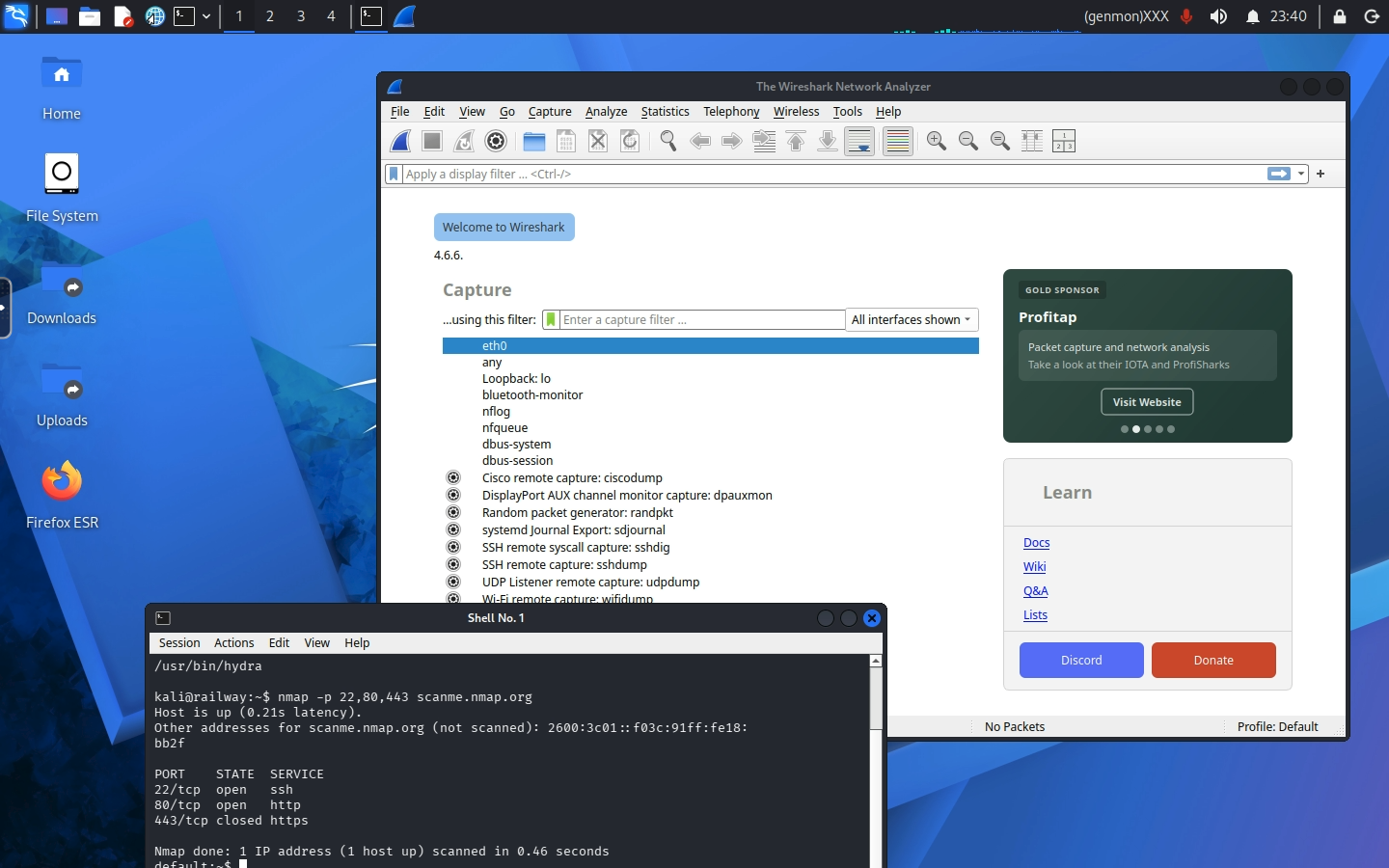
Kali Linux Desktop is a full Kali XFCE graphical desktop that runs in your browser, not a terminal. You get the GUI security tools that a web shell simply cannot run: Burp Suite, Wireshark, Ghidra, Zenmap and a real desktop browser, reachable from any device at a URL with no VNC client or SSH key.
About Hosting Kali Linux Desktop
Deploying runs two services: the Kali desktop itself, and a small Caddy proxy that is the only public surface. The desktop image is large (about 3.6 GB compressed, 16 GB unpacked), but Railway pulls it quickly: a measured deploy from this template reached a working login in about 80 seconds. The URL returns Railway's 404 for those first moments, which is normal.
Cost is the thing to plan for. A graphical desktop is not a terminal: expect it to idle around 1 GB of RAM with a session attached, and more with Burp or a browser open. Enabling Railway's app sleep is strongly recommended so the desktop suspends when you close the tab.
Common Use Cases
- Running GUI-only security tools that a web terminal cannot: Burp Suite, Wireshark on a capture file, Ghidra, Zenmap
- A disposable, isolated analysis desktop that is not your own machine, reachable from a tablet or a locked-down laptop
- Learning and CTF work where you want Kali's toolset without installing a local VM
Dependencies for Kali Linux Desktop Hosting
- A Railway volume mounted at
/home/kasm-user, which holds the desktop's home directory. Without it, every file and installed tool is lost on redeploy. - Nothing else. No database, no API key, and no GitHub repo behind the template.
Deployment Dependencies
- kasmweb/kali-rolling-desktop - the upstream desktop image
- KasmVNC - the streaming layer
- Kali Linux - the distribution and its tooling
- Caddy - the TLS-terminating proxy
Implementation Details
Why there is a proxy service. Kasm's startup script passes -sslOnly to
vncserver on the command line, so the desktop always serves HTTPS on 6901 and
the documented network.ssl.require_ssl: false setting is ignored. Railway
speaks plain HTTP to containers, so Caddy accepts Railway's HTTP and re-encrypts
to Kasm, skipping verification because the certificate is self-signed and
regenerated on every boot. Only the proxy has a public domain.
Patching -sslOnly out of the upstream script was the alternative and was
rejected deliberately: if Kasm ever renames that flag the patch silently does
nothing, the container keeps serving HTTPS, and the template breaks with no
error message.
nmap is patched at boot, and this matters. Kali's nmap binary carries
cap_net_raw and cap_net_admin file capabilities. Railway grants neither, and
Linux refuses to exec a binary whose permitted capability set falls outside the
container's bounding set. The result is that stock nmap does not run at all
here, failing with Operation not permitted before it scans anything. This
template strips those capabilities at startup and replaces the wrapper that
forces --privileged, so nmap <host> works as an ordinary TCP connect scan.
The wallpaper is fixed at boot. The image sets its desktop background on
xfconf keys named monitor0/monitor1, but KasmVNC names its output VNC-0,
so nothing matches and a stock container boots with a black desktop. The
template seeds the correct key, and only when the file is absent, so your own
wallpaper choice survives restarts.
What still does not work, and cannot. A GUI does not grant kernel
capabilities. There is no NET_RAW, so SYN scans (-sS), packet crafting and
live Wireshark capture on an interface are unavailable; Wireshark is useful here
for opening capture files, not sniffing. There is no tun/tap device either, so
OpenVPN and WireGuard do not work, which means HackTheBox and TryHackMe VPNs
cannot be used from this desktop. Plan around connect scans, web tooling and
offline analysis.
VNC_PW has a 6-character minimum. KasmVNC's password tool silently
rejects anything shorter, which would leave the desktop unable to start and the
URL serving 502. The template validates the length at boot and fails with an
explicit message rather than leaving you to guess.
Passwordless sudo is enabled deliberately. Kasm ships kasm-user with a
locked password, no sudo group membership and no sudoers entry, which means a
stock container cannot install anything - apt install is impossible. This
template grants passwordless sudo at boot so the desktop is actually usable. To
lock it back down, remove /etc/sudoers.d/kasm-user inside the running desktop.
Security model. VNC_PW is the only thing between the public Railway URL
and a root-capable desktop holding the full Kali toolset. Set a strong one.
Anyone who reaches the URL with it can run anything, install anything, and probe
Railway's private network.
Why Deploy Kali Linux Desktop on Railway?
Railway is a singular platform to deploy your infrastructure stack. Railway will host your infrastructure so you don't have to deal with configuration, while allowing you to vertically and horizontally scale it.
By deploying Kali Linux Desktop on Railway, you are one step closer to supporting a complete full-stack application with minimal burden. Host your servers, databases, AI agents, and more on Railway.
Template Content
proxy
caddy:2-alpineVNC_PW
Desktop login password, minimum 6 characters. Username is kasm_user.


