
Deploy Kanboard
Kanban board for tracking tasks across columns and swimlanes

Just deployed
/var/lib/postgresql/data
kanboard
Just deployed
/railway

mailpit
Just deployed
/data
Deploy and Host Kanboard on Railway
Kanboard is an open-source kanban board for visual project management, built around one idea: show the work, limit the work in progress, get out of the way. A board is a row of columns, a card is a task, and dragging cards between columns is the whole workflow. Teams use it as a lightweight alternative to Jira or Trello — swimlanes, subtasks, WIP limits, time tracking, automatic actions and a JSON-RPC API on that shape — and it stays fast: the interface is server-rendered PHP, not a JavaScript app.
Deploy Kanboard on Railway and three services arrive wired together. kanboard runs nginx, PHP-FPM and the job runner in one container, serves the board over HTTPS, and keeps attachments and plugins on a persistent volume. Postgres stores every project, task, comment and login session, so signing in survives a redeploy. mailpit is a private SMTP server with a protected inbox, so notification email and password resets work as soon as the deploy finishes. Only kanboard and that inbox are public.
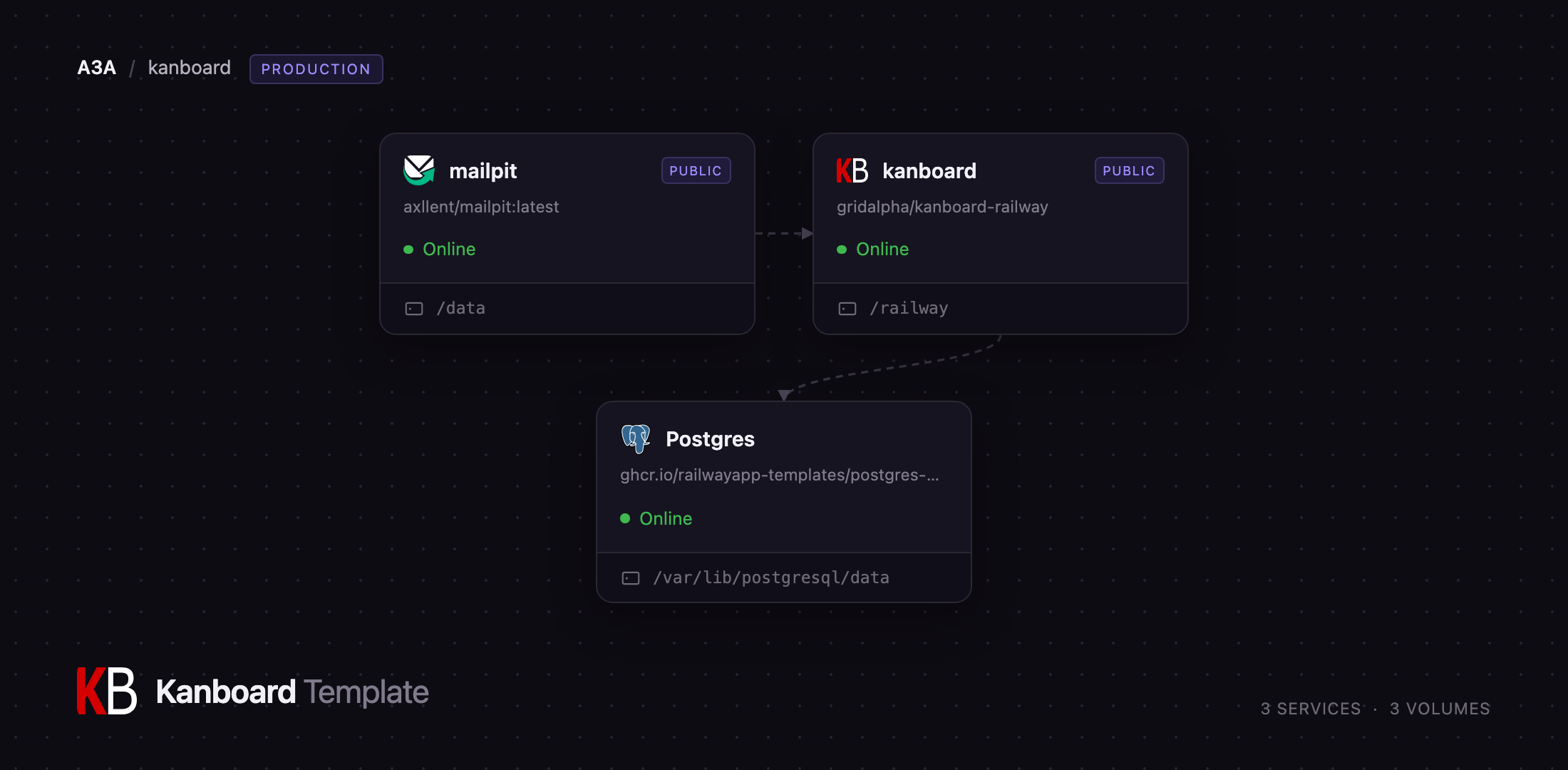
Getting Started with Kanboard on Railway
Open the kanboard service's URL and you land on a sign-in page. Log in with the ADMIN_USERNAME and ADMIN_PASSWORD variables — that password is applied while the container starts, so the admin/admin default documented for a stock install is never live here. Change the variable to rotate it; change it in the app instead and startup leaves your choice alone.
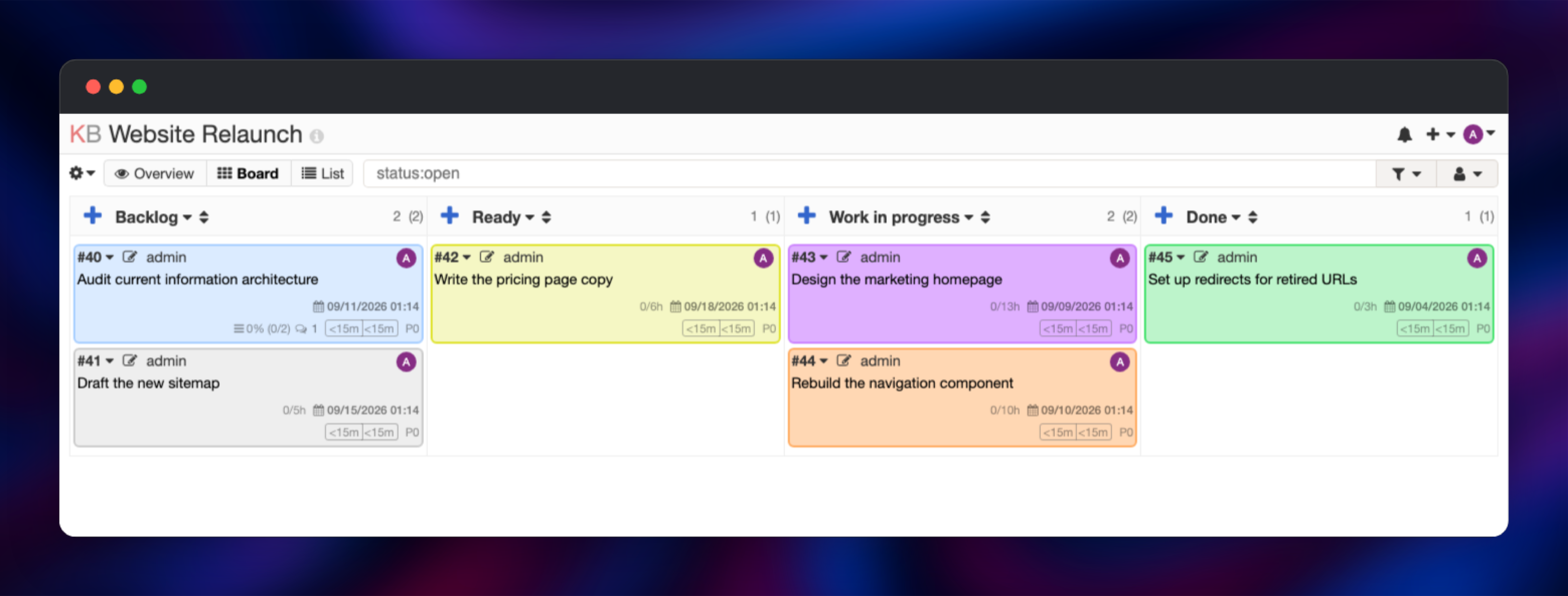
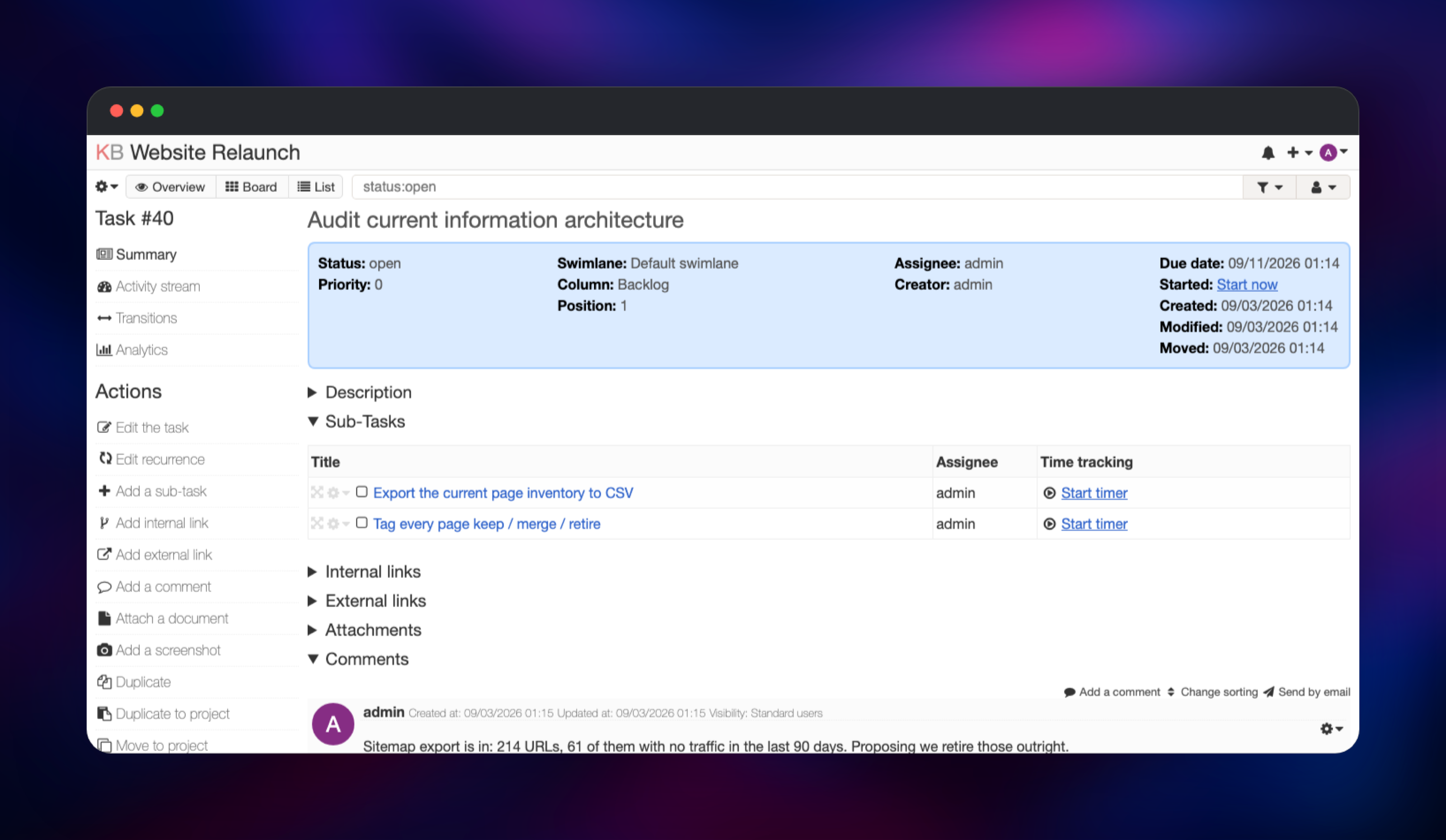
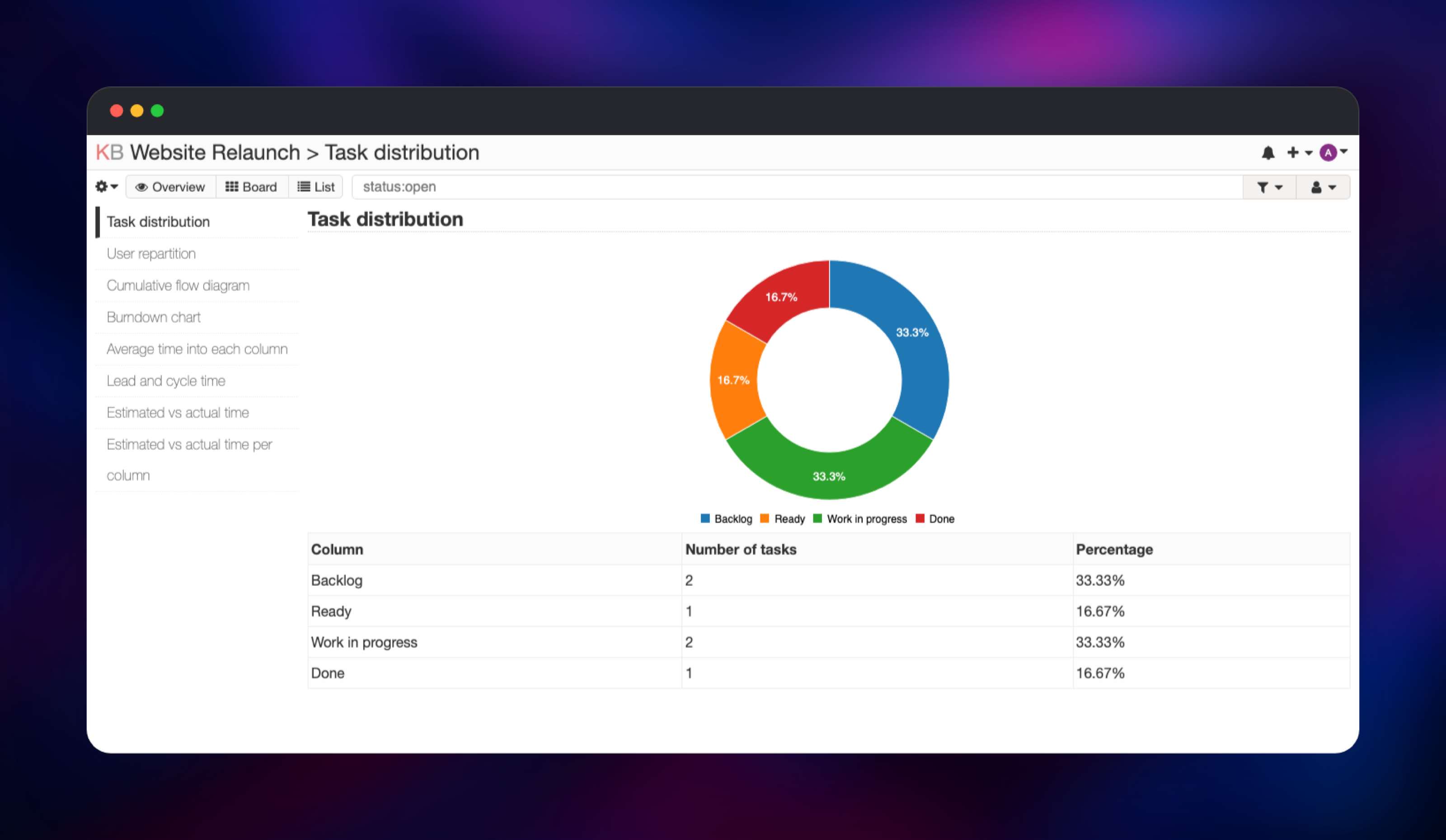
From the dashboard click New project, name it, and you get a board with four columns: Backlog, Ready, Work in progress and Done. Add a card with the + above a column, setting an assignee, colour, due date and estimate. Drag it elsewhere, then open it and add a subtask and a comment — that round trip exercises the app, the database and the volume together. Analytics → Task distribution counts those tasks per column, and you invite the team under Settings → Users. Outgoing mail lands in the mailpit inbox, behind its MP_UI_AUTH credentials.
About Hosting Kanboard
Most trackers make you model your process before you can use them. Kanboard assumes the board is the process, which suits a team that has outgrown a spreadsheet but will not administer Jira — and anyone needing the data on infrastructure they control.
Key features:
- Drag-and-drop boards with swimlanes and per-column work-in-progress limits
- Subtasks, comments, attachments, tags, categories and task colours
- Time tracking with estimated-versus-actual reporting per task and column
- Automatic actions — move a card, get an assignee set or a comment posted
- Analytics: task distribution, cumulative flow, burndown, lead and cycle time
- A JSON-RPC API, plugins, two-factor auth, project roles and LDAP
The app tier is one container deliberately: Kanboard's own production shape is a single PHP application plus an external database, and its background work — overdue notifications, daily statistics — is a cron job inside that container, not a separate worker tier.
Why Deploy Kanboard on Railway
Railway removes the parts of self-hosting Kanboard that are not about kanban:
- Managed Postgres with backups, provisioned and connected for you
- HTTPS on a public domain, certificates handled automatically
- A persistent volume for attachments and plugins, already mounted
- Private networking, so the database is never exposed
- One-click redeploys, plus logs, metrics and a health check
Common Use Cases
- Software sprints — a board per repository, WIP limits keeping work honest, burndown charts for the retro
- Internal IT queues — a triage board where the JSON-RPC API opens tickets from alerts
- Client and agency work — one project per client, roles so a client sees only their board
- Personal task management — recurring tasks and time tracking, self-hosted
Dependencies for Kanboard
- kanboard — gridalpha/kanboard-railway, layered on the official
kanboard/kanboardimage: nginx, PHP 8.4 FPM and the cron runner on port 8080. - Postgres —
ghcr.io/railwayapp-templates/postgres-ssl:18. Holds projects, tasks, comments, settings and sessions; the schema installs on first boot. - mailpit —
axllent/mailpit:latest. SMTP on port 1025 privately, mail in a protected inbox.
Environment Variables Reference
| Variable | Purpose |
|---|---|
ADMIN_USERNAME / ADMIN_PASSWORD | Administrator account applied at startup, replacing the shipped default |
KANBOARD_URL | Absolute base URL, trailing slash included — used in email links |
DB_DRIVER / DB_HOSTNAME / DB_PORT / DB_NAME / DB_USERNAME / DB_PASSWORD | Postgres connection for the app's scoped role |
MAIL_TRANSPORT / MAIL_SMTP_HOSTNAME / MAIL_SMTP_PORT / MAIL_FROM | Outgoing mail — repoint at your own relay |
TRUSTED_PROXY_NETWORKS | Proxy ranges Kanboard trusts, so it records real visitor addresses |
PLUGIN_INSTALLER | Enables the administrator-only plugin installer |
MP_UI_AUTH | user:password protecting the mailpit inbox |
Deployment Dependencies
- Runtime: PHP 8.4 with FPM, nginx, PostgreSQL 18
- Source:
- Upstream and docs: ,
Hardware Requirements for Self-Hosting Kanboard
Kanboard is cheap to run: no runtime JavaScript build, no search engine.
| Resource | Minimum | Recommended |
|---|---|---|
| CPU | 0.5 vCPU | 1–2 vCPU |
| RAM | 256 MB | 512 MB – 1 GB |
| Storage | 1 GB volume | 5 GB+, sized to your attachments |
| Runtime | PHP 8.1+, PostgreSQL/MySQL/SQLite | PHP 8.4, PostgreSQL 18 |
A handful of users fits the minimum column. Scale RAM before CPU — PHP-FPM allows 20 concurrent workers.
Self-Hosting Kanboard
The official image runs unconfigured, storing data in SQLite on a volume:
docker run -d --name kanboard -p 8080:80 \
  -v kanboard_data:/var/www/app/data \
  -v kanboard_plugins:/var/www/app/plugins \
  kanboard/kanboard:latest
Open and sign in with admin / admin, then change it immediately — that is the documented default on every fresh install.
For anything real use Postgres. Kanboard reads discrete connection variables rather than a single URL — add these beside a postgres:18 service:
DB_DRIVER=postgres
DB_HOSTNAME=db
DB_PORT=5432
DB_NAME=kanboard
DB_USERNAME=kanboard
DB_PASSWORD=change-me
Two things to get right yourself. Terminate TLS in front of the container and declare the proxy with TRUSTED_PROXY_NETWORKS, or every login is recorded against your load balancer and the lockdown treats all visitors as one client. And set the Application URL under Settings → Application, since email links come from it.
Is Kanboard Free to Self-Host?
Kanboard is free and open source under the MIT licence — no paid tier, no seat limits, no feature gating, and the official plugin directory is free too. Self-hosting on Railway costs infrastructure only: the app container, the Postgres instance, the volume and egress. Being a lightweight PHP app, it is one of the cheapest trackers you can run.
FAQ
What is Kanboard? An open-source, self-hosted project management application built around the kanban method — boards with drag-and-drop cards, swimlanes, work-in-progress limits, subtasks, time tracking and analytics. Deliberately minimal: server-rendered PHP with no dependency beyond a database.
What does this Railway template deploy? Three services: kanboard, serving the board over HTTPS with attachments and plugins on a volume; a managed Postgres database for everything else; and mailpit, a private SMTP server with a protected inbox.
Why does the template include Postgres and a mail service? Kanboard supports SQLite, but a file-based database ties the data to one container and makes backups awkward; Postgres separates data from app, so a redeploy cannot touch it. Notifications, assignment emails and password resets need SMTP — Kanboard sends nothing without a mail host — so mailpit makes them testable at once.
How do I log in to self-hosted Kanboard the first time?
Use the ADMIN_USERNAME and ADMIN_PASSWORD variables on the kanboard service. That password is applied before the app accepts a request, so the stock admin/admin credential is never valid here.
How do I use the Kanboard API from my own code?
Kanboard exposes JSON-RPC at /jsonrpc.php. Authenticate with HTTP Basic as the user jsonrpc using the API token from Settings → API, then POST a body naming a procedure such as createTask or getAllProjects — the usual way to open tasks from monitoring alerts.
Can I install Kanboard plugins on Railway?
Yes. The plugin directory sits on the persistent volume and the administrator-only installer is enabled, so plugins added from Settings → Plugins survive redeploys; set PLUGIN_INSTALLER to false to close it. Kanboard also has no public sign-up, so an administrator creates every account.
Template Content
kanboard
gridalpha/kanboard-railwaymailpit
axllent/mailpit:latest

