
Deploy Khoj | Open Source Personal AI Assistant
Self Host Khoj. AI second brain with document search and custom agents

SearxNG
Just deployed

Just deployed
/root/.khoj

Postgres
Just deployed
/var/lib/postgresql/data
Terrarium
Just deployed
Deploy and Host Khoj on Railway
Deploy Khoj on Railway to get your own AI-powered second brain — a self-hosted personal assistant that searches your documents, chats with any LLM, builds custom agents, and automates deep research. Self-host Khoj on Railway and own your data completely.
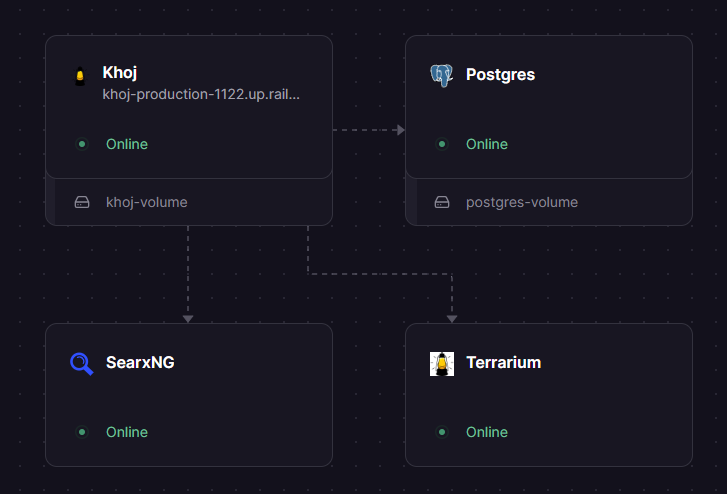
This template pre-configures four services: the Khoj server (ghcr.io/khoj-ai/khoj-cloud:latest), PostgreSQL with pgvector for vector embeddings (pgvector/pgvector:pg16), a Terrarium code execution sandbox (ghcr.io/khoj-ai/terrarium:latest), and SearxNG for privacy-focused web search (searxng/searxng:latest). Database migrations run automatically via preDeployCommand, and all services connect over Railway's private network.
Getting Started with Khoj on Railway
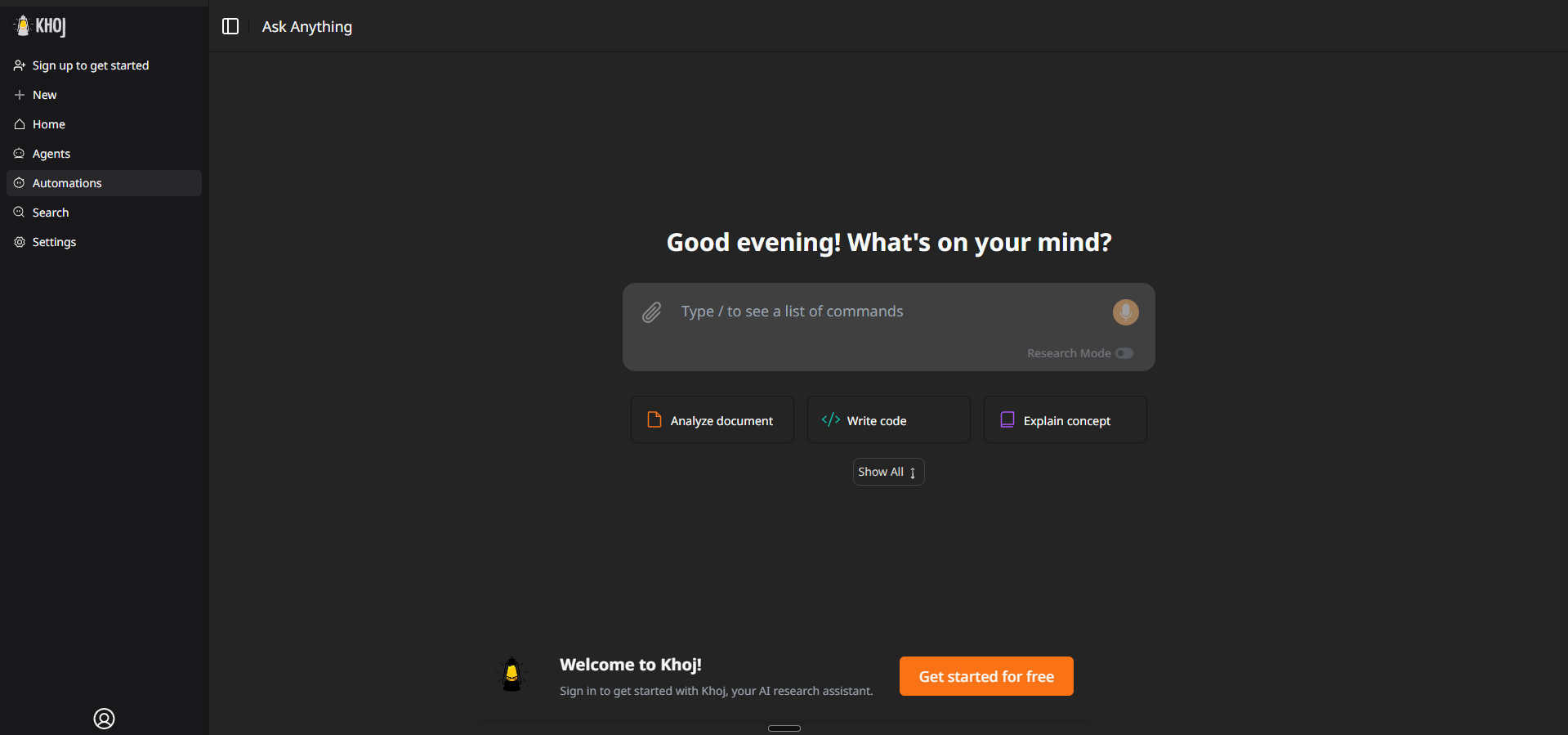
After deploying, visit your Khoj URL to access the web interface. Sign in with the admin email and password you set in the environment variables (KHOJ_ADMIN_EMAIL / KHOJ_ADMIN_PASSWORD). The admin panel is available at /server/admin — use it to manage users, configure AI models, and review system settings.
To start chatting, add at least one LLM API key (OpenAI, Anthropic, or Gemini) in the admin panel under Server Chat Settings, or set the corresponding environment variable. Upload your documents (PDF, Markdown, Word, Notion exports) through the web UI to index them for semantic search. Create your first custom agent from the chat interface to specialize responses for your use case.
About Hosting Khoj AI
Khoj is an open-source (AGPL-3.0) AI personal assistant with 34k+ GitHub stars, backed by Y Combinator (W24). It combines semantic search over your private documents with conversational AI powered by any LLM — local models via Ollama or cloud APIs from OpenAI, Anthropic, Google Gemini, and DeepSeek.
Key features:
- RAG-powered document search — index PDFs, Markdown, Word, Notion, and org-mode files with pgvector embeddings
- Multi-LLM support — use GPT, Claude, Gemini, Llama, Qwen, Mistral, or any Ollama-compatible model
- Custom AI agents — build agents with specific knowledge bases, personas, and tool access
- Deep research automation — automated web research with scheduled reports and smart notifications
- Code execution sandbox — Terrarium sandbox lets agents run Python code safely
- Privacy-first web search — SearxNG integration provides web search without tracking
- Multi-platform clients — browser, desktop, phone, Obsidian plugin, Emacs, WhatsApp
Why Deploy Khoj on Railway
- One-click deploy with PostgreSQL, pgvector, search, and code sandbox pre-configured
- Private network keeps database and internal services unexposed
- Persistent volumes for document storage and database data
- Scale Gunicorn workers via environment variable
- No vendor lock-in — AGPL-3.0 with full data portability
Common Use Cases for Self-Hosted Khoj
- Personal knowledge management — chat with your notes, research papers, and documents using semantic search
- Team research assistant — deploy for a small team with multi-user auth and shared document collections
- Obsidian AI companion — connect the Khoj Obsidian plugin to your self-hosted instance for vault-wide AI search
- Automated research workflows — schedule deep research tasks with web search and get regular reports
Dependencies for Khoj on Railway
This template deploys four services:
- Khoj —
ghcr.io/khoj-ai/khoj-cloud:latest— main application server (Django + Gunicorn + Next.js UI) - Postgres —
pgvector/pgvector:pg16— PostgreSQL with pgvector extension for vector embeddings - Terrarium —
ghcr.io/khoj-ai/terrarium:latest— sandboxed Python code execution for AI agents - SearxNG —
searxng/searxng:latest— privacy-focused metasearch engine for web research
Environment Variables Reference for Khoj
| Variable | Description | Example |
|---|---|---|
KHOJ_ADMIN_EMAIL | Admin account email | admin@example.com |
KHOJ_ADMIN_PASSWORD | Admin password (bootstrap-only) | Static value |
KHOJ_DJANGO_SECRET_KEY | Django session signing key | ${{secret(50)}} |
KHOJ_DOMAIN | Public domain for CSRF | ${{RAILWAY_PUBLIC_DOMAIN}} |
GUNICORN_WORKERS | Number of Gunicorn workers | 2 |
OPENAI_API_KEY | OpenAI API key (optional) | Your key |
ANTHROPIC_API_KEY | Anthropic API key (optional) | Your key |
Deployment Dependencies
- Runtime: Python 3.10, Node.js (Next.js frontend baked into image)
- GitHub: khoj-ai/khoj
- Container registry:
ghcr.io/khoj-ai/khoj-cloud - Docs: docs.khoj.dev
Hardware Requirements for Self-Hosting Khoj
| Resource | Minimum (Cloud LLMs) | Recommended |
|---|---|---|
| CPU | 1 vCPU | 2 vCPU |
| RAM | 4 GB | 8 GB |
| Storage | 2 GB | 10 GB+ |
| GPU | Not required | Not required |
With cloud LLM APIs (OpenAI/Anthropic/Gemini), Khoj runs comfortably on 4 GB RAM. Local model inference via Ollama requires 8–16 GB RAM and a GPU. On Railway, reduce GUNICORN_WORKERS from the default 6 to 2–3 to stay within the 8 GB plan limit.
Self-Hosting Khoj with Docker
Run Khoj locally with Docker Compose:
services:
  database:
    image: pgvector/pgvector:pg16
    environment:
      POSTGRES_DB: khoj
      POSTGRES_USER: postgres
      POSTGRES_PASSWORD: changeme
    volumes:
      - khoj_db:/var/lib/postgresql/data

  server:
    image: ghcr.io/khoj-ai/khoj-cloud:latest
    depends_on:
      database:
        condition: service_healthy
    ports:
      - "42110:42110"
    environment:
      POSTGRES_DB: khoj
      POSTGRES_USER: postgres
      POSTGRES_PASSWORD: changeme
      POSTGRES_HOST: database
      POSTGRES_PORT: "5432"
      KHOJ_ADMIN_EMAIL: admin@example.com
      KHOJ_ADMIN_PASSWORD: your-secure-password
      KHOJ_DJANGO_SECRET_KEY: your-secret-key

volumes:
  khoj_db:
Start with:
docker compose up -d
Access the UI at http://localhost:42110. Add an LLM API key in the admin panel at /server/admin to enable chat.
How Much Does Khoj Cost to Self-Host?
Khoj is fully open-source under the AGPL-3.0 license — the software itself is free. Self-hosting on Railway, you only pay for infrastructure (compute, storage, networking). You'll need API keys for cloud LLMs (OpenAI, Anthropic, or Gemini) unless you use local models. Khoj Cloud (the hosted version) is being deprecated — self-hosting is now the primary deployment path.
Khoj vs AnythingLLM vs Quivr
| Feature | Khoj | AnythingLLM | Quivr |
|---|---|---|---|
| License | AGPL-3.0 | MIT | AGPL-3.0 |
| Document RAG | Yes (pgvector) | Yes | Yes |
| Multi-LLM support | Cloud + Local | Cloud + Local | Cloud + Local |
| Custom agents | Yes | Yes | Yes |
| Web search | Yes (SearxNG) | No built-in | No built-in |
| Code execution | Yes (Terrarium) | No | No |
| Obsidian plugin | Yes | No | No |
| Multi-user auth | Yes | Yes | Yes |
| GitHub stars | 34k+ | 42k+ | 36k+ |
Khoj stands out with built-in web search via SearxNG and a code execution sandbox, making it particularly strong for research automation workflows.
FAQ
What is Khoj and why should I self-host it? Khoj is an open-source AI personal assistant that lets you search your documents, chat with LLMs, and automate research. Self-hosting gives you full control over your data — no documents leave your infrastructure, and you choose which LLM providers to use.
What does this Railway template deploy for Khoj? This template deploys four services: the Khoj application server, PostgreSQL with the pgvector extension for vector embeddings, a Terrarium sandbox for safe code execution, and SearxNG for privacy-focused web search. All internal services communicate over Railway's private network.
Why does Khoj need PostgreSQL with pgvector on Railway?
Khoj uses pgvector to store and query vector embeddings of your documents, enabling semantic search. Standard PostgreSQL doesn't include the pgvector extension, so this template uses the pgvector/pgvector:pg16 image instead of Railway's managed Postgres.
How do I add LLM API keys to self-hosted Khoj on Railway?
After deploying, go to /server/admin, sign in with your admin credentials, and navigate to Server Chat Settings. Add your OpenAI, Anthropic, or Gemini API key there. Alternatively, set OPENAI_API_KEY, ANTHROPIC_API_KEY, or GEMINI_API_KEY as environment variables on the Khoj service in Railway.
Can I use local LLMs with Khoj on Railway? Khoj supports local models through Ollama, but running local inference on Railway is not practical due to the 8 GB RAM limit and lack of GPU access. For Railway deployments, use cloud LLM APIs. For local model support, self-host on hardware with 16+ GB RAM and a GPU.
How do I connect Obsidian to my self-hosted Khoj instance?
Install the Khoj plugin from the Obsidian community plugins. In the plugin settings, set the Khoj URL to your Railway public domain (e.g., https://khoj-production-xxxx.up.railway.app). The plugin will sync your vault for semantic search and AI chat.
Template Content
SearxNG
searxng/searxng:latestRESEND_EMAIL
Sender email for magic link delivery
RESEND_API_KEY
Resend API key for magic link emails
KHOJ_ADMIN_EMAIL
Admin account email
KHOJ_ADMIN_PASSWORD
Admin password (bootstrap-only)
Postgres
pgvector/pgvector:pg16Terrarium
ghcr.io/khoj-ai/terrarium:latest

