
Deploy Hermes Agent
Hermes Agent: self-hosted AI agent for Telegram, Discord, Slack with memory
Just deployed
/opt/data
Deploy and Host Hermes Agent with Railway
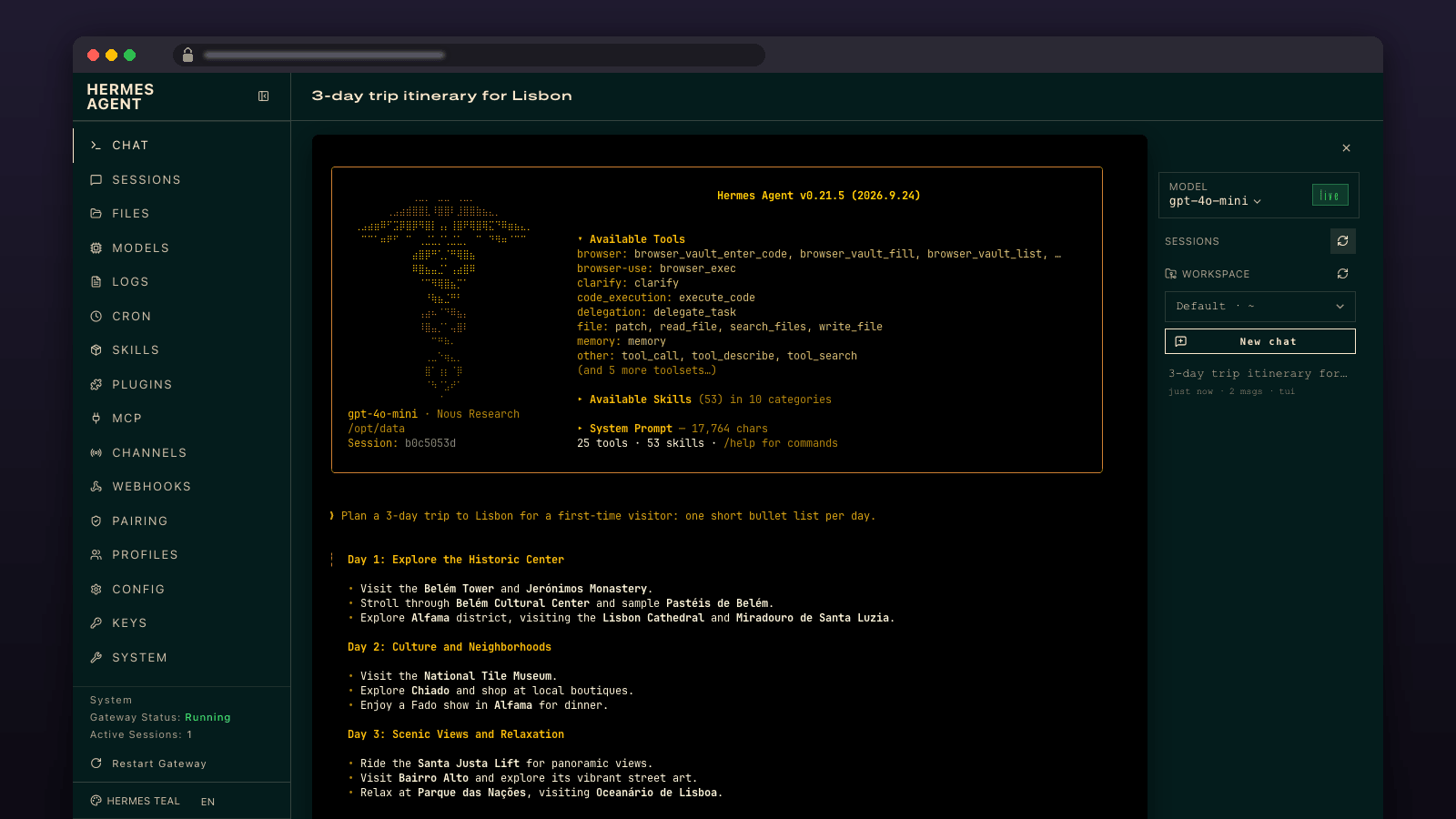
Nous Research's self-hosted AI agent, always on: it talks to you on Telegram, Discord or Slack, runs tools, remembers across conversations, and serves an OpenAI-compatible API — configured from a web dashboard.
Get started
- Deploy. Nothing to fill in. Plan: Hobby. The container idles at about 550 MB, but the dashboard's Chat tab starts a second agent process of about 400 MB per chat session, and these stay until the service restarts, so after real use it sits at 1.2-1.8 GB. Trial (1 GB) holds one dashboard chat session; Free (0.5 GB) cannot run the dashboard chat at all.
- Sign in. Open the Hermes service URL. Username
admin; the password isHERMES_DASHBOARD_BASIC_AUTH_PASSWORDin the service's Variables tab. - Add a provider key and a chat app. In the dashboard add a provider key (OpenRouter, Anthropic, OpenAI or any OpenAI-compatible endpoint), or set
OPENROUTER_API_KEYin Variables, and if you like a Telegram or Discord bot token with your allowed user IDs. The gateway restarts itself with the new configuration. - Choose your model. Hermes starts on
anthropic/claude-opus-4.6, which costs $5/$25 per million tokens on OpenRouter. In Chat, click the model name in the right-hand panel, pick OpenRouter in the provider list (the picker opens on Nous Portal, which shows no models), choose a model such asdeepseek/deepseek-v4.1-flash($0.30/$1.20), then Switch and Reload. It applies to new chats, Telegram and the API.
About Hosting Hermes Agent
Hermes Agent is Nous Research's open-source, self-hosted AI agent: a gateway that talks to you on Telegram, Discord, Slack, WhatsApp and more, runs tools (shell, browser, files, web search), keeps long-term memory, learns reusable skills, and exposes an OpenAI-compatible API - all from one always-on container. This template deploys the official image pinned by digest with the web dashboard behind a generated login, a persistent volume for your agent's state, and a deployment healthcheck. Hermes runs three things in one container: the gateway (connects to your messaging platforms and runs the agent), the dashboard (web UI for configuration, provider keys, sessions and logs) and the OpenAI-compatible API server (/v1/chat/completions on port 8642 inside the container, protected by a generated bearer key). All state - config, provider keys, sessions, memory, skills - lives under /opt/data on the volume, so redeploys and upgrades keep your agent's memory. The dashboard is only reachable through the generated basic-auth login; upstream refuses to bind it publicly without one. The container starts as root and drops to the hermes user for every service, which is how the official image is designed to run.
Common Use Cases
- A personal assistant on Telegram or Discord with persistent memory and the ability to run commands, browse and read files
- A team bot in Slack that answers from your docs and executes approved tool calls
- An always-on agent behind an OpenAI-compatible endpoint for your own apps, with the model choice and tools configured centrally
- Scheduled jobs (cron) that summarise, monitor or report back to a channel
- A sandbox for building and sharing agent skills without running anything on your laptop
Dependencies for Hermes Agent Hosting
nousresearch/hermes-agent:v2026.9.24(Docker Hub, pinned by digest) on an/opt/datavolume
Deployment Dependencies
- Hermes Agent documentation - Docker guide, Telegram setup, API server
- Hermes Agent on GitHub (MIT)
- Railway volumes
Implementation Details
Plan requirements. Measured on this exact image (v2026.9.24) on Railway, 2026-10-03: the dashboard and gateway idle at about 410 MB of process memory (about 550 MB in Railway's metrics, which include file cache). Opening the dashboard's Chat tab starts a terminal agent of about 370-430 MB; New chat or a model switch starts another, and none exit when the browser closes. The gateway grows from about 230 to 310 MB after its first conversation. After four chats with tool calls the service measured 1.1 GB of process memory and 1.5 GB average, 1.97 GB peak in Railway's metrics, and still 1.7 GB after ten idle minutes. What each plan can do: Hobby runs everything; restart the service to drop idle chat processes. Trial (1 GB) runs one dashboard chat session with tools, at the limit; a second session (New chat or a model switch) gets the dashboard killed for memory, the whole service restarts and the open chat is lost. Free (0.5 GB) boots and answers short Telegram/API messages, but a multi-step tool task gets the gateway killed for memory (it restarts on its own and the message is lost), and opening the dashboard chat crashes the service. The headless browser tool is not installed in this image; web search and page extraction work.
First run. There is nothing to fill in at deploy time. Open the Hermes service's public domain, log in with admin and HERMES_DASHBOARD_BASIC_AUTH_PASSWORD from the Variables tab. In the dashboard add a model provider (OpenRouter, Anthropic, OpenAI, Nous Portal, or any OpenAI-compatible endpoint) and, if you want a chat platform, its bot token and your allowed user IDs. The gateway restarts itself when configuration changes. Then pick the model as in step 4: upstream has no variable for the default model (HERMES_INFERENCE_MODEL applies only to one-shot CLI runs), so the dashboard picker, or hermes config set model.default deepseek/deepseek-v4.1-flash from a Railway shell, is the supported route; both write model.default in /opt/data/config.yaml.
Or configure by variables. OPENROUTER_API_KEY, ANTHROPIC_API_KEY, OPENAI_API_KEY, TELEGRAM_BOT_TOKEN, TELEGRAM_ALLOWED_USERS and DISCORD_BOT_TOKEN are all optional service variables; set any of them and redeploy. Telegram runs in polling mode by default, which works with no inbound configuration; upstream's docs describe webhook mode if you prefer. GATEWAY_MULTIPLEX_PROFILES=false keeps the gateway in single-profile mode so it reads these keys from the service's variables: switching the model in the dashboard writes gateway.multiplex_profiles: true to config.yaml, and in multi-profile mode the gateway reads provider keys only from each profile's .env, so without this variable Telegram and the API answer "No LLM provider configured" after the next restart (verified on v2026.9.24).
API server. API_SERVER_KEY is generated for you. Inside the container the server listens on 0.0.0.0:8642; to call it from another Railway service use the private domain (http://hermes.railway.internal:8642/v1/...) with Authorization: Bearer YOUR_API_SERVER_KEY. To expose it publicly, add a second HTTP domain targeting port 8642 in the service's Networking settings.
Healthcheck. Railway polls the dashboard's /api/health before routing traffic to a new deployment, so redeploys and upgrades cut over only once the process is up.
If the gateway stops. The dashboard and the gateway are supervised separately, as in upstream's own container. If the gateway exits - a rejected bot token, a crash, or running out of memory on a small plan - the dashboard stays up so you can fix the cause, and the gateway restarts on its own: after 5 s, backing off to a minute (ten minutes for a configuration error), and immediately when config.yaml or .env changes. Each restart is logged as [railway] gateway exited with code N. Only a dashboard failure restarts the whole service.
Persistence. Everything under /opt/data survives redeploys and restarts (verified). Back up the volume if the agent's memory matters to you; the dashboard also has an export.
Upgrades. The image is pinned. Change the Hermes service's image tag to a newer vYYYY.M.D release and redeploy; Hermes migrates its config on start and keeps a backup under /opt/data/backups/config/ (verified upgrading v2026.9.14 to v2026.9.24).
Risks. The agent can run shell commands, browse and read files inside its container on your behalf - only allow-list people you trust on chat platforms. Pinned images receive security fixes when you upgrade, not automatically. Railway's fair-use policy applies to what the agent does.
Why Deploy Hermes Agent on Railway?
Railway is a singular platform to deploy your infrastructure stack. Railway will host your infrastructure so you don't have to deal with configuration, while allowing you to vertically and horizontally scale it.
By deploying Hermes Agent on Railway, you are one step closer to supporting a complete full-stack application with minimal burden. Host your servers, databases, AI agents, and more on Railway.
Template Content


