
Deploy Kong
Open-source API gateway for routing, auth and rate limiting

kong-admin
Just deployed
Just deployed

Just deployed
/var/lib/postgresql/data
Deploy and Host Kong Gateway on Railway
Kong Gateway is the open-source API gateway that sits in front of your own APIs and handles what every service would otherwise reimplement: routing, authentication, rate limiting, request and response transformation, caching and observability. Built on OpenResty and shipping 45 plugins, it gives teams one place to enforce API policy instead of scattering middleware across every backend. Self-host it when you want that layer on infrastructure you own, with no per-request pricing.
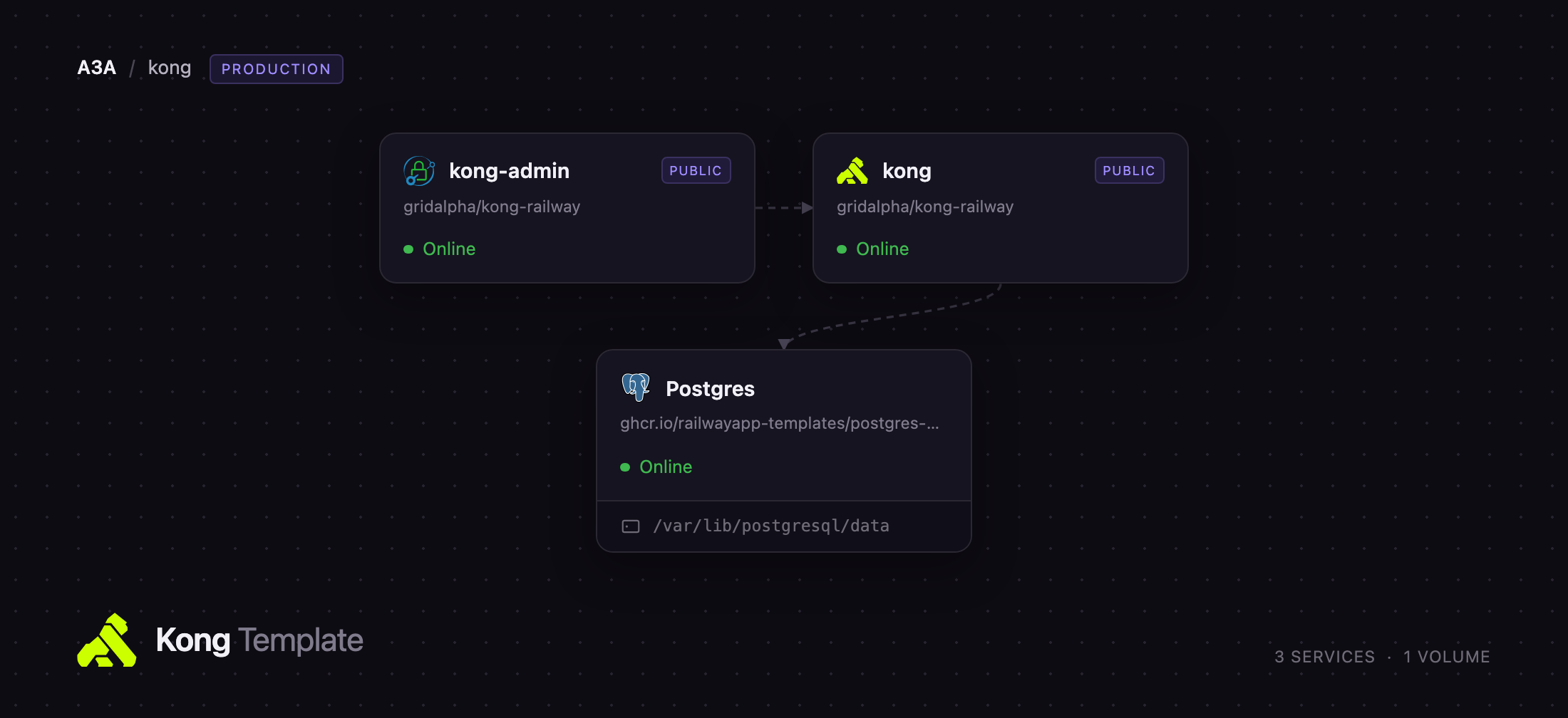
Deploy Kong Gateway on Railway and this template wires up three services. kong is the gateway itself, in database-backed mode — it takes the public domain your clients call, and every service, route, consumer and plugin you create is stored in Postgres rather than a config file, so changes apply without a redeploy. kong-admin is a small authenticated front door: Kong's Admin API and the Kong Manager web UI carry no authentication of their own, so both stay on the private network while kong-admin serves them behind HTTP basic auth — the UI at /, the Admin API at /kong-admin/.
Getting Started with Kong Gateway on Railway
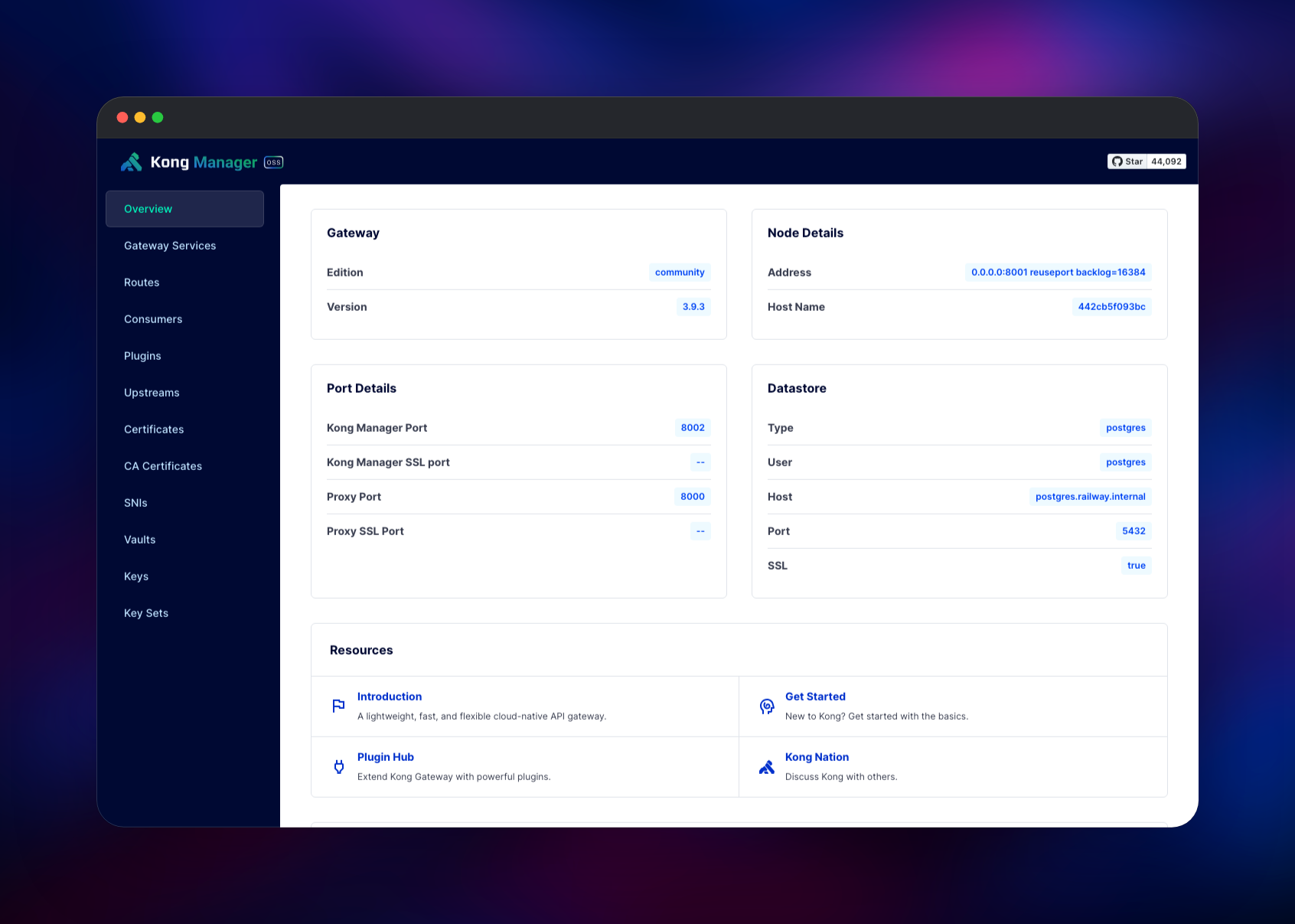
Deploy the template, then set KONG_ADMIN_PASSWORD on the kong-admin service — the only value you must choose, and the service refuses to start without it, so an unprotected admin surface can never go live. Open the kong-admin domain and your browser prompts for credentials; the username is admin unless you changed KONG_ADMIN_USER. Kong Manager has no account system of its own, so those credentials are the whole login, and its overview page confirms the gateway is healthy by reporting the version and the Postgres datastore it is connected to.
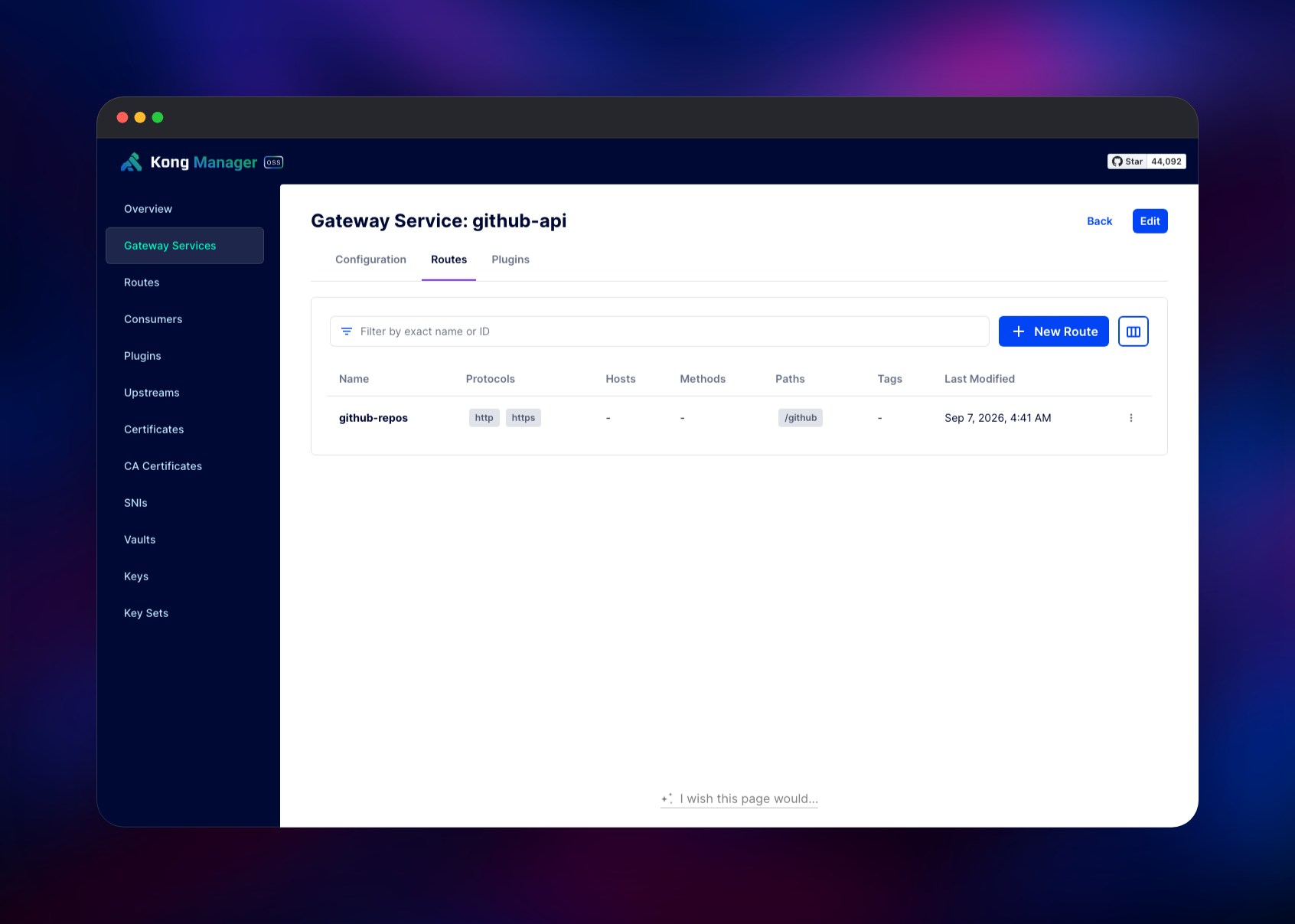
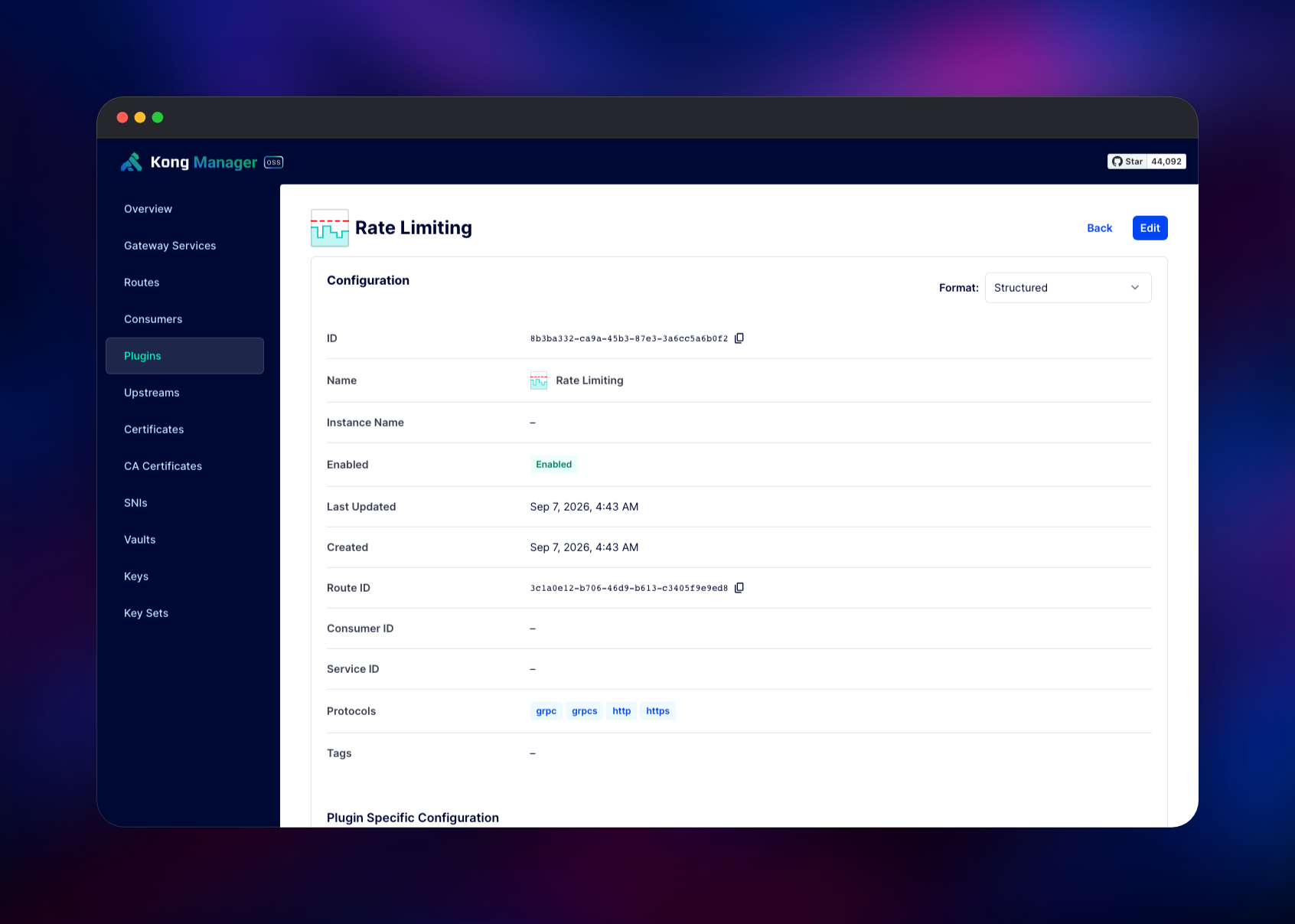
Your first useful action is to create a Gateway Service and a Route. A Gateway Service is one of your backends, given as a URL; a Route is the rule deciding which requests reach it. Point a service at an API you run, add a route matching a path such as /api, then call that path on the kong public domain — a Via: 1.1 kong/3.9.x response header means traffic went through the gateway. Open the route's Plugins tab and add Rate Limiting or Key Authentication to apply policy without touching the backend. Until a route exists the gateway domain answers 404 no Route matched with those values, which is proof Kong is running.
About Hosting Kong Gateway
An API gateway is one entry point in front of many backends. Without one, every service implements its own auth checks, throttling and logging — and they drift apart. Kong centralises that: backends are Gateway Services, matching rules are Routes, plugins attach at whichever level makes sense. Self-hosting fits when a managed gateway's per-request pricing does not, or when traffic must stay on infrastructure you control.
Key capabilities in the open-source build:
- Authentication — key auth, basic auth, HMAC, JWT, OAuth 2.0, LDAP, ACL groups
- Traffic control — rate limiting, request size limiting, proxy caching, IP restriction, bot detection
- Transformation — request and response rewriting, gRPC-to-JSON and gRPC-web bridging, Lua functions
- Observability — Prometheus, OpenTelemetry and Zipkin tracing, Datadog, StatsD, HTTP/TCP/UDP logging
- AI Gateway — proxy and guard LLM traffic through the same policy layer
The three services divide cleanly. Postgres holds the configuration Kong reads and caches; because it is the source of truth, the gateway container is stateless and needs no volume. kong runs the proxy on 8000, the Admin API on 8001, Kong Manager on 8002 and a status endpoint on 8100 that Railway health-checks — a probe that fails if the database is unreachable. kong-admin runs Caddy, terminates basic auth and forwards to the admin ports privately.
Why Deploy Kong Gateway on Railway
Railway removes the operational work around the gateway.
- Postgres is provisioned, connected and backed up
- Migrations run on every deploy, upgrades included
- The proxy gets a TLS-terminated domain, no certificates to manage
- Kong's unauthenticated admin surfaces are gated by default
- Health checks, restart policy and log streaming are configured
Common Use Cases for a Self-Hosted API Gateway
- One front door for microservices — route by path or host, keeping clients on a stable domain as backends move
- Selling or sharing an API — issue per-consumer keys, enforce plan quotas, revoke access without shipping code
- Protecting an internal service — add authentication and rate limits to an application that has none
- Governing LLM traffic — put AI Proxy in front of model providers so prompts and spend flow through one place
Dependencies for Kong Gateway
- Kong Gateway —
kong/kong:3.9, built from Kong/kong (Apache 2.0) - Caddy —
caddy:2-alpine, the basic-auth front door for the admin surfaces - PostgreSQL 18 — Railway's managed database, holding Kong's configuration
Environment Variables Reference
| Variable | Service | Purpose |
|---|---|---|
KONG_ADMIN_PASSWORD | kong-admin | Password for Kong Manager and the Admin API. Required |
KONG_ADMIN_USER | kong-admin | Username for the same; defaults to admin |
KONG_PG_HOST / KONG_PG_USER / KONG_PG_PASSWORD | kong | Connection to the managed Postgres |
KONG_TRUSTED_IPS | kong | Recovers the real client IP behind Railway's edge |
KONG_NGINX_WORKER_PROCESSES | kong | Worker count; raise it with your CPU allocation |
Deployment Dependencies
- Source: Kong/kong · images kong/kong, caddy
- Docs: developer.konghq.com · Plugin Hub
Hardware Requirements for Self-Hosting Kong Gateway
Kong's sizing guidance is roughly 500 MB of memory per worker process, one worker per CPU core.
| Resource | Minimum | Recommended |
|---|---|---|
| CPU | 1 core | 2–4 cores |
| RAM | 1 GB | 4–8 GB |
| Storage | 1 GB (Postgres) | 10 GB+ (Postgres) |
| Runtime | OpenResty / LuaJIT, provided by the image | — |
The gateway container is stateless, so storage belongs to the database, and configuration is small — a few thousand routes is megabytes.
Self-Hosting Kong Gateway with Docker
Kong needs its schema created first. Run the migration against an existing Postgres:
docker run --rm -e KONG_DATABASE=postgres \
  -e KONG_PG_HOST=postgres -e KONG_PG_USER=kong -e KONG_PG_PASSWORD=kong \
  kong/kong:3.9 kong migrations bootstrap
Then start the gateway, publishing the proxy port and keeping the Admin API on loopback:
docker run -d --name kong -e KONG_DATABASE=postgres \
  -e KONG_PG_HOST=postgres -e KONG_PG_USER=kong -e KONG_PG_PASSWORD=kong \
  -e KONG_ADMIN_LISTEN=127.0.0.1:8001 -p 8000:8000 kong/kong:3.9
On upgrades run kong migrations up then kong migrations finish. This template runs all three on every deploy, so a version bump needs no migration window.
How Much Does Kong Gateway Cost to Self-Host?
Kong Gateway is open source under Apache 2.0 and free to run at any scale, with no request quotas or seat limits. The paid products are separate: Kong Konnect is a hosted control plane, and Kong Gateway Enterprise adds role-based access control, a developer portal and analytics. Neither is required here, so your only cost is the Railway resources these services consume.
FAQ
What is Kong Gateway? An open-source API gateway and reverse proxy. It sits in front of your APIs and applies routing, authentication, rate limiting, transformation and observability through plugins, so those concerns live in one layer, not in every backend.
What does this Railway template deploy? Kong Gateway with a public domain for proxy traffic, a managed PostgreSQL database for its configuration, and an authenticated front door publishing Kong Manager and the Admin API behind basic auth.
Why does the template include a PostgreSQL database? Kong can run from a static config file, but then every change means a redeploy. Database-backed mode stores services, routes, consumers and plugins in Postgres and reloads them live, which is what makes the Admin API and Kong Manager useful — and lets you add nodes later on the same configuration.
Is Kong Manager included in the open-source version? Yes. Kong Manager OSS covers services, routes, consumers, plugins, upstreams, certificates and vaults. It has no login of its own, which is why this template puts it behind basic auth.
How do I secure the Kong Admin API when self-hosting? Never publish port 8001 directly. Bind it to the private network and put an authenticating proxy in front, as this template does, or use Kong's loopback pattern — routing the Admin API through the proxy with an auth plugin.
Why does my gateway domain return "no Route matched with those values"? That is Kong answering correctly with no routes configured. Create a Gateway Service and a Route in Kong Manager, then retry your path.
Template Content
kong-admin
gridalpha/kong-railway

