
Deploy Kutt
URL shortener with custom links, visit stats and an admin panel

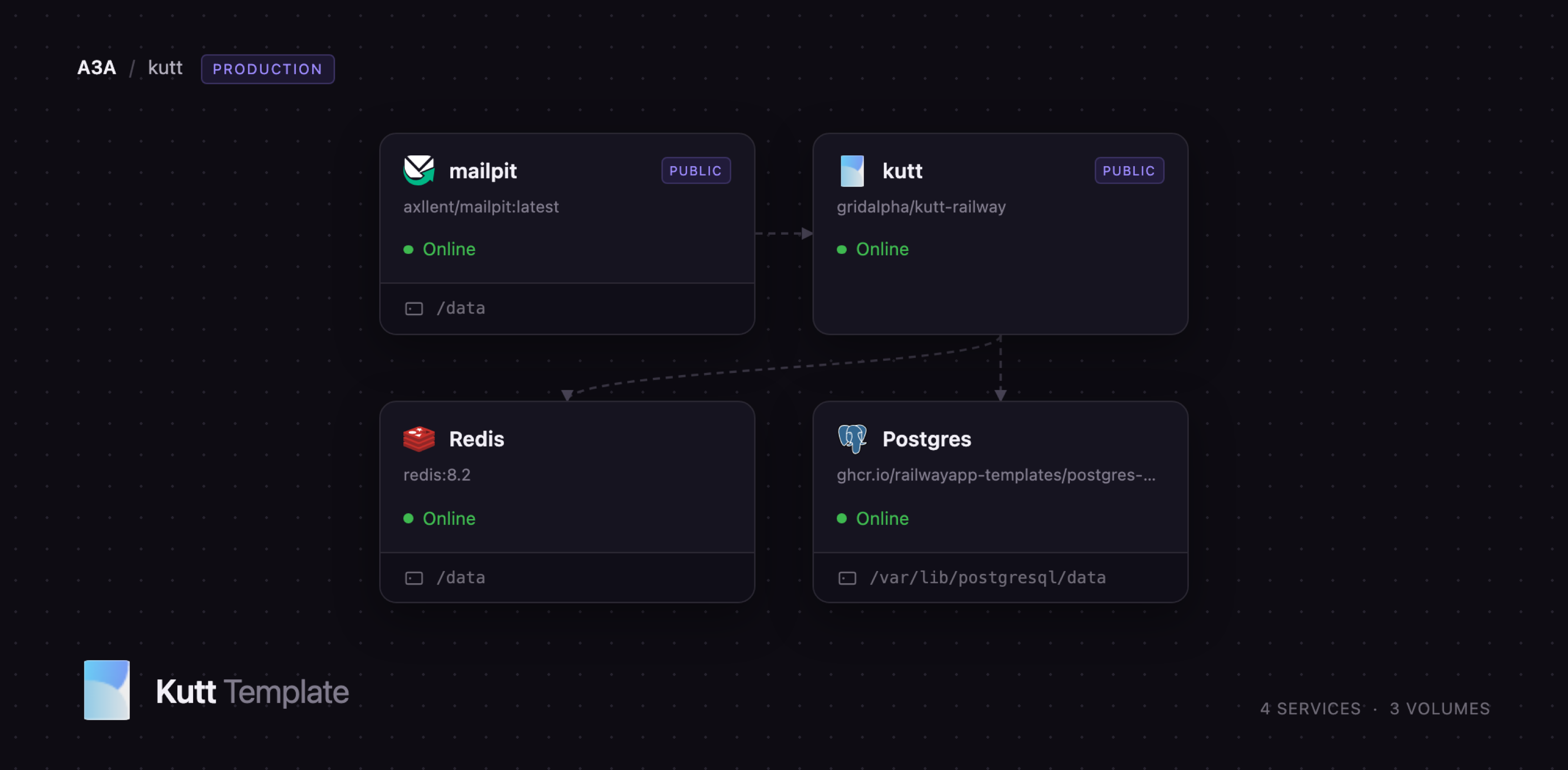
mailpit
Just deployed
/data
Just deployed

Redis
Just deployed
/data

Just deployed
/var/lib/postgresql/data
Deploy and Host Kutt on Railway
Kutt is a modern, open-source URL shortener that gives a team its own branded short links instead of renting them from bit.ly. Deploy Kutt on Railway for custom short addresses, password-protected and expiring links, per-link visit analytics, an admin panel and a REST API, on a domain you control. Marketing teams track campaigns without handing click data to a third party; engineering teams mint links from CI and support tooling.
Self-host Kutt on Railway with everything wired together. The template runs four services: kutt, the Node.js application behind a public HTTPS domain; Postgres, holding users, links and visit records; Redis, backing the queue that records every redirect, the link cache and the shared rate limiter; and mailpit, a private mailbox catching the password-reset and abuse-report messages Kutt sends. Traffic arrives at the kutt service, which looks the address up in Redis or Postgres, answers the browser with a 302 and queues the visit for analytics. Nothing but the app and the mailbox is reachable from the internet.
Getting Started with Kutt on Railway
Set ADMIN_EMAIL and ADMIN_PASSWORD when you deploy. Those two values are the only input the template needs: the container creates that administrator during the first boot, before the web server accepts a request. Kutt's own first-run flow serves an unauthenticated create admin page to whoever loads the site first, a race on any public URL. The template closes it.
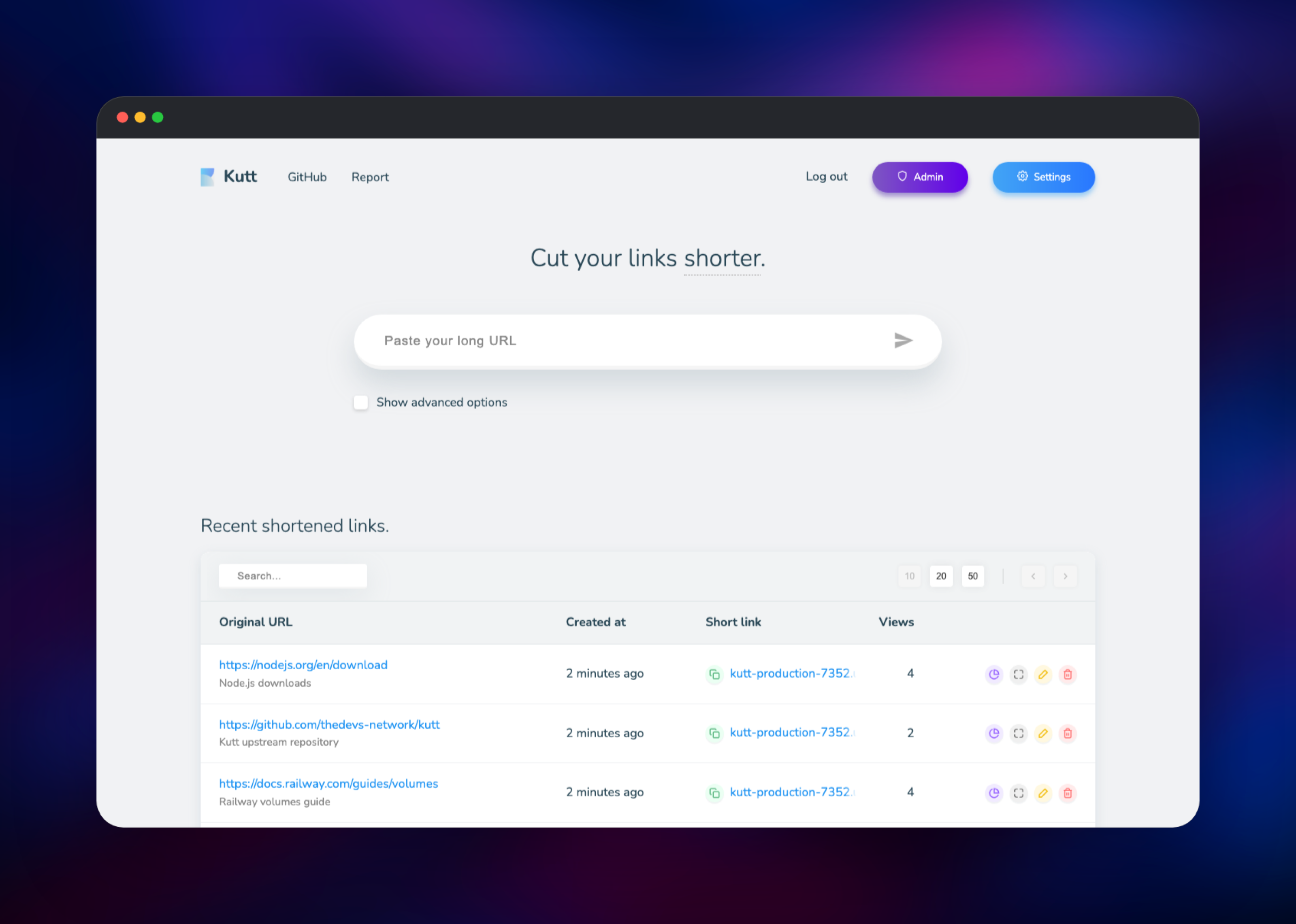
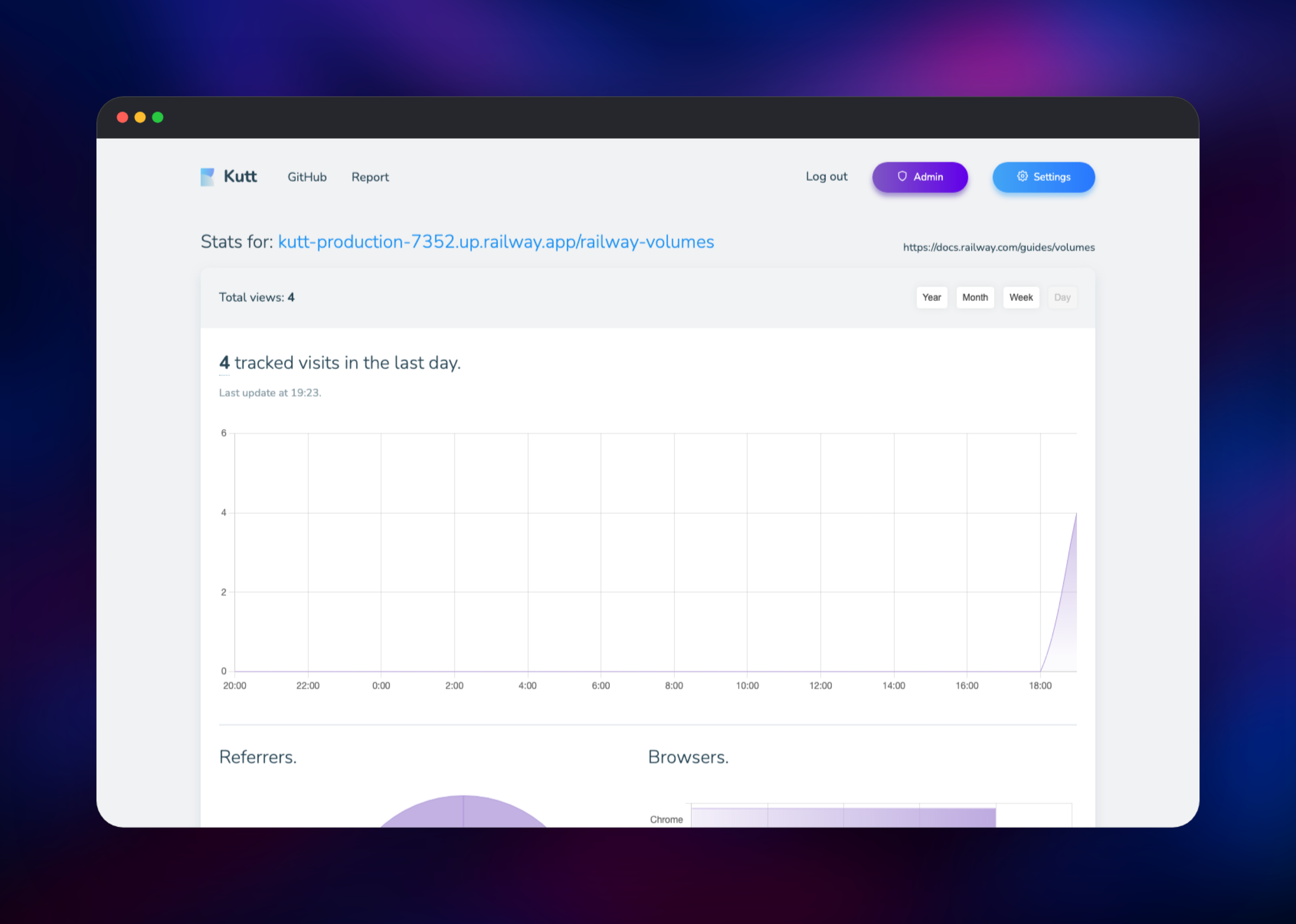
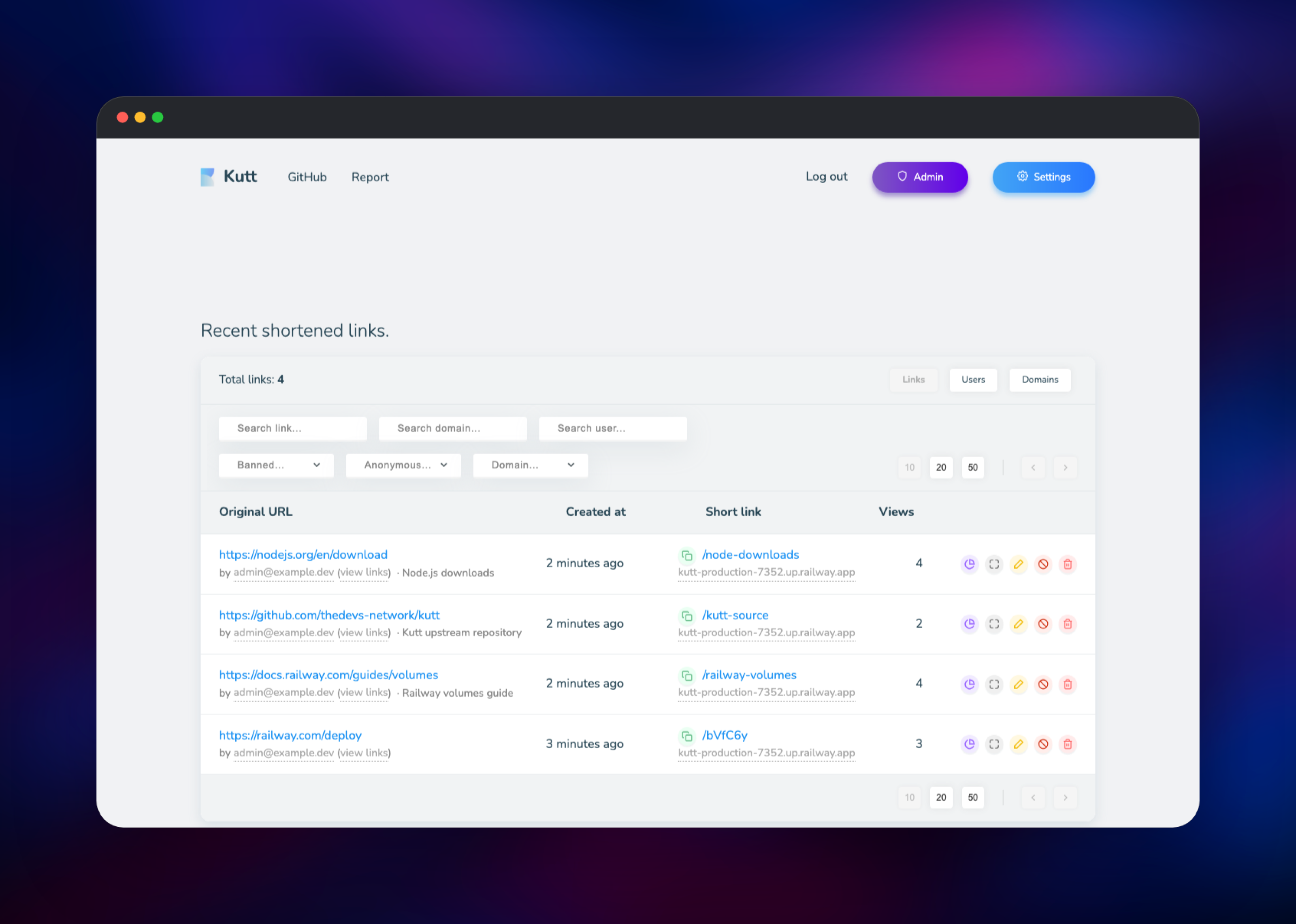
Open the deployed URL and sign in with the address and password you supplied. Change the password immediately from Settings, where you will also find your API key. Paste a long URL into the box on the home page and press the arrow; Kutt returns a short link on your Railway domain. Open it in another tab, then click the chart icon on that row to see the visit recorded with referrer, browser, country and operating system breakdowns. If the count moves, every service is working. Admin lists every link and user, with filters and per-link banning.
Registration is closed by default and anonymous link creation is disabled, so the instance is yours alone until you open it. Invite colleagues from the admin panel, or set DISALLOW_REGISTRATION=false to let people sign up. Password-reset and report mail lands in mailpit, on its own Railway domain behind the MP_UI_AUTH credentials — point Kutt's MAIL_* variables at a real SMTP relay in production.
About Hosting Kutt
Kutt is a Node.js application by The Devs, MIT-licensed and developed in the open at thedevs-network/kutt. It answers a problem every team hits eventually: shortened links are permanent public infrastructure, and a commercial shortener owns both the domain and the click data. Self-hosting moves both back in-house.
Key features:
- Custom short addresses, or generated ones from a confusion-free alphabet
- Password-protected links, expiry dates and per-link descriptions
- Private visit analytics: referrers, browsers, countries, operating systems
- Multiple custom domains, each with its own homepage redirect
- A REST API with per-user API keys, plus OpenID Connect single sign-on
- An admin panel for users, links, domains and abuse reports
The Railway architecture follows Kutt's own production compose file. Postgres holds every durable record. Redis is not decoration: it runs the queue that writes visit records asynchronously, so a redirect returns without waiting on a database write, and it caches lookups so a popular link never touches Postgres. Mailpit fills the gap that makes password reset impossible on a fresh install.
Why Deploy Kutt on Railway
Railway removes the setup work between a repository and a running shortener.
- Postgres, Redis and the mailbox are provisioned and connected
- HTTPS and a public domain on first deploy; custom domains supported
- Managed backups and metrics for the database
- Private networking keeps Postgres, Redis and SMTP off the internet
- Scale CPU and memory without touching the container
Common Use Cases
- Branded campaign links whose click data never leaves your servers
- Short links minted programmatically from CI, release notes or a support desk
- Password-protected or expiring links for sharing documents with clients
- A shared team shortener with per-user accounts and admin oversight
Dependencies for Kutt
- kutt — gridalpha/kutt-railway, one layer over the official
kutt/kutt:latestimage that seeds the administrator and waits for the database - Postgres —
ghcr.io/railwayapp-templates/postgres-ssl:18, storing users, links, domains, visits - Redis —
redis:8.2, running the visit queue, lookup cache and rate-limit store - mailpit —
axllent/mailpit:latest, an SMTP sink with a web inbox
Environment Variables Reference
| Variable | Purpose |
|---|---|
ADMIN_EMAIL | Address of the administrator created at first boot |
ADMIN_PASSWORD | Its password; change it after first sign-in |
JWT_SECRET | Signs session tokens; changing it logs everyone out |
DEFAULT_DOMAIN | Host every short link is built from |
DISALLOW_REGISTRATION | true closes public signup |
DISALLOW_ANONYMOUS_LINKS | true requires an account to make links |
ENABLE_RATE_LIMIT | Throttles login and password-reset routes |
LINK_LENGTH | Characters in a generated address |
MAIL_ENABLED | Turns on password reset, signup and reports |
OIDC_ENABLED | Enables single sign-on via an OpenID provider |
Deployment Dependencies
- Runtime: Node.js 22 (Alpine)
- Source repository:
- Image:
- Documentation:
Hardware Requirements for Self-Hosting Kutt
| Resource | Minimum | Recommended |
|---|---|---|
| CPU | 0.5 vCPU | 1–2 vCPU |
| RAM | 512 MB app, 512 MB Postgres | 1 GB app, 1 GB Postgres |
| Storage | 1 GB database | 5 GB, grows with visit history |
| Runtime | Node.js 20+ | Node.js 22 |
Kutt is light. The database grows with the visit table, not the link table, so size a busy instance by traffic rather than link count.
Self-Hosting Kutt Outside Railway
The published image is the fastest route. This runs Kutt against SQLite on port 3000:
docker run -d --name kutt -p 3000:3000 \
  -e JWT_SECRET=change-me \
  -e DEFAULT_DOMAIN=links.example.com \
  -e DB_FILENAME=/var/lib/kutt/data.sqlite \
  -v kutt-data:/var/lib/kutt \
  kutt/kutt:latest
For the production shape, clone the repository and use the Postgres compose file, which adds Redis beside the database:
git clone https://github.com/thedevs-network/kutt.git
cd kutt
cp .example.env .env   # set JWT_SECRET and DEFAULT_DOMAIN
docker compose -f docker-compose.postgres.yml up -d
An unclaimed instance serves an open create admin page on first visit. Claim it immediately, or firewall it until you have.
Is Kutt Free to Self-Host?
Kutt is free and open source under the MIT licence, with no paid tier, seat limits or feature gates in the self-hosted build. A free hosted instance also runs at kutt.it. Deploying on Railway costs only the compute, memory and storage the four services use, billed by consumption — a low-traffic shortener is among the cheapest things you can run.
FAQ
What is Kutt?
An open-source URL shortener written in Node.js. It turns long URLs into short links on your own domain and records who follows them, with accounts, an admin panel and a REST API.
What does this Railway template deploy?
Four services: the Kutt application on a public HTTPS domain, a Postgres database, a Redis instance, and a Mailpit mailbox that captures outgoing email. The administrator is created during the first boot from the email and password you supply.
Why does self-hosted Kutt need Redis as well as Postgres?
Postgres stores the durable records. Redis runs the queue that writes visit records after the redirect has been sent, caches link lookups so popular links never hit the database, and holds the rate-limit counters. Without it, every redirect waits on a database write and the counters live in one process's memory.
How do I create short links from the Kutt API?
Copy your API key from Settings, then POST to /api/v2/links with an X-API-Key header and a JSON body containing target, plus optional customurl, password, expire_in and description. The response carries the short link.
Can I use my own domain with self-hosted Kutt?
Yes. Attach the domain to the kutt service in Railway and set DEFAULT_DOMAIN to that hostname; every new link is issued on it. Further domains can be added from the settings page, each with its own homepage redirect.
How do I stop strangers from creating links on my instance?
Both locks are on by default: DISALLOW_REGISTRATION=true closes signup and DISALLOW_ANONYMOUS_LINKS=true rejects link creation without an account. Add colleagues from the admin panel, or set the first to false for open registration.
Template Content


