
Deploy Langflow | Production Ready Visual AI Workflow Builder
Self-host Langflow on Railway - build LLM apps with drag-and-drop UI
Langflow - Production Setup

Just deployed
/var/lib/postgresql/data
Langflow
Just deployed
Deploy and Host Langflow | Production Ready Visual AI Workflow Builder on Railway
Deploy Langflow on Railway in under 60 seconds. This template provisions a production-ready visual AI workflow builder with PostgreSQL persistence, automatic SSL, and zero Kubernetes complexity. Click deploy, and start building LLM applications through Langflow's drag-and-drop canvas.
About Hosting Langflow | Production Ready Visual AI Workflow Builder
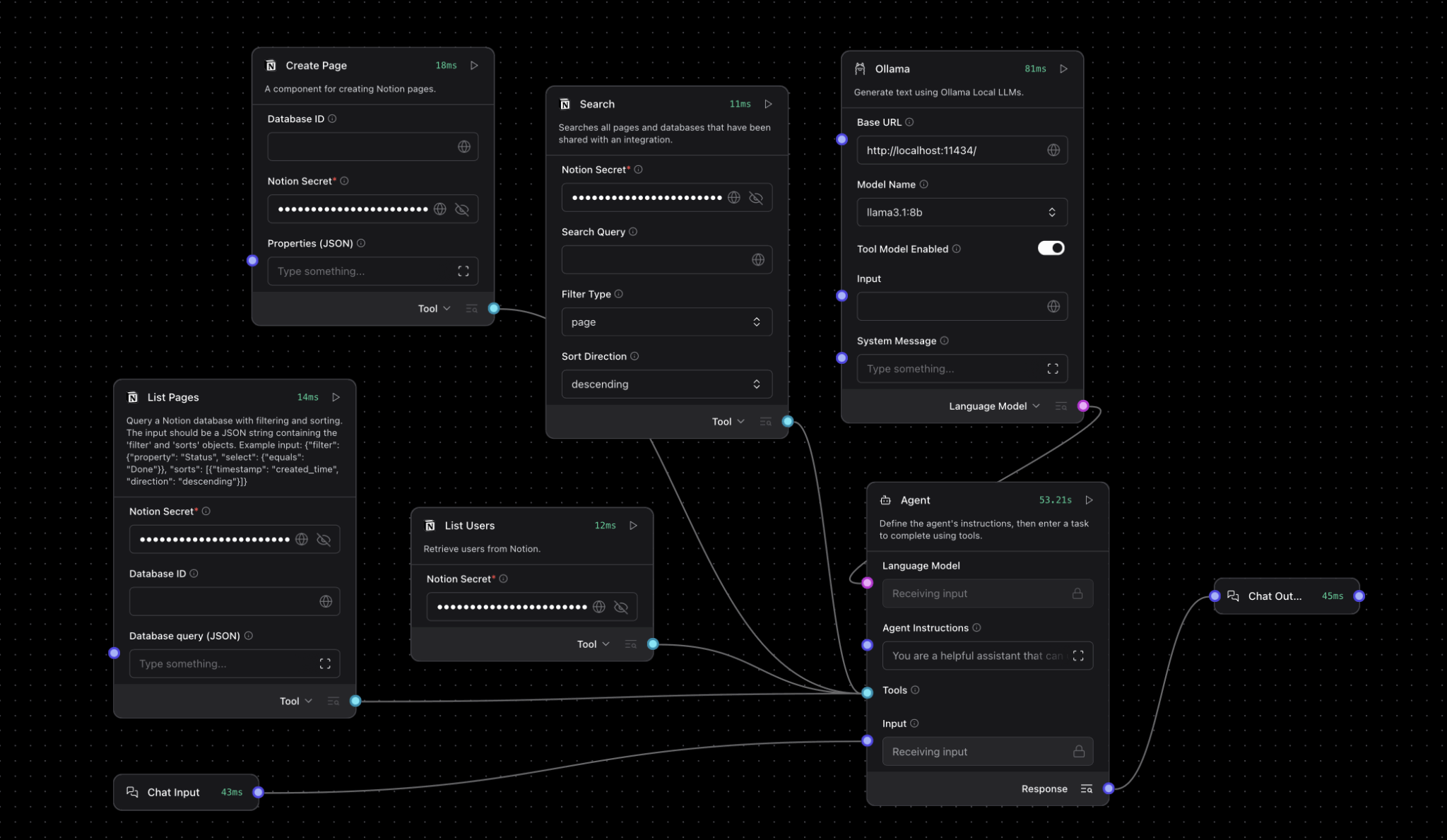
Langflow is an open-source, Python-based visual programming platform for building AI applications with large language models. Instead of writing complex LangChain code, you connect pre-built components—LLMs, vector databases, prompt templates, agents—on a visual canvas to create production workflows in minutes.
Key features:
- Visual flow builder: Drag-and-drop interface for designing LLM pipelines without code
- Component library: 100+ pre-built integrations (OpenAI, Anthropic, Pinecone, Weaviate, ChromaDB)
- RAG support: Built-in vector database connectors and document loaders for retrieval-augmented generation
- Agent framework: Create autonomous AI agents with tool access and memory
- Real-time testing: Run and debug flows directly in the editor before deployment
- API-first: Every flow auto-generates REST endpoints for integration
- MCP protocol: Full Model Context Protocol support for advanced agent architectures
This Railway template deploys langflowai/langflow:latest with a dedicated PostgreSQL 17 instance for persistent flow storage, replacing the default SQLite setup with production-grade data durability.
Why Deploy Langflow on Railway
Railway eliminates the infrastructure overhead of self-hosting Langflow:
- Private networking: Langflow and Postgres communicate over Railway's private network—no exposed database ports
- Managed SSL: Automatic HTTPS on your custom domain or Railway subdomain
- Zero-config volumes: Persistent storage for both services survives redeployments
- Environment variables UI: Update API keys, database URLs, and secrets without touching config files
- One-click rollbacks: Revert to previous deployments instantly if something breaks
- Free tier: $5/month credit covers small projects; scale to production without platform migration
Compared to manually deploying on a VPS with Docker Compose, Railway handles SSL certificates, database backups, container orchestration, and monitoring—letting you focus on building AI workflows instead of managing infrastructure.
Common Use Cases
- Customer support automation: Build RAG chatbots that answer questions from your knowledge base, product docs, or support tickets
- Document analysis pipelines: Extract structured data from PDFs, invoices, or contracts using LLMs with custom prompts
- Multi-agent systems: Chain specialized agents together—one for research, one for writing, one for fact-checking—to automate complex tasks
- Content generation workflows: Create SEO articles, social media posts, or email campaigns by connecting LLMs with your brand guidelines and data sources
Dependencies for Langflow | Production Ready Visual AI Workflow Builder Hosting
Langflow requires API keys for external LLM providers (OpenAI, Anthropic, Cohere) and vector databases (Pinecone, Weaviate) depending on which components you use in your flows. These are configured per-flow in the Langflow UI, not as deployment environment variables.
Environment Variables Reference
| Variable | Description | Required |
|---|---|---|
LANGFLOW_DATABASE_URL | PostgreSQL connection string (auto-populated from Postgres service) | Yes |
LANGFLOW_SECRET_KEY | 32-character secret for session encryption (auto-generated) | Yes |
LANGFLOW_SUPERUSER | Admin username for initial login | Yes |
LANGFLOW_SUPERUSER_PASSWORD | Admin password (auto-generated 32-char secret) | Yes |
LANGFLOW_PORT | HTTP port Langflow listens on (default: 7860) | Yes |
LANGFLOW_AUTO_LOGIN | Skip login screen (set false for production) | No |
LANGFLOW_NEW_USER_IS_ACTIVE | Auto-activate new user registrations (set false to require admin approval) | No |
DO_NOT_TRACK | Disable anonymous telemetry (true recommended) | No |
Deployment Dependencies
The Railway template requires no manual configuration. After clicking Deploy Now, Railway automatically:
- Provisions PostgreSQL with SSL and persistent volume
- Generates secure credentials for admin access and database
- Injects
DATABASE_URLinto Langflow service via template variables - Exposes Langflow on a public
railway.appdomain with HTTPS
Connecting External Vector Databases
Langflow supports multiple vector stores for RAG applications. After deployment, add API keys in the Langflow UI:
# Example: Connect Pinecone in a Langflow component
from langflow.components.vectorstores import PineconeVectorStore

vectorstore = PineconeVectorStore(
    api_key="your-pinecone-api-key",
    environment="us-west1-gcp",
    index_name="langflow-docs"
)
For pgvector (PostgreSQL extension), enable it in your Railway Postgres instance:
CREATE EXTENSION vector;
Then use the DATABASE_URL from Railway's Postgres service in Langflow's pgvector component.
Triggering Flows via API
Once deployed, trigger Langflow workflows programmatically:
# Get your flow ID from the Langflow UI (top-right corner)
FLOW_ID="your-flow-id"
RAILWAY_URL="https://your-app.railway.app"

curl -X POST "$RAILWAY_URL/api/v1/run/$FLOW_ID" \
  -H "Content-Type: application/json" \
  -d '{
    "input_value": "What are your business hours?",
    "output_type": "chat",
    "input_type": "chat"
  }'
This returns the LLM response as JSON. Use this endpoint to integrate Langflow with front-end applications, Slack bots, or other services.
Langflow vs other Automation Tools
Langflow vs Flowise:
Both are visual LLM workflow builders, but Langflow is Python-native (built on LangChain) while Flowise uses TypeScript. Langflow offers deeper LangChain integration, better agent support, and MCP compatibility. Flowise has a simpler UI for basic chatbots but lacks Langflow's extensibility for custom components.
Langflow vs n8n:
n8n is a general-purpose workflow automation tool with some AI nodes; Langflow is purpose-built for LLM applications. If you need to connect Slack, Stripe, and Google Sheets, use n8n. If you're building RAG systems, AI agents, or complex prompt chains, Langflow is the better choice.
Self-Hosting Langflow with Docker
Run Langflow locally or on your own VPS with Docker:
# Quick start with SQLite (data lost on container restart)
docker run -p 7860:7860 langflowai/langflow:latest

# Production setup with PostgreSQL
docker run -d \
  --name langflow \
  -p 7860:7860 \
  -e LANGFLOW_DATABASE_URL=postgresql://user:pass@postgres:5432/langflow \
  -e LANGFLOW_SECRET_KEY=$(openssl rand -hex 16) \
  -e LANGFLOW_SUPERUSER=admin \
  -e LANGFLOW_SUPERUSER_PASSWORD=yourpassword \
  -v langflow_data:/app/langflow \
  langflowai/langflow:latest
Access Langflow at http://localhost:7860. For production deployments, add Nginx or Caddy for SSL termination.
GitHub repo: https://github.com/logspace-ai/langflow
Integrations and Extensions
Langflow components support 50+ integrations out of the box:
- LLM providers: OpenAI (GPT-4, GPT-3.5), Anthropic (Claude), Cohere, Hugging Face, Ollama (local models)
- Vector databases: Pinecone, Weaviate, ChromaDB, Qdrant, Supabase pgvector
- Document loaders: PDF, CSV, JSON, web scrapers, Google Drive, Notion
- Tools: Google Search, Wikipedia, Wolfram Alpha, custom API calls via HTTP components
Custom components can be added by writing Python classes that extend Langflow's base component interface—useful for proprietary APIs or specialized data sources.
FAQ
What is Langflow used for?
Langflow is a visual low-code platform for building AI applications using large language models. It lets you design chatbots, RAG systems, document analyzers, and autonomous agents by connecting pre-built components on a drag-and-drop canvas instead of writing LangChain code.
How do I add OpenAI API keys to Langflow?
After deploying, open Langflow and create a new flow. When you add an OpenAI component, click it to reveal the configuration panel. Paste your API key in the "OpenAI API Key" field. Keys are stored encrypted in the PostgreSQL database.
How do I access the Langflow admin panel after deployment?
Navigate to your Railway-provided URL (e.g., https://langflow-production.up.railway.app). Log in with username admin and the auto-generated password found in your Langflow service's environment variables (LANGFLOW_SUPERUSER_PASSWORD).
Can I use local LLMs with Langflow on Railway?
Yes, via Ollama components. Deploy a separate Ollama service on Railway, expose it on the private network, and configure Langflow's Ollama components to point to ollama.railway.internal:11434.
Does Langflow support multi-user deployments?
Yes. Set LANGFLOW_NEW_USER_IS_ACTIVE=false to require admin approval for new registrations. Each user gets isolated flows and API keys. Suitable for team deployments.
What's the difference between Langflow Cloud and self-hosting?
Langflow Cloud (DataStax Astra) offers managed hosting with enterprise features like SSO and team collaboration. Self-hosting on Railway gives you full control, no vendor lock-in, and costs ~$10-20/month for small projects versus Cloud's per-seat pricing.
Template Content