Deploy Lightdash
Business intelligence tool that builds dashboards from your dbt models

nats
Just deployed
lightdash
Just deployed

headless-browser
Just deployed
warehouse-worker
Just deployed

Just deployed
/var/lib/postgresql/data
scheduler
Just deployed
lightdash-storage
Bucket
Just deployed
Deploy and Host Lightdash on Railway
Lightdash is an open-source business intelligence platform that turns a dbt project into a governed self-serve analytics layer. Metrics and dimensions are defined once in your dbt YAML; everyone else works through point-and-click explores, a SQL runner, charts, dashboards and scheduled deliveries. Teams pick it over closed BI tools because the semantic layer lives in version control beside the models it describes — a metric change is a reviewable pull request.
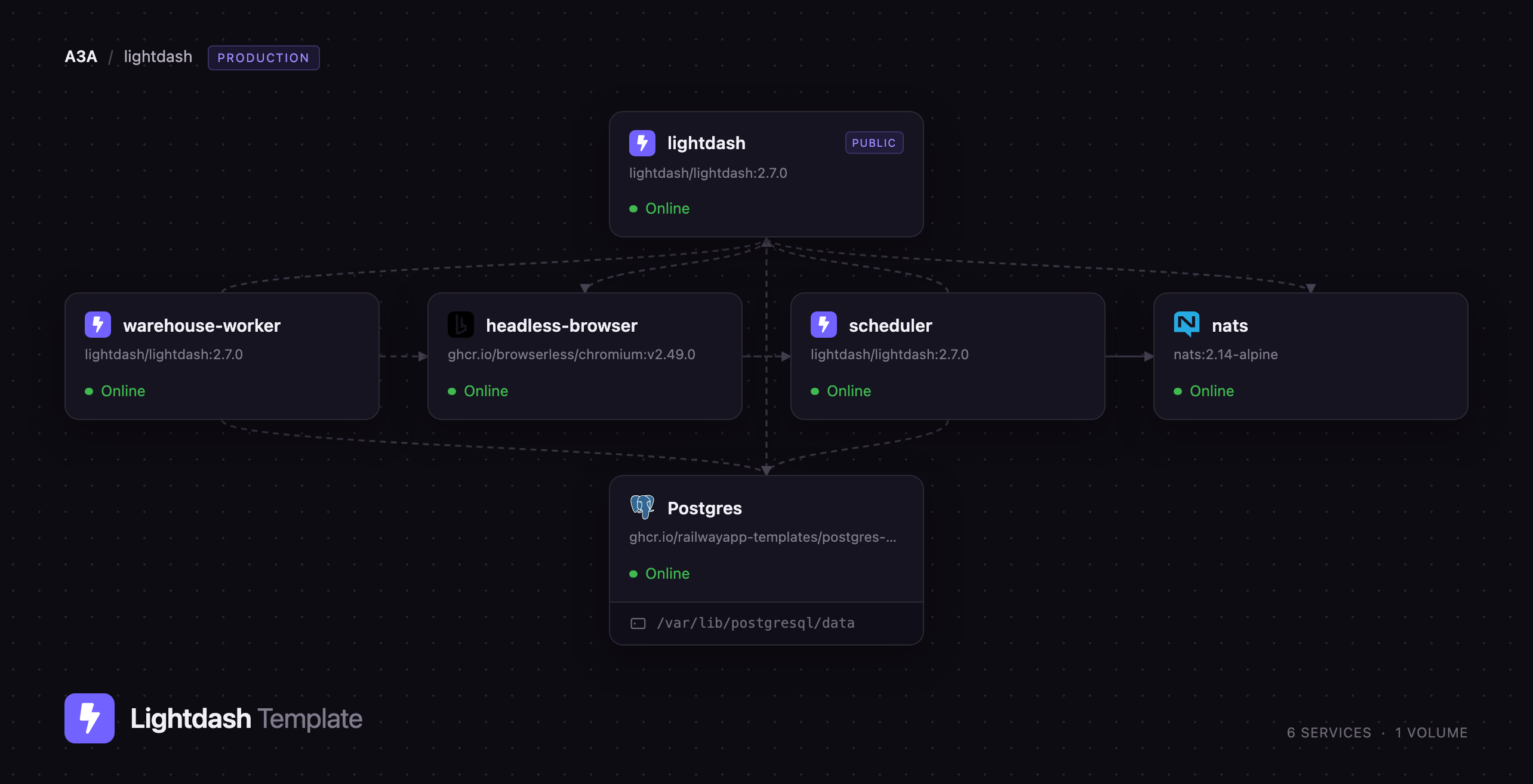
Self-host Lightdash on Railway and this template wires up the production shape upstream documents: the API and UI, a dedicated scheduler worker for deliveries and exports, a NATS JetStream queue with a warehouse query worker, a Browserless Chromium instance for chart rendering, managed PostgreSQL for Lightdash's metadata, and an S3-compatible bucket for results. Only the Lightdash service is public. Interactive queries go to NATS and are run by the warehouse worker, which streams results into object storage so a heavy dashboard never blocks the API.
Getting Started with Lightdash on Railway
Open the generated public URL and you land on the registration screen. Lightdash ships with no default credentials: the first person to register creates the organization and becomes its admin, so register immediately rather than leaving the instance open. The setup dialog asks for an organization name and offers to let anyone sharing your email domain join as a viewer — untick that unless you want it. With ALLOW_MULTIPLE_ORGS at false, later visitors need an invite.
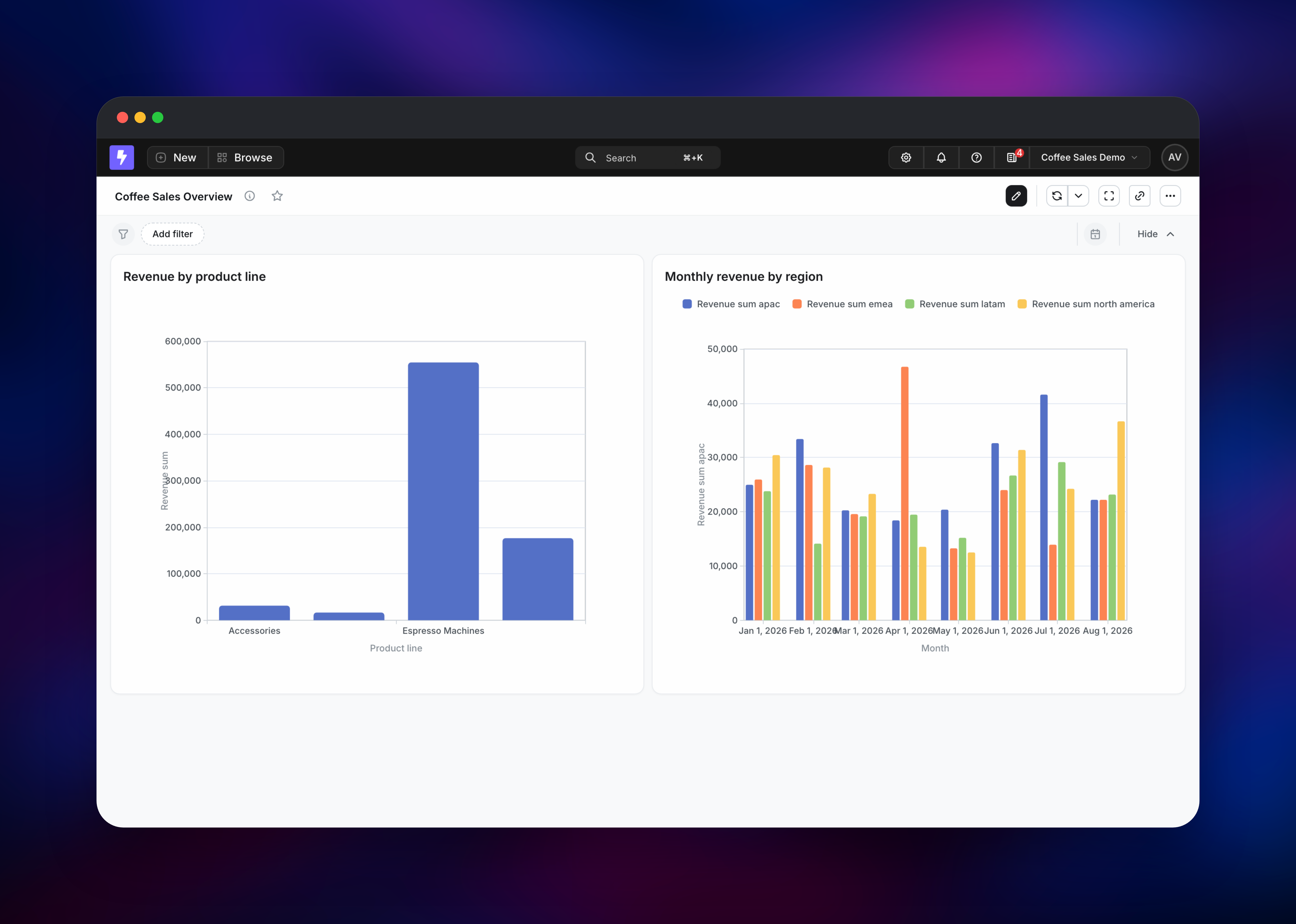
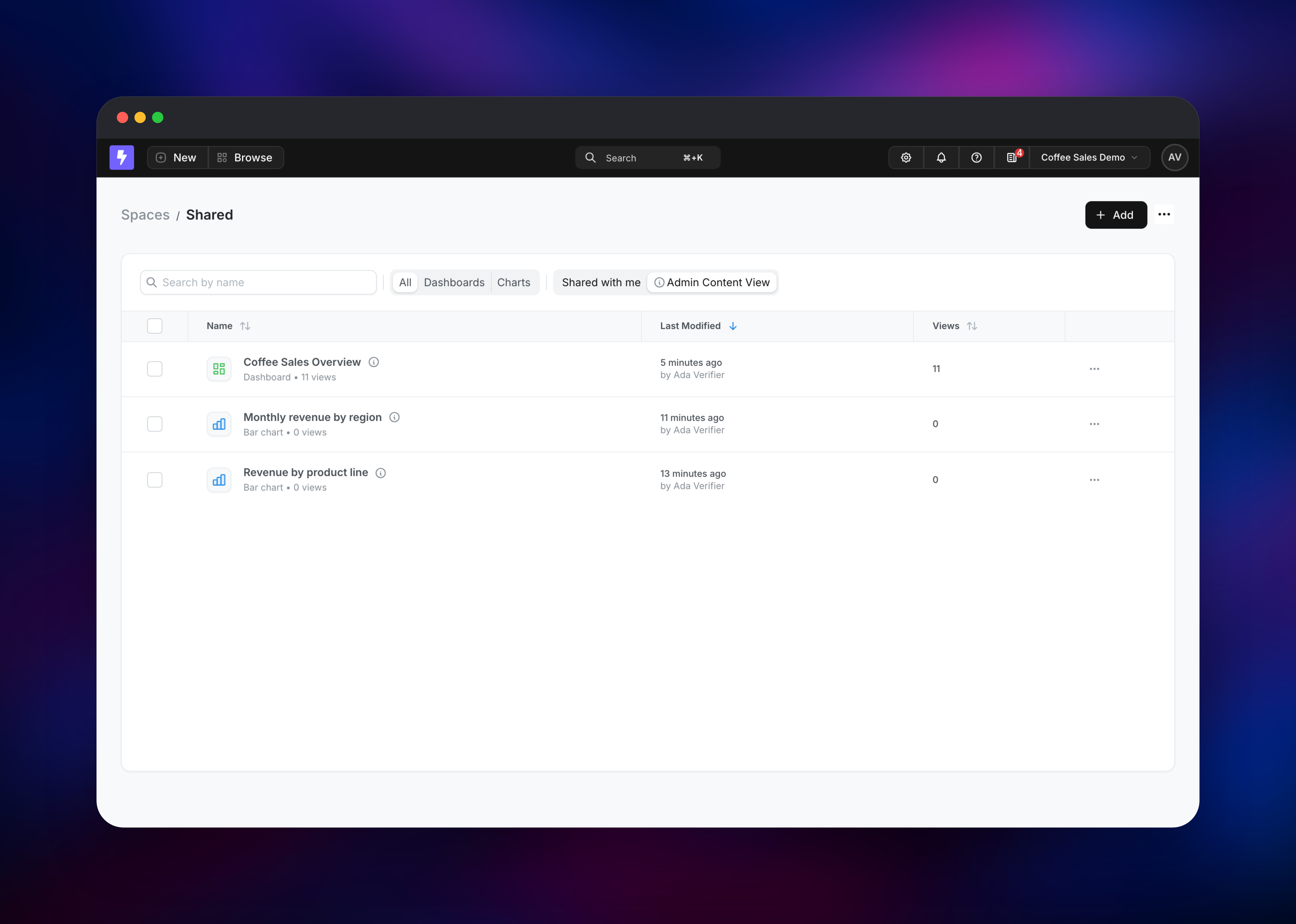
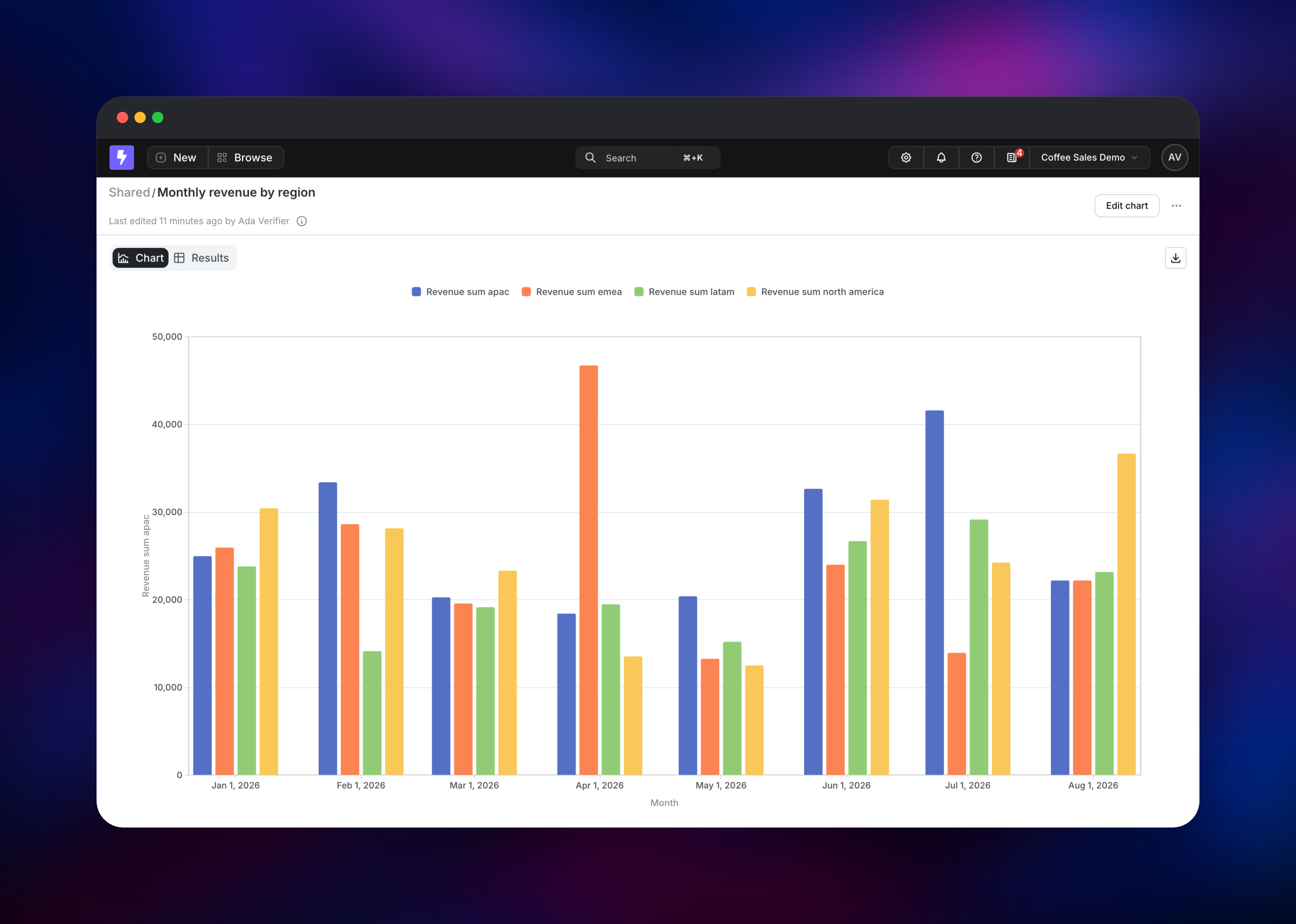
Next, connect a project. Lightdash asks for a data warehouse (BigQuery, Snowflake, Databricks, Redshift, PostgreSQL, Trino, ClickHouse or Athena) and a dbt project (GitHub, GitLab, Bitbucket, Azure DevOps, dbt Cloud, or the lightdash CLI). If your warehouse is a PostgreSQL server with a self-signed certificate — most managed instances are — set the SSL mode in the advanced options to disable or no-verify, or the connection test fails. Then pick a table under Explore, drag in a dimension and a metric, run it, and save the result as a chart. Building a dashboard from two or three charts is the fastest health check for the stack: it exercises the queue, the worker, the warehouse connection and object storage at once.
About Hosting Lightdash
Lightdash reads your schema.yml files, picks up the meta blocks marking columns as dimensions and metrics, and compiles them into explores analysts query without writing SQL. That fits a team already running dbt that wants business users answering their own questions against the definitions the data team maintains — with credentials, results and dashboards on your own infrastructure.
Key features:
- Semantic layer defined in dbt YAML and versioned in git
- Point-and-click explores plus a SQL runner
- Dashboards with cross-filtering, drill-downs and date zooms
- Scheduled email and Slack deliveries with rendered chart images
- Role-based access control, spaces and per-project permissions
Lightdash serves the API and React UI and migrates at boot under a lease, so a rolling deploy never runs two migrators at once. PostgreSQL holds Lightdash's metadata — users, spaces, charts, dashboards, schedules and encrypted warehouse credentials — and is not your analytics warehouse. NATS carries the JetStream work queue; warehouse-worker consumes it, runs the SQL and streams rows into the bucket. scheduler owns deliveries and exports so a heavy render cannot starve the API. headless-browser screenshots charts for Slack and email.
Why Deploy Lightdash on Railway
Railway removes the infrastructure work this stack needs:
- Managed PostgreSQL and an S3 bucket ship with the template
- Private networking links the workers, queue and browser, none of them public
- TLS and a public domain are automatic
- Services scale independently; add worker replicas without touching the API
- Health checks and rolling deploys come configured
Common Use Cases
- Self-serve access to dbt models for business teams, without warehouse logins
- Replacing spreadsheet reporting with scheduled Slack and email deliveries
- Embedding dashboards into an internal or customer-facing product
- A metrics catalogue where every KPI has one reviewed definition in git
Dependencies for Lightdash
lightdash/lightdash— API, UI, scheduler and warehouse worker (GitHub)ghcr.io/browserless/chromium— Chromium pool for chart screenshotsnats:2-alpine— JetStream queue for async warehouse queries- Railway PostgreSQL — application metadata
- Railway bucket — results and exports
Environment Variables Reference
| Variable | Purpose |
|---|---|
SITE_URL | Public HTTPS URL, used in invite emails and delivery links |
LIGHTDASH_SECRET | Signs sessions, encrypts credentials — never change it |
PG* | Lightdash's metadata database |
S3_* | Object storage — required, the app refuses to boot without it |
NATS_ENABLED / NATS_URL | Routes warehouse queries through the queue |
SCHEDULER_ENABLED | false; the worker owns scheduled jobs |
SECURE_COOKIES / TRUST_PROXY | Both true behind Railway's TLS edge |
LIGHTDASH_MAX_PAYLOAD | Raise above the 5 MB default for big dbt manifests |
EMAIL_SMTP_* | Optional relay; needed for invites and deliveries |
Deployment Dependencies
- Source: github.com/lightdash/lightdash
- Docs: docs.lightdash.com/self-host
Hardware Requirements for Self-Hosting Lightdash
| Resource | Minimum | Recommended |
|---|---|---|
| CPU | 1 vCPU (API) | 1 API, 0.5 scheduler, 0.25 worker, 2 browser |
| RAM | 1.5 GB (API) | 2–4 GB API, 1.5 GB per worker, 4 GB browser, 1 GB Postgres |
| Storage | 5 GB metadata database | 10 GB plus object storage for results |
| Runtime | Node.js 22, PostgreSQL 14+ | Managed PostgreSQL, backed up |
Memory bites first: the warehouse worker holds result sets in memory, and Chromium needs headroom for a wide dashboard.
Self-Hosting Lightdash
Upstream ships a Docker Compose file for local evaluation:
git clone https://github.com/lightdash/lightdash.git
cd lightdash && cp .env.development .env
docker compose up -d
For a single container against an existing database and bucket:
docker run -d --name lightdash -p 8080:8080 \
  -e PGCONNECTIONURI="postgresql://user:pass@db:5432/lightdash" \
  -e LIGHTDASH_SECRET="$(openssl rand -hex 32)" \
  -e SITE_URL="https://lightdash.example.com" \
  -e SECURE_COOKIES=true -e TRUST_PROXY=true \
  -e S3_ENDPOINT="https://s3.example.com" -e S3_BUCKET="lightdash" \
  -e S3_REGION="auto" -e S3_FORCE_PATH_STYLE=true \
  -e S3_ACCESS_KEY="key" -e S3_SECRET_KEY="secret" \
  lightdash/lightdash:latest
Production adds what this template includes: a scheduler started with node dist/scheduler.js, a NATS server, a warehouse worker started with node dist/natsWorker.js --stream warehouse, and a Browserless container. Keep every Lightdash service on one image tag — upstream publishes several releases a day and they share a schema.
Is Lightdash Free to Self-Host?
Lightdash is open source under the MIT licence, and the self-hosted build includes explores, the SQL runner, charts, dashboards, spaces, scheduled deliveries and the CLI at no cost. An optional enterprise licence key unlocks AI Analyst, pre-aggregations, SCIM, embedding and results caching. On Railway you pay only for the compute, database and storage used.
FAQ
What is Lightdash? An open-source BI tool that builds explores, charts and dashboards from the metrics and dimensions defined in a dbt project, keeping the semantic layer in git.
What does this Railway template deploy? The Lightdash API and UI, a scheduler worker, a NATS JetStream queue with a warehouse query worker, a Browserless Chromium service, managed PostgreSQL and a bucket. Only Lightdash is public.
Why does the template include PostgreSQL and object storage? PostgreSQL stores Lightdash's metadata — users, charts, dashboards, schedules and encrypted warehouse credentials. Object storage is not optional: Lightdash refuses to start without S3 settings, and it holds results and rendered images.
Do I need a dbt project to use self-hosted Lightdash? For the full explore experience, yes. You can connect a warehouse first and build charts in the SQL runner, adding dbt later.
How do I connect Lightdash to a PostgreSQL warehouse over TLS?
Open the advanced options on the warehouse connection and pick an SSL mode. The default validates the certificate chain, which fails against the self-signed certificates most managed PostgreSQL services present; use disable on a private network, no-verify otherwise.
How do I send scheduled deliveries by email from self-hosted Lightdash?
Set EMAIL_SMTP_HOST, EMAIL_SMTP_PORT, EMAIL_SMTP_USER, EMAIL_SMTP_PASSWORD and EMAIL_SMTP_SENDER_EMAIL on the Lightdash and scheduler services, then redeploy. Slack deliveries need a Slack app.
Template Content
nats
nats:2.14-alpinelightdash
lightdash/lightdash:2.7.0headless-browser
ghcr.io/browserless/chromium:v2.49.0warehouse-worker
lightdash/lightdash:2.7.0scheduler
lightdash/lightdash:2.7.0lightdash-storage
Bucket