
Deploy LightRAG
Turns your documents into a searchable knowledge graph you can query
lightrag
Just deployed
/app/storage

ollama
Just deployed
/root/.ollama

Just deployed
/var/lib/postgresql/data
Deploy and Host LightRAG on Railway
LightRAG is an open-source retrieval-augmented generation engine from the Data Intelligence Lab at the University of Hong Kong. It reads your documents, uses a language model to pull out entities and the relationships between them, and stores that knowledge graph alongside vector embeddings of every chunk. Questions are answered by walking the graph and searching the vectors, so the model sees how facts connect rather than a bag of similar paragraphs. Teams use it for private assistants over runbooks, contracts, papers and support histories.
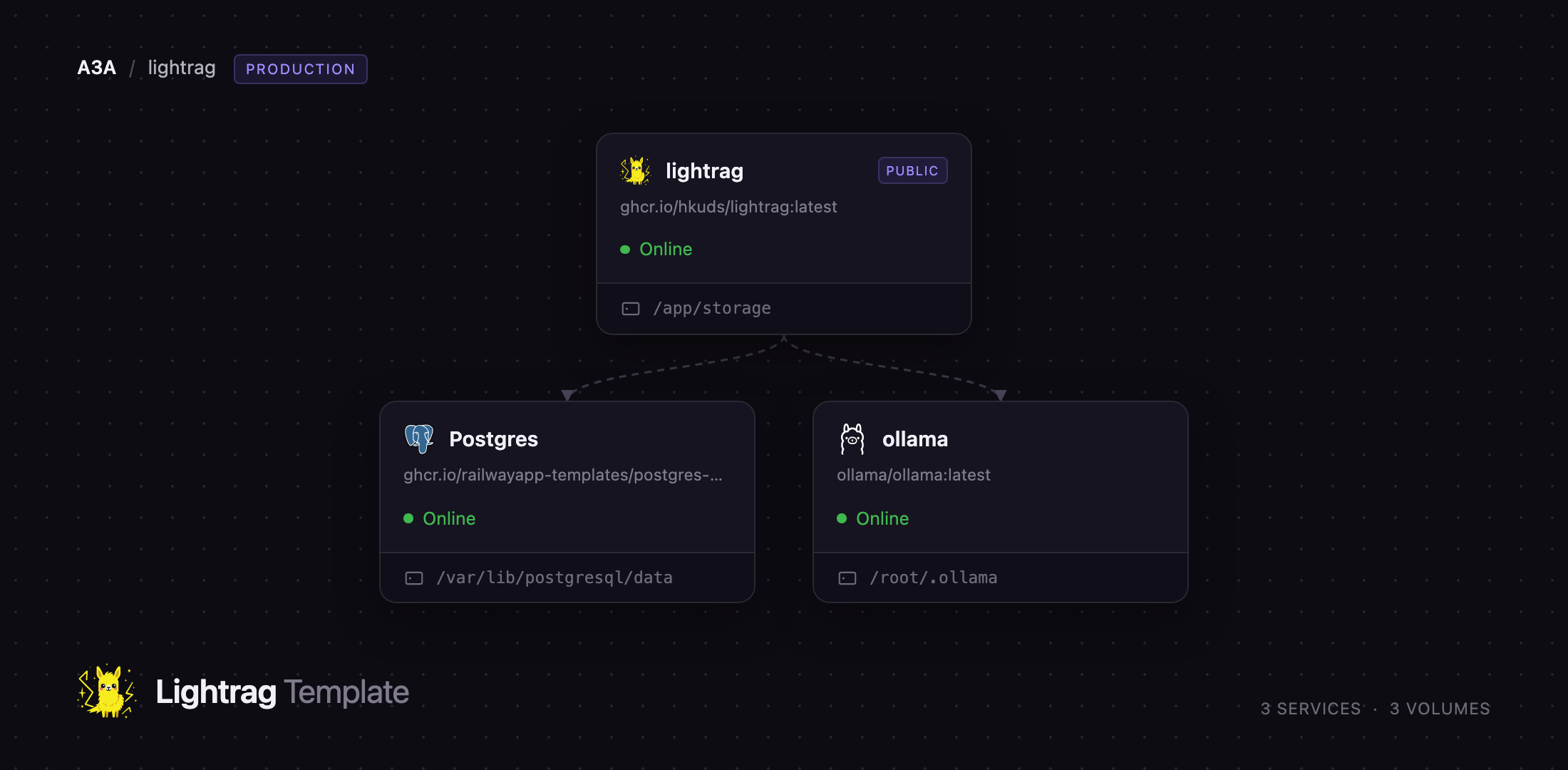
Deploy LightRAG on Railway and the stack arrives wired together: the LightRAG API server with its web interface, a PostgreSQL database holding the key-value store, document status, pgvector embeddings and the graph itself, and an Ollama service running the language and embedding models on Railway's own CPU. The browser reaches LightRAG over HTTPS; LightRAG reaches PostgreSQL and Ollama privately, and neither has a public address. So you can self-host LightRAG and index your first document without an API key from anyone, then move to a hosted model by changing two variables.
Getting Started with LightRAG on Railway
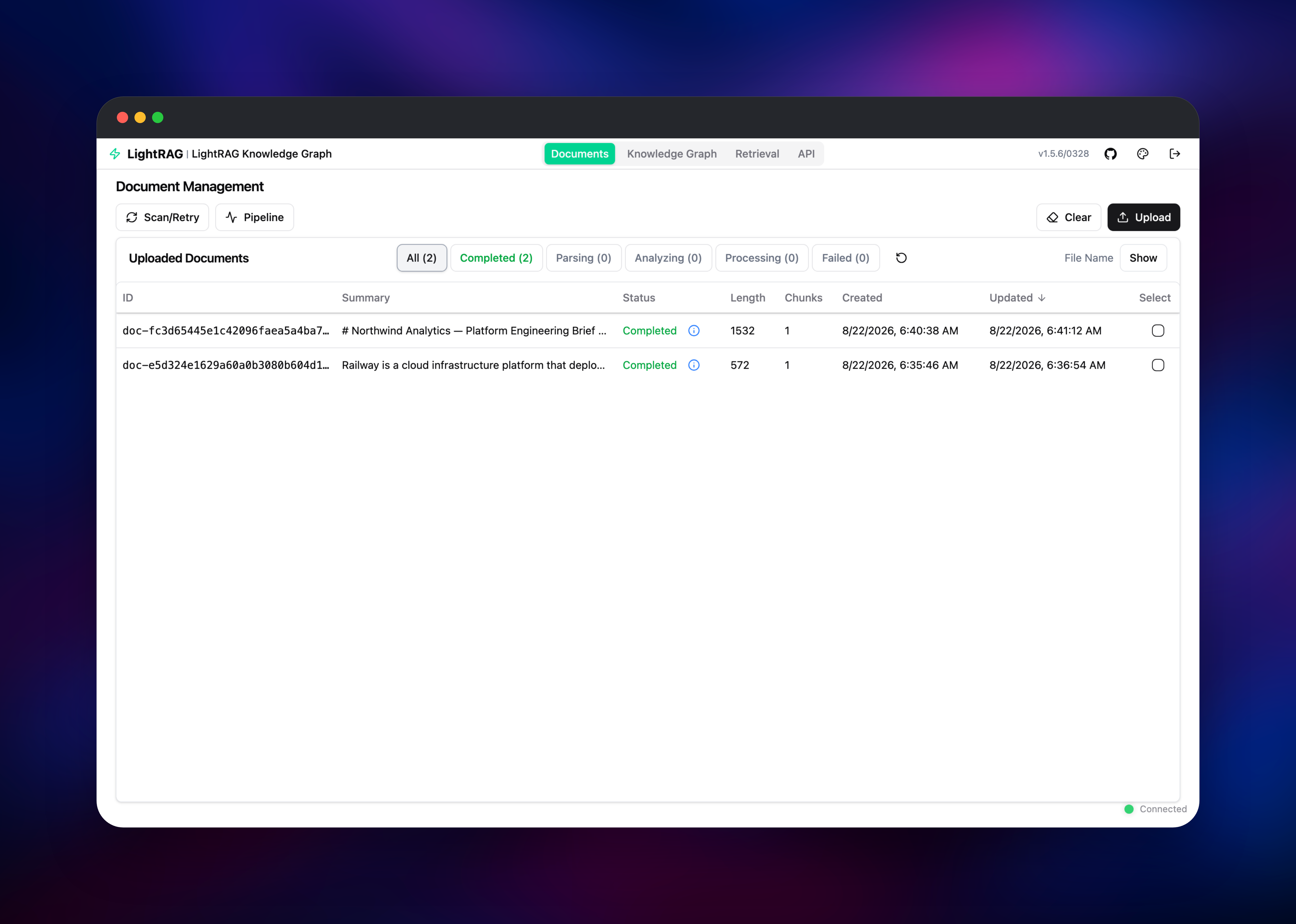
Open the deployed URL and sign in with the username and password from the AUTH_ACCOUNTS variable on the LightRAG service — change it to set your own before sharing the URL. Then give it something to read: open the Documents tab, click Upload, and drop in a Markdown, PDF, DOCX or plain-text file. The row moves through Parsing, Analyzing and Processing to Completed as entities are extracted; on the bundled CPU models a short document takes a minute or two.
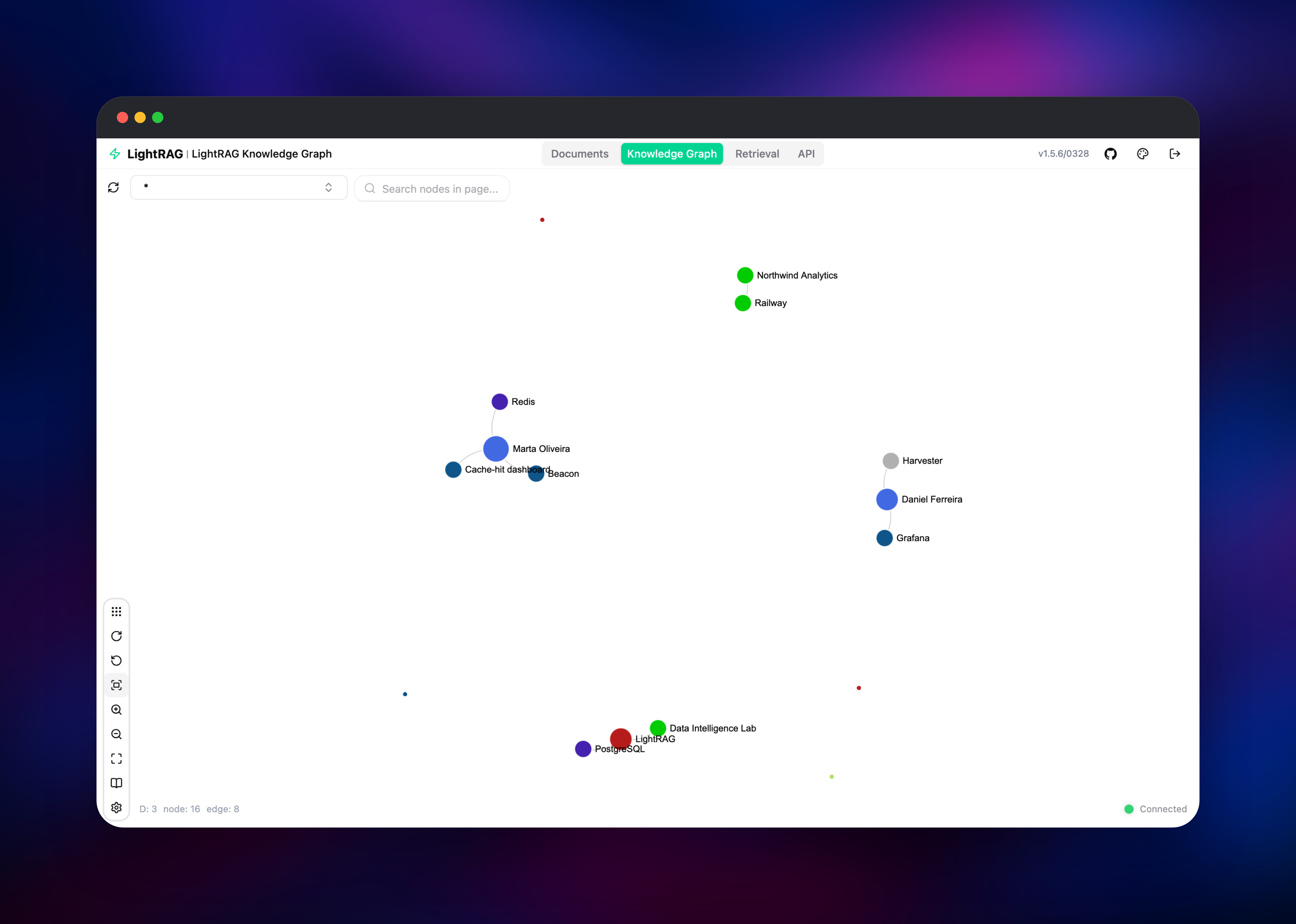
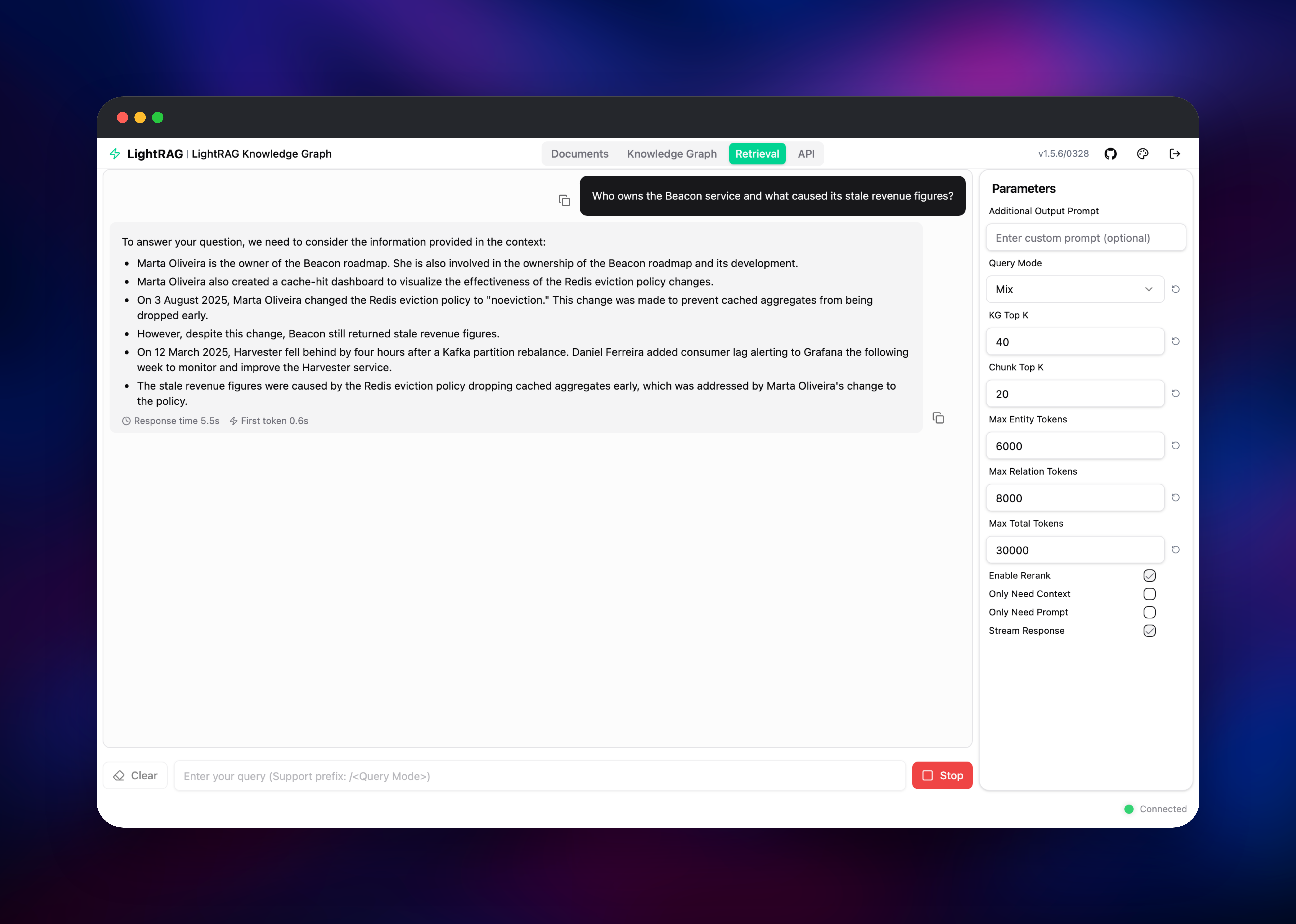
Then open the Knowledge Graph tab — the entities and relationships found in your file are drawn as a live graph you can search and expand. Go to the Retrieval tab and ask a question in plain language: a grounded answer comes back with numbered references to the documents it used, the fastest way to confirm the whole path is healthy. The API tab documents the REST endpoints; send LIGHTRAG_API_KEY as an X-API-Key header to call them from your own code.
About Hosting LightRAG
Classic RAG embeds chunks and retrieves whatever looks similar to the question. That breaks down when the answer depends on a relationship spread across documents — who owns which service, which incident caused which change. Graph RAG builds an entity graph first, and LightRAG does it cheaply enough to run continuously: one extraction pass per chunk, new documents merging into the graph rather than triggering a rebuild.
Key features:
- Dual-level retrieval combining graph traversal with vector similarity, in
local,global,hybrid,mixandnaivemodes - Incremental indexing, so adding a document does not re-index the corpus
- Pluggable bindings: Ollama, OpenAI and compatible endpoints, Azure OpenAI, Bedrock, Gemini
- Pluggable storage: PostgreSQL, Redis, MongoDB, Neo4j, Milvus, Qdrant, Memgraph
- A REST API with Ollama-compatible chat routes for existing clients
Three services. LightRAG serves the API and web interface on port 9621, the only public address. PostgreSQL holds everything durable — documents, pgvector embeddings, processing status and the graph — using table-backed graph storage, so no Apache AGE build or second database is needed. Ollama runs qwen2.5:3b for extraction and bge-m3 for embeddings, its model files on a volume so they download once.
Why Deploy LightRAG on Railway
Railway removes the setup that makes graph RAG awkward to trial:
- PostgreSQL with pgvector provisioned and connected, no extension work
- Private networking between app, database and model server
- Persistent volumes for model weights and uploaded documents
- One public HTTPS URL with a managed certificate
- Vertical scaling when indexing gets heavy
Common Use Cases
- Internal engineering knowledge base — ingest runbooks and incident reports so on-call engineers get cited answers
- Research and literature review — graph a paper collection to surface how authors, datasets and methods relate
- A retrieval backend for your own agents — call the REST API and let LightRAG own indexing and retrieval
Dependencies for LightRAG
- LightRAG —
ghcr.io/hkuds/lightrag:latest, the API server and web interface - PostgreSQL — Railway's managed PostgreSQL with pgvector, providing all four storage backends
- Ollama —
ollama/ollama:latest, the inference server supplying models privately
Environment Variables Reference
| Variable | Purpose |
|---|---|
AUTH_ACCOUNTS | Web interface logins as user:password, comma-separated |
TOKEN_SECRET | Signs session tokens; changing it logs everyone out |
LIGHTRAG_API_KEY | Value clients send as the X-API-Key header |
WHITELIST_PATHS | Paths exempt from auth; /health closes the rest |
LLM_BINDING / LLM_MODEL | Provider and model for extraction and answering |
EMBEDDING_BINDING / EMBEDDING_MODEL | Provider and model for embeddings |
EMBEDDING_DIM | Embedding width; must match the model |
Deployment Dependencies
- Source and image: github.com/HKUDS/LightRAG, MIT licence
- Models: ollama.com/library
Hardware Requirements for Self-Hosting LightRAG
| Resource | Minimum | Recommended |
|---|---|---|
| CPU | 2 vCPU (hosted model) | 8 vCPU (bundled Ollama) |
| RAM | 2 GB for LightRAG alone | 8 GB with both local models resident |
| Storage | 5 GB database + 1 GB uploads | 10 GB+ per service |
| Runtime | Python 3.12 container, PostgreSQL 14+ | Plus a GPU-backed model endpoint |
Local inference is the expensive part; with a hosted provider LightRAG runs comfortably in 2 GB.
Self-Hosting LightRAG
The published image runs anywhere Docker does, against an existing PostgreSQL and Ollama with data on a volume:
docker run -d --name lightrag -p 9621:9621 --env-file .env \
  -v lightrag-data:/app/storage ghcr.io/hkuds/lightrag:latest
The .env file names the login, storage backends and model bindings:
AUTH_ACCOUNTS=admin:choose-a-password
TOKEN_SECRET=replace-with-openssl-rand-hex-32
LIGHTRAG_KV_STORAGE=PGKVStorage
LIGHTRAG_DOC_STATUS_STORAGE=PGDocStatusStorage
LIGHTRAG_VECTOR_STORAGE=PGVectorStorage
LIGHTRAG_GRAPH_STORAGE=PGTableGraphStorage
POSTGRES_HOST=postgres
POSTGRES_USER=postgres
POSTGRES_PASSWORD=postgres
POSTGRES_DATABASE=rag
LLM_BINDING=ollama
LLM_MODEL=qwen2.5:3b
EMBEDDING_BINDING=ollama
EMBEDDING_MODEL=bge-m3
EMBEDDING_DIM=1024
For OpenAI, swap those last five lines for LLM_BINDING=openai, LLM_BINDING_HOST=https://api.openai.com/v1, LLM_BINDING_API_KEY=sk-your-key, LLM_MODEL=gpt-4o-mini, EMBEDDING_BINDING=openai, EMBEDDING_MODEL=text-embedding-3-small and EMBEDDING_DIM=1536. Changing the embedding model changes the vector width, so LightRAG creates fresh tables and indexed documents must be re-ingested — choose one before loading a large corpus.
How Much Does LightRAG Cost to Self-Host?
LightRAG is free and open source under the MIT licence — no paid tier, seat count or usage meter. Self-hosting costs the infrastructure plus whatever model calls you make. With the bundled Ollama service there are no model fees at all; you pay Railway for three always-on containers and their volumes. A hosted model turns indexing into a per-token cost, where single-pass extraction is far cheaper than graph RAG that rebuilds everything.
FAQ
What is LightRAG? An open-source engine that builds a knowledge graph from your documents and combines graph traversal with vector search when answering questions. It comes from the Data Intelligence Lab at the University of Hong Kong, under the MIT licence.
What does this Railway template deploy? The LightRAG API server and web interface with a volume for uploads, a managed PostgreSQL database, and an Ollama inference server with a volume for model weights. Only LightRAG is public.
Why does the template include PostgreSQL? LightRAG defaults to files on disk, which no container restart survives. PostgreSQL with pgvector holds all four stores — key-value, document status, embeddings and the graph — its table-backed graph storage needing no extra extension.
Do I need an OpenAI API key to use self-hosted LightRAG?
No — the bundled Ollama service runs qwen2.5:3b and bge-m3 on CPU, so it works out of the box. A hosted model is faster and more accurate: set LLM_BINDING, LLM_BINDING_HOST, LLM_BINDING_API_KEY and LLM_MODEL to switch.
How do I secure the LightRAG API on a public URL?
Set AUTH_ACCOUNTS for browser logins and LIGHTRAG_API_KEY for API clients, and keep WHITELIST_PATHS=/health — LightRAG ships /api/* open for Ollama-client compatibility, and narrowing it closes those routes.
Why is my first document slow to index?
Entity extraction is a model call per chunk and the bundled models run on CPU. A hosted provider indexes near-instantly; raise MAX_ASYNC_LLM once the model server handles parallel calls.
Template Content


