
Deploy LiteLLM
LiteLLM: LLM router, virtual keys, budgets, cost tracking, guardrails
LiteLLM
Just deployed

Just deployed
/var/lib/postgresql/data

Redis
Just deployed
/data
Deploy and Host LiteLLM with Railway
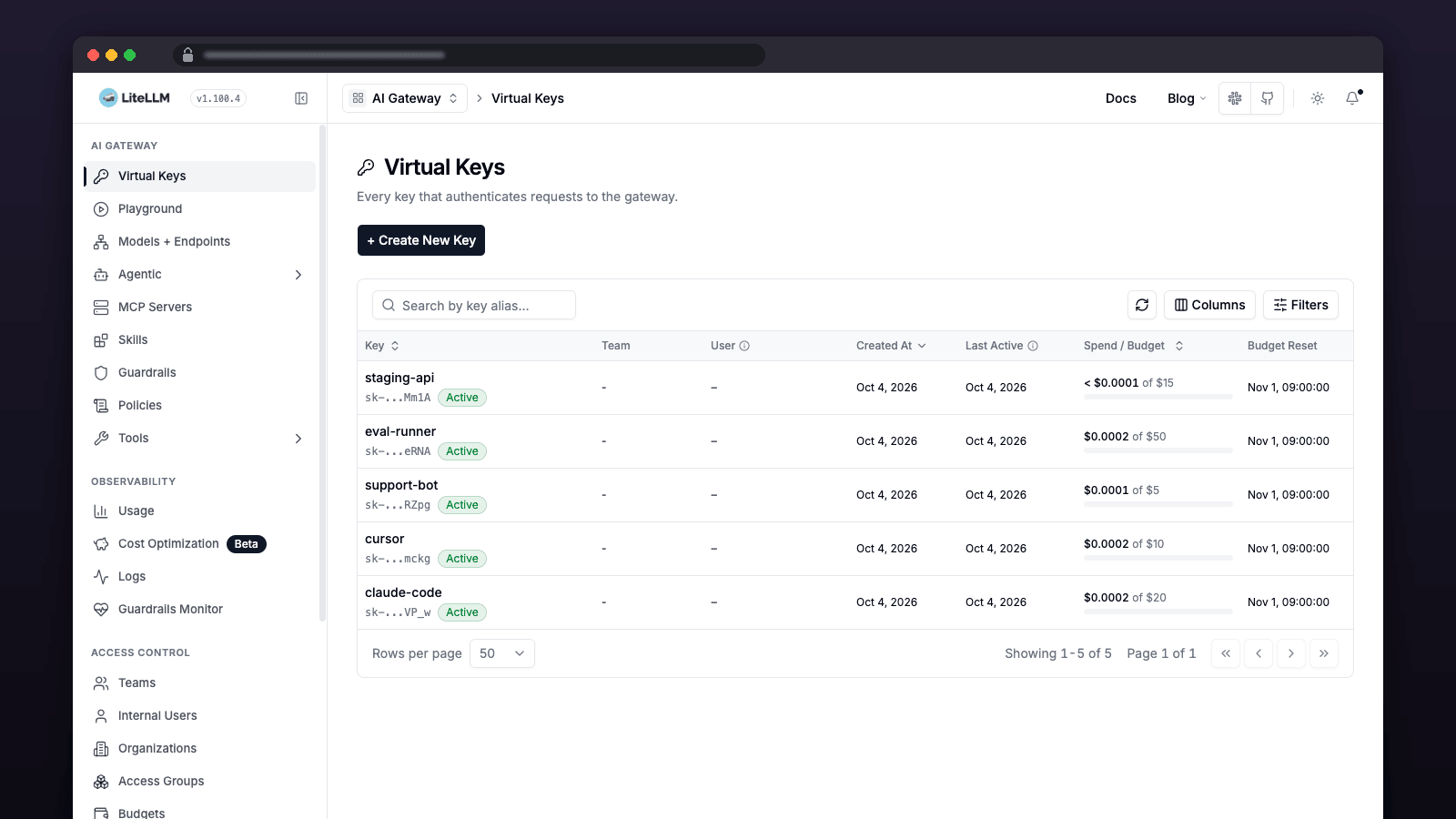
One OpenAI-compatible endpoint for 100+ LLM providers, with virtual keys, per-key budgets and spend tracking for every app and coding agent you run.
Get started
- Deploy. No inputs: LiteLLM, Postgres and Redis are wired together and every secret is generated. Use Hobby or higher — the stack idles at about 1 GB. Trial (1 GB) works for light use with little headroom; Free (0.5 GB) cannot run it.
- Sign in. Open the LiteLLM service URL at
/ui. Usernameadmin; the password isLITELLM_MASTER_KEYfrom the LiteLLM service's Variables tab. - Add a model and call it. Models → Add Model and paste a provider key — one OpenRouter key added as
openrouter/*makes all 400+ OpenRouter models available. Point Claude Code, Cursor or any OpenAI-compatible client at your URL with the master key, or a virtual key from Keys.
About Hosting LiteLLM
LiteLLM is an open-source AI gateway that puts one OpenAI-compatible endpoint in front of 100+ LLM providers. This template deploys the LiteLLM Proxy Server with Postgres and Redis, giving you virtual API keys, per-key budgets, spend tracking, rate limits, fallbacks and response caching — managed from a web dashboard. The proxy runs as a Python service backed by Postgres for models, keys, budgets and spend history, plus Redis for response caching and cross-replica rate limiting. All three services are wired together over private networking, with generated secrets, official digest-pinned images, database migrations in a lightweight pre-deploy step, and deployment gated on readiness. No config file is required for a default deployment; add models and your provider credentials in the Admin UI afterwards.
Common Use Cases
- One endpoint for every coding agent. Point Claude Code, Cursor, Codex or any OpenAI-compatible client at a single URL and one key.
- Spend governance for a team. Issue a virtual key per person with its own monthly budget, and see exactly who spent what.
- 400+ models from one provider key. Add
openrouter/*and every OpenRouter model becomes available immediately. - Cost control through caching and fallbacks. Cache repeated responses in Redis, and fail over automatically when a provider errors.
- A private gateway for your own app. Reach it over Railway's private network without exposing it publicly.
Dependencies for LiteLLM Hosting
- Postgres — stores models, virtual keys, budgets, teams and spend logs.
- Redis — response caching and rate-limit coordination across replicas.
Deployment Dependencies
- LiteLLM documentation
- LiteLLM proxy configuration reference
- LiteLLM GitHub repository
- Supported providers
- OpenRouter (optional — one key for 400+ models)
Implementation Details
Plan requirements. LiteLLM needs about 0.9 GB to start and 2 GB or more for real use (measured on this image: 877 MiB at readiness, ~120 MiB for the pre-deploy migration). Hobby or higher is recommended. Trial (1 GB) starts and works for light use but has little headroom; Free (0.5 GB) cannot run it — the deploy stops immediately with a clear "upgrade the plan" message instead of crash-looping.
Deploying. Click deploy; secrets are generated and no inputs are required to boot the dashboard. Both startup commands check the container's memory limit first and stop with an explicit message if it is under ~0.9 GB. When the deploy goes green, open the service URL. Model requests require your own provider credentials and may incur provider charges.
Logging in. Go to /ui. Username admin, password is your LITELLM_MASTER_KEY — copy it from the LiteLLM service's Variables tab. That same value is the API key your clients use.
Adding your first model. In the Admin UI choose Models → Add Model, pick a provider, paste your provider key. To get every OpenRouter model (466 listed on 2026-10-03) from a single OpenRouter key, add a model with the literal name openrouter/* and enable drop_params.
Coding agents. Claude Code:
# both values come from the LiteLLM service's Variables tab
export ANTHROPIC_BASE_URL="https://your-service.up.railway.app"
export ANTHROPIC_AUTH_TOKEN="sk-your-litellm-master-key"
Add models in the Admin UI whose names match what the client requests (for example claude-sonnet-4-5-20250929), routed to whichever provider you prefer. Cursor and any OpenAI-compatible tool use the same URL with /v1 and the same key.
Response caching. In the Admin UI open Response Cache and save — REDIS_URL is already wired, so the form arrives pre-filled. Add at least one model before enabling caching; enabling it on an empty proxy leaves the cache inert until a restart.
Redis persistence is off in the current configuration. The attached volume is not proof of durability: Redis must actually write persistence files for it to help. Decide whether Redis holds disposable response caches or coordination state such as rate limits before choosing persistence and eviction settings. Evicting coordination keys can change enforcement; do not blindly apply a cache-only eviction policy to shared Redis. Monitor memory usage and rejected writes; the template does not automatically change persistence or eviction policy.
Keep the generated Redis password unless you have a reason to replace it. Startup
quotes it as one argument and rejects an empty password. If you choose a custom
password with URL-reserved characters, also encode it correctly in REDIS_URL.
Virtual keys and budgets. Keys → Create Key, set max_budget and optionally restrict which models it may use. Spend is tracked per key. With OpenRouter, spend is the provider's exact reported cost rather than an estimate.
Optional YAML and Prometheus metrics. Set LITELLM_CONFIG_YAML on the LiteLLM
service to supply a config file. Blank and whitespace-only values are ignored.
Both pre-deploy and startup validate YAML; invalid YAML fails pre-deploy rather than
waiting for application boot. YAML syntax validation does not prove that all
LiteLLM settings or provider credentials are valid.
For Prometheus, paste:
litellm_settings:
  callbacks: ["prometheus"]
  require_auth_for_metrics_endpoint: false
The embedded helper writes nonblank config to a file and passes it to LiteLLM;
no script is fetched at runtime. Both commands use PORT consistently and wait
up to 90 seconds for database connectivity before invoking LiteLLM. If that wait
expires, deployment fails with a clear database-connectivity error. Check the
database's status and connection variables before retrying.
The readiness query uses general_settings.database_url when supplied in YAML,
including os.environ/VARIABLE_NAME references, otherwise DATABASE_URL. Referenced
environment variables must exist; a missing reference fails rather than silently
checking the template's default database.
Toggling Prometheus in the Admin UI instead appears to succeed but never creates the endpoint, because the route only exists on the config-file load path.
The variable only takes effect on a fresh deployment. If you apply it from the CLI, note
that railway redeploy replays the previous configuration, so the endpoint keeps returning
401 and looks broken. Changing any variable triggers a real deploy.
Then scrape /metrics/ — with the trailing slash; without it you get a 307.
This example disables metrics authentication: restrict access appropriately, or
enable authentication and configure your scraper's credentials.
Migrations and scaling. Pre-deploy runs prisma migrate deploy directly from the
image's bundled Prisma toolchain against LiteLLM's shipped migrations (~120 MiB, a few
seconds). The application then starts with the Prisma CLI hidden from its PATH, so
LiteLLM skips its own startup migration pass — that pass is what pushed peak memory to
~1.3 GB. Expect one startup log line saying DATABASE_URL found in environment, but prisma package not found; it is the skip working, and the database is fully used.
Consequences: do not remove the pre-deploy command — it is the only place migrations
run. An unresolved failed migration (P3009) blocks the deploy with the Prisma output in
the pre-deploy logs. Pre-deploy runs once per deploy, before the new replicas start, so
same-version replicas start against a migrated schema; this is not a substitute for
reviewing upgrades, backing up the database, or planning mixed-version rollouts.
Budget database connections for rollout overlap:
(old replicas + new replicas) × workers × 10, plus administration and migration
headroom, against Postgres's 100-connection maximum. Check actual Railway plan
limits and observed database usage before increasing replicas or workers. There is
no automatic eight-replica safety allowance.
Readiness and rollout. /health/readiness is a deployment gate, cached for
15 seconds. It is not continuous monitoring or proof that provider requests will
succeed. Railway waits for readiness before switching traffic; the 120-second
draining setting allows time for in-flight requests but does not guarantee every
request finishes. Database downtime can cause request failures even after a
successful deploy. Monitor runtime errors and exercise an authenticated model
request after changing providers or configuration.
Two things that will bite you.
- Never change
LITELLM_SALT_KEY. It encrypts stored provider credentials. Rotate it and every saved provider key becomes unreadable — your models silently vanish from the API while the service still reports healthy and logs no errors. - Never bump the Postgres major version. Changing the image tag is not an upgrade; the container refuses to start and crash-loops. Your data is safe and setting the tag back restores service, but a real major upgrade needs a dump and restore.
Backups and storage. Keep a secure copy of LITELLM_SALT_KEY and your configuration
alongside recoverable Postgres backups. Choose a backup cadence and retention based
on acceptable data loss; use pg_dump -Fc from a trusted machine with database
access, store the dump securely outside the database volume, and periodically test
pg_restore into a separate database. A persistent volume is not a backup. Monitor
Postgres and Redis volume utilization in Railway, as well as service memory; review
spend-log growth and retention before storage fills. No extra backup service is
provisioned by this template.
Upgrades. Official LiteLLM v1.100.4, Postgres and Redis images are pinned by digest. Updating a digest is an explicit, reviewed change: read release and migration notes, take a backup, and test the upgrade before applying it. Do not assume patch releases are migration-free. Marketplace edits affect future deployments, not existing projects; operators must apply reviewed changes to their own services.
One announced change is worth pre-empting. LiteLLM's deprecation list
(discussion #32090, finalized
2026-09-30) includes models: [] meaning all proxy models. Today a key or team created with no
models listed can reach every model on the proxy; once the change ships it reaches none,
and nothing in the proxy warns you — affected keys simply start returning authorization errors.
As of 2026-10-03 the change is not in any stable release (release notes through v1.103.2), so
there is no deadline yet. Granting the reserved entry all-proxy-models means exactly what an
empty list means today, so it is a no-op now and keeps working afterwards:
# find keys that rely on the old "empty means everything" default
curl -s "https://your-service.up.railway.app/key/list?return_full_object=true" \
  -H "Authorization: Bearer $LITELLM_MASTER_KEY" \
| jq -r '.keys[] | select((.models // []) | length == 0) | .token'

# then make the intent explicit for each one
for TOKEN in $(curl -s "https://your-service.up.railway.app/key/list?return_full_object=true" \
  -H "Authorization: Bearer $LITELLM_MASTER_KEY" \
| jq -r '.keys[] | select((.models // []) | length == 0) | .token'); do
  curl -s -X POST "https://your-service.up.railway.app/key/update" \
    -H "Authorization: Bearer $LITELLM_MASTER_KEY" -H 'Content-Type: application/json' \
    -d "{\"key\": \"$TOKEN\", \"models\": [\"all-proxy-models\"]}"
done
Why Deploy LiteLLM on Railway?
Railway is a singular platform to deploy your infrastructure stack. Railway will host your infrastructure so you don't have to deal with configuration, while allowing you to vertically and horizontally scale it.
By deploying LiteLLM on Railway, you are one step closer to supporting a complete full-stack application with minimal burden. Host your servers, databases, AI agents, and more on Railway.
Template Content


