
Deploy LiteLLM
One API for every AI model, with keys, budgets and usage
litellm
Just deployed

Redis
Just deployed
/data

Just deployed
/var/lib/postgresql/data
Deploy and Host LiteLLM on Railway
LiteLLM is an open-source AI gateway that puts more than 100 model providers — OpenAI, Anthropic, Google Vertex AI, AWS Bedrock, Azure, Groq, Mistral, Ollama and the rest — behind one OpenAI-compatible API. Teams reach for it when provider sprawl starts to hurt: nobody can say what inference cost last month, swapping a model means a code change in six repositories, or a contractor needs access that expires on Friday.
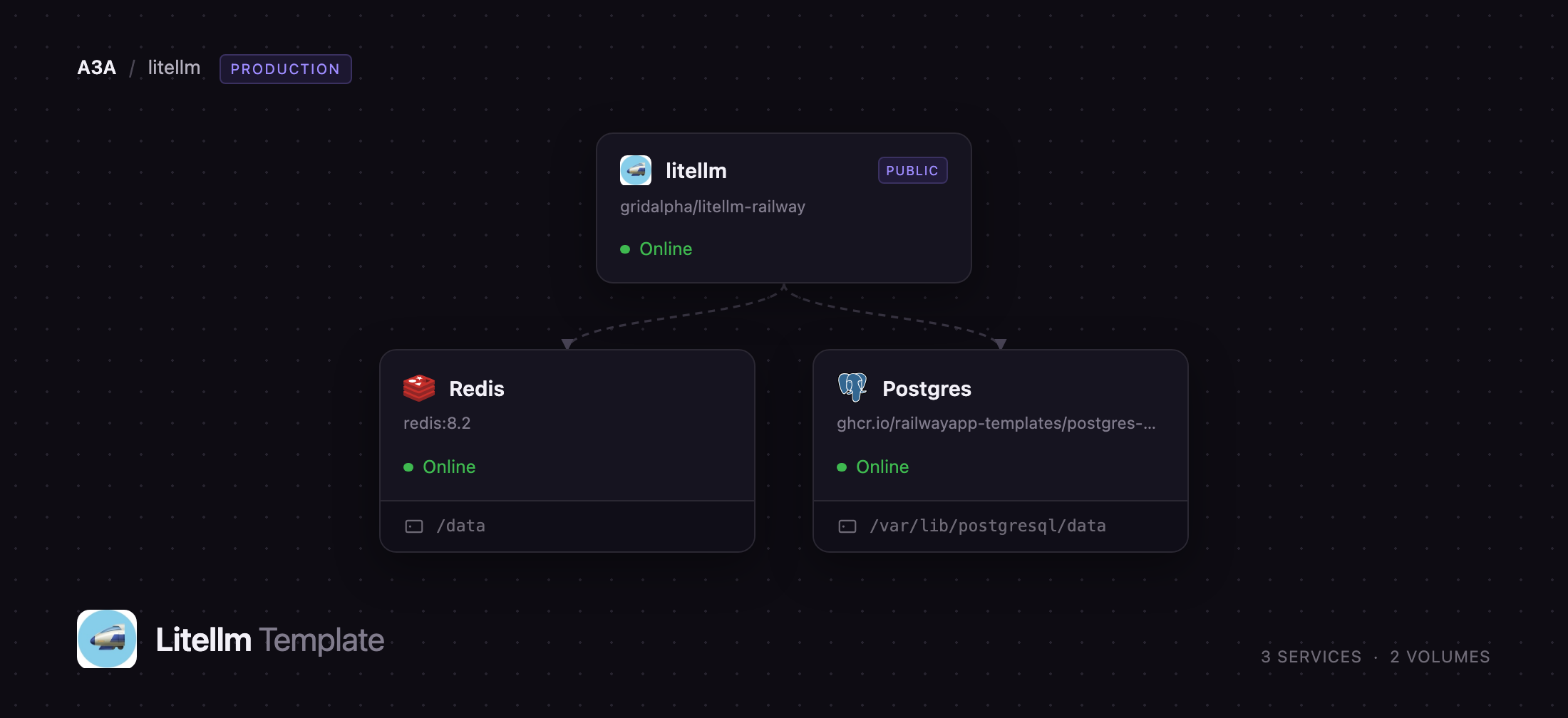
This template lets you self-host LiteLLM on Railway with the pieces a production gateway needs already wired together. Three services deploy as a unit: the gateway on a public HTTPS domain, a PostgreSQL database holding virtual keys, teams, budgets and spend logs, and a Redis instance backing the response cache, the shared rate-limit counters and the leader election that keeps scheduled jobs running exactly once. Requests are authenticated against a key record in Postgres, routed upstream, and written back to the spend tables in batches. Nothing but the gateway is reachable from the internet.
Getting Started with LiteLLM on Railway
Deploy the template, then open the generated Railway domain with /ui appended to reach the Admin UI. Sign in as admin with the generated LITELLM_MASTER_KEY, readable from the gateway's Variables tab — there is no separate UI password unless you set UI_PASSWORD. Your first job is to add a model: go to Models + Endpoints → Add Model, pick a provider, paste your own API key, and give the model a public name your applications will use. That credential is encrypted with LITELLM_SALT_KEY and stored in Postgres, so it survives redeploys.
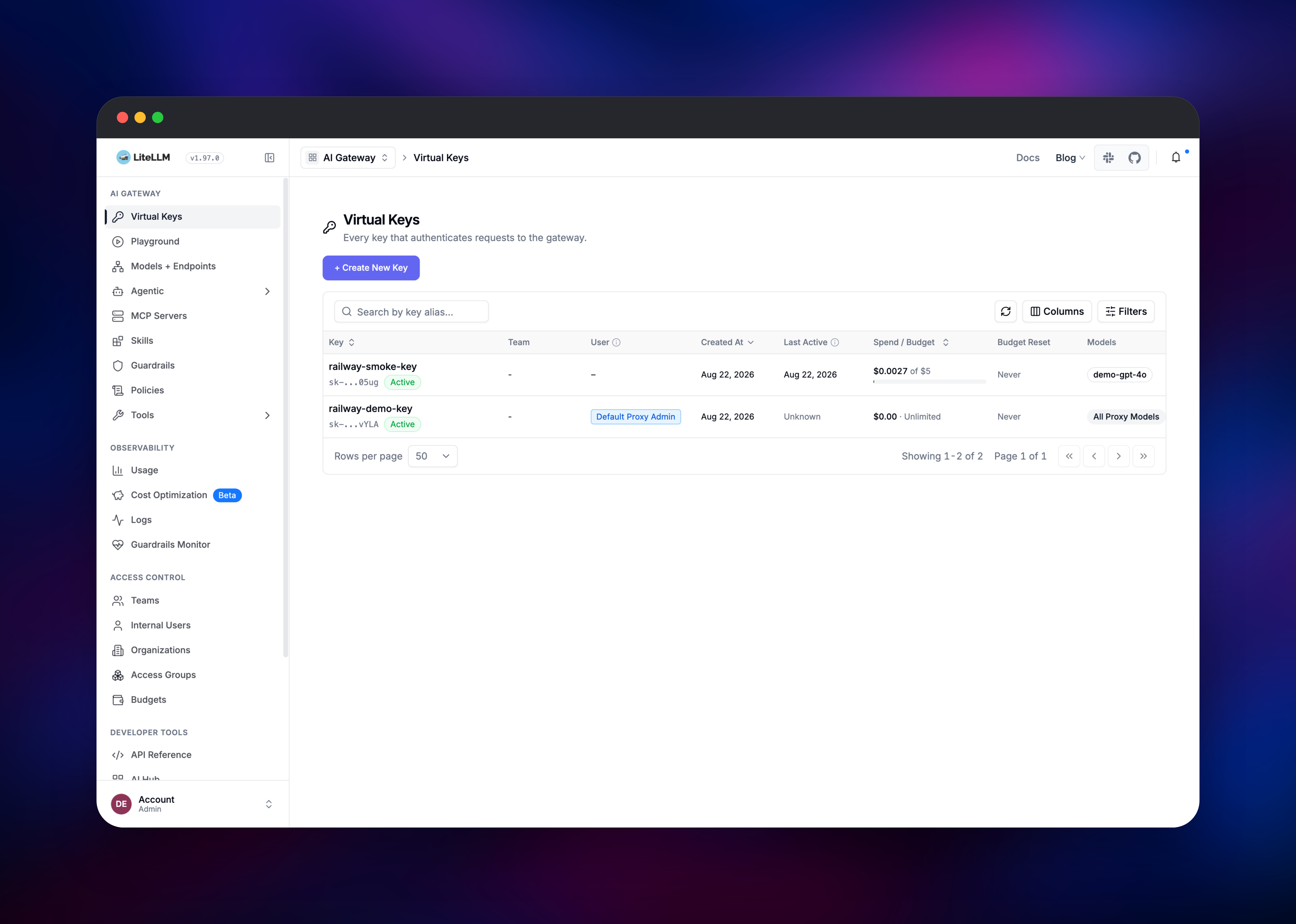
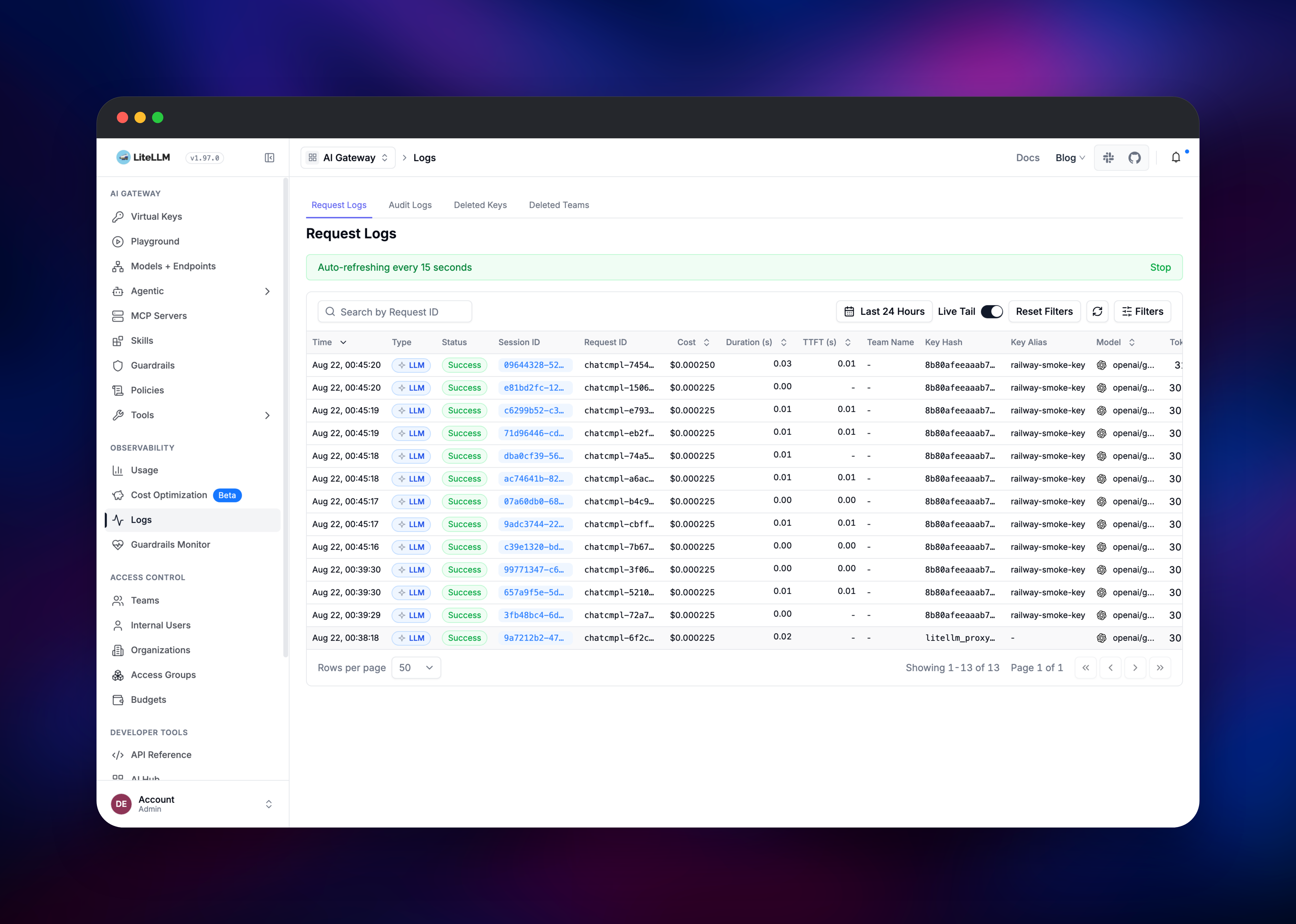
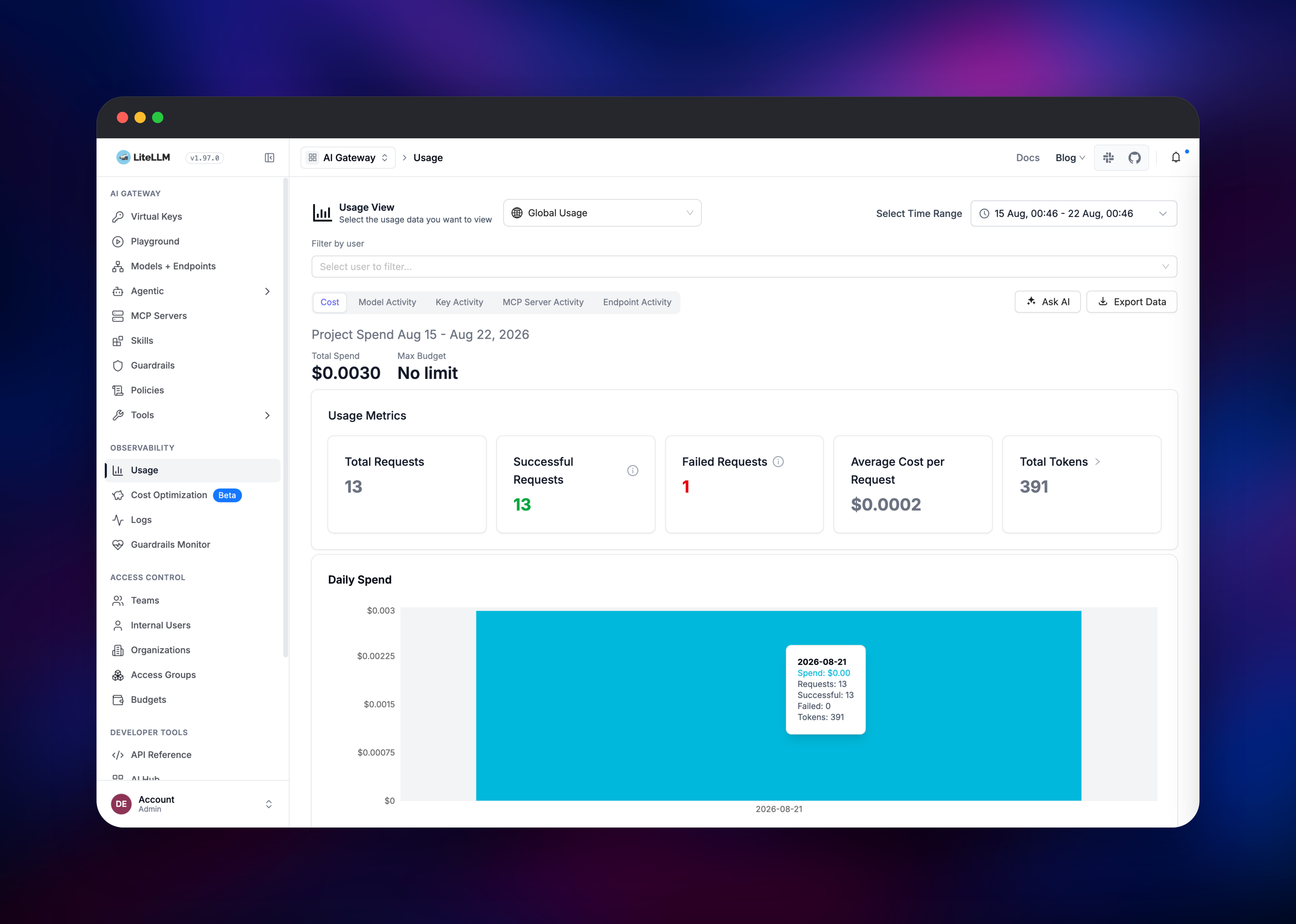
Next, create a virtual key under Virtual Keys → Create New Key. A virtual key is what you hand to an application or a teammate: scope it to specific models, give it a dollar budget, rate-limit it, and revoke it without touching the provider key behind it. Test the gateway by pointing any OpenAI client at your Railway domain with that key, or use the built-in Playground. Confirm it works in Logs, where a call appears within seconds with its cost, tokens and originating key, and Usage, which rolls that up by day and model. /health/readiness answers without a key and reports whether Postgres is up.
About Hosting LiteLLM
Once more than one team is calling language models, provider SDKs diverge, keys get pasted into environment files, spend is invisible until the invoice lands, and one provider's outage takes an application down. A gateway turns that into configuration. Self-hosting matters more here than for most tools: every prompt your company sends passes through this service.
Key features:
- One OpenAI-compatible API for 100+ providers, covering chat, embeddings, images, audio and batch endpoints
- Virtual keys with budgets, rate limits, model allow-lists and expiry dates
- Per-model cost tracking, with spend logs, daily rollups and exportable usage data
- Load balancing and automatic fallbacks across deployments of the same model
- Response caching, guardrails and an MCP gateway for tool servers
Each concern sits in its own service. The gateway handles requests and serves the admin UI. PostgreSQL is the system of record — virtual keys, teams, budgets, spend logs and the encrypted model store, which is why models added in the UI persist across deploys. Redis carries what must be shared rather than stored: the response cache, rate-limit counters, router cooldowns, and the lock electing one owner for jobs such as budget resets — which is what makes the gateway safe to scale horizontally.
Why Deploy LiteLLM on Railway
Railway removes the infrastructure work a production gateway usually demands.
- Postgres and Redis are provisioned, networked and backed by volumes automatically
- Private networking keeps the database and cache off the public internet
- HTTPS, certificates and a public domain are issued on deploy
- Health checks and rolling deploys are configured out of the box
Common Use Cases
- Central AI gateway for an engineering org — every service calls one endpoint, each team gets a scoped key and budget, finance gets one spend report
- Provider portability and failover — route a model name to Anthropic today and Bedrock tomorrow, or set fallbacks so an outage degrades rather than fails
- Cost control for AI features — cap spend per customer, feature or environment, and see which prompt is expensive before the invoice arrives
- Safe access for contractors — a key limited to one model with a $20 budget and an expiry date, revocable without rotating upstream
Dependencies for LiteLLM
- LiteLLM gateway — gridalpha/litellm-railway, a thin image over
ghcr.io/berriai/litellm:main-stableadding the production configuration file - PostgreSQL —
ghcr.io/railwayapp-templates/postgres-ssl, storing keys, teams, budgets, spend logs and the model store - Redis —
redis:8.2, providing the response cache, rate-limit counters and the background-job lock
Environment Variables Reference
| Variable | Purpose |
|---|---|
LITELLM_MASTER_KEY | Admin credential and UI password. Without it the gateway is open |
LITELLM_SALT_KEY | Encrypts provider keys at rest. Changing it makes them unreadable |
DATABASE_URL | Postgres connection string; migrations run at startup |
REDIS_URL | Redis connection string for cache, counters and locks |
PORT | Gateway listening port, also used by the health check |
LITELLM_LOG | Log level. DEBUG to troubleshoot, ERROR at high traffic |
NUM_WORKERS | Uvicorn worker processes per container |
Deployment Dependencies
Hardware Requirements for Self-Hosting LiteLLM
| Resource | Minimum | Recommended |
|---|---|---|
| CPU | 1 vCPU | 2+ vCPU per worker |
| RAM | 2 GB | 4 GB per Uvicorn worker |
| Storage | 1 GB for Postgres | 10 GB+ once spend logs accumulate |
| Runtime | Python container | Postgres 16+, Redis 7+ |
The 4 GB figure is upstream's guidance, not idle usage: LiteLLM's database layer holds memory as a high-water mark, so a container's floor rises to its largest write and stays there.
Self-Hosting LiteLLM
The fastest local run uses Docker with a Postgres connection string:
docker run -p 4000:4000 \
  -e LITELLM_MASTER_KEY=sk-your-long-random-value \
  -e LITELLM_SALT_KEY=sk-another-long-random-value \
  -e DATABASE_URL=postgresql://user:pass@host:5432/litellm \
  -e OPENAI_API_KEY=sk-your-openai-key \
  ghcr.io/berriai/litellm:main-stable --port 4000
Any OpenAI client then works unchanged — only the base URL and key change. In Python:
from openai import OpenAI

client = OpenAI(
    base_url="https://your-app.up.railway.app",
    api_key="sk-your-virtual-key",
)

response = client.chat.completions.create(
    model="gpt-4o",
    messages=[{"role": "user", "content": "Summarise this changelog."}],
)
print(response.choices[0].message.content)
To run from source, clone BerriAI/litellm, pip install 'litellm[proxy]', write a config.yaml listing your models, and start it with litellm --config config.yaml.
How Much Does LiteLLM Cost to Self-Host?
LiteLLM is free and open source under the MIT licence, with a separately licensed enterprise directory covering features such as SSO and audit logs. Everything in this template — gateway, virtual keys, budgets, spend tracking, caching and the admin UI — is open source. On Railway you pay only for the compute and storage the three services use, and LiteLLM adds no per-request fee.
FAQ
What is LiteLLM?
LiteLLM is an open-source AI gateway that exposes 100+ language model providers through one OpenAI-compatible API, adding virtual keys, budgets, load balancing, caching and cost tracking on top.
What does this Railway template deploy?
Three services: the gateway on a public HTTPS domain, PostgreSQL for keys, teams, budgets and spend logs, and Redis for caching, rate limiting and job coordination.
Why does self-hosted LiteLLM need Postgres and Redis?
Postgres is what makes virtual keys, teams, budgets, spend tracking and the admin UI possible — without it LiteLLM can only proxy requests defined in a static config file. Redis shares state between instances, so cache hits, rate limits and scheduled jobs stay correct across replicas.
How do I add my own API keys to self-hosted LiteLLM?
Add them in the admin UI under Models + Endpoints when you register a model. They are encrypted with LITELLM_SALT_KEY and stored in Postgres, so no provider key goes into a repository.
Is the deployed LiteLLM endpoint secure by default?
Yes. LITELLM_MASTER_KEY is generated at deploy time and every API route rejects requests without a valid master or virtual key. Do not clear it — with no master key set, LiteLLM treats every caller as an authorised internal user.
Template Content


