
Deploy LLDAP
Lightweight LDAP server with web UI for user management
lldap
Just deployed
/data

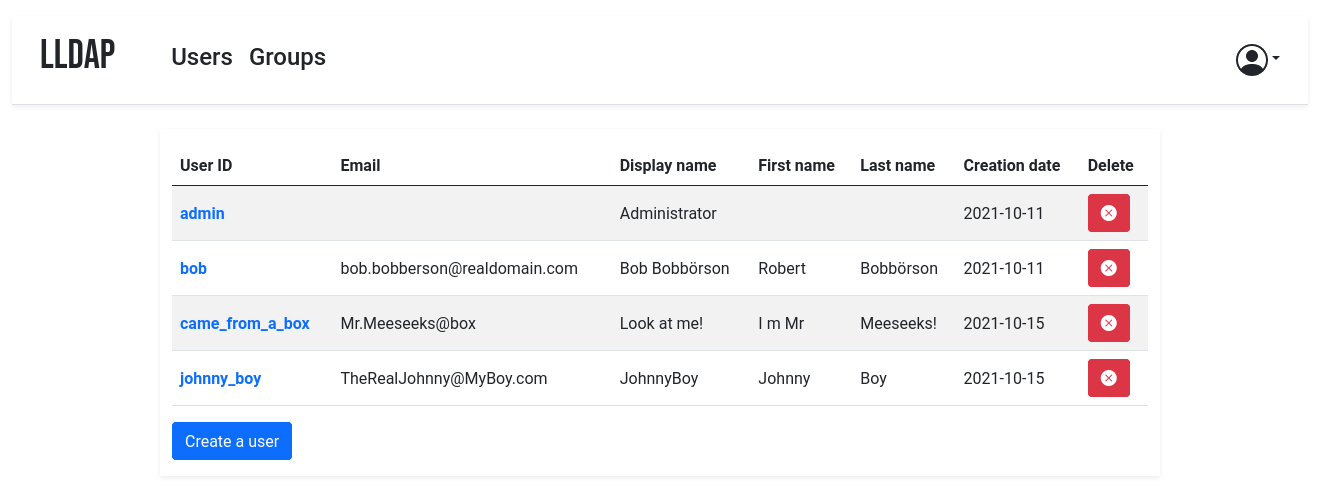
LLDAP's users list — upstream screenshot from the LLDAP project (screenshot.png). The live UI was verified rendering during end-to-end testing of this template's own deployment.
Deploy and Host
LLDAP is a lightweight LDAP server for user management, with a web UI: create users and groups, set passwords, and give your self-hosted apps (Nextcloud, Gitea, Jellyfin, Authelia, and anything else that speaks LDAP) a single source of truth for authentication. One-click deploy creates a single LLDAP service with a persistent volume and no companion database: users, groups, and settings live in SQLite on the volume. After deploy, open the public URL and log in as admin with the generated password shown on the deploy form — there is no setup wizard and no email step.
About Hosting
Hosting LLDAP on Railway keeps your user directory on your own volume instead of a SaaS. The deployment is a single always-on Rust service: the wrapper maps Railway's injected PORT onto LLDAP's HTTP port on every boot (upstream ignores generic PORT), the upstream entrypoint seeds the admin account from the generated deploy-form password, and the SQLite database lives on the volume. The deploy form has three generated fields and nothing to type.
Why Deploy
- One login for every app: users and groups in one place, consumed by any LDAP-capable service instead of a separate account per app.
- Tiny footprint: a single Rust binary, ~2 MB RAM at rest, SQLite on a persistent volume — no database service to run or pay for.
- Admin UI included: manage users, groups, and passwords from the browser; no LDAP client or command line needed for day-to-day use.
- Groups that work:
memberOfsupport, so apps can filter by group (e.g. onlycn=admins,ou=groups,dc=example,dc=commay sign in). - Self-hosted data: your user directory stays on your Railway volume, with no tracking and no subscription.
- Password resets by email (optional): configure SMTP and users can reset their own passwords from the login page.
Common Use Cases
- Homelab SSO-lite: one user directory for Nextcloud, Gitea, Jellyfin, and other self-hosted apps that support LDAP.
- Small teams: a handful of users and groups with per-app access controlled by group membership.
- A front-end for Authelia / Keycloak / Authentik: LLDAP as the user store behind a full SSO portal.
- Replacing a spreadsheet of accounts: real user management with password policies instead of shared logins.
Dependencies for
- A single LLDAP service (Rust, SQLite, no companion service).
- One persistent volume mounted at
/data(config at/data/lldap_config.toml, SQLite database at/data/users.db). - Environment variables (condensed reference — full documentation in the repo README):
| Variable | Default | Description |
|---|---|---|
LLDAP_LDAP_USER_PASS | ${{secret(32)}} | Admin password (user admin), seeded once on first boot. |
LLDAP_JWT_SECRET | ${{secret(32)}} | Random secret for JWT signatures. |
LLDAP_KEY_SEED | ${{secret(32)}} | Random seed for the server private key protecting stored passwords. |
LLDAP_HTTP_URL | derived at boot | Public URL, used in password-reset email links. Derived from the live Railway domain by the wrapper entrypoint; never set it to https://${{RAILWAY_PUBLIC_DOMAIN}} as a variable — it resolves to a bare https:// on first deploy and LLDAP rejects it hard ("empty host"). |
PORT | Railway-injected | HTTP port, exported as LLDAP_HTTP_PORT by the wrapper on every boot. |
LLDAP_LDAP_BASE_DN | dc=example,dc=com | Base DN for the directory (baked). |
LLDAP_LDAP_PORT | 3890 | LDAP port (baked). Internal only — Railway's public edge is HTTP-only, so LDAP is reachable from other services in the same project over the private network, not from the internet. |
LLDAP_DATABASE_URL | sqlite:///data/users.db?mode=rwc | SQLite database on the volume (baked). |
LLDAP_SMTP_OPTIONS__* | unset | Optional password-reset email settings. |
LLDAP_LDAPS_OPTIONS__* | unset | Optional LDAPS (LDAP over TLS) settings. |
Deployment Dependencies
- Plan tier: works on Railway's entry tiers; a single always-on service with a persistent volume.
- RAM needs: very light — one Rust service, ~2 MB at rest, no companion database or cache service.
Template Content
lldap
INAPP-Mobile/lldap
