
Deploy MailFlow
One inbox for Gmail, Outlook and every IMAP account. Shift alternative.
Just deployed
postgres
Just deployed
/var/lib/postgresql
Just deployed
Deploy and Host MailFlow on Railway
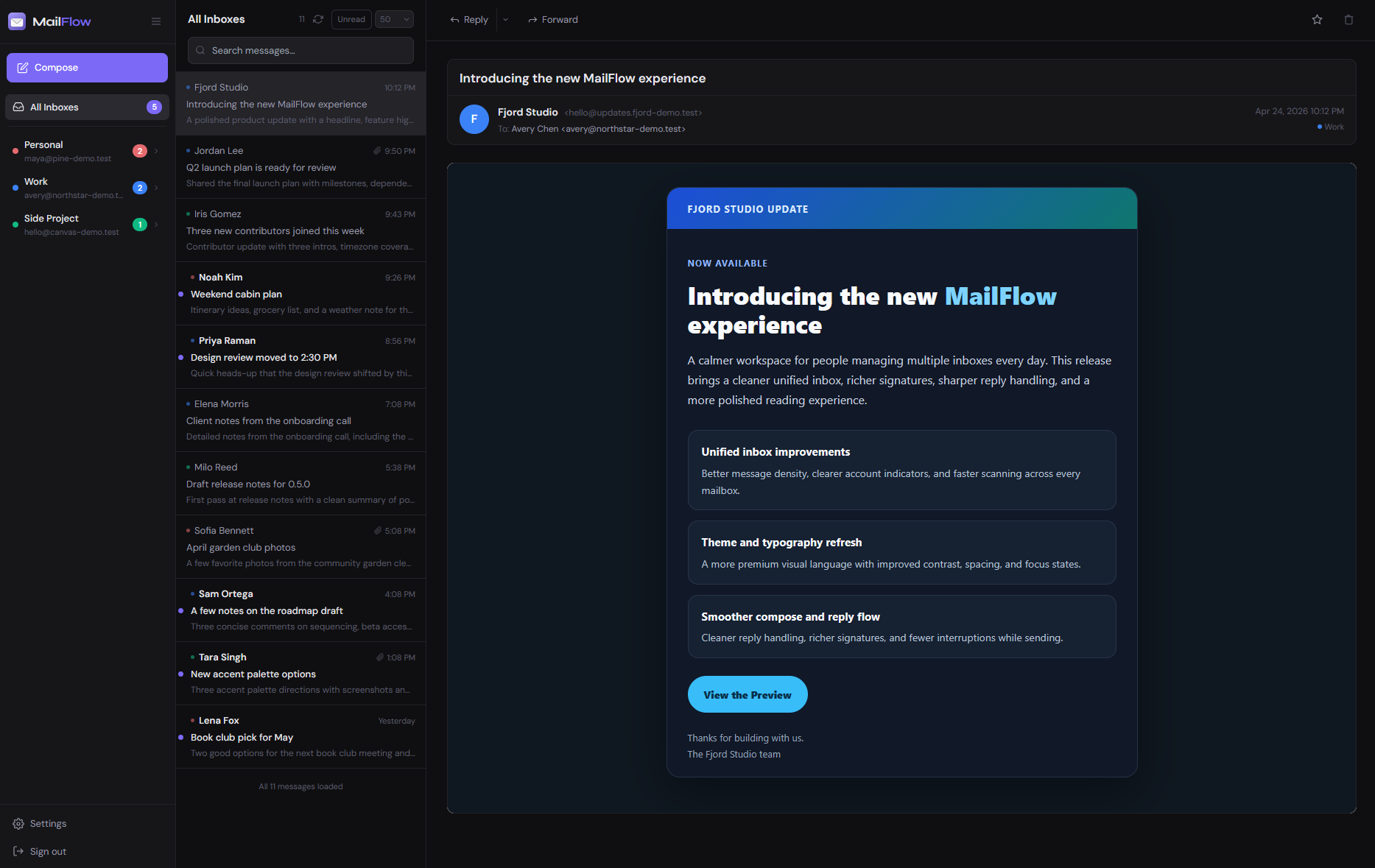
Deploy MailFlow on Railway and read every IMAP account you own in one unified inbox: Gmail, Outlook, Fastmail, iCloud and your own domain. MailFlow is an open-source webmail client under AGPL-3.0 with 720+ GitHub stars and ten releases in the last month alone. Shift's Advanced plan costs $149/year; self-hosting MailFlow costs a few dollars a month, and the database holding your accounts and settings runs in your own project.
What This Template Deploys
| Service | Purpose |
|---|---|
| frontend | The MailFlow web app served by Caddy on port 80 with the public HTTPS domain; proxies /api and WebSocket traffic to the backend |
| backend | The Node.js API on private port 8080: IMAP sync, SMTP sending, rules, search and push notifications, with a health check at /api/health |
| postgres | PostgreSQL 16 (Alpine) on the private network, storing users, connected accounts, rules, contacts and the message index |
| Persistent Volume | Mounted at /var/lib/postgresql on postgres: users, encrypted account credentials, settings and the search index survive redeploys |
Only the frontend is public. The backend and Postgres talk over Railway's private network, and database migrations run automatically every time the backend starts. Redis is not part of the stack, since MailFlow dropped it in version 4.4.
About Hosting MailFlow
A self-hosted webmail client normally means wiring up a reverse proxy, a Node.js process, a database, TLS, secrets and backups on a server you then have to patch. One wrong proxy header and WebSocket notifications or session cookies silently stop working.
Railway handles that for you. The template creates all three services, links them with private hostnames, issues an HTTPS domain for the frontend and generates the session secret, the encryption key and the Postgres password. The backend is preset to trust the Railway edge and Caddy as proxies, so secure cookies and real-time new-mail toasts work from the first sign-in.
Register your admin account right away. The first account created on a fresh MailFlow instance becomes the administrator and open registration then closes to invite-only. Open the domain and sign up as soon as the deploy finishes so nobody else claims it. MailFlow is a client, not a mail server: your messages stay on your existing providers, and you still need their IMAP and SMTP access.
Typical cost: about $5 to $10/month on Railway for the three services, depending on how many accounts you sync. Shift Advanced is $149/year per user. MailFlow is free for personal use; businesses are asked, but not required, to buy a $100/year license to support development.
Deploy in Under 5 Minutes
- Click Deploy on Railway. The frontend, backend and Postgres start in about three minutes.
- Open the frontend's public domain and register the first user, which becomes the admin.
- Turn on two-factor authentication under your profile settings.
- Go to Settings, Accounts and add each mailbox with its IMAP and SMTP details, or an app password for Gmail and iCloud.
- Wait for the first sync, then set up inbox rules, categories and the layout you prefer.
No SSH. No Compose file. No reverse proxy config to write.
Common Use Cases
- Self-hosted alternative to Shift or Mailbird: one unified inbox for every personal and work account, opened from any browser
- Gmail and Outlook in one webmail: read Gmail, Microsoft 365 and Outlook.com side by side with per-account SMTP routing on replies
- Freelancers with several client domains: keep every client mailbox separate on the server but answer them all from one screen
- Inbox rules and newsletter cleanup: move, archive, star or delete mail by sender, subject or header, and unsubscribe in one click
- Private AI email assistant: summarize threads and draft replies with any OpenAI-compatible provider that you choose
- Small team webmail with SSO: invite users, enforce TOTP, and sign in through an OpenID Connect provider
Configuration
| Variable | Required | Description |
|---|---|---|
SESSION_SECRET | 🔐 Auto-generated | Signs session cookies; 64 random characters |
ENCRYPTION_KEY | 🔐 Auto-generated | 64-character hex key that encrypts stored mail passwords and OAuth tokens |
POSTGRES_PASSWORD | 🔐 Auto-generated | Postgres superuser password, referenced by the backend as DB_PASSWORD |
APP_URL | ✅ Auto-injected | Public HTTPS address of the frontend, used for CORS, WebSocket origin checks and links |
FRONTEND_URL | ✅ Auto-injected | Same public frontend address as APP_URL |
DB_HOST | ✅ Auto-injected | Private hostname of the postgres service |
BACKEND_HOST | ✅ Auto-injected | Private hostname of the backend that Caddy proxies to |
Never change ENCRYPTION_KEY after adding accounts. Every stored IMAP password and OAuth token is encrypted with it, so a new key makes all of them unreadable and you must re-enter each account. If you add a custom domain, update APP_URL and FRONTEND_URL together on the backend, or logins and live updates fail with origin errors.
MailFlow vs. Alternatives
| MailFlow (Railway) | Shift Advanced | Mailbird | Roundcube | |
|---|---|---|---|---|
| Monthly cost | ~$5 to $10 (Railway usage) | $149/year | Paid plans | Free, you host it |
| Self-hosted | ✅ Yes | ❌ No | ❌ No | ✅ Yes |
| Unified inbox across accounts | ✅ Yes | ✅ Yes | ✅ Yes | ❌ One account per login |
| Works in any browser | ✅ Yes, plus PWA | ❌ Desktop app | ❌ Desktop app | ✅ Yes |
| Many users on one instance | ✅ Invite-only | ⚠️ Priced per user | ⚠️ Priced per user | ✅ Yes |
| Server-side inbox rules | ✅ Yes | ❌ No | ❌ No | ⚠️ Via plugin |
| OIDC single sign-on | ✅ Yes | ❌ No | ❌ No | ⚠️ Via plugins |
| License | ✅ AGPL-3.0 | ❌ Proprietary | ❌ Proprietary | ✅ GPL-3.0 |
Dependencies for MailFlow Hosting
- Railway account: the Hobby plan runs all three services; usage grows with the number of synced mailboxes
- IMAP and SMTP access to each mailbox, usually an app password for Gmail, iCloud and Yahoo
- Optional: Google or Microsoft OAuth app credentials, VAPID keys for web push, and an AI provider key
Deployment Dependencies
- MailFlow on GitHub: source, releases and provider setup guide
- MailFlow Website: roadmap and licensing options
- PostgreSQL 16 Documentation: the bundled database
- Railway Volumes Documentation: how the Postgres volume persists
Implementation Details
The template runs ghcr.io/onepush-dev/mailflow-frontend:4.5.1 and ghcr.io/onepush-dev/mailflow-backend:4.5.1, community builds of the upstream MailFlow 4.5.1 images with Railway defaults baked in, plus the official postgres:16-alpine. Caddy in the frontend runs with TLS off because Railway terminates HTTPS at the edge, and the backend trusts two proxy hops (Railway plus Caddy) so client IPs and secure cookies are correct.
The backend keeps a sender-image cache in the container at /var/cache/mailflow/images, capped at 512 MB. It is not on a volume, so it rebuilds after each redeploy; nothing important is lost. The one setting to protect is ENCRYPTION_KEY: keep it stable for the life of the instance and back up the Postgres volume before upgrading to a new MailFlow release.
Frequently Asked Questions
What is MailFlow and why self-host a webmail client? MailFlow is an open-source unified webmail client that merges many IMAP and SMTP accounts into one inbox with rules, search, threads and an optional AI assistant. Self-hosting keeps your account credentials and settings in a database you control instead of a vendor's cloud.
How much does MailFlow on Railway cost compared with Shift? Expect about $5 to $10/month on Railway for the three services. Shift Advanced costs $149/year, and MailFlow is free for personal use under AGPL-3.0.
Why can't I register a new account on my MailFlow instance? The first user to register becomes the admin and then registration closes to invite-only. Sign in as the admin and send invites from the user management panel to add more people.
Do I lose my accounts and settings when Railway redeploys?
No. Users, connected accounts, rules and contacts live in Postgres on the volume at /var/lib/postgresql. Your actual email stays on your IMAP servers, so redeploys never delete messages.
Can I connect Gmail and Microsoft 365 accounts to MailFlow? Yes. Gmail works over IMAP with an app password, and Microsoft 365 or Outlook.com works through OAuth2 once you add an Azure app registration or use the device code flow described in the MailFlow setup guide.
Is MailFlow a mail server that can host my domain's email? No. MailFlow is only a client. It reads and sends mail through providers you already have, so pair it with a hosted mailbox or a separate mail server for your domain.
Why Deploy and Host MailFlow on Railway?
Railway is a singular platform to deploy your infrastructure stack. Railway will host your infrastructure so you don't have to deal with configuration, while allowing you to vertically and horizontally scale it.
By deploying MailFlow on Railway, you get a private unified webmail with rules, full-text search, SSO and an AI assistant for a few dollars a month, with every credential stored in your own Postgres database.
Template Content


