
Deploy Mailpit
Catches the email your app sends and shows it in a web inbox
mailpit
Just deployed
/data
Deploy and Host Mailpit on Railway
Mailpit is an SMTP server that catches email instead of delivering it. Point any application at it — a Laravel app sending password resets, a Rails mailer, a Node service firing order confirmations — and every message lands in a fast web inbox rather than a real person's mailbox. Developers and QA teams use it to see exactly what their software sends: rendered HTML, plain text, raw MIME source, headers, attachments and links. It is a dependency-free Go binary and the maintained successor to MailHog, which it replaces port-for-port and API-for-API.
Self-host Mailpit on Railway and you get one service on the official axllent/mailpit image, already wired up. The web interface and REST API are published on a Railway domain behind HTTP basic authentication, so the inbox is not open to the internet. The SMTP listener stays on the private network at mailpit.railway.internal:1025, reachable only by other services in your project and only with a username and password. Captured mail goes to SQLite on a volume at /data, so the inbox survives redeploys.

Getting Started with Mailpit on Railway
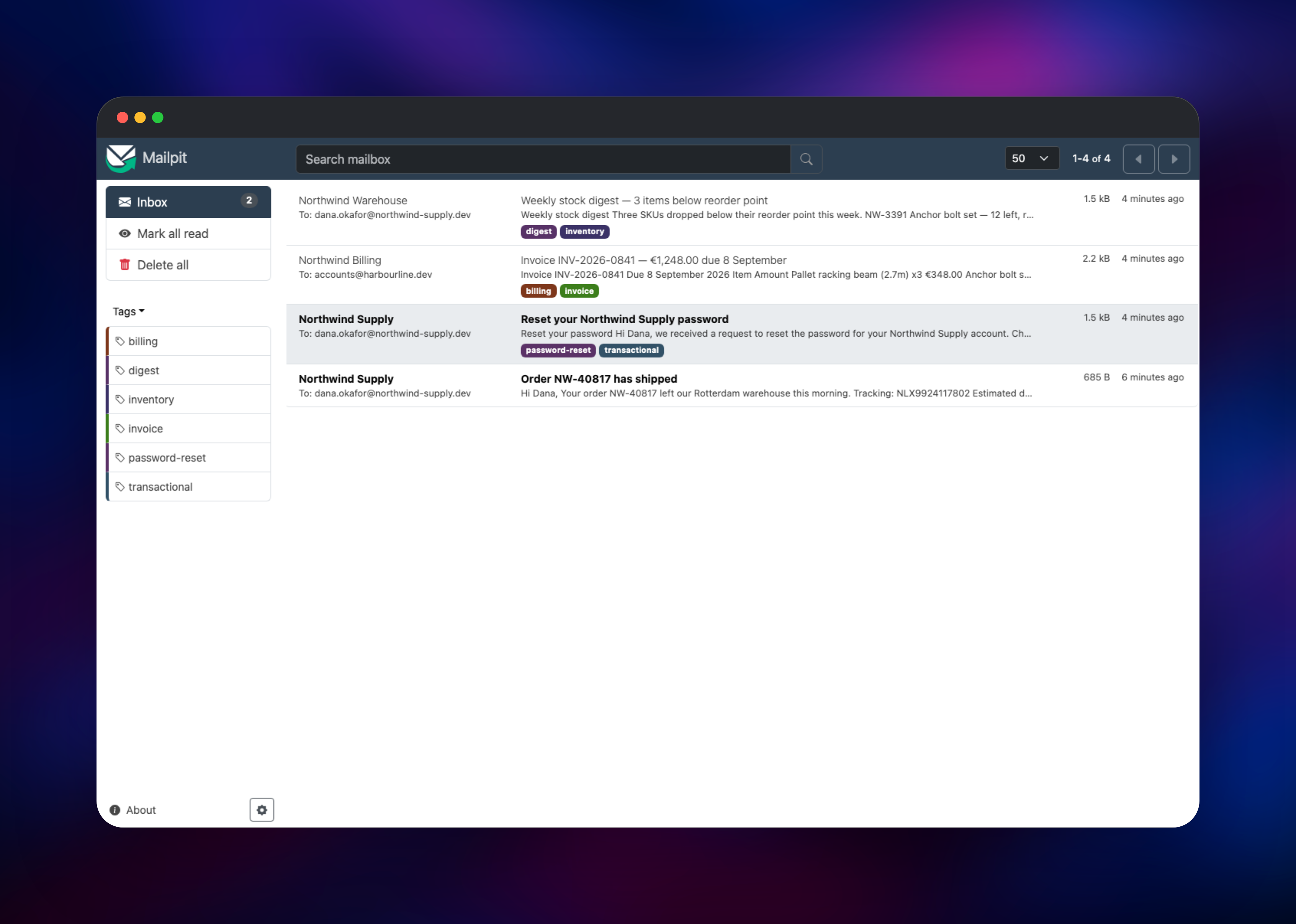
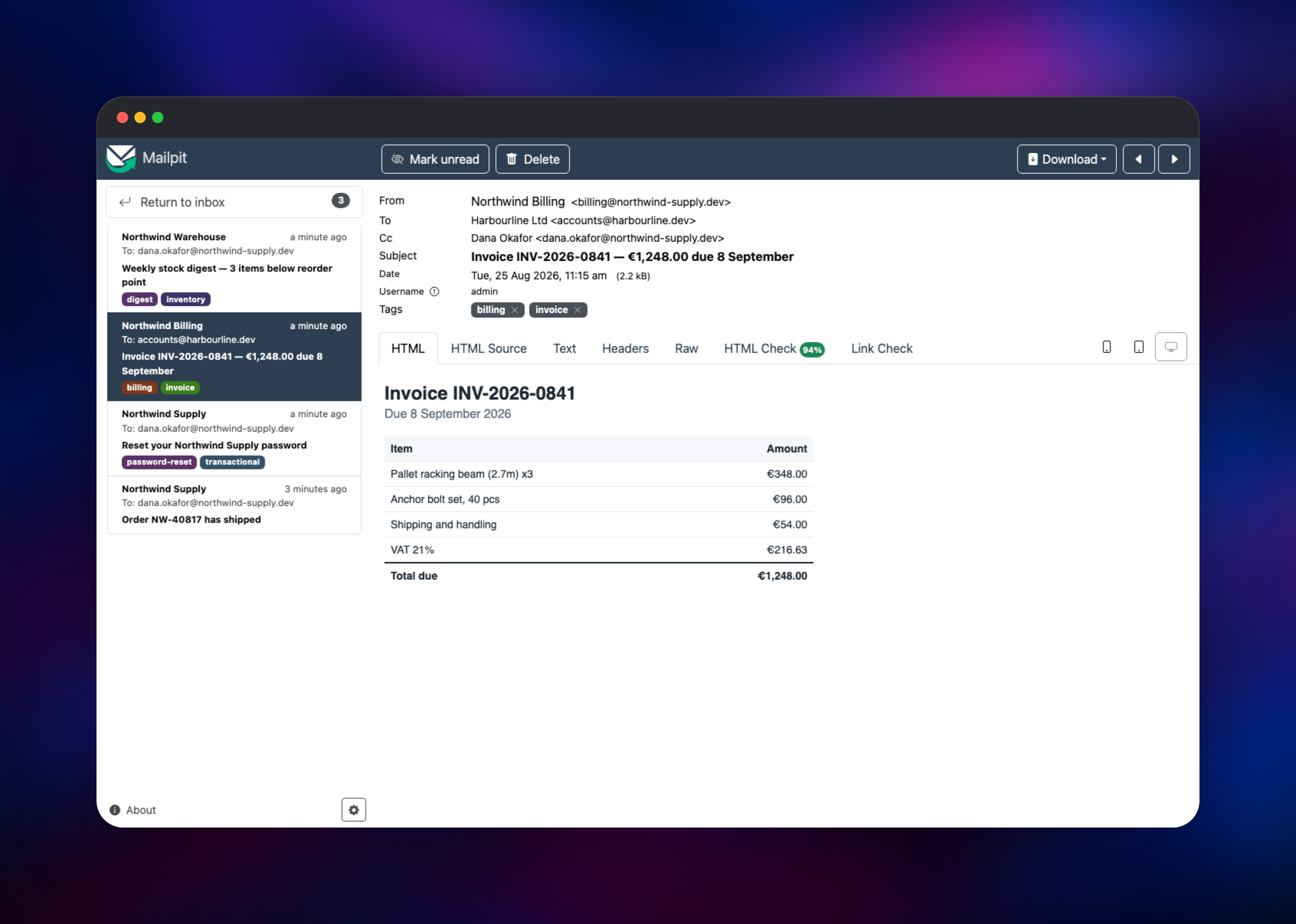
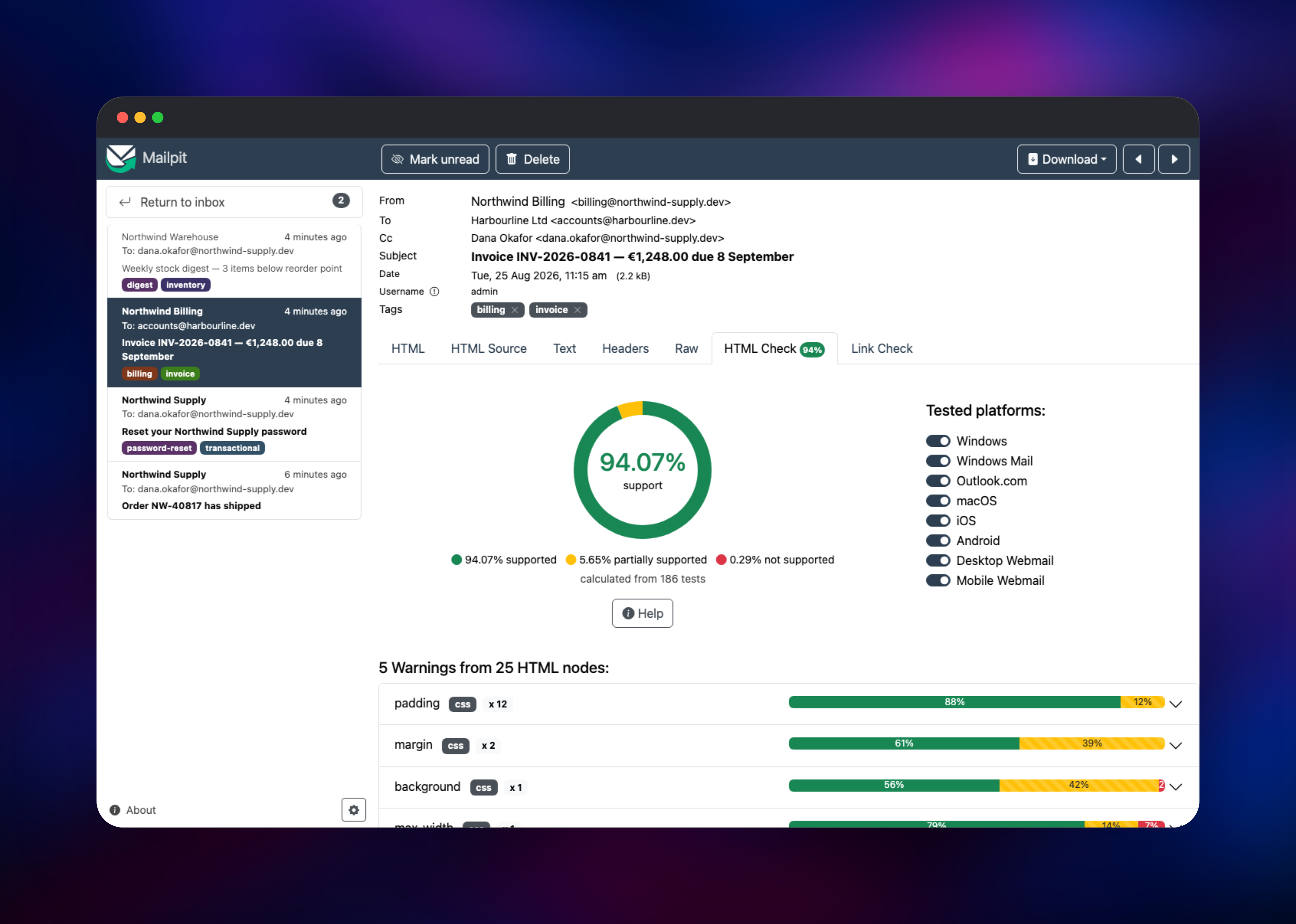
Deploy the template, then open the generated Railway URL. Your browser will ask for a username and password: these come from MP_UI_AUTH, set to admin plus a password generated at deploy time — read it from the service's Variables tab. The inbox starts empty, as expected. Next, point an application at the SMTP listener: host mailpit.railway.internal, port 1025, and the two halves of MP_SMTP_AUTH as username and password, with TLS and STARTTLS turned off, since the private listener is unencrypted by design and the internal network isolates it. Authentication is mandatory — a sender with no credentials is refused 530 5.7.0 Authentication required and the message dropped. Trigger any email in your app and it should appear within a second. Click a message for the rendered HTML, open the HTML Check tab for a compatibility score, or search by sender or subject.
About Hosting Mailpit
Sending real email from staging is risky: test messages reach real inboxes, deliverability suffers, and reviewing what an app produced means logging into someone's mail account. Mailpit stands in as the mail server instead — everything your app sends is intercepted, stored and browsable, without a message leaving your infrastructure.
Key features:
- Web inbox with real-time updates, full-text search and tagging
- Rendered HTML, plain-text, header, raw source and attachment views per message
- HTML Check — scores markup and CSS against a client-support database, naming what degrades on Outlook, Gmail or iOS
- Link Check — follows every URL in a message and reports broken ones
- A REST API for automated tests, plus a send API for injecting messages
- POP3 access, and optional relaying to an upstream mail server
The architecture is deliberately simple. Mailpit is one Go binary with an embedded SQLite store, so there is no separate database, cache or worker — the single service holds the SMTP listener, the HTTP interface and storage. The only supporting resource is the volume at /data, holding mailpit.db. SQLite is single-writer, so this service runs at one replica.
Why Deploy Mailpit on Railway
Railway removes the setup work around an otherwise simple binary:
- One-click deploy with the volume, domain, health check and auth configured
- Private networking keeps the SMTP port open to your apps, not the internet
- A persistent volume keeps the captured inbox across redeploys
- Automatic HTTPS on the generated domain
- Your app and its mail catcher resolve each other by name
Common Use Cases for Self-Hosted Mailpit
- Staging environments — give a deployed preview a mail server that captures everything, so QA reviews transactional email without touching real inboxes
- Email template development — iterate on an HTML invoice and check client compatibility on every send, not at release time
- Integration and end-to-end tests — assert through the REST API that a signup produced one message, to the right address, with the right link
- Shared team review — one hosted inbox designers, QA and developers can all open, not a local container only one person sees
Dependencies for Mailpit
axllent/mailpit:latest— the official image from github.com/axllent/mailpit: a Go binary on Alpine holding the SMTP listener, web interface, REST API and storage- A Railway volume at
/data— holdsmailpit.db, the SQLite store of captured messages, so the inbox persists across redeploys
Environment Variables Reference
| Variable | Purpose |
|---|---|
PORT | Web interface and REST API port (8025) |
MP_DATABASE | Path to the SQLite message store, on the volume |
MP_UI_AUTH | user:password for the inbox, REST API and metrics |
MP_SMTP_AUTH | user:password every SMTP sender must present |
MP_SMTP_AUTH_ALLOW_INSECURE | Permits SMTP auth on the unencrypted private listener |
MP_MAX_MESSAGES | Messages retained before the oldest are pruned |
Deployment Dependencies
- Source: github.com/axllent/mailpit (MIT)
- Image: hub.docker.com/r/axllent/mailpit
- Docs: mailpit.axllent.org/docs
- Runtime: a static Go binary — no language runtime to install
Hardware Requirements for Self-Hosting Mailpit
| Resource | Minimum | Recommended |
|---|---|---|
| CPU | 0.1 vCPU | 0.5 vCPU |
| RAM | 64 MB | 256 MB |
| Storage | 1 GB volume | 5 GB volume |
| Runtime | None (static Go binary) | None |
Mailpit is unusually light — an idle instance uses roughly 10 MB of memory. Storage is what scales, with messages retained and attachment sizes; cap it with MP_MAX_MESSAGES or MP_MAX_AGE.
Self-Hosting Mailpit with Docker
Running Mailpit locally takes one command, with the same authentication and persistence this template configures:
docker run -d --name mailpit -p 8025:8025 -p 1025:1025 \
  -v mailpit-data:/data -e MP_DATABASE=/data/mailpit.db \
  -e MP_UI_AUTH="admin:changeme" -e MP_SMTP_AUTH="mailpit:changeme" \
  -e MP_SMTP_AUTH_ALLOW_INSECURE=true axllent/mailpit:latest
To confirm an instance is capturing mail, send a message through its REST API and list the inbox. The following uses curl:
curl -u admin:changeme -X POST http://localhost:8025/api/v1/send \
  -H "Content-Type: application/json" \
  -d '{"From":{"Email":"app@example.dev"},"To":[{"Email":"qa@example.dev"}],
       "Subject":"Hello from Mailpit","Text":"Capture is working."}'

curl -u admin:changeme http://localhost:8025/api/v1/messages
How Much Does Mailpit Cost to Self-Host?
Mailpit is free and open source under the MIT licence. There is no paid tier, message cap or seat limit, and no feature held back — HTML checking, link checking, the REST API and POP3 are all in the one binary. Hosted alternatives such as Mailtrap charge per user; the only cost here is infrastructure.
Mailpit vs MailHog and Mailtrap
| Mailpit | MailHog | Mailtrap | |
|---|---|---|---|
| Maintained | Actively | Unmaintained since 2020 | Commercial |
| Self-hosted | Yes | Yes | No, cloud only |
| HTML compatibility check | Yes | No | Paid plans |
| Cost | Free, MIT | Free, MIT | Free tier, then per user |
Mailpit keeps MailHog's default ports and a compatible API, so an existing MailHog setup usually moves over by swapping the image name.
FAQ
What is Mailpit? Mailpit is an open-source SMTP server that captures the email your applications send and shows it in a web inbox, so nothing reaches a real recipient during development or testing.
What does this Railway template deploy?
One Mailpit service on the official axllent/mailpit image, with a volume for the message store, an HTTPS domain for the inbox behind basic auth, and a private authenticated SMTP listener on port 1025.
Why does this template include a volume? Mailpit stores captured messages in SQLite. Without a volume that file sits in the container's temporary filesystem, so every redeploy would wipe the inbox.
How do I connect my app to self-hosted Mailpit on Railway?
Set the mail host to mailpit.railway.internal, the port to 1025, and the credentials to the two halves of MP_SMTP_AUTH. Turn TLS and STARTTLS off — the private listener is unencrypted, and the private network is unreachable from outside your project.
Why is my app's mail not showing up in the inbox?
Usually missing SMTP credentials: authentication is required here, so an anonymous client is rejected with 530 5.7.0 Authentication required and the message discarded. The next most common cause is a client set to demand STARTTLS, which this listener does not advertise.
Can Mailpit forward captured messages to a real mail server?
Yes. The MP_SMTP_RELAY_* variables forward matching messages to an upstream server. They are left unset here so the deployment is purely a capture sink; set them only if you want it to deliver mail.
Template Content
mailpit
axllent/mailpit:latest

