
Deploy Mediawiki
Wiki software for building a linked, versioned knowledge base
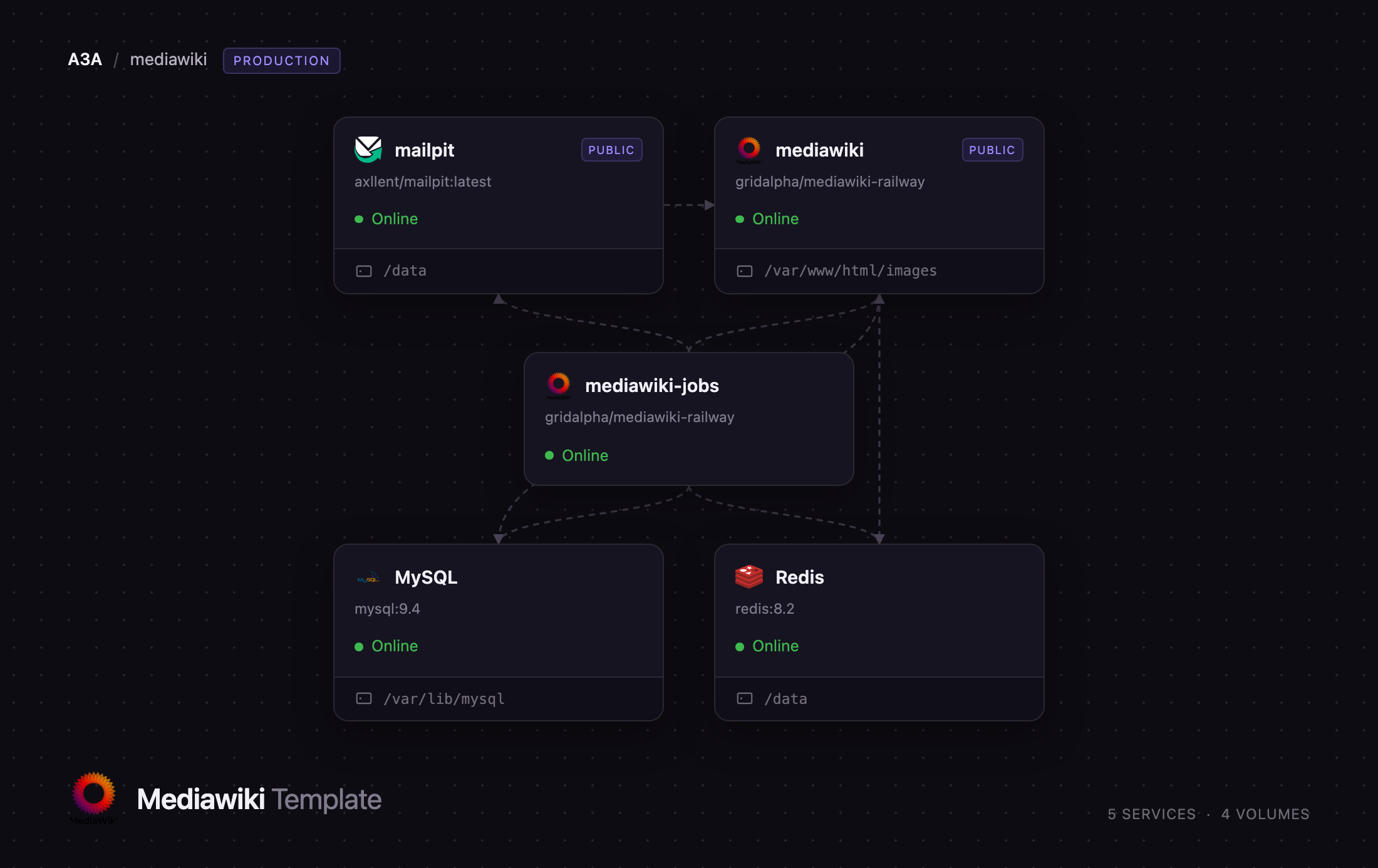
mediawiki
Just deployed
/var/www/html/images

MySQL
Just deployed
/var/lib/mysql

Redis
Just deployed
/data
mediawiki-jobs
Just deployed

mailpit
Just deployed
/data
Deploy and Host MediaWiki on Railway
Self-host MediaWiki, the wiki engine that runs Wikipedia, Wiktionary and thousands of company handbooks, game wikis and research archives. MediaWiki turns plain wikitext into a linked, versioned, searchable knowledge base: every page keeps its full revision history, every change is attributable and revertible, and templates, categories and Lua modules let a handful of editors keep tens of thousands of pages consistent. GPL-licensed and in development since 2002, it is the safest choice when the content itself — not a vendor's workspace — is the long-term asset.
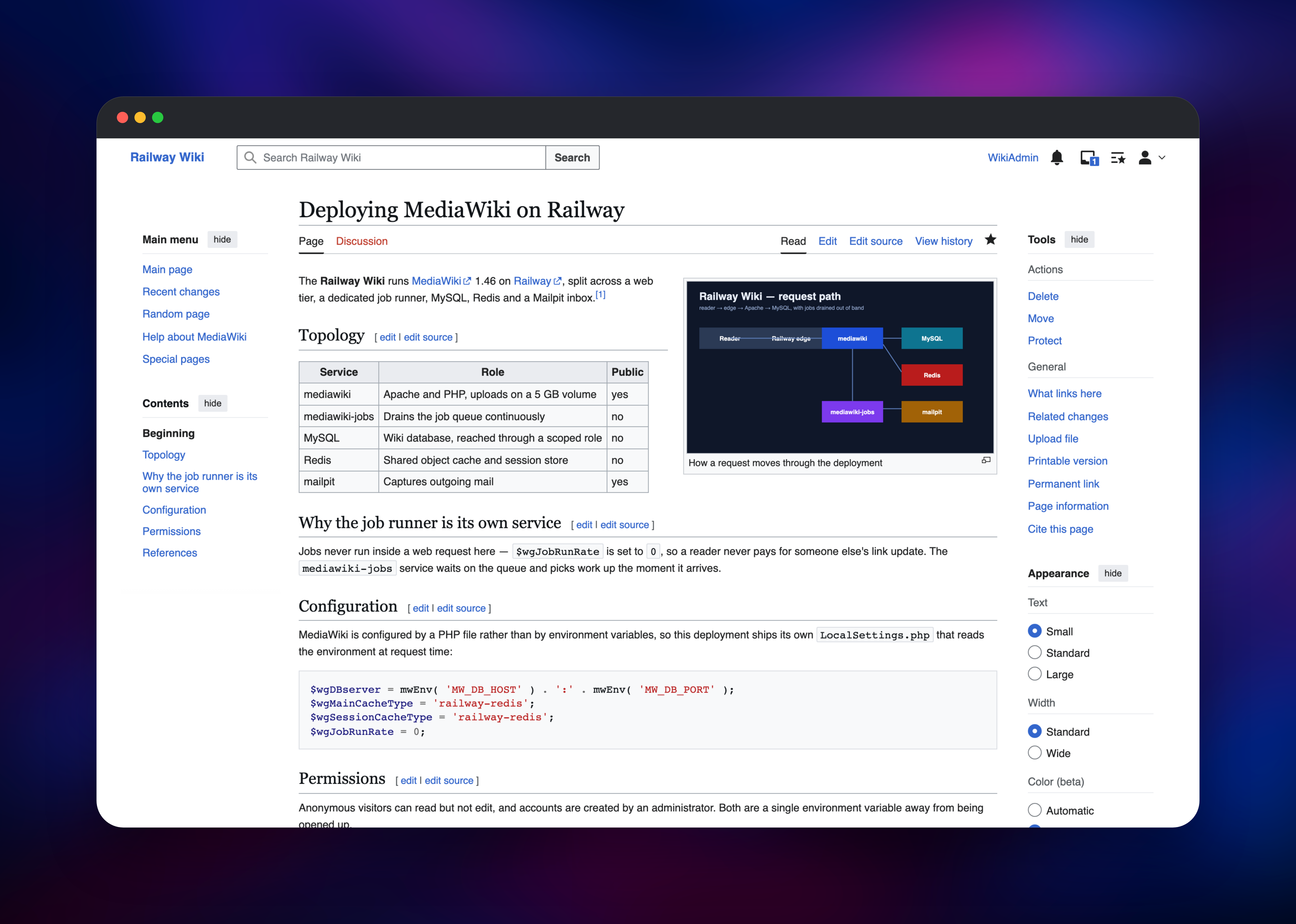
This template runs MediaWiki 1.46 in the shape a real wiki needs, not the smallest one that boots. A mediawiki web tier on Apache and PHP 8.3 serves readers and editors; a dedicated mediawiki-jobs runner drains the background queue; MySQL stores pages, revisions and users; Redis holds the shared object cache and login sessions; and a Mailpit inbox captures outgoing mail. Page saves queue background work the runner picks up out of band, so nobody's page load pays for someone else's link update. Uploads live on a persistent volume and survive every redeploy.
Getting Started with MediaWiki on Railway
Set MW_SITENAME to your wiki's name, choose an MW_ADMIN_USER, and deploy — everything else has a working default. There is no setup wizard: the first boot installs the schema, creates your administrator and applies every bundled extension's tables before Apache accepts a request. When the deployment goes green, open the public URL, click Log in, and sign in with the MW_ADMIN_USER and MW_ADMIN_PASSWORD values from your Railway variables.
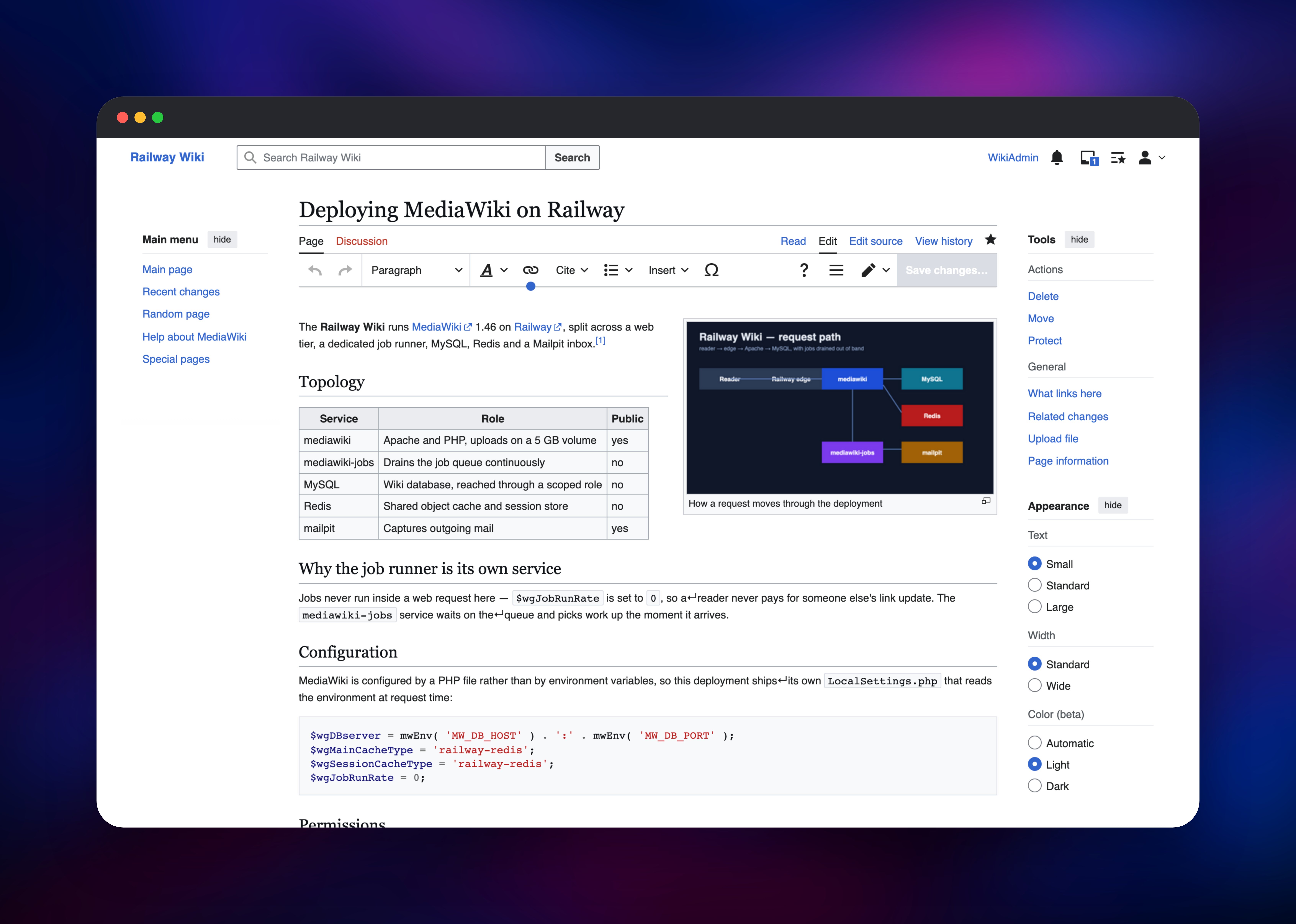
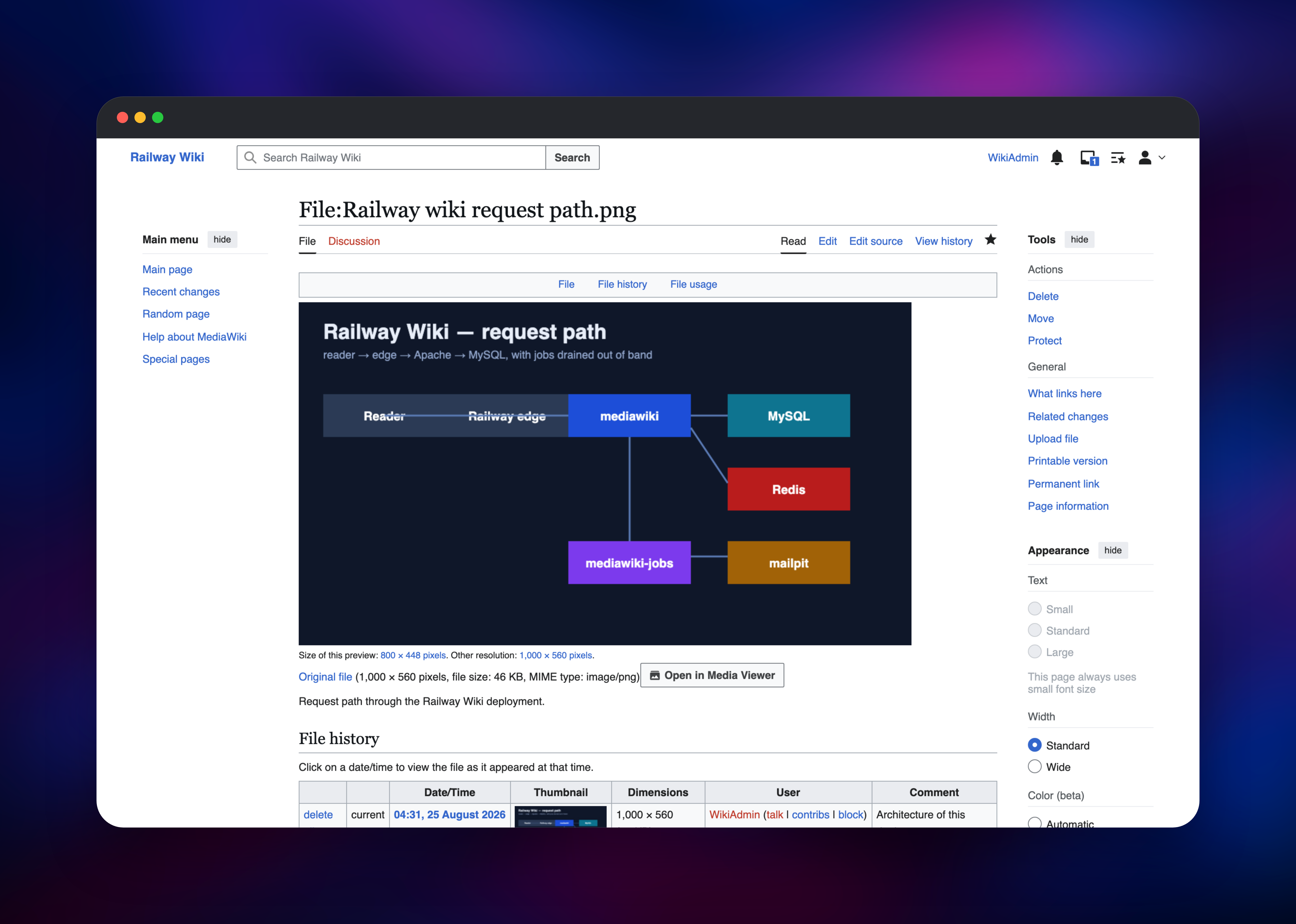
Your first useful action is creating a real page. Visit /wiki/Your_Page_Title, click Create, and write wikitext or switch to VisualEditor, which needs no separate Parsoid service here. Then upload a file from Special:Upload — the thumbnail that appears proves the storage volume and ImageMagick are both working. Anonymous visitors can read but not edit, and accounts are created by an administrator from Special:CreateAccount; both are one variable away from being opened up.
About Hosting MediaWiki
MediaWiki is a PHP application backed by a relational database, built for wikis that grow past what one editor can hold in their head. Teams self-host it for full control of their content, unlimited editors with no per-seat pricing, and an extensible codebase.
- Full revision history on every page, with diffs, rollback and page protection
- VisualEditor alongside the classic wikitext editor, both included
- Templates, parser functions and Lua modules via Scribunto
- Categories, redirects, watchlists, talk pages and full-text search
- Uploads with thumbnailing for images, SVG and PDF
- User groups, permissions, two-factor authentication
- Spam controls: AbuseFilter, SpamBlacklist, TitleBlacklist, CAPTCHA
Splitting the job runner out keeps the wiki fast at busy moments; sessions in Redis let the web tier grow past a single replica.
Why Deploy MediaWiki on Railway
Railway removes the parts of running MediaWiki that are not about wikis:
- Managed MySQL and Redis with volumes and backups, no tuning
- One-click deploy of all five services, already wired together
- Persistent volumes for uploads, so media survives every redeploy
- Automatic HTTPS on a public domain, or bring a custom one
- Health checks that watch the database, not just the container
- Horizontal scaling once the wiki outgrows one web replica
Common Use Cases
- Internal knowledge bases — engineering handbooks, runbooks and onboarding docs, where revision history matters more than a polished editor
- Public documentation and community wikis — game wikis, fandom archives and open-data projects with thousands of interlinked pages
- Research archives — citable content kept in one consistent shape by templates
- Migrating off Confluence — teams leaving per-seat cloud pricing for content they own
Dependencies for MediaWiki
- MediaWiki 1.46 — built from
mediawikion Apache and PHP 8.3, configured by environment variables - MySQL 9.4 — the wiki database; PostgreSQL and SQLite are supported upstream too
- Redis 8.2 — shared object cache, message cache and session store
- Mailpit —
axllent/mailpit, SMTP sink and inbox
Environment Variables Reference
| Variable | Purpose |
|---|---|
MW_SITENAME | Wiki name; also its project namespace |
MW_ADMIN_USER / MW_ADMIN_PASSWORD | First administrator, created on first boot |
MW_SECRET_KEY | Signs sessions and reset tokens; must stay stable |
MW_SERVER | Public base URL — set this for a custom domain |
MW_ANON_EDIT | Allow anonymous editing (default off) |
MW_PUBLIC_REGISTRATION | Allow self-service accounts (default off) |
MW_PRIVATE_WIKI | Require login to read anything (default off) |
MW_EXTENSIONS | Bundled extensions to load, comma-separated |
Deployment Dependencies
- Source repository: gridalpha/mediawiki-railway
- Upstream: mediawiki.org and the source
- Runtime: PHP 8.3 with
mysqli,intl,apcu,luasandboxandredis - Media: ImageMagick, librsvg, poppler-utils, Ghostscript
Hardware Requirements for Self-Hosting MediaWiki
| Resource | Minimum | Recommended |
|---|---|---|
| CPU | 1 vCPU total | 2–4 vCPU |
| RAM | 1 GB across all services | 4 GB |
| Storage | 5 GB uploads volume + database volume | 20 GB+ |
| Runtime | PHP 8.1+, MySQL 8.0.28+ or MariaDB 10.6+ | PHP 8.3, MySQL 9.x, Redis 8.x |
A small team wiki runs comfortably at the minimum. Heavy read traffic gains more from extra web replicas and a CDN than from one larger container.
Self-Hosting MediaWiki with Docker
The official image needs a LocalSettings.php file the web installer normally writes by hand. This Compose file gets a local instance running; visit http://localhost:8080 to complete the installer:
services:
  mediawiki:
    image: mediawiki:latest
    ports: ["8080:80"]
    volumes: ["images:/var/www/html/images"]
  db:
    image: mysql:9.4
    environment: { MYSQL_DATABASE: mediawiki, MYSQL_USER: mediawiki, MYSQL_PASSWORD: change-me, MYSQL_RANDOM_ROOT_PASSWORD: "yes" }
    volumes: ["db:/var/lib/mysql"]
volumes: { images: , db: }
To skip the wizard entirely — which is what this template does — run the command-line installer instead:
php maintenance/install.php --dbtype mysql --dbserver db:3306 \
  --dbname mediawiki --dbuser mediawiki --dbpass change-me \
  --server https://wiki.example.com --scriptpath "" \
  --pass your-admin-password "My Wiki" Admin
How Much Does MediaWiki Cost to Self-Host?
MediaWiki is free and open source under the GPL-2.0-or-later licence: no paid tier, no per-editor pricing, no feature gating — the software running Wikipedia is the software you deploy here. Every bundled extension ships at no cost, and on Railway you pay only for the compute, memory and storage the five services use.
MediaWiki vs Confluence, DokuWiki and Wiki.js
| MediaWiki | Confluence | DokuWiki | Wiki.js | |
|---|---|---|---|---|
| Self-hostable | Yes | Cloud only | Yes | Yes |
| Storage | Database | Vendor cloud | Flat files | Database |
| Per-user pricing | None | Yes | None | None |
MediaWiki suits content that must outlive the team maintaining it. DokuWiki is simpler for a few hundred pages, Wiki.js is friendlier for Markdown, and Confluence is no longer self-hostable.
FAQ
What is MediaWiki? MediaWiki is the free, open-source wiki engine the Wikimedia Foundation built to run Wikipedia. It stores pages as wikitext in a database, keeps a full revision history of every edit, and supports templates, categories, uploads and a very large extension ecosystem.
What does this Railway template deploy? Five services: a MediaWiki web tier on Apache and PHP 8.3, a dedicated job-queue runner, MySQL, Redis and a Mailpit inbox. The wiki installs itself on first boot — no setup wizard, no configuration file to write by hand.
Why does the template include Redis and a separate job runner? Redis holds the object cache and login sessions, so users stay signed in across redeploys and the web tier can scale past one replica. The job runner drains MediaWiki's background queue — link updates, category changes, cache purges, notification mail — so none of it runs inside a visitor's page load.
How do I let anyone create an account or edit my wiki?
Set MW_PUBLIC_REGISTRATION to true for open sign-ups and MW_ANON_EDIT to true for anonymous editing. Both default to off, so a fresh wiki is publicly readable but closed to edits until you decide otherwise.
Will my uploaded files survive a redeploy?
Yes. Uploads are written to a persistent volume at /var/www/html/images, preserved across deployments and restarts along with their generated thumbnails.
Template Content
mediawiki
gridalpha/mediawiki-railwayMySQL
mysql:9.4Redis
redis:8.2mediawiki-jobs
gridalpha/mediawiki-railwaymailpit
axllent/mailpit:latest
