
Deploy Memos | Open-Source Alternative to Notion on Railway
Self-host Memos. Open-source lightweight note-taking app

Just deployed
/var/lib/postgresql/data
Just deployed
/var/opt/memos

Deploy and Host Memos on Railway
Self-host Memos on Railway and get a privacy-first, Markdown-native note-taking app running in under a minute. Deploy Memos — a lightweight Go binary distributed as a single ~20 MB Docker image (neosmemo/memos:stable) — alongside a Railway-managed PostgreSQL database and persistent volume, with a public HTTPS URL generated automatically.
This Railway template provisions the Memos web app, a PostgreSQL 18 database for multi-user storage, and a persistent volume at /var/opt/memos for uploaded media. The database connection is wired automatically via a cross-service reference — no manual configuration required.
Getting Started with Memos on Railway
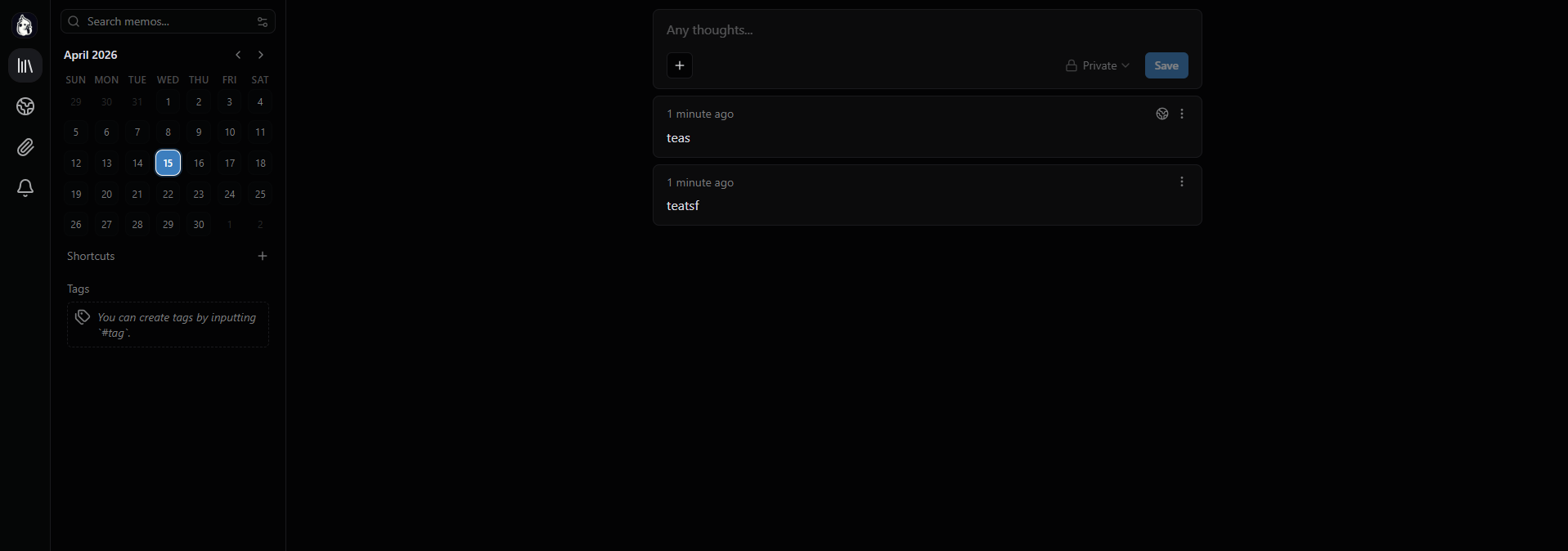
Once your Railway deployment is live, open the generated .up.railway.app domain in your browser. You will see the Memos registration page — the first user to sign up becomes the admin. Create your account with a username and password, then start writing immediately.
The interface is timeline-first: open the compose box, type your note in Markdown, and hit save. Use #tags inline to categorize memos, and the search bar for full-text search across all your notes. Upload images, videos, or documents by dragging them into the editor.
About Hosting Memos on Railway
Memos is an open-source, self-hosted note-taking tool built for quick capture. Created by the usememos team and MIT-licensed with over 58,000 GitHub stars, it solves the problem of needing a fast, private place to capture thoughts without the complexity of Notion or the local-only limitation of Obsidian.
Key features:
- Full Markdown support with syntax highlighting, tables, and LaTeX math
- Timeline-first UI — open, write, done. No folder hierarchy to manage
- Drag-and-drop attachments: images, videos, audio, documents
- Full-text search and flexible
#tagsystem - Complete REST and gRPC APIs for custom integrations
- Built-in RSS feeds for public memos and webhook support
- Multi-user support with PostgreSQL or MySQL backends
- ~20 MB Docker image — runs on a Raspberry Pi
Why Deploy Memos on Railway
One-click deploy with PostgreSQL and persistent storage pre-configured.
- Zero setup — database connection and volume wired automatically
- Full data ownership — your notes live on your infrastructure, not a third-party cloud
- Lightweight — ~20 MB image, starts in seconds, minimal resource usage
- Private networking — Memos connects to Postgres over Railway's internal network
- Instant HTTPS — public domain with TLS, no certificate management
Common Use Cases for Memos
- Developer journal — capture code snippets, debug notes, architecture decisions, and learning resources with Markdown and syntax highlighting
- Personal knowledge base — collect bookmarks, research notes, and ideas with tags and full-text search replacing folder hierarchies
- Team memo board — share meeting notes, standup updates, and internal announcements across a small team using multi-user mode
- Writing scratchpad — draft blog posts, collect quotes, and brainstorm outlines in a distraction-free, timeline-first interface
Dependencies for Self-Hosting Memos
| Service | Source | Purpose |
|---|---|---|
| Memos | neosmemo/memos:stable (Docker Hub) | Note-taking web app |
| PostgreSQL | Railway-managed Postgres | Multi-user database backend |
| Volume | Railway persistent volume | Media uploads and data at /var/opt/memos |
Environment Variables Reference for Memos on Railway
| Variable | Required | Description |
|---|---|---|
MEMOS_DRIVER | Yes | Database driver. Set to postgres for Railway Postgres (also supports sqlite, mysql) |
MEMOS_DSN | Yes | Database connection string. Use ${{Postgres.DATABASE_URL}} to reference Railway Postgres |
MEMOS_INSTANCE_URL | Recommended | Public URL for absolute links. Use https://${{RAILWAY_PUBLIC_DOMAIN}} |
MEMOS_PUBLIC | No | Set to false to disable public registration after creating your admin account |
RAILWAY_RUN_UID | Yes | Set to 0 — required for volume write permissions on Railway |
Deployment Dependencies
- Docker Hub: neosmemo/memos
- GitHub: usememos/memos
- Docs: usememos.com/docs
- License: MIT — free to self-host and modify
Hardware Requirements for Self-Hosting Memos
Memos is extremely lightweight. The Go backend and React frontend are bundled into a single binary — the Docker image is under 20 MB.
| Resource | Minimum | Recommended |
|---|---|---|
| CPU | 0.5 vCPU | 1 vCPU |
| RAM | 128 MB | 256 MB |
| Storage | 1 GB (volume) | 5 GB+ (scales with media uploads) |
| Runtime | Docker | Docker |
Self-Hosting Memos with Docker
Minimal Docker run with SQLite (no external database):
docker run -d --name memos \
  -p 5230:5230 \
  -v memos-data:/var/opt/memos \
  neosmemo/memos:stable
Open http://localhost:5230 and create your first account.
Docker Compose with PostgreSQL (production setup):
services:
  postgres:
    image: postgres:18
    environment:
      POSTGRES_USER: memos
      POSTGRES_PASSWORD: changeme
      POSTGRES_DB: memos
    volumes:
      - pgdata:/var/lib/postgresql/data

  memos:
    image: neosmemo/memos:stable
    environment:
      MEMOS_DRIVER: postgres
      MEMOS_DSN: postgresql://memos:changeme@postgres:5432/memos
      MEMOS_PUBLIC: "true"
    ports:
      - "5230:5230"
    volumes:
      - memos-data:/var/opt/memos
    depends_on:
      - postgres

volumes:
  pgdata:
  memos-data:
How Much Does It Cost to Self-Host Memos?
Memos is MIT-licensed open-source software — free to use, modify, and redistribute with no licensing fees or paid tiers. Running it on Railway costs only the infrastructure: the Memos container uses under 256 MB RAM and minimal CPU, making it one of the cheapest services to keep running. You pay only for Railway compute and Postgres storage you actually use.
Memos vs Obsidian vs Notion — Which Should You Self-Host?
| Feature | Memos | Obsidian | Notion |
|---|---|---|---|
| Self-hosted | Yes | No (local-only) | No (SaaS) |
| Open source | MIT | No | No |
| Web access | Yes — any browser | No (desktop/mobile app) | Yes (SaaS) |
| Data ownership | Full — your server | Local files | Notion's cloud |
| Collaboration | Multi-user with Postgres | Paid sync add-on | Built-in |
| Offline support | No (web app) | Yes | Limited |
| Complexity | Minimal — timeline UI | High — plugin ecosystem | High — databases, views |
| Resource usage | ~128 MB RAM | Desktop app | N/A (SaaS) |
Summary: Choose Memos if you want a fast, private, web-accessible note-taking tool you fully control. Choose Obsidian for a powerful local-first knowledge graph with plugins. Choose Notion for team workspaces with databases and project management — but without self-hosting or data ownership.
FAQ
What is Memos and why should you self-host it? Memos is an open-source, self-hosted note-taking app built for quick capture. It uses Markdown natively, runs as a single Go binary, and gives you full ownership of your data. Self-hosting means zero telemetry, no vendor lock-in, and notes that never leave your infrastructure.
What does this Railway template deploy for Memos?
It deploys three components: the neosmemo/memos:stable Docker image (the web app), a Railway-managed PostgreSQL database for multi-user storage, and a persistent volume at /var/opt/memos for uploaded media and attachments.
Why is PostgreSQL included instead of using Memos with SQLite?
Memos defaults to SQLite, which works for single-user setups. PostgreSQL is included because it handles concurrent users, provides better backup and restore workflows, and is the recommended backend for production deployments. You can switch to SQLite by changing MEMOS_DRIVER to sqlite and removing the Postgres service.
How do I disable public registration on my self-hosted Memos instance?
Set the environment variable MEMOS_PUBLIC=false on the Memos service in Railway and redeploy. After this, only existing users can log in — new sign-ups are blocked. Make sure you create your admin account first, as the first registered user becomes the administrator.
Does Memos support an API for custom integrations? Yes. Memos exposes comprehensive REST and gRPC APIs for reading, creating, and managing memos programmatically. It also supports webhooks for event notifications and built-in RSS feeds for public memos, enabling integration with tools like Zapier, n8n, or custom scripts.
Can I migrate my notes from Notion or Obsidian to Memos? Memos supports Markdown natively, so any Markdown-formatted notes can be pasted or imported directly. There is no built-in one-click import from Notion or Obsidian, but community tools and scripts exist for batch conversion. Export your notes as Markdown files and create them via the Memos API.
How do I back up my self-hosted Memos data on Railway?
Your memos are stored in PostgreSQL (backed up via Railway's database snapshots) and uploaded media lives on the persistent volume at /var/opt/memos. For a full backup, use pg_dump on the Postgres service and download the volume contents via Railway's CLI or dashboard.
Template Content

