
Deploy Multica AI
Manage AI coding agents like teammates. Assign work, track progress & ship.
multica-backend
Just deployed
/app/data/uploads
multica-web
Just deployed
Postgres
Just deployed
/var/lib/postgresql/data
Deploy and Host Multica on Railway
Multica is a self-hosted platform for managing AI coding agents like teammates. It helps you assign work, track progress, coordinate agent workflows, and manage development activity from a centralized interface.
This template deploys Multica with its Web UI, Backend API, and PostgreSQL with pgvector in a complete Railway stack.
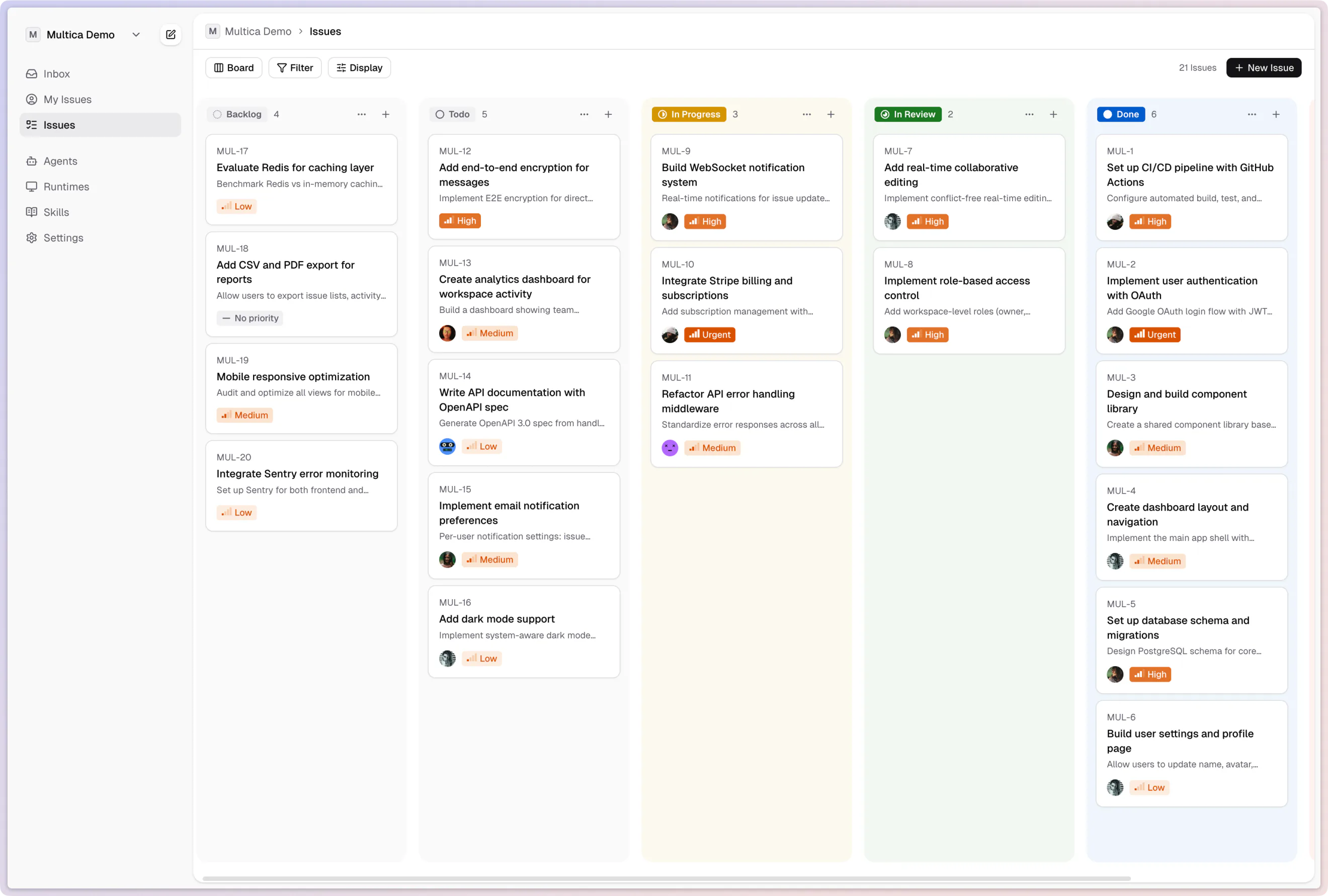
About Hosting Multica
Hosting Multica on Railway gives you a complete self-hosted environment for coordinating AI coding agents and their workflows.
This template deploys three services:
- Multica Web — browser-based user interface
- Multica Backend — API, authentication, WebSocket, agent coordination, and application logic
- PostgreSQL + pgvector — persistent relational and vector data storage
Multica Web and Backend communicate through Railway networking, while PostgreSQL remains private inside the project.
The Backend also uses persistent storage for uploaded files so application data survives redeployments.
Dependencies for Multica Hosting
Multica requires the following services and persistent storage to run as a complete self-hosted stack on Railway.
| Component | Purpose | Required |
|---|---|---|
| Multica Web | Browser-based user interface | ✅ |
| Multica Backend | API, authentication, WebSocket, and agent coordination | ✅ |
| PostgreSQL 17 | Primary relational database | ✅ |
| pgvector | Vector extension used inside PostgreSQL | ✅ |
| PostgreSQL Volume | Persists database data across redeployments | ✅ |
| Backend Upload Volume | Persists uploaded application files | ✅ |
| Redis | External cache or queue service | ❌ |
| S3-compatible storage | Optional alternative for file storage | ❌ |
| Separate vector database | Not required because pgvector is included | ❌ |
This template packages the required infrastructure into three Railway services:
Multica
├── Multica Web
├── Multica Backend
└── PostgreSQL + pgvector
The Multica Backend connects to PostgreSQL through Railway private networking.
Multica Web and Backend expose the endpoints required by browser clients, AI agents, and external integrations.
Persistent Railway volumes are used for PostgreSQL and Backend uploads so important application data remains available across redeployments.
Common Use Cases
- Manage AI coding agents from one dashboard
- Assign development work to agents
- Track tasks and agent progress
- Coordinate multiple coding agents
- Monitor autonomous development workflows
- Manage agent workspaces and development projects
- Connect tools such as Claude Code, Codex, Cursor, and other coding agents
- Run a self-hosted AI development control plane
Why Use Multica?
| Capability | Multica |
|---|---|
| Centralized AI agent management | ✅ |
| Web-based management UI | ✅ |
| Multi-agent workflows | ✅ |
| Task assignment and tracking | ✅ |
| Real-time updates with WebSockets | ✅ |
| PostgreSQL persistence | ✅ |
| Vector storage with pgvector | ✅ |
| Self-hosted deployment | ✅ |
| Persistent file uploads | ✅ |
| Private database networking | ✅ |
| External Redis required | ❌ |
| Separate vector database required | ❌ |
| Mandatory S3 storage | ❌ |
Multica is useful when individual coding agents are no longer enough and you need a central place to coordinate work across agents, projects, and development workflows.
Architecture
The Railway template uses three independent services:
                       Internet
                          │
              ┌───────────┴───────────┐
              │                       │
              ▼                       ▼
       Multica Web :8080      Multica Backend :8080
          PUBLIC                    PUBLIC
              │                       │
              │ Railway Networking    │
              └───────────┬───────────┘
                          │
                          ▼
                 PostgreSQL :5432
                    PRIVATE
                          │
                          ▼
                    pgvector
Persistent storage is attached to the required services:
Multica Backend
      │
      ▼
/app/data/uploads

PostgreSQL
      │
      ▼
/var/lib/postgresql/data
Multica Web
Multica Web provides the main browser interface.
It runs on:
8080
Generate a Railway public domain for this port.
Example:
https://your-multica.up.railway.app
The frontend communicates with the Backend through both private and public endpoints depending on whether the request originates from the server or the user's browser.
Multica Backend
The Multica Backend handles:
- Authentication
- User and workspace management
- Agent coordination
- Project management
- API requests
- WebSocket connections
- Database access
- File uploads
- Agent-related application logic
The Backend runs on:
8080
A public domain is required because browser clients, external agents, daemons, and integrations may need to reach the API and WebSocket endpoints.
PostgreSQL and pgvector
Multica uses PostgreSQL as its primary persistent database.
This template uses PostgreSQL with the pgvector extension so relational and vector data can be stored in the same database service.
The database runs internally on:
5432
PostgreSQL does not need a public domain for the default deployment.
Applications communicate with it through Railway private networking.
Persistent Storage
PostgreSQL
A persistent Railway volume is mounted at:
/var/lib/postgresql/data
This preserves:
- User accounts
- Workspaces
- Projects
- Tasks
- Agent information
- Application metadata
- Vector data
- Database indexes and schemas
Backend Uploads
A second persistent Railway volume is attached to the Multica Backend at:
/app/data/uploads
This preserves uploaded files across application redeployments and container replacements.
Public and Private Networking
Public Services
The following services require public Railway domains:
| Service | Port | Public |
|---|---|---|
| Multica Web | 8080 | ✅ |
| Multica Backend | 8080 | ✅ |
| PostgreSQL | 5432 | ❌ |
Private Communication
PostgreSQL stays inside the Railway private network.
Conceptually:
Multica Backend
      │
      │ Railway Private Network
      ▼
PostgreSQL :5432
The frontend server can also communicate with the Backend through Railway private networking, while browser requests use the Backend's public URL.
Multica Stack Benefits
| Benefit | Supported |
|---|---|
| Complete Web UI | ✅ |
| Backend API included | ✅ |
| PostgreSQL included | ✅ |
| pgvector included | ✅ |
| Persistent uploads | ✅ |
| Persistent database | ✅ |
| Railway private networking | ✅ |
| Public WebSocket access | ✅ |
| No Redis dependency | ✅ |
| No separate vector database | ✅ |
The result is a relatively compact stack despite supporting agent management, authentication, persistent data, vector workloads, real-time communication, and file storage.
Getting Started After Deployment
- Deploy the Multica template.
- Wait for PostgreSQL, Multica Backend, and Multica Web to become healthy.
- Generate a public domain for Multica Backend on port
8080. - Generate a public domain for Multica Web on port
8080. - Open the Multica Web URL.
- Create your first account.
- Create or configure a workspace.
- Connect your coding agents and development tools.
- Start assigning work and monitoring agent progress.
PostgreSQL should remain private and does not need a public TCP proxy for normal Multica operation.
Upgrading Multica
This template uses the official Multica container images.
After deployment, you can change the deployed Multica version directly from the Railway service settings.
To change versions:
- Open the required Multica service in Railway.
- Go to Settings.
- Locate the container image configuration.
- Change the image tag to the version you want to run.
- Redeploy the service.
For production deployments, using pinned image versions instead of latest can make upgrades more predictable.
Always review upstream release notes before performing major upgrades.
Why Deploy Multica on Railway?
Railway is a singular platform to deploy your infrastructure stack. Railway will host your infrastructure so you don't have to deal with configuration, while allowing you to vertically and horizontally scale it.
By deploying Multica on Railway, you get the Web UI, Backend API, persistent PostgreSQL with pgvector, private networking, WebSocket connectivity, and persistent file storage in one self-hosted AI agent management stack.
Template Content
multica-backend
ghcr.io/multica-ai/multica-backend:latestmultica-web
ghcr.io/multica-ai/multica-web:latestPostgres
pgvector/pgvector:pg17

