
Deploy OneDev
Git server with built-in CI/CD, issue tracking and code review
onedev-agent
Just deployed
/agent/work

Just deployed
/var/lib/postgresql/data
onedev
Just deployed
/opt/onedev
Deploy and Host OneDev on Railway
OneDev is an all-in-one development platform that puts Git hosting, pull requests, CI/CD, issue tracking, code search and package registries in a single MIT-licensed Java service. Teams reach for it when GitHub is not an option and GitLab is more machinery than they want: one process to operate, code intelligence on any commit, and a build engine that is part of the product. Self-host OneDev when your source code should stay on infrastructure you control.
Deploy OneDev on Railway and this template wires up three services. The onedev service runs the server and takes the public domain, serving the web UI, REST API, Git over HTTPS and every package registry. Postgres holds all application data — projects, issues, builds, users and settings. onedev-agent is a dedicated CI/CD worker that reaches the server over Railway's private network and runs build jobs; it registers itself on first boot, so no token is copied by hand. Repositories, Git LFS objects and build artifacts live on the server's volume, and the agent keeps job workspaces on its own.
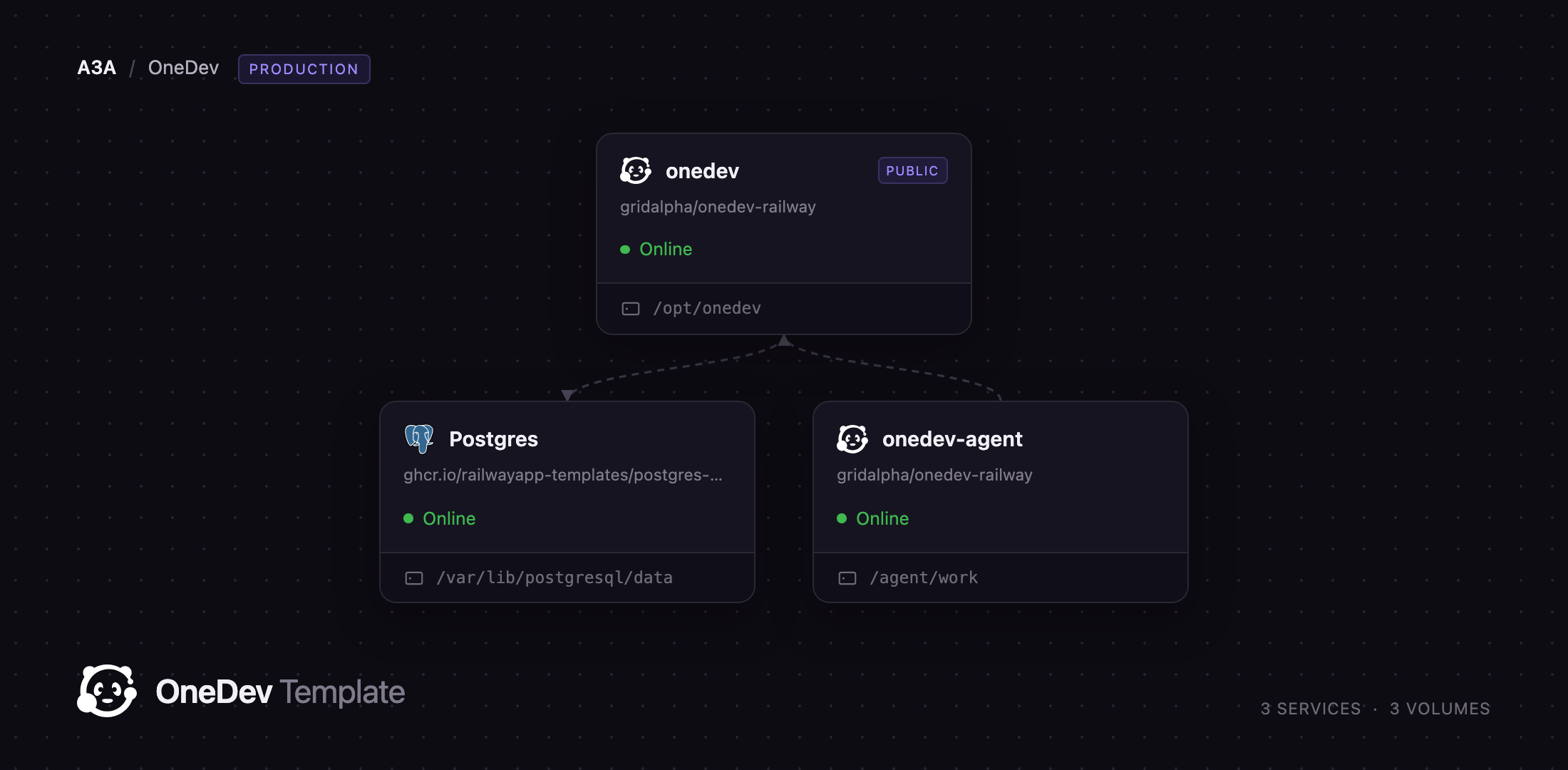
Getting Started with OneDev on Railway
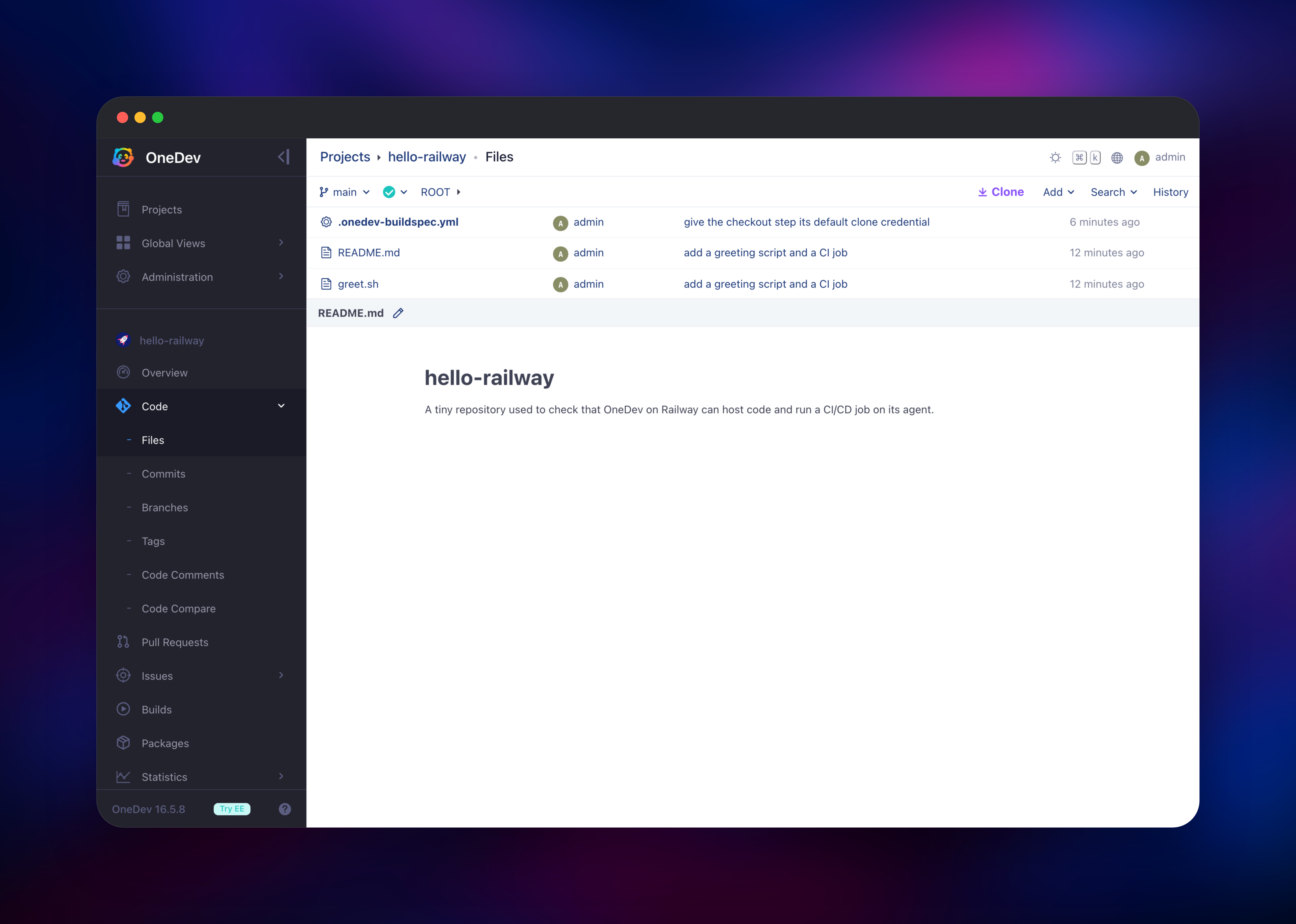
Open the generated Railway URL and sign in with the administrator account created on first boot from the initial_user and initial_password variables — there is no setup wizard, and account self sign-up is switched off, so the instance is not open to strangers the moment it goes live. Add teammates from Administration → User Management, or connect a directory under External Authentication, which covers LDAP, Active Directory and OpenID Connect. Create your first project from the Projects page, then push a repository to https:/// using your login and password or an access token from your profile. Symbol search and click-through navigation work as soon as there are commits, with no indexing step to configure.
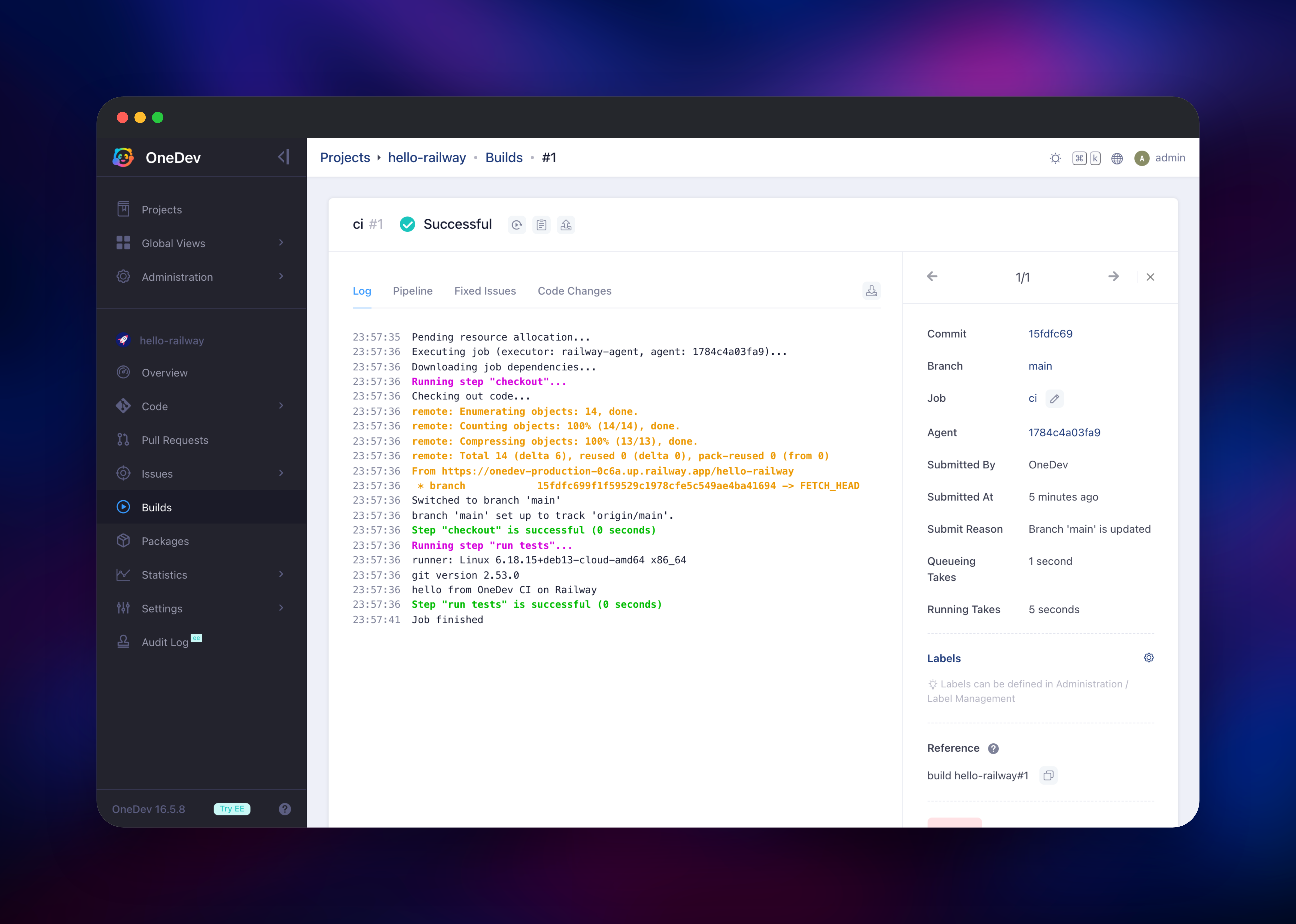
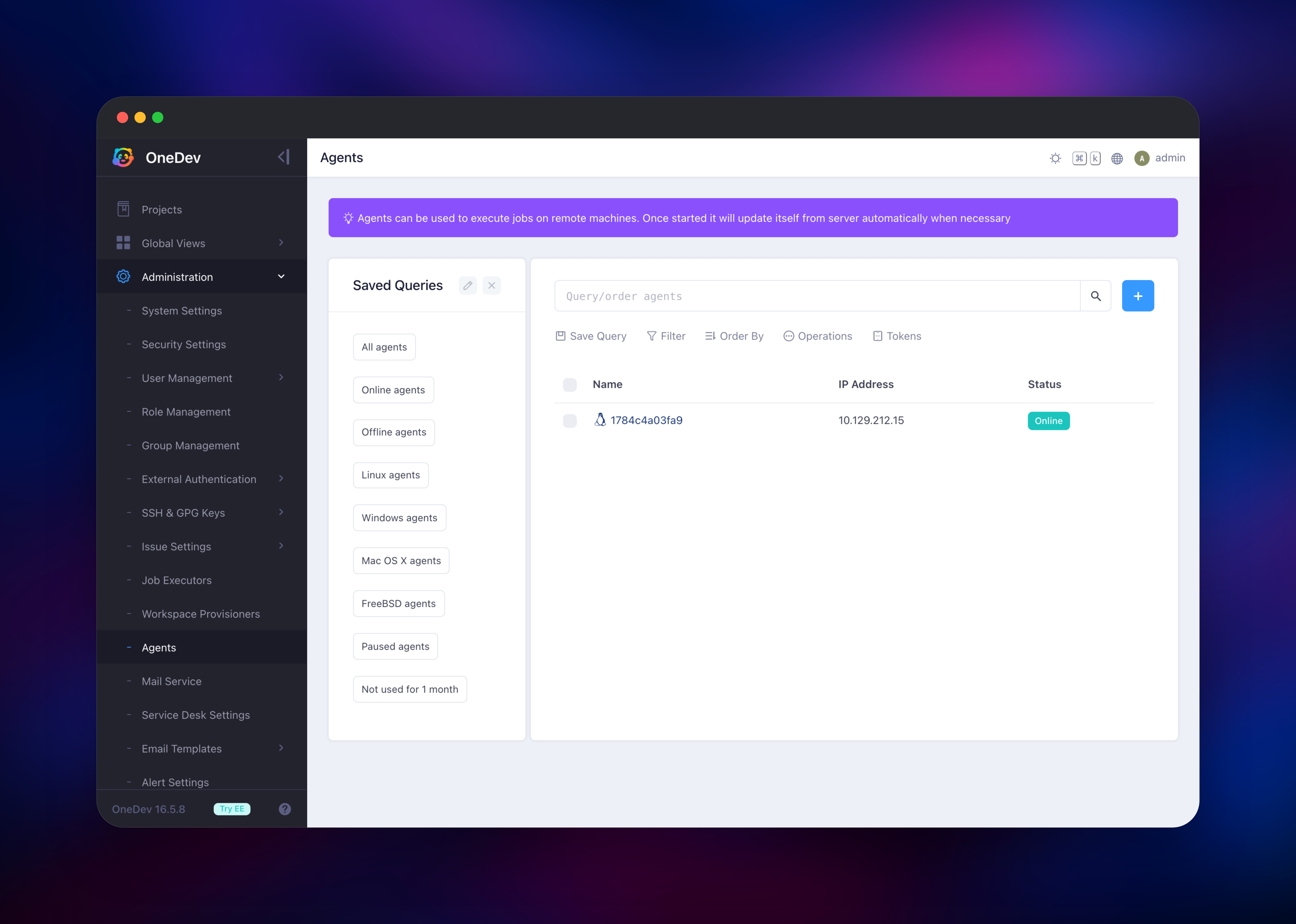
To try the build engine, add a .onedev-buildspec.yml and push it — the job is picked up by the pre-configured railway-agent executor and the log streams live under Builds. Confirm the deployment is healthy under Administration → Agents: one agent should read Online. Git over SSH needs one extra step, since it uses a second port: add a TCP proxy on port 6611 to the onedev service, and the clone URL updates itself on the next restart.
About Hosting OneDev
OneDev is a single Java application backed by a relational database, which makes it unusually cheap to run for what it does. One server covers the whole delivery loop, and the build farm scales out by adding agents rather than a second control plane.
- Git hosting with pull requests, review policies, protected branches and comments on any snippet or diff
- Language-aware code search and symbol navigation on every commit, not just the default branch
- A CI/CD engine with a visual job editor, matrix jobs, templates, caching and build-spec imports
- Issue tracking with custom fields, transition rules, Kanban boards and iterations
- Package registries for Docker, Maven, npm, NuGet, PyPI, RubyGems and Helm
- Service desk, so customers open and discuss issues by email without an account
- LDAP, Active Directory and SSO, plus fine-grained project and role permissions
The Postgres service is not decoration: OneDev's embedded database is for evaluation only, and pointing the server at Postgres keeps your data recoverable and independent of the container. The onedev-agent service exists because containers cannot start containers on Railway, so OneDev's default Docker executor cannot run. The agent takes its place, running each job with its own shell using the git, git-lfs and JDK 17 in its image, and updating its libraries from the server on every upgrade.
Why Deploy OneDev on Railway
Railway removes the operational work around a self-hosted Git server.
- Three services, one volume each, deployed and networked in a single click
- TLS and a public domain issued automatically for the web UI and Git over HTTPS
- Postgres provisioned and wired to the server with no connection string to copy
- The CI agent reaches the server over private networking, never the public internet
- Scaling up or out without touching Git data on the volume
Common Use Cases
- An internal Git server for code that cannot leave your infrastructure, with reviews and CI in one place
- A GitLab replacement for a small team that wants built-in CI without a 4 GB baseline
- A private package registry serving Docker, npm and Maven artifacts beside their source
- A customer-facing service desk where support email lands on the issue board
Dependencies for OneDev
- onedev — built from
1dev/server; the web UI, REST API, Git server and package registries - onedev-agent — built from
1dev/agent; a CI/CD worker that runs build jobs - Postgres —
ghcr.io/railwayapp-templates/postgres-ssl:18; the application database
Environment Variables Reference
| Variable | Service | Purpose |
|---|---|---|
hibernate_connection_url | onedev | JDBC URL for the Postgres database |
http_host | onedev | :: so the prober and the agent are both served |
http_port / PORT | onedev | HTTP port, 6610 |
ssh_port | onedev | Git over SSH port, 6611 |
initial_user / initial_password | onedev | First administrator, created on first boot only |
initial_server_url | onedev | Public URL used in clone links and notifications |
serverUrl | onedev-agent | Private address of the OneDev server |
agentToken | onedev-agent | Optional; unset means one is created for you |
Deployment Dependencies
- Source: github.com/theonedev/onedev
- Docs: docs.onedev.io
- Runtime: Java 17, packaged in the official images
Hardware Requirements for Self-Hosting OneDev
| Resource | Minimum | Recommended |
|---|---|---|
| CPU | 2 vCPU | 4 vCPU |
| RAM | 2 GB server + 1 GB agent | 4 GB server + 2 GB agent |
| Storage | 5 GB volume | Repo size × 3, plus artifacts |
| Runtime | Java 17 | Java 17 |
Self-Hosting OneDev with Docker
The quickest local run keeps everything in one container on the embedded database:
docker run -it --rm \
  -v $(pwd)/onedev:/opt/onedev \
  -p 6610:6610 -p 6611:6611 \
  1dev/server
Beyond evaluation, point the server at Postgres. These environment variables replace the embedded database and create the first administrator without a setup wizard:
hibernate_dialect=io.onedev.server.persistence.PostgreSQLDialect
hibernate_connection_driver_class=org.postgresql.Driver
hibernate_connection_url=jdbc:postgresql://postgres:5432/onedev
hibernate_connection_username=onedev
hibernate_connection_password=your-password
initial_user=admin
initial_password=your-password
initial_email=admin@example.com
initial_server_url=https://git.example.com
Mount a volume at /opt/onedev — that path holds the whole installation, repositories, LFS objects, artifacts and packages included.
How Much Does OneDev Cost to Self-Host?
OneDev is open source under the MIT licence and free for any number of users and repositories. The paid Enterprise Edition adds clustering, time tracking, cross-project code search, vulnerability scanning, Renovate integration, audit logging and the CI web terminal; everything this template deploys is in the free edition. On Railway you pay only for the compute, memory and volume storage the three services use.
FAQ
What is OneDev? OneDev is a self-hosted development platform combining a Git server, pull requests, CI/CD, issue tracking, code search and package registries in one application.
What does this Railway template deploy? A OneDev server with a public domain, a Postgres database and a dedicated CI/CD agent, each with its own volume.
Why does the template include a separate agent service? Railway does not let containers start containers, so OneDev's Docker-based job executor cannot run. The agent is a normal service that runs build jobs with its own shell, already registered when the deployment finishes.
Why does OneDev need Postgres instead of its built-in database? The embedded database is for evaluation. Postgres keeps projects, issues and build history in a managed service that can be backed up independently of the application container.
How do I clone over SSH from self-hosted OneDev?
Add a TCP proxy on port 6611 to the OneDev service, then add your public key under your profile's SSH keys. The clone URL in the UI picks up the proxy's hostname and port.
Can I add more build capacity to self-hosted OneDev? Yes. Deploy another agent service pointing at the same server URL; each registers itself and the existing job executor uses it. Raise the executor's concurrency under Administration → Job Executors to run more jobs per agent.
Is account registration open on a fresh deployment? No. Self sign-up is disabled before the instance accepts traffic. Re-enable it under Administration → Security Settings for an open instance.
Template Content
onedev-agent
gridalpha/onedev-railwayonedev
gridalpha/onedev-railway

