
Deploy OpenBot (Grok Bot Alternative)
OpenBot: open-source AI coworkers with their own browser, files and tools

Gate
Just deployed

Just deployed
/var/lib/postgresql/data
OpenBot
Just deployed
/data
Routines
Just deployed
Just deployed
Deploy and Host OpenBot on Railway
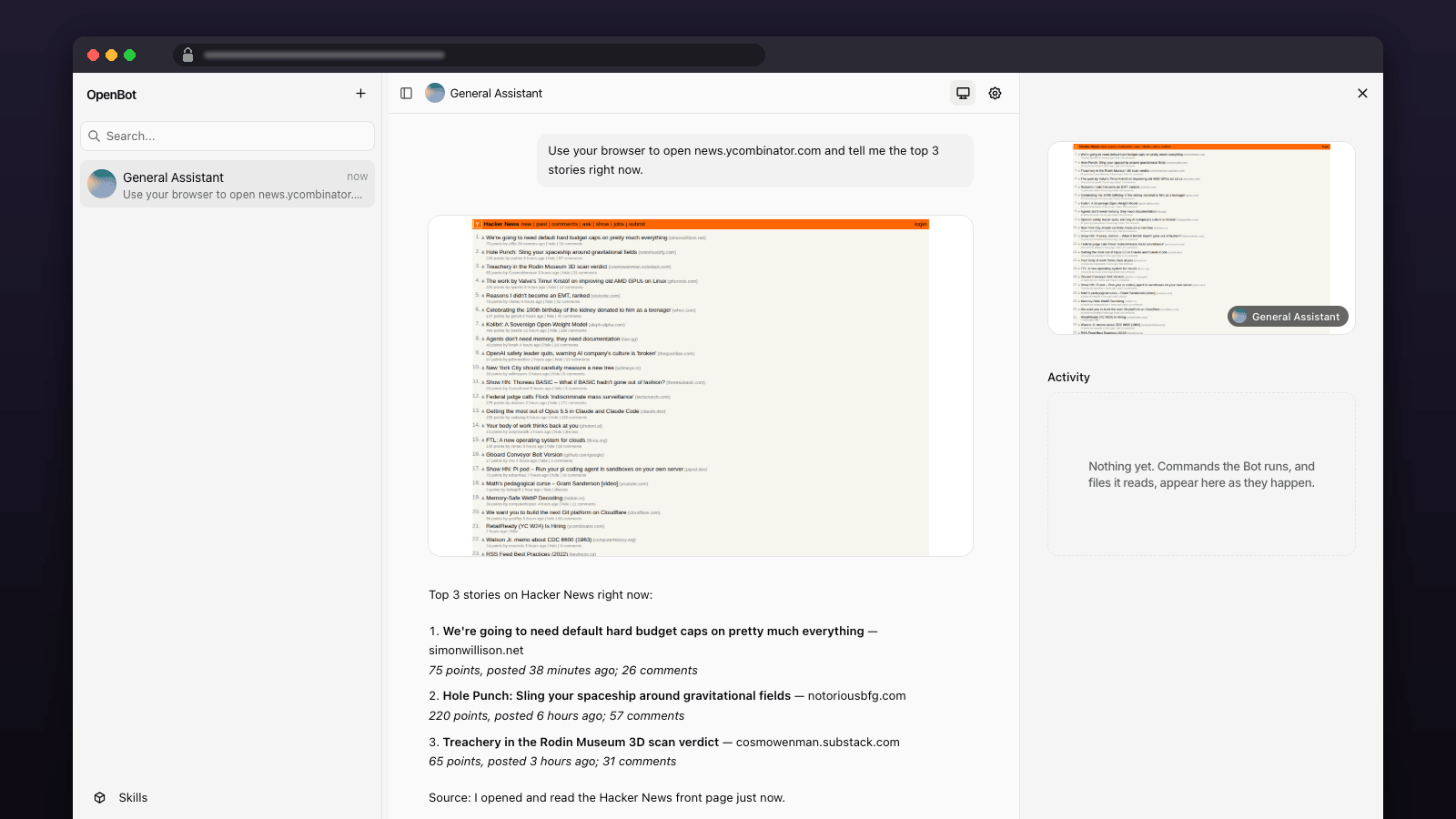
Your own AI coworkers, each with a browser, files and tools, behind a password — an open-source alternative to xAI's Grok Bot that you host and audit.
Get started — you need an OpenAI API key (or an OpenRouter key) and a free CopilotKit Intelligence project key, about two minutes with their CLI (Step 1 below). Hobby recommended: the OpenBot service peaks at about 620 MB with its browser working, above Free's 0.5 GB limit; the five services idle at about 0.45 GB.
- Get your CopilotKit project key (Step 1 below), then deploy and paste it and your model key into the form.
- Sign in. Open the Gate service URL. Username
admin; the password isGATE_PASSWORDin the Gate's Variables tab. Click through the short welcome screen. - Give it a task. Ask the General Assistant to look something up on the web and watch its browser work.
About Hosting OpenBot
OpenBot gives you AI coworkers with a computer: a browser, files and a shell, with every action recorded. This template runs the official ghcr.io/copilotkit/openbot image next to a Railway Postgres, adds the Bot process that lets you create your own coworkers and the scheduler that makes routines fire, puts a password in front of the URL, wires all of it together over the private network, generates every secret, and keeps the coworkers' browser logins and files on a volume so they survive redeploys.
OpenBot is a Bun server that serves the web app and API on one port and drives a headless Chromium inside the same container for the coworkers' "computer". Users, work and the encrypted credential vault live in Postgres; conversation threads and memory live in CopilotKit Intelligence, a free hosted service that the app requires. Three things upstream's single image does not carry come as their own services here: Agent runs the coworkers you create (CopilotKit's official agent-langgraph v0.0.15 image, pinned by digest), Routines is a five-minute cron that fires scheduled work, and Gate is a 30 MB Caddy that holds the public URL and asks for a username and password before anything reaches OpenBot. Migrations run automatically when the container starts. Two values are yours to paste at deploy time: an OpenAI key, and a CopilotKit Intelligence project key that a short CLI session writes for you.
Common Use Cases
- Your own always-on AI coworkers that browse, fill forms and use web tools on your behalf
- A self-hosted alternative to hosted "computer-use" agents, with an audit trail of every action
- Named coworkers with their own roles that the built-in Bots can hand work to
- A front end for your own agent: point a coworker at any AG-UI endpoint
Dependencies for OpenBot Hosting
- Postgres — included in this template, wired automatically
- CopilotKit Intelligence — free Developer plan (3-day thread retention, 200 threads; paid plans keep more); one project key from their CLI (step 1)
- An OpenAI API key — or an OpenRouter key with
OPENAI_BASE_URLset (step 2)
Deployment Dependencies
- OpenBot repository and deployment guide
- CopilotKit Intelligence
- Agent uses the official
agent-langgraphv0.0.15 image atghcr.io/copilotkit/openbot-agent-langgraph@sha256:da9fdbee1c12e62f66e359ae2c9a083456c2d8f795d0db066b8b1e313542b477(Linux amd64). OpenBot and Routines run upstream v0.0.6, the release that stopped requiring a CopilotKit licence token, and stay there to preserve this template's password-gated single-user contract.
Implementation Details
Plan. Hobby recommended: the OpenBot service measured about 620 MB at peak with its browser working (above the Free plan's 0.5 GB limit), and the five services together idle at about 0.45 GB. On Free the browser is what gets killed when memory runs out, and it restarts on its own a few seconds later, but busy pages will not finish loading there.
Step 1 — get your CopilotKit project key (free, about two minutes). Sign up at CopilotKit Intelligence if you have no account, then in a terminal:
mkdir openbot && cd openbot
npx --yes copilotkit@latest login
npx --yes copilotkit@latest project select --create openbot
grep '^CPK_INTELLIGENCE_API_KEY=' .env | sed 's/^CPK_//'
The last line prints one line, named exactly like the field on the deploy form:
INTELLIGENCE_API_KEY=cpk-...
Copy the value into that field. No licence token is needed: managed Intelligence derives your plan from the project key. The project name is just a label, so openbot is fine; if you already have a project, run project select without --create and pick it. The CLI never prints the key on its own, it only writes it to .env in the folder you ran it in, which is why the commands start with mkdir and cd. On Windows without grep, open .env in any editor and copy the value. Don't paste that terminal output anywhere except the deploy form.
Step 2 — deploy. Paste the key plus your OpenAI API key into the two fields and deploy. To use OpenRouter instead of OpenAI, paste an OpenRouter key as OPENAI_API_KEY and set OPENAI_BASE_URL to https://openrouter.ai/api/v1. When all five services are green, open the Gate service's URL. Your browser asks for a username and password: admin and the value of GATE_PASSWORD in the Gate service's variables. That is the whole sign-in, and it works the same from a phone or any laptop — the chat is built for small screens; the admin pages want a laptop. Click through the short welcome screen and say hello to the General Assistant.
Give a coworker a browsing task. Ask it to look something up on the web and it opens its browser. Each Bot has its own browser profile and files on the /data volume, so a coworker you signed into a site stays signed in across redeploys (sites that only use session cookies will ask again) and its notes survive too. Computers in the admin area shows each Bot's browser; Stop browser keeps the logins, Reset wipes them.
Create your own coworkers. Agents → New agent opens the New coworker form: give it a name, a title and a role, leave the endpoint empty, and it runs on the Agent service. Coworkers are rows in Postgres, so make as many as you like; one small Agent process serves all of them. The shipped example coworker (Risk Analyst) appears once the Agent service is up. Like the General Assistant, a coworker can ask you to take control of its browser at a sign-in page.
Teamwork. Under a Bot's Bots it may ask, grant the General Assistant the right to hand work to Knowledge or to any coworker you created. The asked Bot answers in its own channel. Coworkers you create can be asked but cannot ask in this release.
Routines. Grant a Bot the routine tools at /admin/plugins/routines, then ask it in chat to do something on a schedule ("every weekday at 9, ..."). A coworker's routines are listed in its own dialog (open it from the coworker's name). The Routines service checks every five minutes and dispatches whatever is due (a firing more than ten minutes overdue is skipped, not replayed); the shortest schedule is fifteen minutes, and the routine runs as the person who created it. Routine turns have no browser or shell, and nothing tells them the time — they can think, write, and use any connected tools such as Notion or Drive — so schedule summaries and check-ins whose facts come from those tools, not browsing or "post the time". A routine that fails ten times in a row is switched off.
Model. The General Assistant and Knowledge ask for gpt-5.6-terra from whatever endpoint OPENAI_BASE_URL points at (OpenAI by default; OpenRouter resolves the same name); their model is fixed by the image and needs an OpenAI-compatible key whatever else you change. Coworkers you create use BOT_MODEL on the Agent service, the same name by default. To run them on Claude or Gemini instead, set BOT_PROVIDER to anthropic or google on the Agent service, set BOT_MODEL to a model that provider serves, and add ANTHROPIC_API_KEY or GOOGLE_API_KEY there; the Agent refuses to start if the matching key is missing. The OpenAI key can be rotated without a redeploy at /admin/credentials (type Model, provider openai, key id openai-api-key).
Who can get in. Whoever passes the Gate's password is the one administrator — upstream's single-user mode, right for one person and their coworkers. Change the password by editing GATE_PASSWORD on the Gate service and redeploying it; OpenBot itself has no public address, only the Gate does. To add people with real accounts, register a Google, Microsoft or Okta OAuth client using the redirect URI shown in the variable descriptions (the Gate's domain), set the matching variables plus BETTER_AUTH_SECRET, BETTER_AUTH_URL and INITIAL_ADMIN_EMAILS, and set OPENBOT_SINGLE_USER to false; the Gate password stays in front as a second layer, or remove it by clearing basic_auth from the Gate's start command.
One computer, shared. Every coworker in this deployment runs on the same computer service — one workspace, one shell, one process boundary — with a browser profile of its own. That is how the single image behaves on any platform without a Docker socket; it is fine for one person's coworkers and not a boundary between separate users. The browser can also reach the other services in your Railway project over the private network, so keep this project to OpenBot and its own database. Conversation threads and memory live in CopilotKit Intelligence rather than in your Postgres, and on the free plan a thread is kept for three days — coworkers' files, notes and audit rows in your own Postgres and volume keep as long as you like.
How the containers start. The image's own init must be PID 1, which Railway does not provide, so the OpenBot service starts the three processes directly: migrations, the browser sidecar, then the API, all as the image's pwuser. The API is the healthchecked main process; the browser runs under a small loop that restarts it with backoff whenever it exits (look for [railway] agent-computer exited in the deploy logs), so a browser crash or out-of-memory kill never restarts the container or leaves the app running without a browser. The Routines service runs the same image with a one-shot start command that sweeps due routines and exits, killed after four minutes if it ever hangs. Because the OpenBot service owns a volume, Railway cannot overlap its old and new containers: expect a few seconds of unavailability on each redeploy (measured: about six seconds), with nothing lost. The Gate is stock Caddy with a start command that writes a four-line config from its variables. Agent is pinned to an immutable upstream digest; OpenBot and Routines use the v0.0.6 release tag. Do not blindly upgrade all services together: OpenBot v0.0.14 and later refuse single-user mode with a public URL, even behind this password Gate. Upgrading the app to that release requires configuring a supported OAuth provider first. Never change KEY_ENCRYPTION_KEY after first use, or every stored credential becomes unreadable.
Why Deploy OpenBot on Railway?
Railway is a singular platform to deploy your infrastructure stack. Railway will host your infrastructure so you don't have to deal with configuration, while allowing you to vertically and horizontally scale it.
By deploying OpenBot on Railway, you are one step closer to supporting a complete full-stack application with minimal burden. Host your servers, databases, AI agents, and more on Railway.
Template Content
Gate
caddy:2-alpineOPENAI_API_KEY
Your OpenAI API key. The built-in coworkers spend it. To use OpenRouter instead, paste an OpenRouter key here and set OPENAI_BASE_URL to https://openrouter.ai/api/v1.
INTELLIGENCE_API_KEY
From step 1 of the guide: the value of the CPK_INTELLIGENCE_API_KEY line that npx copilotkit@latest project select writes to .env (starts with cpk-). Free.


