Deploy Ubuntu OpenClaw Desktop (GUI)
OpenClaw on an Ubuntu desktop: watch its Chrome, sign in to sites for it

proxy
Just deployed

Just deployed
/home/kasm-user
Deploy and Host OpenClaw Desktop on Railway
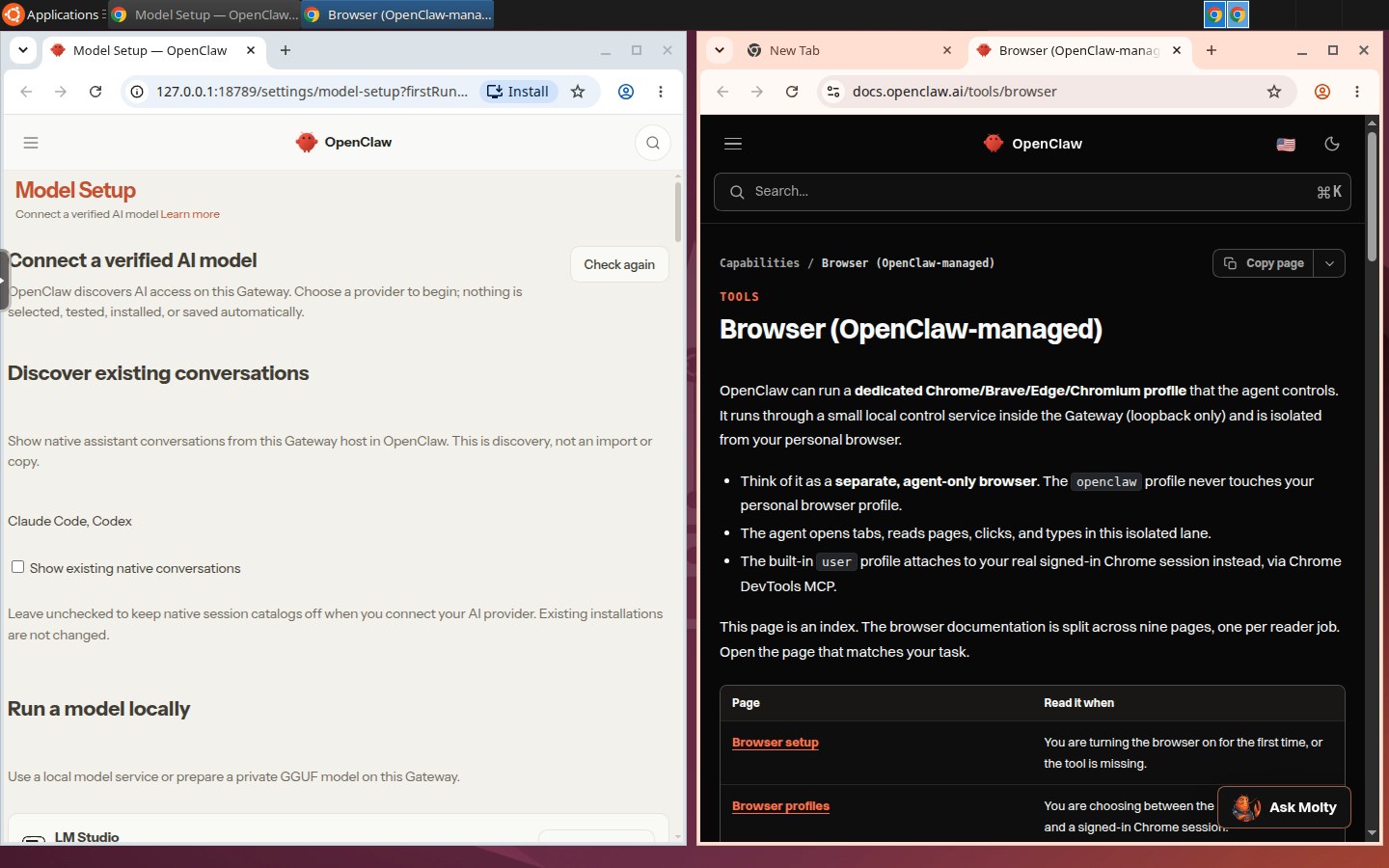
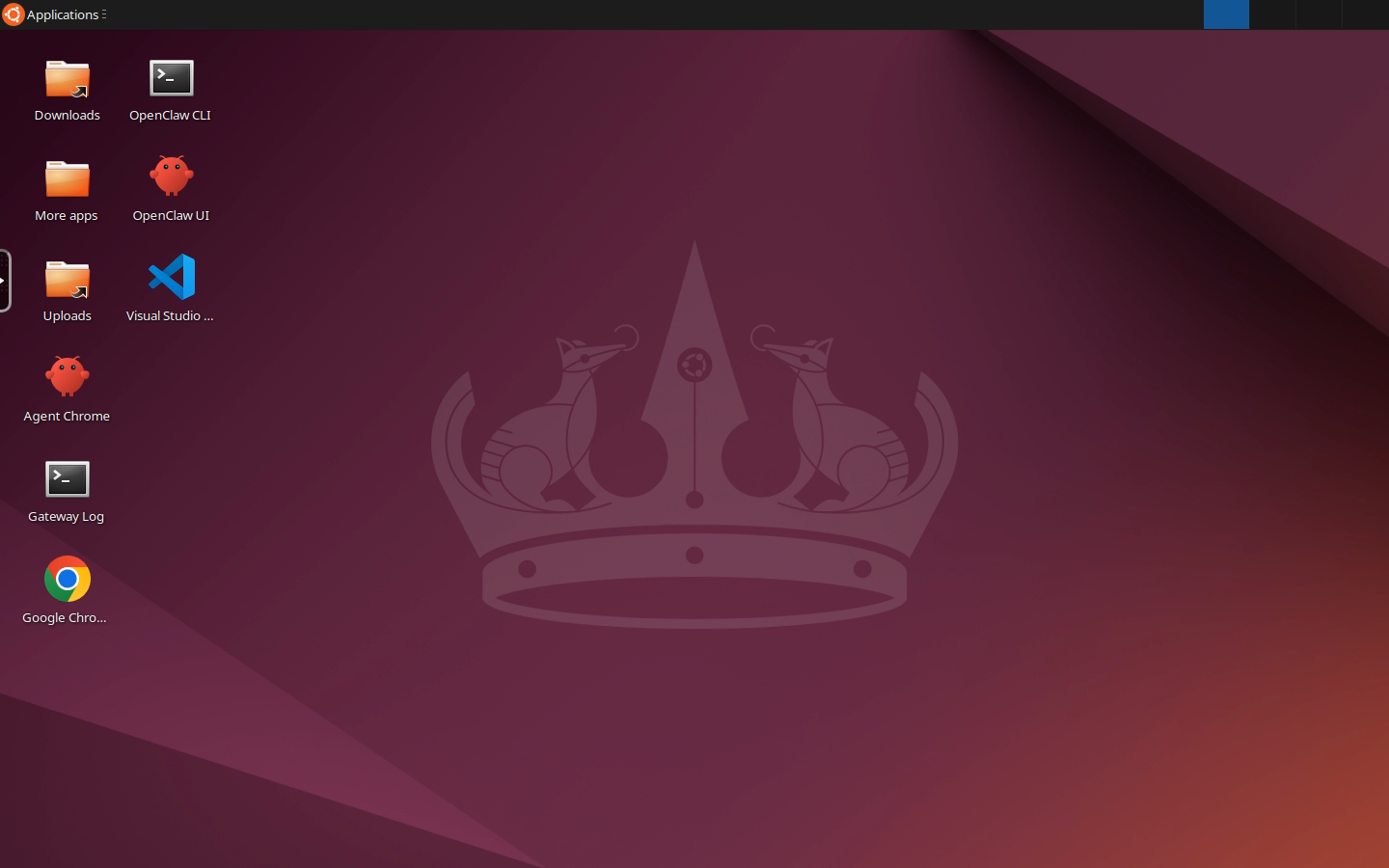
OpenClaw Desktop runs the OpenClaw personal AI assistant on an Ubuntu 24.04 XFCE desktop that lives in your browser tab. The agent's Chrome is a window on that desktop, so you can watch it browse, take over when a site wants a login or a captcha, and leave it signed in for next time. The Control UI, the CLI and the gateway log are one double-click away, and Telegram, Discord and the other channels work as they do on any OpenClaw install.
About Hosting OpenClaw Desktop
Deploying runs two services: the desktop, and a small Caddy proxy that is the only public surface. The desktop image is Kasm's Ubuntu Noble workspace (about 2.6 GB compressed), which ships Chrome. On first boot a background job installs Node.js 24 and OpenClaw into the home directory, which is a Railway volume, runs OpenClaw's non-interactive onboarding with whichever model key you set, and starts the gateway with the desktop's display attached. The login page appears within a minute or two and OpenClaw is up about a minute later; later boots skip the download. The gateway listens on loopback only and is restarted by the same job if it ever exits.
Plan on 3 to 4 GB of RAM: the desktop idles near 1 GB, the gateway takes about 0.5 GB, and each Chrome window (the agent's and yours) adds a few hundred MB. Leave app sleeping off; it would stop the gateway and its channels.
Common Use Cases
- An OpenClaw assistant on Telegram or Discord that browses with a real Chrome you can watch, instead of a headless one you debug from screenshots
- Signing in to your accounts in the agent's browser once, so it can act inside them afterwards
- Connecting model providers through the Control UI or
openclaw onboard, including the subscription OAuth logins that need a browser on the gateway host
Dependencies for OpenClaw Desktop Hosting
- A Railway volume mounted at
/home/kasm-user, which holds OpenClaw, its config, sessions and the agent browser's profile. Without it, everything is lost on redeploy. - A model provider. Set
ANTHROPIC_API_KEY,OPENAI_API_KEY,OPENROUTER_API_KEYorGEMINI_API_KEYat deploy time, or leave them all blank and pick a provider from the desktop after the first boot (Model Setup in the Control UI, oropenclaw onboardin the OpenClaw CLI launcher). - Optional:
TELEGRAM_BOT_TOKENorDISCORD_BOT_TOKENto connect a channel at boot. Other channels are added from the desktop withopenclaw channels add. - No GitHub repo backs this template. Both services boot from public images.
Deployment Dependencies
- OpenClaw - installed from npm (
openclaw@latest) on first boot - OpenClaw browser docs - what the agent can do with its Chrome
- OpenClaw channel docs - Telegram, Discord, WhatsApp, Slack and the rest
- kasmweb/ubuntu-noble-desktop - the upstream desktop image
- KasmVNC - the streaming layer
- Caddy - the TLS-terminating proxy
- Node.js - 24 LTS, installed as a tarball into the home directory
Implementation Details
What is on the desktop. Four launchers. OpenClaw UI opens the Control UI
in Chrome at http://127.0.0.1:18789 with the gateway token already in the
URL. Agent Chrome starts the agent's own browser profile so you can sign in
to sites for it. OpenClaw CLI is a terminal with the useful commands listed.
Gateway Log tails the gateway output. Kasm's other apps are in the More
apps folder and in the Applications menu.
Why the gateway has no public URL. Since OpenClaw 2026.8.1 a browser that reaches the Control UI over the network needs a one-time device approval, while a loopback connection is approved automatically once the token matches. Opening the UI inside the desktop is loopback, so there is nothing to pair, and the channels connect outbound, so the gateway needs no domain. It binds to 127.0.0.1 and is reachable only from the desktop.
How the agent's browser ends up on screen. The gateway runs as the desktop
user with DISPLAY=:1, and the template sets browser.headless: false,
browser.noSandbox: true (a container without user namespaces),
browser.executablePath to the image's Chrome and --disable-dev-shm-usage
for Railway's 64 MB /dev/shm. When the agent uses its browser tool, or when
you click Agent Chrome, OpenClaw launches its managed openclaw profile
(orange accent) as a normal window. The profile lives in
~/.openclaw/browser/openclaw on the volume, so logins persist across
redeploys.
Onboarding. On first boot the template runs openclaw onboard --non-interactive with the first key it finds: Anthropic, OpenAI, OpenRouter,
Gemini, in that order (OpenAI first installs OpenClaw's Codex runtime plugin).
With no key it onboards with --auth-choice skip, and the OpenClaw UI launcher
opens on the Model Setup page, where every provider, including the subscription
OAuth logins, can be connected from the desktop's browser. Onboarding runs
once; the browser settings, gateway token and channel tokens are re-applied on
every boot, so a changed variable takes effect after a redeploy. Output is in
~/.openclaw/onboard.log, provisioning progress in ~/.provision.log.
Channels. TELEGRAM_BOT_TOKEN and DISCORD_BOT_TOKEN are written into
channels.telegram and channels.discord with DM pairing, OpenClaw's default:
the first message from a new user returns a pairing code, which you approve
from the Control UI or with openclaw pairing approve telegram <code>.
WhatsApp is QR-only: run openclaw channels login --channel whatsapp in the
OpenClaw CLI launcher and scan the code on screen, which is what the desktop is
for.
VNC_PW has a 6-character minimum. KasmVNC's password tool silently
rejects anything shorter, which would leave the desktop unable to start and the
URL serving 502. The template validates the length at boot and fails with an
explicit message instead.
Passwordless sudo is enabled deliberately. Kasm ships kasm-user with a
locked password and no sudo rights, so a stock container cannot apt install
anything. The template grants passwordless sudo at boot. To lock it back down,
remove /etc/sudoers.d/kasm-user inside the desktop.
Security model. VNC_PW is the only thing between the public Railway URL
and a root-capable desktop holding your OpenClaw config, model keys, channel
tokens and the agent browser's logins. Set a strong one. The gateway token is
generated per deployment and never leaves the desktop.
Why Deploy OpenClaw Desktop on Railway?
Railway is a singular platform to deploy your infrastructure stack. Railway will host your infrastructure so you don't have to deal with configuration, while allowing you to vertically and horizontally scale it.
By deploying OpenClaw Desktop on Railway, you are one step closer to supporting a complete full-stack application with minimal burden. Host your servers, databases, AI agents, and more on Railway.
Template Content
proxy
caddy:2-alpineVNC_PW
Desktop login password, minimum 6 characters. Username is kasm_user.


