
Deploy OpenClaw (Prev Clawdbot, Moltbot) | Self Host OpenClaw on Railway
[Jun '26] 1-Click Deploy AI Agent Securely (TUI Support, Manage Devices)

OpenClaw (Prev Moltbot, Clawdbot)
Just deployed
/data

Deploy and Host OpenClaw (Prev Clawdbot, Moltbot) – Self-Hosted AI Agents on Railway
OpenClaw is a powerful AI agent framework that enables you to run Claude, GPT, or Gemini as your personal assistant. Chat via web, Telegram, Discord, or Slack. Execute code, browse the web, schedule tasks, and maintain conversation context.
🛠️ Support & Issues
If you encounter any bugs, have feature requests, or need help with OpenClaw, please open an issue on the GitHub repository.
❓ Frequently Asked Questions (FAQ)
The OpenClaw UI says "Pairing Required" — what do I do?
Any new browser opening the OpenClaw UI needs a one-time device approval. Go to /setup, click Manage Devices → Approve Latest Request. That's it — the browser is now authorized.
The UI shows "Gateway Disconnected" or an auth error
Go to /setup and click Open OpenClaw UI from there. This automatically injects the required auth tokens into the session. Opening the UI directly from the Railway URL without going through /setup first will cause this.
How do I approve a Telegram or Discord channel?
After running setup:
- Go to
/setup→ click Approve Pairing - Enter the pairing code shown in your channel
If no pairing code appeared, send hey to your bot in the channel — it will reply with the code. Then enter that code in the Approve Pairing dialog.
How do I enable the TUI (terminal UI)?
Set the environment variable ENABLE_TUI=true in your Railway service variables, then redeploy. Once running, access it at /tui on your Railway URL.
What is the difference between OpenClaw, Clawdbot, and Moltbot?
Same project, different names over time. Moltbot → Clawdbot → OpenClaw is the evolution. OpenClaw is the current name.
How much does it cost to run OpenClaw on Railway?
Railway: ~$5-10/month (Hobby plan: $5/month base + usage). Free tier available with limits.
AI API costs (varies by usage):
- Anthropic Claude: ~$5-30/month for moderate personal use
- OpenAI GPT: ~$5-40/month depending on model
- Google Gemini: Often free for personal use
Is my data private and secure on OpenClaw?
Yes. OpenClaw is self-hosted — all data stays on your Railway instance. API keys are stored encrypted in your volume. Traffic is HTTPS.
Can I switch AI providers after setup?
Yes. Go to /setup, change the provider and API key in the config, and click Run Setup again.
Can I use OpenClaw without Telegram/Discord?
Yes. The web UI at your Railway URL is fully functional on its own. Channels are optional.
How do I access OpenClaw from my phone?
Visit your Railway URL in a mobile browser, or use the Telegram/Discord/Slack apps if you've set up those channels.
Can I run multiple OpenClaw instances?
Yes — deploy the template multiple times on Railway. Each gets its own domain, volume, and config. Useful for separating personal and work use.
Can I migrate off Railway?
Yes. Go to /setup → export a backup (.zip) → deploy OpenClaw on any platform (VPS, Docker, home server) → import the backup there.
🚀 Quick Start Deployment Guide
Step 1: Deploy on Railway
- Click the "Deploy on Railway" button at the top of this page & wait for the initial deployment to complete (~3-5 minutes)
Step 2: Note Your Credentials
Check the Variables tab and save following:
- SETUP_PASSWORD: Your password for accessing the setup wizard
⚠️ Keep this secure! You'll need this in the next steps.
Step 3: Access Setup Wizard
- Click on the URL provided by Railway in your project dashboard (e.g.,
https://your-app-xyz.up.railway.app) - Login prompt appears:
- Username: Leave blank (press Enter)
- Password: Enter your
SETUP_PASSWORD
Step 4: Complete the Setup Wizard
Once you log in, follow the intuitive 7-step guide on the left side of the setup screen to bring your AI agent online:
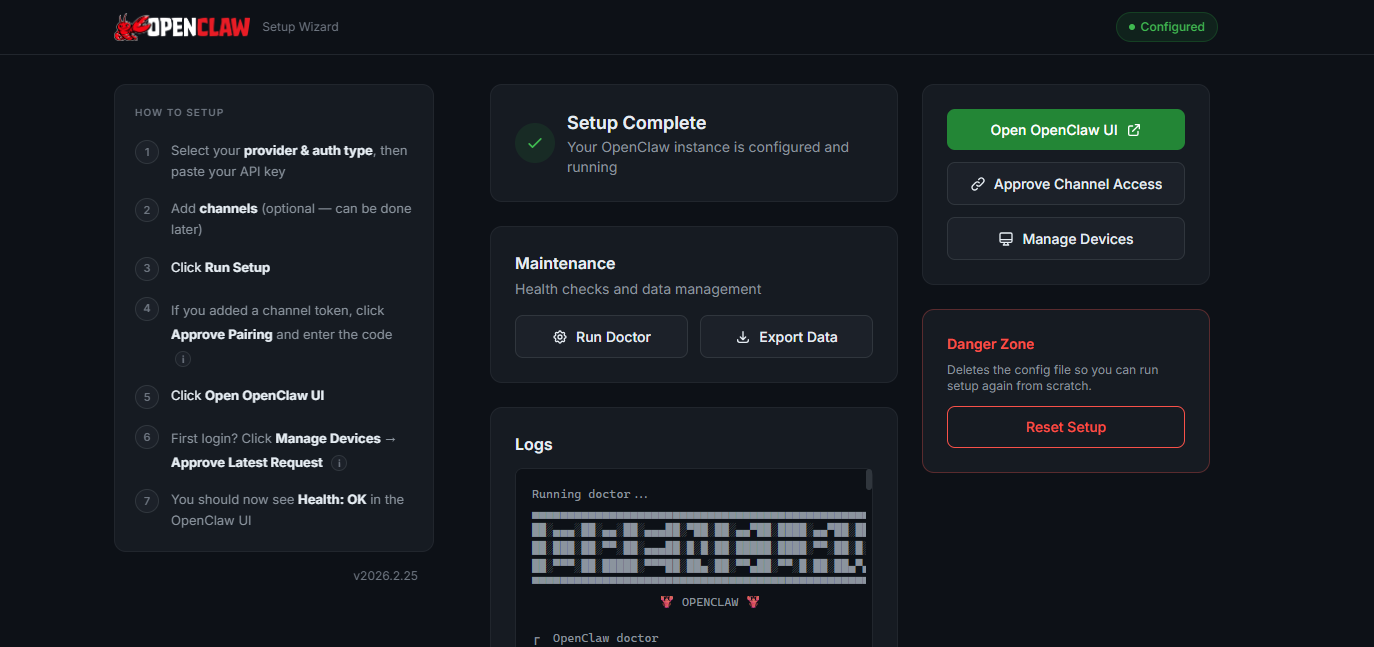
- Select your provider & auth type, then paste your API key
- Add channels (optional — can be done later)
- Click Run Setup
- If you added a channel token, click Approve Pairing and enter the code (After setup, message your bot on the channel. It will reply with a pairing code. Enter that code here to grant DM access.)
- Click Open OpenClaw UI
- First login? Click Manage Devices → Approve Latest Request (New browsers need a one-time device approval. After clicking "Open OpenClaw UI", come back here, click "Manage Devices", and approve the pending request.)
- You should now see Health: OK in the OpenClaw UI.

Step 5: Start Chatting
- Click "Chat" in the sidebar of the newly opened OpenClaw UI
- Type your first message
- Enjoy your self-hosted AI assistant! 🎉
About Hosting OpenClaw (Prev Clawdbot, Moltbot) – Self-Hosted AI Agents
Deploying OpenClaw on Railway traditionally requires interactive terminal access for onboarding, which Railway doesn't provide. This template solves that challenge by wrapping OpenClaw's gateway with a web-based setup wizard. You get a one-click deployment with browser-based configuration—no CLI commands needed. This template lets you deploy OpenClaw in 1 click.
Common Use Cases
- Personal AI Assistant: Chat with Claude/GPT via web interface or messaging apps for research, coding help, writing, and daily tasks
- Automated Workflows: Schedule recurring tasks, monitor websites, send notifications, and automate repetitive processes using cron jobs
Dependencies for OpenClaw (Prev Clawdbot, Moltbot) – Self-Hosted AI Agents Hosting
- AI Provider API Key: Anthropic Claude, OpenAI GPT, Google Gemini, or other supported providers
Deployment Dependencies
- OpenClaw GitHub Repository - Source code for the AI agent framework
- Anthropic API Keys - Claude AI models (recommended)
- OpenAI API Keys - GPT models (alternative)
- Google AI Studio - Gemini models (alternative)
- Telegram BotFather - Create Telegram bots for messaging
- Discord Developer Portal - Create Discord bots
🔑 How to Get API Keys for Different AI Providers
How to Get an Anthropic API Key? (Claude - Recommended)
- Visit Anthropic Console
- Sign up/log in → Navigate to "API Keys" in the left sidebar → Click "Create Key"
- Name your key (e.g., "OpenClaw Railway") → Copy the key → Paste into the setup wizard
How to Get an OpenAI API Key? (GPT)
- Go to OpenAI Platform
- Create an account or sign in → Click on your profile → "View API Keys"
- Click "Create new secret key" → Name it (optional) and click "Create"
- Copy the key → Paste into the setup wizard
How to Get a Google Gemini API Key?
- Visit Google AI Studio
- Sign in with your Google account
- Click "Get API Key" in the left menu
- Select existing project or create new
- Click "Create API Key"
- Copy the generated key
- Paste into the setup wizard
💬 How to Add Messaging Channels to OpenClaw
How to Add a Telegram Bot?
Step 1: Create Your Bot
- Open Telegram and search for
@BotFather - Send the command:
/newbot - Choose a display name: "My OpenClaw Assistant"
- Choose a username:
my_openclaw_bot(must end with 'bot') - BotFather will give you a token (format:
123456789:ABCdef...) - Copy this token
Step 2: Add to OpenClaw
- Go to your setup wizard:
/setup - Scroll to "Optional: Channels" section
- Paste token in "Telegram bot token" field
- Click "Run Setup"
- Wait for completion
Step 3: Start Chatting
- Search for your bot username in Telegram
- Click "Start" or send
/start - Begin chatting with your AI agent!
How to Add a Discord Bot?
Step 1: Create Discord Application
- Go to Discord Developer Portal
- Click "New Application"
- Name it (e.g., "OpenClaw Bot")
- Go to "Bot" tab in left sidebar
- Click "Add Bot" → Confirm
Step 2: Configure Bot
- Under "Privileged Gateway Intents":
- ✅ Enable "MESSAGE CONTENT INTENT" (Required!)
- Click "Reset Token" → Copy the token
- Save the token securely
Step 3: Invite Bot to Your Server
- Go to "OAuth2" → "URL Generator"
- Select scopes:
- ✅
bot - ✅
applications.commands
- ✅
- Select permissions:
- ✅ Read Messages/View Channels
- ✅ Send Messages
- ✅ Read Message History
- ✅ Embed Links
- Copy the generated URL
- Open URL in browser → Select server → Authorize
Step 4: Add to OpenClaw
- Go to your setup wizard:
/setup - Paste token in "Discord bot token" field
- Click "Run Setup"
- Mention
@YourBotNamein Discord to chat!
Why Deploy OpenClaw (Prev Clawdbot, Moltbot) – Self-Hosted AI Agents on Railway?
Railway is a singular platform to deploy your infrastructure stack. Railway will host your infrastructure so you don't have to deal with configuration, while allowing you to vertically and horizontally scale it.
By deploying OpenClaw (Prev Clawdbot, Moltbot) – Self-Hosted AI Agents on Railway, you are one step closer to supporting a complete full-stack application with minimal burden. Host your servers, databases, AI agents, and more on Railway.
Template Content
OpenClaw (Prev Moltbot, Clawdbot)
praveen-ks-2001/openclaw-railway-template-new