
Deploy OpenMuse
OpenMuse personal AI assistant with browser, tasks, goals and Postgres

Just deployed
/data
Just deployed
/data

Just deployed
/var/lib/postgresql/data
Deploy and Host OpenMuse with Railway
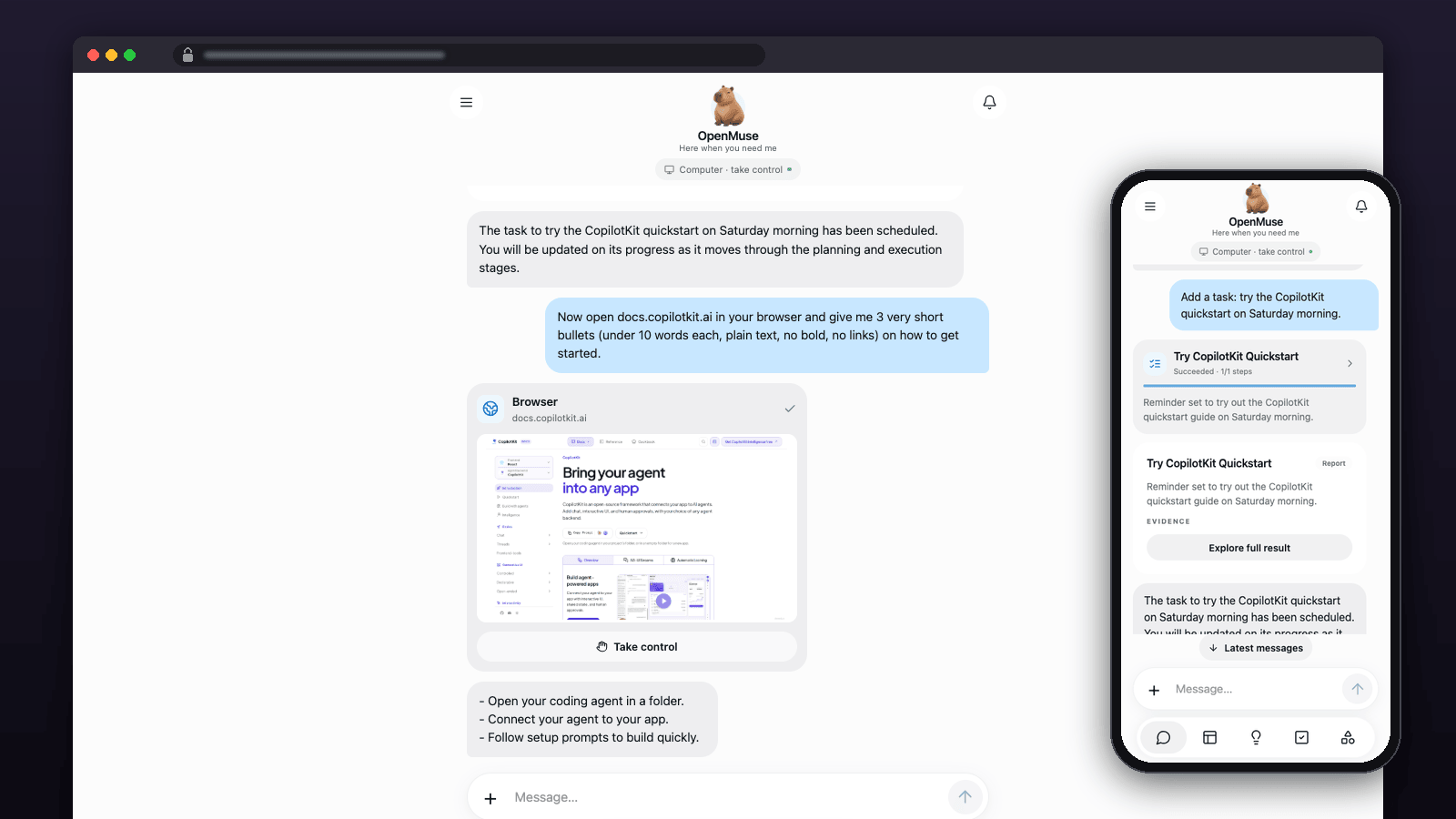
CopilotKit's open-source personal agent, with its own browser, documents, tasks and goals, in a web app that works on your phone.
Get started — you need a free CopilotKit Intelligence key and a model provider key. Hobby recommended: the three services idle at about 350 MB when fresh and about 700 MB once the browser has been used.
- Get a CopilotKit key and deploy. Sign up free at CopilotKit Intelligence; in an empty folder run
npx copilotkit@latest login, thennpx copilotkit@latest project select --create openmuse, and paste theCPK_INTELLIGENCE_API_KEYvalue from the.envit writes into the deploy form. - Choose a model. In the OpenMuse service's Variables set
MODELand the matching key, then deploy the change. With OpenRouter:MODEL=openai/openai/gpt-4o-mini,OPENAI_API_KEY= your OpenRouter key,OPENAI_BASE_URL=https://openrouter.ai/api/v1. - Sign in and ask. Open the OpenMuse service URL, paste
OPENMUSE_ACCESS_KEYfrom its Variables tab, and ask it to summarize a web page.
About Hosting OpenMuse
OpenMuse is CopilotKit's open-source personal assistant: chat, a persistent browser, delegated tasks, goals, ideas and document workflows in a mobile-friendly web app. This template deploys the web app and API, a private Chromium browser worker, and PostgreSQL. Workspace data, documents and browser profiles survive redeploys. One input is required: your CopilotKit Intelligence project key. The workspace login key, encryption key, browser token and database password are generated for you. Three services make up this deployment:
| Service | Purpose | Persistent storage |
|---|---|---|
| OpenMuse | Web client, API, task worker and Caddy, on one public HTTPS origin | /data: documents and the session-signing key |
| Browser | Private Playwright Chromium worker, authenticated with a generated token | /data: browser profiles |
| Postgres | Workspace records, tasks, goals, approvals and encrypted connector credentials | /var/lib/postgresql/data |
Conversations use CopilotKit Intelligence, a separate hosted dependency. This is not a completely offline or entirely self-contained deployment. Step 1 above creates a free Developer project with the CopilotKit CLI and writes its server-only key to .env as CPK_INTELLIGENCE_API_KEY; that value goes into the variable of the same name. CopilotKit plan limits and retention apply; model-provider usage is separate.
The API and browser worker drop root privileges before running. Only OpenMuse has a public domain. PostgreSQL and the browser communicate over Railway's private network.
Common Use Cases
- Chat with your own model and ask it to read or summarize public webpages.
- Delegate research and document work, then review saved results and source evidence.
- Keep track of goals, tasks and recurring website checks.
- Connect Gmail and Google Calendar using your own Google OAuth application.
- Use an external raw AG-UI agent for conversational routing instead of the built-in model.
Dependencies for OpenMuse Hosting
- OpenMuse source at commit
fed01e9d6411ab773d9adf1aa490a07dc8c64d0b(MIT). ghcr.io/will-bogusz/openmuse:fed01e9-20261003, pinned by digest: API, web client and Caddy.ghcr.io/will-bogusz/openmuse-browser-worker:fed01e9-20260922, pinned by digest: upstream browser-worker Dockerfile, unchanged.- Railway's PostgreSQL 18 image and three persistent volumes.
- Your own CopilotKit Intelligence project key; a model and provider key for general-purpose AI work.
These are community-maintained images, not official CopilotKit images. Build source and provenance are public; the OpenMuse application source is built unchanged.
Deployment Dependencies
- OpenMuse source and documentation
- Connect a runtime to CopilotKit Intelligence
- Railway persistent volumes
- Railway private networking
Implementation Details
Plan requirements. Hobby recommended. Measured idle: about 350 MB across the three services on a fresh deploy; after the browser has read a few pages it stays near 700 MB (OpenMuse 161 MB, Browser 463 MB, Postgres 72 MB; 2026-10-03). The Browser service then sits close to the Free plan's 0.5 GB per-service limit, and Free and Trial volumes hold only 0.5 GB.
This is an alpha for self-hosters and tinkerers, not a managed assistant. Bring your own model provider, review agent actions, and expect upstream behavior to change. The optional Docker-based Linux desktop/terminal is not included; Railway cannot provide the Docker engine it needs. Browser automation works without it.
First login. Wait for all three services to deploy, then open OpenMuse's public domain. Copy OPENMUSE_ACCESS_KEY from the OpenMuse service's Variables tab into the sign-in screen. Anyone with this key shares the same workspace; this is not a multi-tenant service. Do not put the key in a URL or share it publicly. If chat shows "Runtime info request failed with status 503", no model is configured yet.
Configure a model. The workspace can boot without one, but model chat and open-ended tasks need a provider. In OpenMuse's Variables, set MODEL to the provider/model identifier and set the matching key, then deploy the changes:
| Provider | MODEL format | Key |
|---|---|---|
| OpenAI | openai/YOUR-MODEL-ID | OPENAI_API_KEY |
| Anthropic | anthropic/YOUR-MODEL-ID | ANTHROPIC_API_KEY |
google/YOUR-MODEL-ID | GOOGLE_API_KEY | |
| OpenAI-compatible Responses API | openai/YOUR-PROVIDER-MODEL-ID | OPENAI_API_KEY plus OPENAI_BASE_URL |
For example, OpenRouter was exercised with MODEL=openai/openai/gpt-4o-mini and OPENAI_BASE_URL=https://openrouter.ai/api/v1. An endpoint offering only Chat Completions is not sufficient: the built-in OpenAI provider uses the Responses API. No provider key or paid model is bundled.
Bring your own harness. Set AGENT_BACKEND=agui, AGENT_URL to your raw AG-UI run endpoint, and optionally AGENT_TOKEN. This replaces conversational routing only. Built-in delegated model tasks still need MODEL and its provider key. OpenBot's Intelligence runtime is not a raw AG-UI URL.
Google connector. Enable Gmail API and Google Calendar API in your Google Cloud project. Create an OAuth web application, configure its consent screen and test users as appropriate, and add https://YOUR-OPENMUSE-DOMAIN/api/google/callback as an authorized redirect URI. Set GOOGLE_CLIENT_ID and GOOGLE_CLIENT_SECRET, redeploy, then connect Google from Apps. Initial consent requests Gmail read-only and Calendar event/calendar-list read-only access. Sending mail or creating events needs additional scopes and a separate action approval. A Google application in Testing can require periodic reconnection. Google OAuth was not connected to a personal account during template QA.
Persistence and backups. Keep TOKEN_ENCRYPTION_KEY unchanged and backed up with PostgreSQL; rotating it makes stored connector credentials unreadable. Keep the OpenMuse volume for documents and session signing, and the Browser volume for profiles. Back up all three volumes before upgrading. CopilotKit conversation retention is independent of these backups. Deleting a service or its volume is not the same as redeploying it.
Health and redeploys. /api/health is an unauthenticated, inexpensive process/configuration check, not a model, browser or database round-trip. The private browser uses /health. Inside the OpenMuse container the API and Caddy are each restarted on their own with backoff if they exit, so a crash does not restart the container; look for openmuse: api exited or openmuse: web exited in the deploy logs. Volume-attached services cannot overlap their old and new deployments, so expect a short interruption during redeploys. Do not treat a green healthcheck as proof that a connector or model provider is configured.
Alpha limitations. A delegated model task can stop in Waiting input without calling its completion tool. Read its timeline and provide a continuation if appropriate; a queued task is not proof of completion. General chat, real browser reads and a continued task producing a sourced report were exercised. Connected-account actions, external harnesses and the Docker computer were not exercised. Browser automation may encounter captchas or site restrictions; complete those yourself rather than trying to bypass them.
Upgrades. Images are immutable digest pins, not automatic updates. Review upstream changes, build and test a new pinned commit, then update both image references. See the image repository for the build workflow. Your existing deployment does not automatically inherit marketplace-template edits.
Risks. Models can act on untrusted webpages and documents. Give the workspace only the access it needs, inspect proposed external actions, and keep the login key private. Browser profiles can contain signed-in sessions. Provider charges, CopilotKit terms, site terms and Railway's fair-use policy apply. Alpha software and pinned images require active maintenance and backups.
Why Deploy OpenMuse on Railway?
Railway hosts the application, private browser and database together, wires their private-network connections, provides an HTTPS domain and keeps persistent volumes across redeploys. You supply your own service credentials and retain control of the application configuration.
Template Content
CPK_INTELLIGENCE_API_KEY
Required. CopilotKit Intelligence project key (starts with cpk-). Sign up free at dashboard.operations.copilotkit.ai, then in an empty folder run npx copilotkit@latest login and npx copilotkit@latest project select --create openmuse; the key is written to .env as CPK_INTELLIGENCE_API_KEY.


