
Deploy OpenPanel
Web and product analytics with events, funnels and user profiles
dashboard
Just deployed
Just deployed
Just deployed

Redis
Just deployed
/data

Just deployed

clickhouse
Just deployed
/var/lib/clickhouse

mailpit
Just deployed
/data

Just deployed
/var/lib/postgresql/data
Deploy and Host OpenPanel on Railway
OpenPanel is an open-source web and product analytics platform: the pageview reporting you expect from Plausible plus the events, funnels and profiles you expect from Mixpanel. It suits teams who want to know which pages bring visitors in and what those visitors then do, without handing that data to a vendor. Events land in your own ClickHouse instance, visitors are identified by a rotating salted hash rather than a tracking cookie, and every chart is queried from the raw event table.
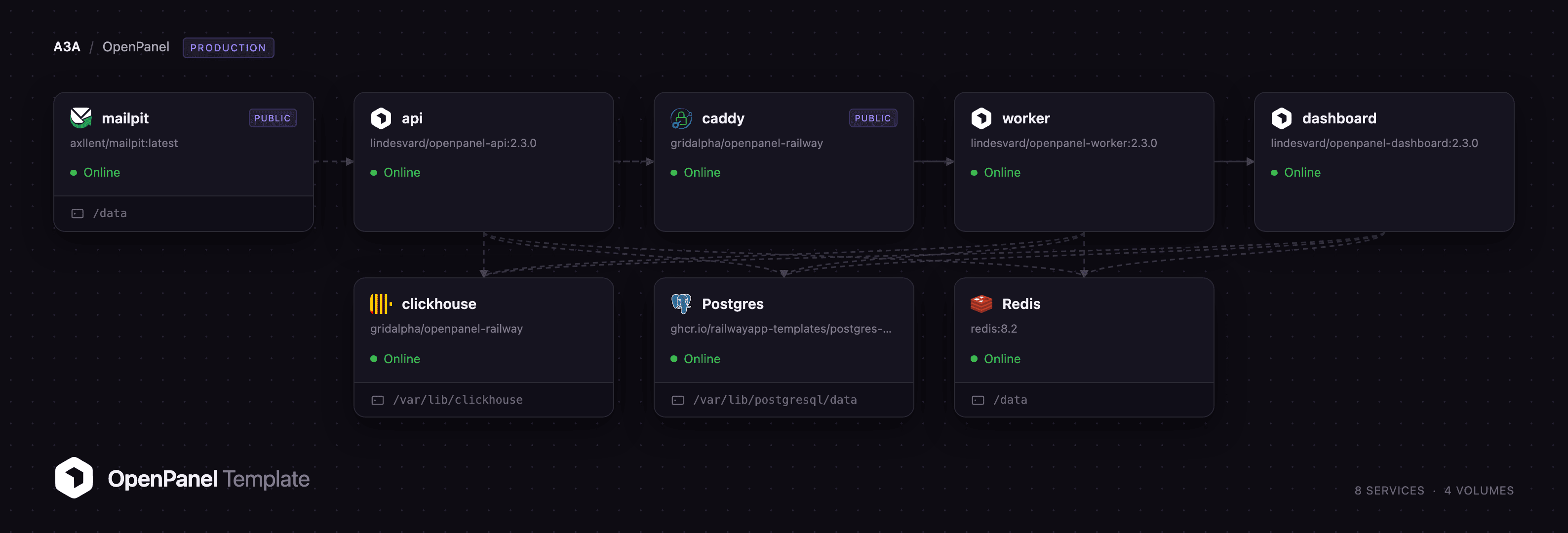
Deploy OpenPanel on Railway and this template pre-configures the whole self-hosted stack: caddy as the public front door, dashboard for the interface, api for ingestion and the tRPC layer, worker for queues and scheduled jobs, clickhouse for the event store, managed Postgres and Redis, and a mailpit inbox so invitations and password resets work immediately. Browser traffic and SDK calls both reach caddy, which sends /api* to the API and everything else to the dashboard — one origin, one session cookie, no CORS to get wrong.
Getting Started with OpenPanel on Railway
Open the caddy service's public URL once the deploy is green. There are no default credentials: the first person to visit /onboarding becomes the owner, and registration closes behind them, because the template ships ALLOW_REGISTRATION=false and OpenPanel exempts only the first user. Claim that account immediately, then name your workspace and create a project, choosing Website, App or Backend.
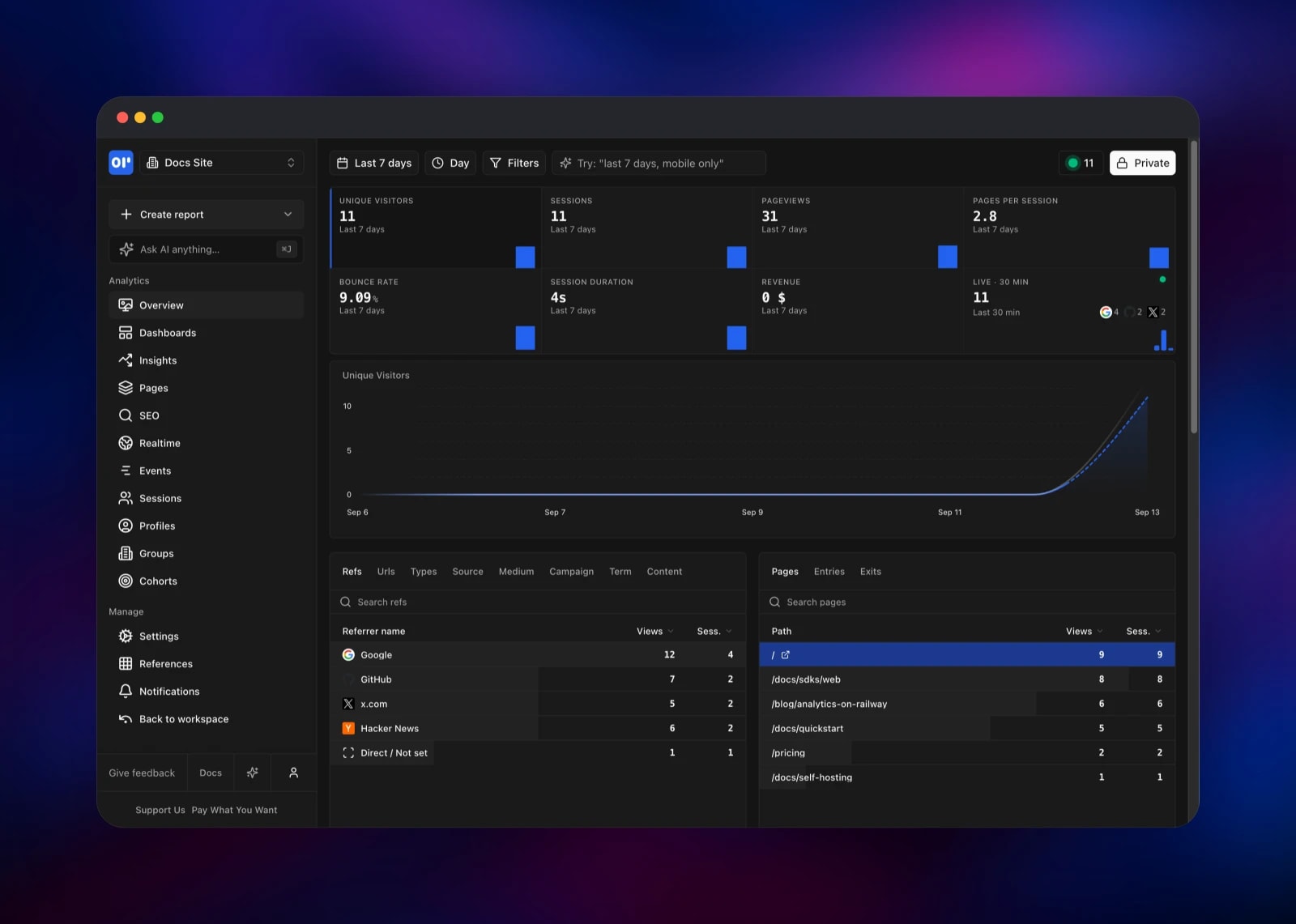
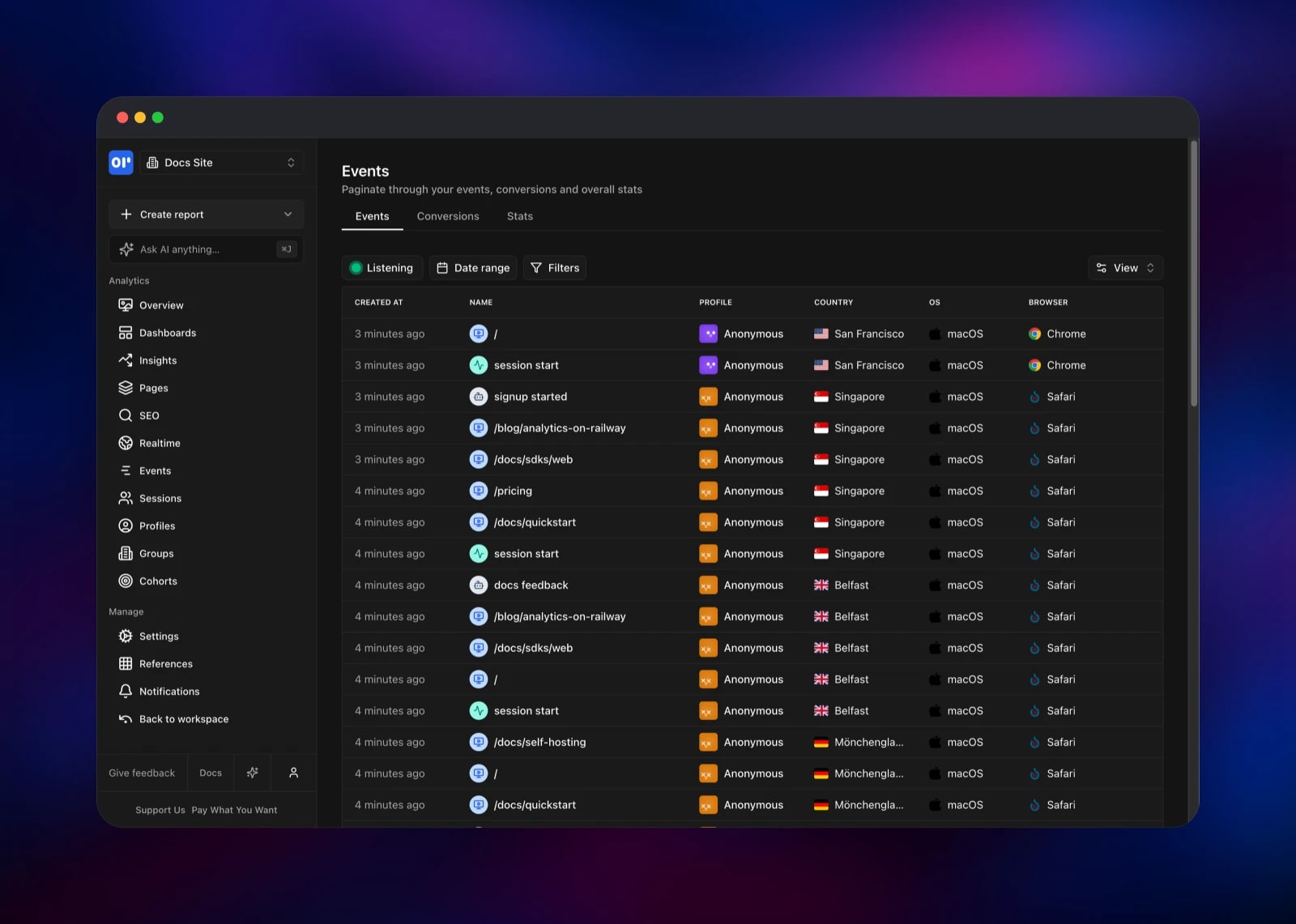
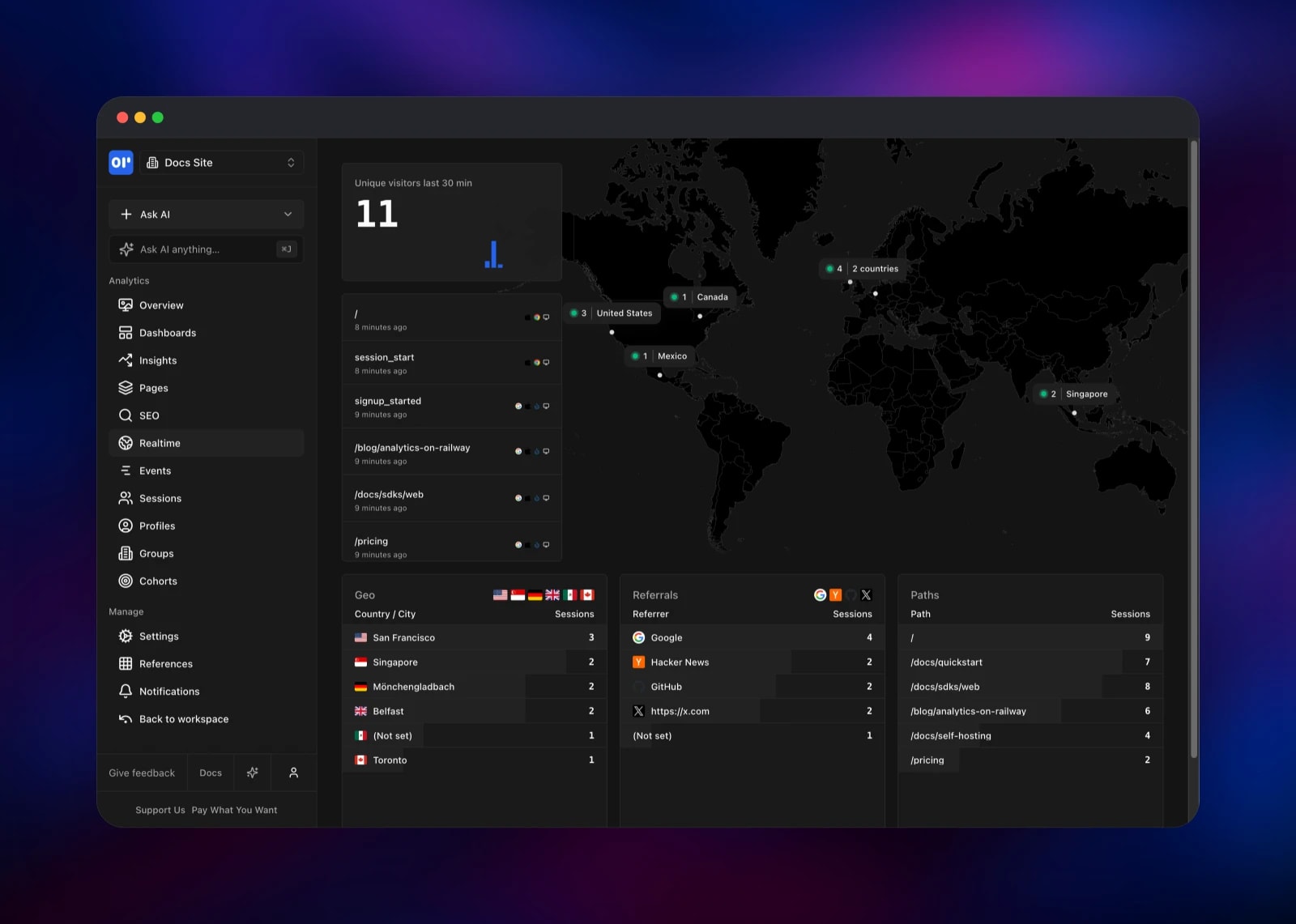
The connect screen shows a client ID, a client secret and a ready-made snippet. Paste it into your site — pointing the second script tag at /op1.js on your own deployment rather than the vendor's CDN — or use a framework SDK. The verify step waits for your first live event. After that, Overview gives you visitors, referrers, pages and devices; Realtime maps sessions by city; Events pages through the raw stream; and Create report saves a chart onto a dashboard. One test event from a terminal is the fastest end-to-end check: it exercises the API, Redis, the worker and ClickHouse at once.
About Hosting OpenPanel
Self-host OpenPanel when analytics data is sensitive, when ad blockers eat a third of your traffic on a vendor domain, or when per-event pricing makes product analytics too expensive to leave on. Running it yourself means unlimited events, SQL-level access to the raw data and a tracker served from your own domain.
- Web analytics: visitors, sessions, bounce rate, referrers, UTM campaigns, entry and exit pages
- Product analytics: custom events, funnels, retention, cohorts, profiles and groups
- Realtime view with a live world map, saved reports, dashboards and public share links
- Session replay, Google Search Console SEO reporting, event notification rules
- SDKs for web, React, Next.js, Vue, Astro, React Native, Node, Laravel, Rust, Ruby, iOS and Android, plus a REST API
Each service has one job. caddy owns the public origin and forwards /api* to the API with the prefix stripped. api validates and enqueues events, serves the dashboard's tRPC calls and runs the Postgres and ClickHouse migrations at boot. worker drains the queue into ClickHouse, stitches sessions and runs cron jobs. clickhouse stores events; Postgres holds accounts, projects, reports and dashboards; Redis carries queues, caching and rate limits.
Why Deploy OpenPanel on Railway
Railway removes the infrastructure work this stack needs:
- Postgres, Redis and ClickHouse provisioned and wired together
- Private networking; only the front door is public
- Persistent volumes for ClickHouse and captured mail
- Health checks and automatic restarts on every service
- One-click redeploys when a newer OpenPanel release ships
Common Use Cases
- Replace Google Analytics with a privacy-friendly tracker on your own database
- Track signups, activation and feature adoption, and build funnels over them
- Give each client or site in a portfolio its own project in one workspace
- Feed mobile and backend events into the same timeline as web pageviews
Dependencies for OpenPanel
lindesvard/openpanel-api:2.3.0— Fastify API, ingestion and migrationslindesvard/openpanel-dashboard:2.3.0— the user interfacelindesvard/openpanel-worker:2.3.0— queue workers, cron and queue inspectorclickhouse/clickhouse-server:25.10.2.65— event store, built from the template's source repo with OpenPanel's configcaddy:2-alpine— single-origin reverse proxy, same repo- Railway managed Postgres 18 and Redis 8.2
axllent/mailpit:latest— SMTP capture for invites and password resets
Environment Variables Reference
| Variable | Purpose |
|---|---|
DASHBOARD_URL | Public URL of the deployment; also the cookie and CORS origin |
CUSTOM_COOKIE_DOMAIN | Exact host for the session cookie — required on a railway.app domain |
COOKIE_SECRET | Signs session cookies; keep it stable |
ENCRYPTION_KEY | 64 hex characters, encrypts TOTP and integration tokens |
ALLOW_REGISTRATION | false after the first account; true reopens signup |
SMTP_HOST / SMTP_PORT | Mail transport; point at a real relay in production |
DISABLE_BULLBOARD | Set to 1 to switch off the queue inspector |
Deployment Dependencies
- Source: github.com/Openpanel-dev/openpanel
- Images: hub.docker.com/u/lindesvard
- Docs: openpanel.dev/docs
- Runtime: Node.js 22, ClickHouse 25.10, PostgreSQL 18, Redis 8
Hardware Requirements for Self-Hosting OpenPanel
| Resource | Minimum | Recommended |
|---|---|---|
| CPU | 2 vCPU across all services | 4 vCPU |
| RAM | 4 GB total | 8 GB, mostly for ClickHouse |
| Storage | 5 GB ClickHouse volume | 20 GB+ at high volume |
| Runtime | Docker / container platform | Railway |
ClickHouse compresses events aggressively — millions fit in a few gigabytes — but it is the service to watch as traffic grows.
Self-Hosting OpenPanel
Upstream ships a bundle for a single Docker host. Clone the repo and run its setup script, which writes a Compose file and a Caddy config for your domain:
git clone https://github.com/Openpanel-dev/openpanel.git
cd openpanel/self-hosting
./setup
./start
Every service is configured by environment variables, so the images run directly too. The API needs all three datastores and migrates before starting:
docker run -d --name openpanel-api \
  -e DATABASE_URL="postgresql://postgres:pass@db:5432/postgres?schema=public" \
  -e CLICKHOUSE_URL="http://default:pass@clickhouse:8123/openpanel" \
  -e REDIS_URL="redis://redis:6379" -e SELF_HOSTED=true \
  -e DASHBOARD_URL="https://analytics.example.com" \
  -e API_URL="https://analytics.example.com/api" \
  -e COOKIE_SECRET="change-me" -p 3000:3000 \
  lindesvard/openpanel-api:2.3.0 \
  sh -c "CI=true pnpm -r run migrate:deploy && node dist/index.js"
Serve the dashboard and API from one hostname: splitting them across two domains breaks the session cookie, which is why this template puts Caddy in front.
How Much Does OpenPanel Cost to Self-Host?
OpenPanel is open source under AGPL-3.0 and free to run, with no event caps, seat limits or feature gates. The hosted cloud starts around $20/month at a comparable volume, so self-hosting pays for itself quickly. On Railway you pay only for the compute, memory and volumes the services use, and ClickHouse is the part that grows with traffic. The project also sells a supporter tier unlocking a private registry of daily builds; the free Docker Hub releases used here are the same software on a slower cadence.
FAQ
What is OpenPanel? An open-source analytics platform that merges web and product analytics in one interface — a self-hostable alternative to Mixpanel, PostHog and Plausible.
What does this Railway template deploy? Eight services: a Caddy front door, the dashboard, the API, a worker, ClickHouse, managed Postgres and Redis, and a Mailpit inbox.
Why does OpenPanel need both ClickHouse and Postgres? ClickHouse is columnar and built for billions of append-only event rows; Postgres stores the relational, low-volume side — accounts, projects, reports and dashboards. Redis carries the queue between API and worker.
How do I create the first admin account on a self-hosted OpenPanel?
Visit /onboarding on the deployed URL. The first account to register becomes the workspace owner and registration closes afterwards; set ALLOW_REGISTRATION=true to reopen it, or invite teammates by email.
Can I send events from a backend or mobile app rather than a browser?
Yes. Every SDK and the REST API take the same payload — POST /api/track with openpanel-client-id and openpanel-client-secret headers — so server, mobile and web events share one timeline.
How do I connect a real email provider to self-hosted OpenPanel?
Set SMTP_HOST, SMTP_PORT, SMTP_USER and SMTP_PASS on the api, dashboard and worker services — or RESEND_API_KEY instead — and point EMAIL_SENDER at a domain you control.
Template Content

