
Deploy OpenSign
Electronic signature platform for sending and signing PDF documents

MongoDB
Just deployed
/data/db

opensign
Just deployed

mailpit
Just deployed
/data
opensign-server
Just deployed
/usr/src/app/files
opensign-client
Just deployed
Deploy and Host OpenSign on Railway
OpenSign is an open-source electronic signature platform — a self-hosted alternative to DocuSign, Dropbox Sign and PandaDoc. Upload a PDF, drag signature, initial, date and text fields onto it, and send it to whoever needs to sign. Every completed document is sealed with a real PKCS#7 digital signature and an audit trail recording who signed, when, and from which IP address. Legal, HR and procurement teams use it when contracts cannot leave their own infrastructure; developers use its REST API to fold signing into a product.
Deploy OpenSign on Railway and the whole stack arrives wired together. A Caddy gateway named opensign holds the single public domain, routing /api/* to the backend and serving the React app for everything else. opensign-server runs the API, the signing engine and DOCX conversion against a volume holding every uploaded and signed document. opensign-client serves the single-page app, MongoDB stores documents, templates, contacts and the audit trail, and mailpit captures signature e-mails. The signing certificate OpenSign requires is generated on first boot.
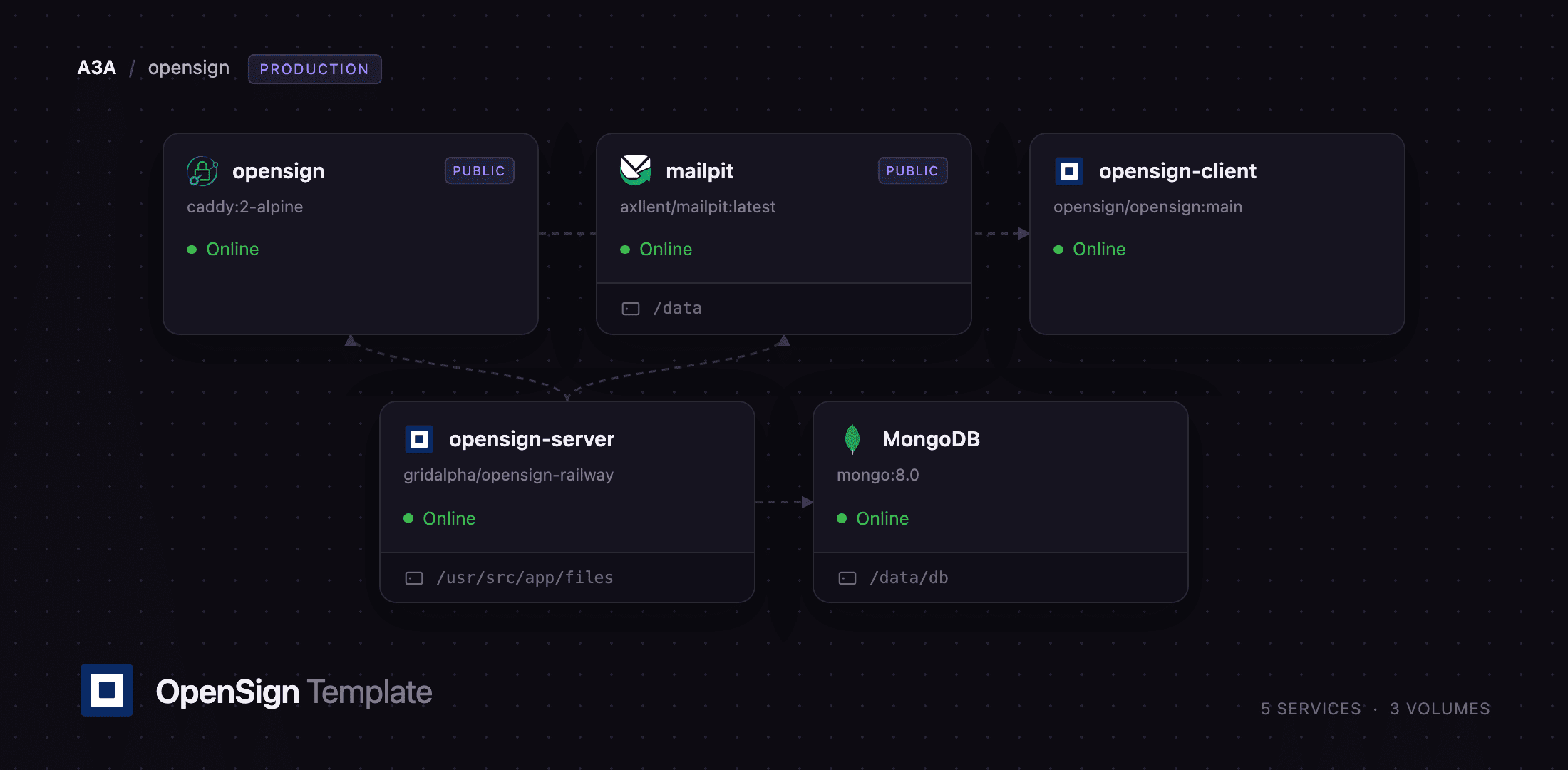
Getting Started with OpenSign on Railway
Set an administrator e-mail address and password at deploy time. That account is created inside the container before the public port opens, so nobody can take it first. Open the public URL and sign in. There is no public registration page: further users are invited from Settings → Users, and the anonymous organisation-creation endpoint is refused once an administrator exists.
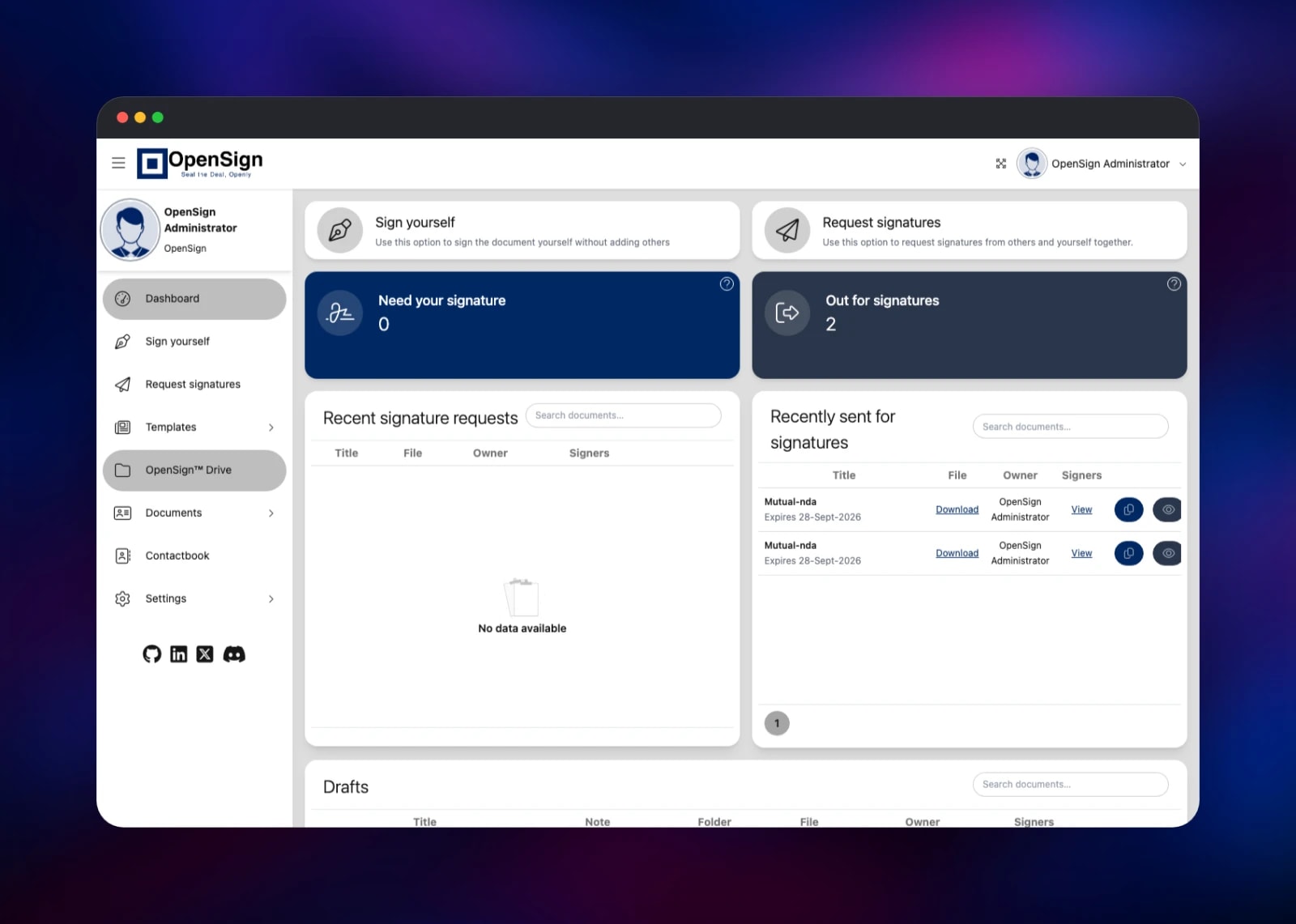
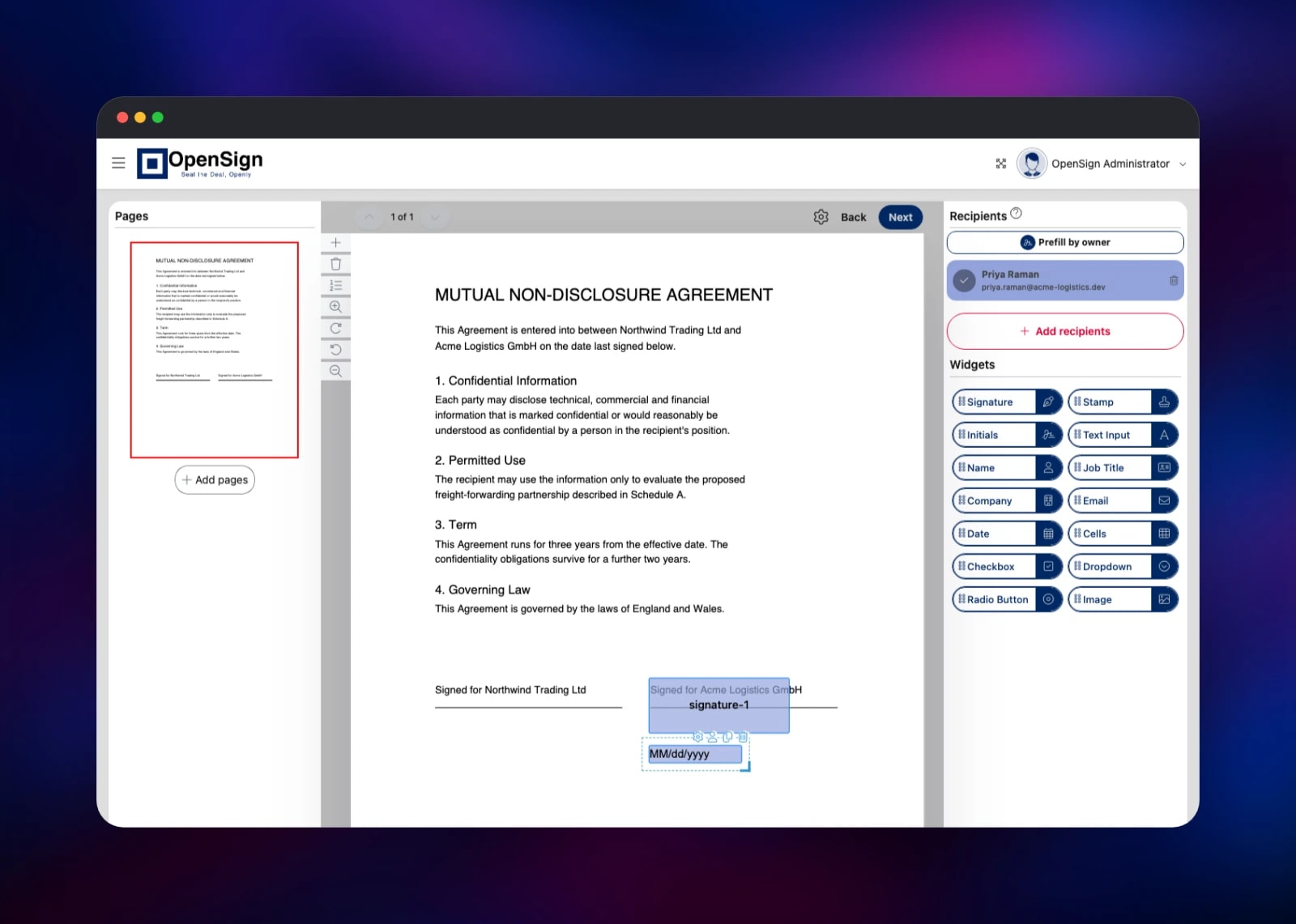
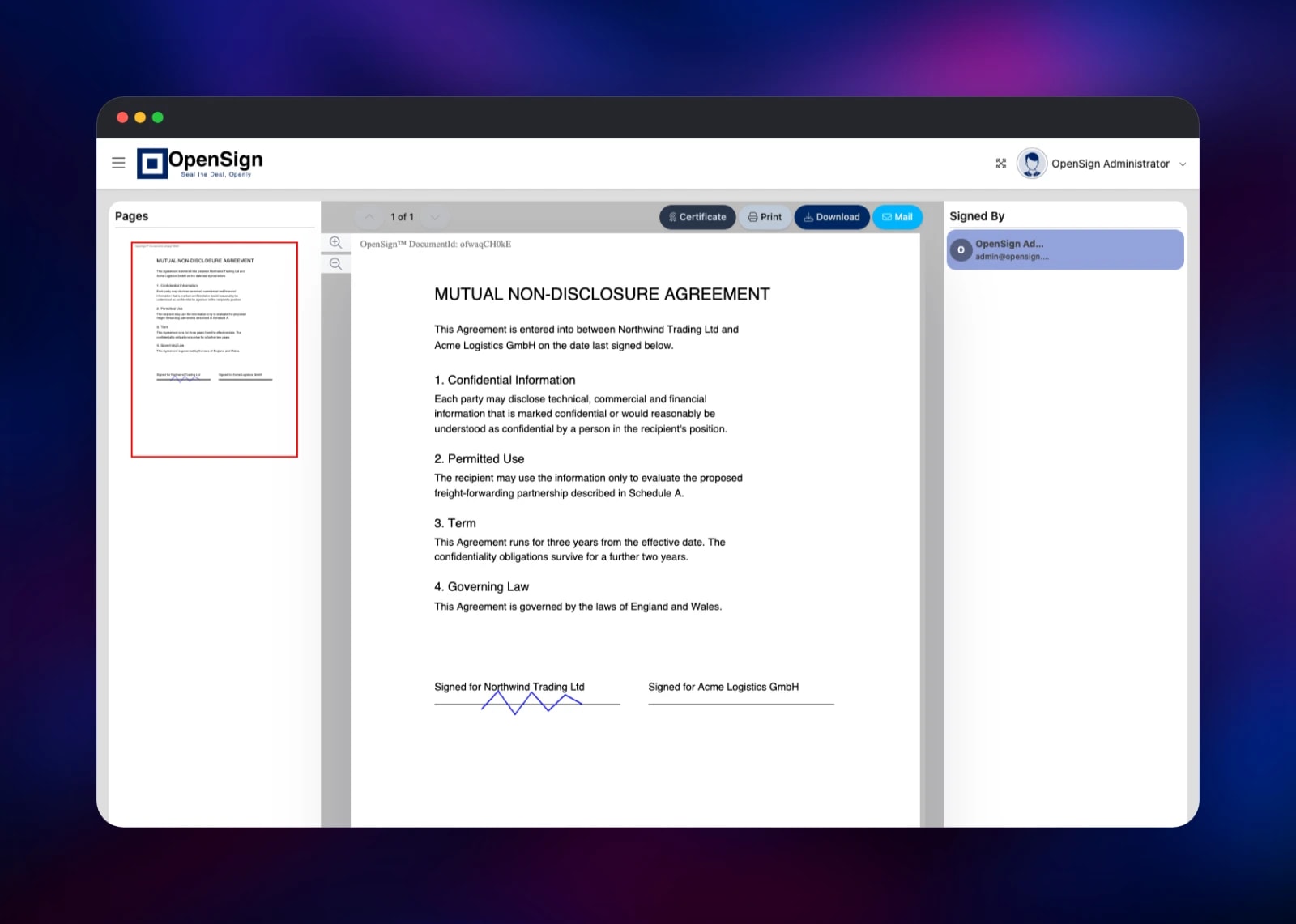
The quickest check is Sign yourself: upload a PDF, give it a title and note, and continue to the editor. Drag the Signature widget onto the page, draw a signature, save it, then press Finish. OpenSign flattens the field into the PDF, signs it, and offers Certificate, Print, Download and Mail — a downloadable signed copy proves the certificate, the volume and the database are healthy.
For the full workflow, add a contact under Contactbook, then use Request signatures: pick the recipient, place signature and date fields against their name, and send. The invitation lands in the Mailpit inbox at that service's own URL, behind the credentials in MP_UI_AUTH. Point the SMTP_* variables at your own provider for real delivery.
About Hosting OpenSign
Self-hosting OpenSign matters when the documents are themselves the sensitive asset. Contracts, NDAs and patient forms pass through a signing platform in full, so a hosted service means handing that content — and everyone who signed it — to a third party. Running it yourself keeps the PDFs on storage you control and removes per-envelope pricing.
- Drag-and-drop signature, initials, stamp, name, date, text, checkbox and image fields
- Multiple signers with optional signing order, expiry dates and reminders
- Reusable templates for documents sent repeatedly
- PKCS#7 signing, a completion certificate and a per-event audit trail
- Optional per-document one-time-password verification, plus a REST API and webhooks
opensign is a Caddy gateway giving the app one origin — OpenSign builds the signing links it e-mails from the request host, so API and UI must answer on the same domain. opensign-client learns its API address at runtime, so no rebuild is needed.
Why Deploy OpenSign on Railway
Railway removes the setup work self-hosting an e-signature stack involves.
- Gateway, API, frontend, database and mail server deploy together, already wired
- Managed MongoDB with its own volume, and a volume for every signed document
- The signing certificate is generated for you on first boot
- HTTPS and a public domain from the first deploy
Common Use Cases
- Sales and procurement contracts — send an MSA or purchase order and archive the signed copy with its audit trail.
- HR onboarding packs — offer letters and policy acknowledgements as reusable templates for every new hire.
- Regulated document flows — keep consent forms and financial mandates inside your own data boundary.
Dependencies for OpenSign
opensign—caddy:2-alpine, the gateway holding the public domainopensign-server— built from gridalpha/opensign-railway on top ofopensign/opensignserver:mainopensign-client—opensign/opensign:mainMongoDB—mongo:8.0, Railway-managedmailpit—axllent/mailpit:latest
Environment Variables Reference
| Variable | Service | Purpose |
|---|---|---|
OPENSIGN_ADMIN_EMAIL | opensign-server | Administrator created on first boot |
OPENSIGN_ADMIN_PASSWORD | opensign-server | Password for that administrator |
OPENSIGN_OPEN_SIGNUP | opensign-server | true re-enables self-service signup |
MASTER_KEY | opensign-server | Parse master key; also signs download URLs |
SMTP_HOST / SMTP_PORT | opensign-server | Mail server for signature requests |
PFX_BASE64 / PASS_PHRASE | opensign-server | Optional: your own signing certificate |
REACT_APP_SERVERURL | opensign-client | API address the browser calls |
MP_UI_AUTH | mailpit | Credentials for the Mailpit inbox |
Deployment Dependencies
- Source: github.com/OpenSignLabs/OpenSign
- Images: opensign/opensignserver, opensign/opensign
- Docs: docs.opensignlabs.com; runtime Node.js 22, Parse Server 8, LibreOffice
Hardware Requirements for Self-Hosting OpenSign
| Resource | Minimum | Recommended |
|---|---|---|
| CPU | 1 vCPU | 2 vCPU |
| RAM | 2 GB | 4 GB |
| Storage | 5 GB volume | 20 GB+, sized to document volume |
| Runtime | Node.js 22 + MongoDB 8 | Node.js 22 + MongoDB 8 |
The backend bundles LibreOffice for DOCX-to-PDF conversion, the memory-hungry part; signing itself is cheap. Each signed PDF is stored beside its original, so plan roughly double the raw size.
Self-Hosting OpenSign
Upstream ships a Docker Compose stack:
export HOST_URL=https://sign.example.com
curl --remote-name-all \
  https://raw.githubusercontent.com/OpenSignLabs/OpenSign/main/docker-compose.yml \
  https://raw.githubusercontent.com/OpenSignLabs/OpenSign/main/Caddyfile \
  https://raw.githubusercontent.com/OpenSignLabs/OpenSign/main/.env.local_dev
mv .env.local_dev .env.prod
docker compose up --force-recreate
Replace the shipped MASTER_KEY and example certificate before exposing it. OpenSign wants a PKCS#12 keystore in PFX_BASE64, its passphrase in PASS_PHRASE:
openssl req -x509 -newkey rsa:2048 -sha256 -days 3650 -nodes \
  -keyout signing.key -out signing.crt -subj "/CN=Your Company"
openssl pkcs12 -export -inkey signing.key -in signing.crt \
  -out signing.pfx -passout pass:your-passphrase \
  -keypbe PBE-SHA1-3DES -certpbe PBE-SHA1-3DES -macalg sha1
base64 -w0 signing.pfx > signing.b64
On Railway this is unnecessary: a keystore is generated on the volume at first boot, and PFX_BASE64 exists only as an override.
Is OpenSign Free to Self-Host?
OpenSign is released under the GNU Affero General Public License v3, so the software costs nothing and the self-hosted build carries no envelope limit, seat count or feature gate. OpenSign Labs also sells a hosted plan priced per user. On Railway you pay only for the compute, memory and volume storage the five services consume — for a few hundred documents a month, a fraction of a per-envelope subscription.
FAQ
What is OpenSign? An open-source electronic signature platform that sends documents out for signature and seals the result with a PKCS#7 signature and an audit trail — the self-hosted equivalent of DocuSign.
What does this Railway template deploy? Five services: a Caddy gateway on the public domain, the OpenSign backend with a document volume, the React frontend, managed MongoDB, and Mailpit as a capture-only mail server for signature e-mails.
Why does it need MongoDB and a volume? OpenSign is built on Parse Server, which stores documents, templates, contacts, users and audit events in MongoDB. The PDFs are files rather than rows, so the backend keeps them on a volume with the signing certificate.
Will Adobe Acrobat show the signatures as valid?
The signature is cryptographically valid and Acrobat confirms the document is unaltered since signing, but the generated certificate is self-signed, so the signer's identity reads as unverified. Supply an AATL-approved certificate through PFX_BASE64 for the green check.
How do I add more users to self-hosted OpenSign?
Sign in as the administrator and invite them from the Users screen under Settings. Self-service signup is off by default; set OPENSIGN_OPEN_SIGNUP to true to let anyone reaching the URL create an organisation.
Can I use the OpenSign REST API from my own application?
Yes. The backend exposes OpenSign's documented API under /api/app on the same public domain, so a token from the dashboard lets you create documents, add signers and fetch signed copies programmatically.
Template Content
MongoDB
mongo:8.0opensign
caddy:2-alpinemailpit
axllent/mailpit:latestopensign-server
gridalpha/opensign-railwayopensign-client
opensign/opensign:main

