
Deploy Passbolt
Password manager for teams, with end-to-end encrypted sharing

mailpit
Just deployed
/data

MySQL
Just deployed
/var/lib/mysql
passbolt
Just deployed
/data
Deploy and Host Passbolt on Railway
Passbolt is an open-source password manager built for teams. Every credential is encrypted in the browser with OpenPGP and shared by encrypting it to each colleague's public key, so revoking access is a cryptographic operation rather than a permission flag. Engineering teams, agencies and IT departments use it to share server logins, API keys and service accounts without pasting them into chat.
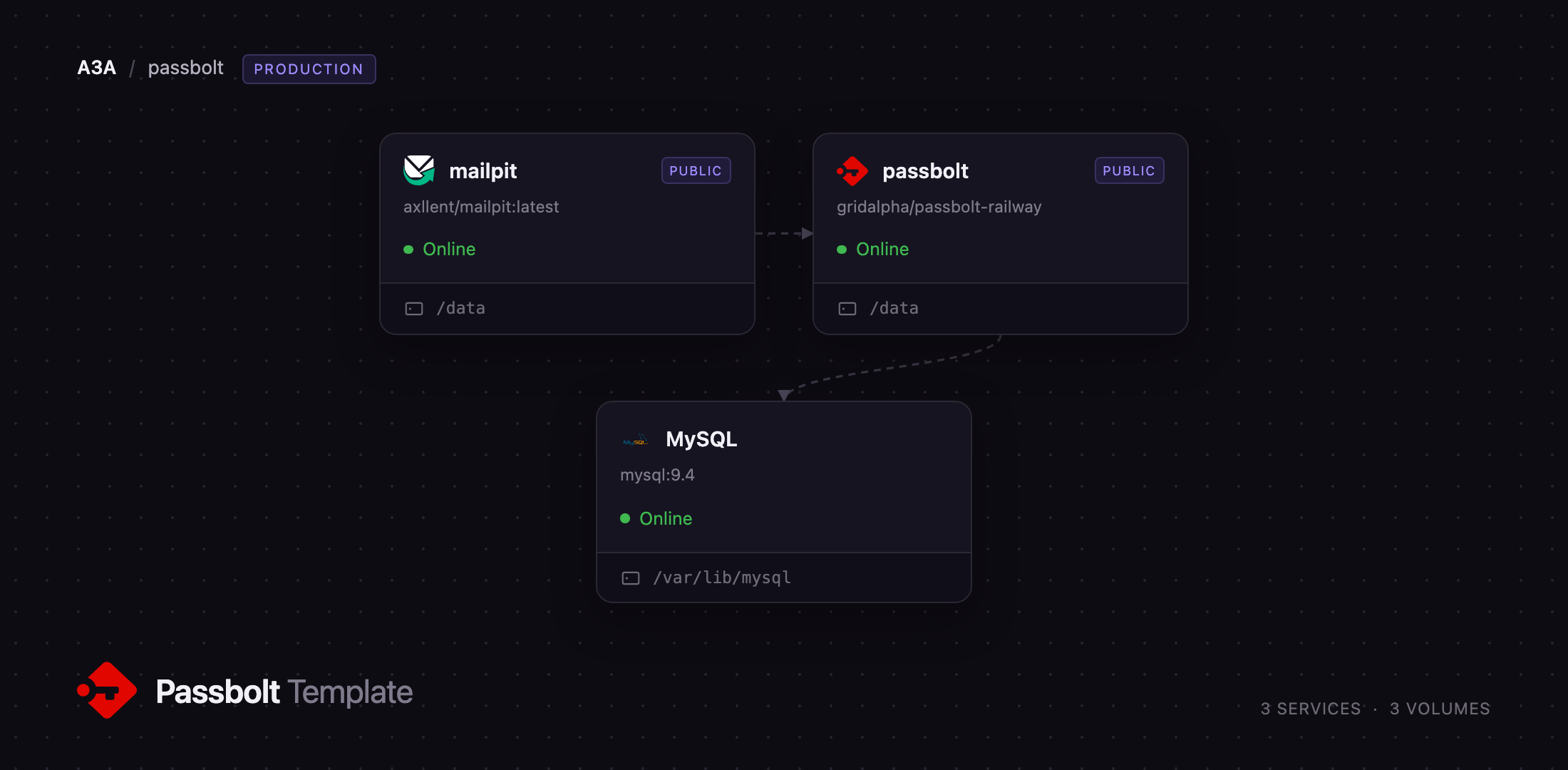
Deploy Passbolt on Railway and you get the production shape rather than one container: a passbolt service running nginx, PHP-FPM and the email cron under supervisord; a Railway-managed MySQL database holding users, groups, permissions and encrypted secrets; and a mailpit service capturing the mail Passbolt sends. Mail matters more here than in most apps — the setup link, invitations and account recovery all arrive by email — so this template ships a working inbox rather than asking you to arrange SMTP first. The OpenPGP server key and JWT signing keys live on a persistent volume, and Railway's edge terminates TLS.
Getting Started with Passbolt on Railway
Before deploying, set PASSBOLT_ADMIN_EMAIL to your own address — that is the account the first administrator is created under, and editing the variable later will not move it. When the deploy finishes, the passbolt service registers that administrator and prints a one-time /setup/start/... link in its deploy log. The same link is emailed to you and waits in the Mailpit inbox, behind the credentials in MP_UI_AUTH.
Passbolt has no password login. Install the passbolt browser extension for Chrome, Firefox, Edge or Safari, then open that setup link. The extension generates your OpenPGP key pair in the browser, asks for a passphrase, hands you a recovery kit, and lets you pick a security token — three characters and a colour shown whenever Passbolt asks for your passphrase, so a phishing page cannot imitate it. Keep the recovery kit: it is the only copy of your private key.
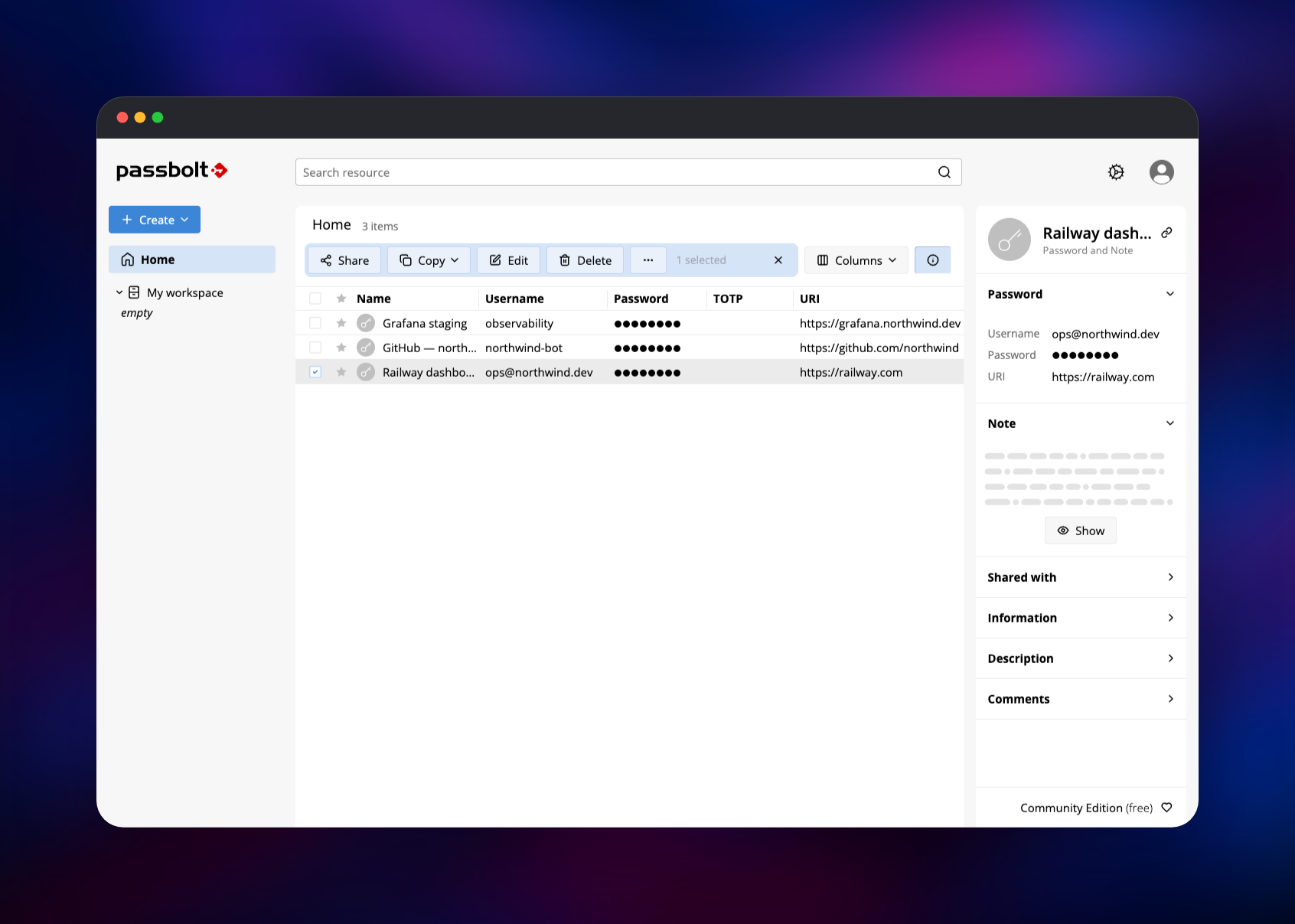
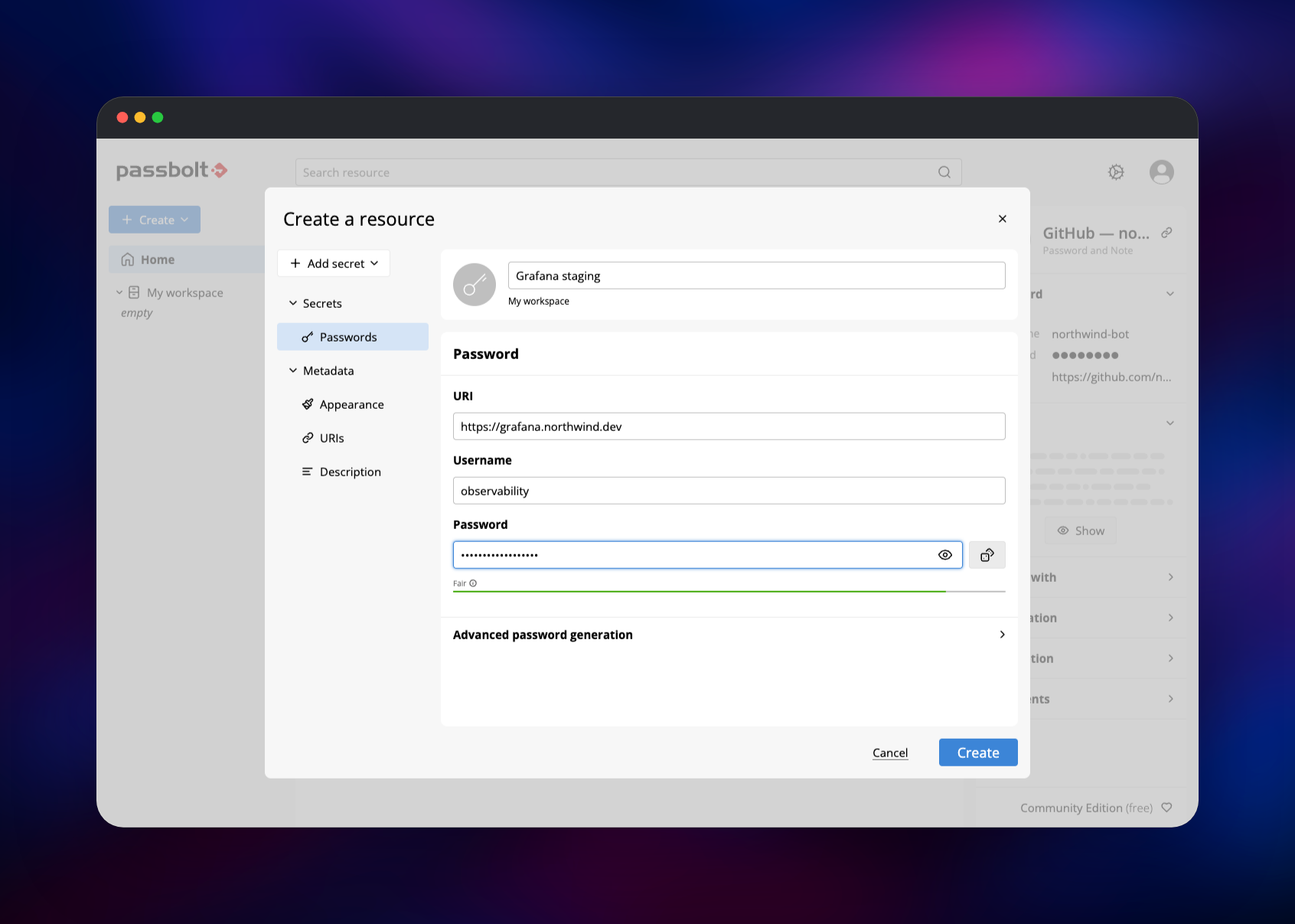
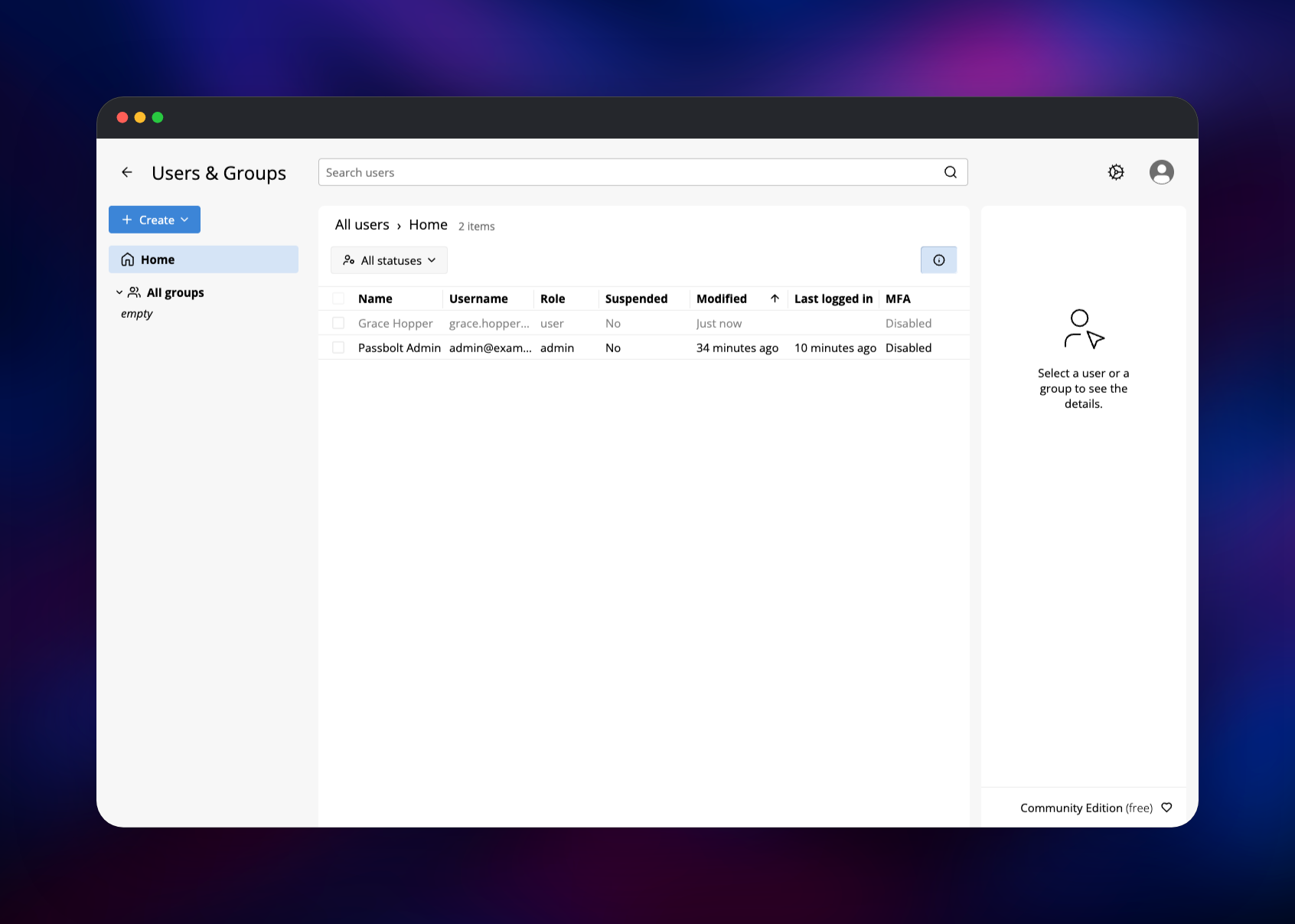
You then land in the workspace. Press Create → Password, save a real credential, reopen it and reveal the secret — that round trip proves the database, the server key and the extension all work. Then invite a colleague from Users & Groups → Create → User; their invitation reaches Mailpit within a minute, confirming the mail path.
About Hosting Passbolt
Self-hosting Passbolt means the ciphertext never leaves infrastructure you control and no vendor holds a key that could decrypt it. Because encryption happens client-side the server is an ordinary PHP application: it stores OpenPGP messages it cannot read and decides who may fetch them.
Key features:
- Per-resource and per-folder sharing with Owner, Update and Read permissions
- Groups, so access follows a team rather than a list of individuals
- TOTP secrets, notes and custom fields stored alongside passwords
- Import and export in KeePass, LastPass, 1Password and CSV
- Browser extensions, mobile apps, and a JSON API with JWT authentication
The deployment splits this across three services. passbolt serves the API and the workspace and runs the cron that flushes outgoing mail every minute. MySQL is the only durable store for application data. mailpit accepts SMTP on the private network and keeps messages in a searchable inbox, replaceable with a real relay later.
Why Deploy Passbolt on Railway
Railway removes the parts of a Passbolt install that usually take an afternoon:
- Managed MySQL with backups, provisioned and wired up already
- TLS, a public domain and HTTP/2 at the edge, with no certificate to renew
- A persistent volume for the OpenPGP server key, mounted before first boot
- A working SMTP path from the first deploy, so invitations actually arrive
- Redeploy on git push, with a health check gating the rollout
Common Use Cases
- Shared infrastructure credentials — root passwords, database logins and API keys an on-call rotation needs, shared to a group not a person
- Agency or MSP client credentials — one folder per client, granted and revoked as staff move between projects
- Regulated environments — GDPR, ISO 27001 or SOC 2 programmes needing the vault in a known jurisdiction
Dependencies for Passbolt
passbolt/passbolt:latest-ce— the official Community Edition image, extended by gridalpha/passbolt-railway so nginx listens on Railway's port, the forwarded client IP and scheme are recovered, the three persistent directories share one volume, and the first administrator is created for youmysql:9.4— Railway's managed MySQL; Passbolt targets MySQL 8+ or MariaDB 10.3+axllent/mailpit:latest— SMTP sink and web inbox
Environment Variables Reference
| Variable | Purpose |
|---|---|
APP_FULL_BASE_URL | Public URL Passbolt builds links from; must match what browsers use |
PASSBOLT_ADMIN_EMAIL | Address the first administrator is registered under on first boot |
DATASOURCES_DEFAULT_* | MySQL host, port, database, username and password |
EMAIL_TRANSPORT_DEFAULT_* | SMTP host, port, and credentials for a real relay |
EMAIL_DEFAULT_FROM | Sender address |
MP_UI_AUTH | Username and password guarding the Mailpit inbox |
Deployment Dependencies
- Source repository:
- Upstream API:
- Docker image:
- Docs:
Hardware Requirements for Self-Hosting Passbolt
| Resource | Minimum | Recommended |
|---|---|---|
| CPU | 1 vCPU | 2 vCPU |
| RAM | 1 GB | 2 GB |
| Storage | 1 GB volume + database | 5 GB volume, 10 GB database |
| Runtime | PHP 8.2+, MySQL 8+ / MariaDB 10.3+ | PHP 8.4, MySQL 9 |
The workload is light — secrets are small and the cryptography runs in the browser — so a team of a few hundred fits the recommended column. Run one replica: the container also runs the email cron, so a second copy would send every message twice.
Self-Hosting Passbolt
Upstream publishes a Docker Compose stack that runs Passbolt beside MariaDB:
curl -LO https://raw.githubusercontent.com/passbolt/passbolt_docker/main/docker-compose/docker-compose-ce.yaml
docker compose -f docker-compose-ce.yaml up -d
The image installs with no administrator, so create the first one and open the URL it prints:
docker compose -f docker-compose-ce.yaml exec passbolt \
  su -m -c "bin/cake passbolt register_user \
    -u you@example.com -f Ada -l Lovelace -r admin" -s /bin/sh www-data
Keep /etc/passbolt/gpg and /etc/passbolt/jwt on persistent storage and back them up. Lose the server key and every stored secret is permanently undecryptable; a database restore will not recover it.
How Much Does Passbolt Cost to Self-Host?
Passbolt Community Edition is free and open source under AGPL-3.0, with no user cap, no feature gating on sharing or groups, and no licence key. You pay only for infrastructure — on Railway, usage-based billing for the app container, the managed MySQL database and the volumes, which makes a team vault one of the cheapest services you can run. The paid Pro and Enterprise editions add directory sync, SSO and custom roles; nothing here needs them.
FAQ
What is Passbolt? An open-source, self-hosted password manager for teams. Credentials are encrypted in the browser with OpenPGP and shared by encrypting them to each recipient's public key, so the server holds only ciphertext.
What does this Railway template deploy? Three services: the Passbolt Community Edition server, a Railway-managed MySQL database, and Mailpit as an SMTP inbox. Volumes, private networking, the public domain and a health check are already configured.
Why does the template include a database and a mail service? MySQL is Passbolt's only data store — users, groups, permissions and encrypted secrets all live there. Mail is not optional either: the setup link, invitations and account recovery are all delivered by email, so the deployment ships a working SMTP target rather than failing quietly without one.
How do I log in to self-hosted Passbolt for the first time?
Open the /setup/start/... link from the passbolt service's deploy log, or the same message in the Mailpit inbox, in a browser with the extension installed. The extension generates your key pair and passphrase; there is no username-and-password form.
How do I send real email from self-hosted Passbolt instead of using Mailpit?
Point EMAIL_TRANSPORT_DEFAULT_HOST and _PORT at your provider and add EMAIL_TRANSPORT_DEFAULT_USERNAME, _PASSWORD and _TLS. An administrator can also set these in the admin UI under Email server, which stores them in the database and overrides the variables.
What happens if I lose the OpenPGP server key?
Every stored secret becomes undecryptable, and a database backup will not help. The key lives on the passbolt service's volume at /data/gpg — back it up separately, along with each user's recovery kit.
Template Content

