Deploy PgWeb | Lightweight Browser-Based Postgres UI on Railway
Self-host PgWeb. Cross-platform client for PostgreSQL databases.
pgweb
Just deployed

Just deployed
/var/lib/postgresql/data
Deploy and Host pgweb on Railway
Self-host pgweb on Railway to get an instant, browser-based PostgreSQL client with zero dependencies. Deploy pgweb — a lightweight Go binary distributed as a single Docker image (sosedoff/pgweb) — alongside a Railway-managed Postgres instance and access your database from any browser in seconds.
This Railway template provisions the pgweb web UI and a PostgreSQL 18 database, wires the connection automatically via a cross-service reference, and exposes a public HTTPS URL with no manual configuration required.
Getting Started with pgweb on Railway
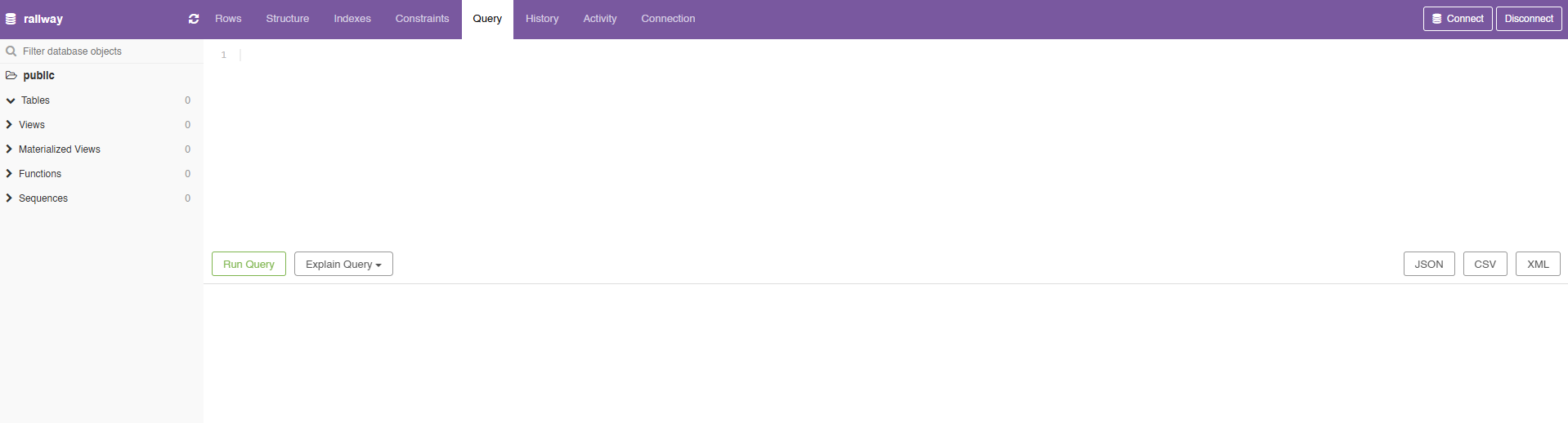
Once your Railway deployment is live, click the generated .up.railway.app domain to open the pgweb UI. You will be prompted for a username and password (HTTP Basic Auth) — use the values you set in PGWEB_AUTH_USER and PGWEB_AUTH_PASS. pgweb pre-connects to Postgres using the PGWEB_DATABASE_URL environment variable, so no manual connection string entry is needed.
From the sidebar you can browse tables, views, and sequences. Use the Query tab to run custom SQL, and the export buttons to download results as CSV, JSON, or XML. If you want to connect to a second database in the same session, set PGWEB_SESSIONS=1 in the pgweb service's environment variables and restart — a session picker will appear in the top bar.
To secure the interface, place pgweb behind an OAuth2 proxy (e.g. oauth2-proxy) or restrict access at the Railway network level. By default, the UI is unauthenticated and accessible to anyone with the URL.
About Hosting pgweb on Railway
pgweb is an open-source, cross-platform web client for PostgreSQL databases, written in Go by Dan Sosedoff. It solves the problem of needing a heavy desktop app or complex setup just to inspect a Postgres database — the entire tool ships as a single statically-linked binary with zero runtime dependencies.
Key features:
- Works with PostgreSQL 9.1 and above
- Zero dependencies — single binary, single Docker image
- Multiple concurrent database sessions (
PGWEB_SESSIONS=1) - Native SSH tunnel support for remote databases
- Custom SQL query execution with query history
- Table and query export to CSV, JSON, and XML
- Server bookmarks for quickly switching databases
- Cross-platform: Mac, Linux, Windows (64-bit)
Why Deploy pgweb on Railway
One-click deploy with Railway's managed Postgres pre-connected — no manual setup.
- No desktop app needed — inspect any PostgreSQL database from a browser
- Lightweight — the Docker image is small; startup takes seconds
- Zero dependencies — no PHP, no Node, no external services required
- Railway-native — connects to Railway Postgres via private network, no public DB exposure
- SSH tunnel support — reach databases that aren't publicly accessible
Common Use Cases for pgweb
- Ad-hoc query runner — let developers run SQL against production or staging without direct
psqlaccess or a VPN - Data team access — give analysts a read-only interface to explore tables and export data to CSV without installing any local tooling
- Debugging during development — quickly inspect table contents, verify migrations, and check foreign key relationships while building an app
- Lightweight DBA panel — manage schemas and run maintenance queries from any machine with a browser
Dependencies for Self-Hosting pgweb
| Service | Source | Purpose |
|---|---|---|
| pgweb | sosedoff/pgweb (Docker Hub) | Web-based PostgreSQL UI |
| PostgreSQL | Railway-managed Postgres | Database backend |
Environment Variables Reference for pgweb
| Variable | Required | Description |
|---|---|---|
PGWEB_DATABASE_URL | Yes | PostgreSQL connection string. Use ${{Postgres.DATABASE_URL}} to reference Railway Postgres. Preferred over DATABASE_URL in pgweb ≥v0.17.0 |
PGWEB_AUTH_USER | Recommended | HTTP Basic Auth username. Set to restrict access to the UI |
PGWEB_AUTH_PASS | Recommended | HTTP Basic Auth password. Must be a plain string — do not use ${{secret()}} as it re-generates on every deploy |
PGWEB_SESSIONS | No | Set to 1 to enable multiple simultaneous database sessions in one UI |
Deployment Dependencies
- Docker Hub: sosedoff/pgweb
- GitHub: sosedoff/pgweb
- License: MIT — free to self-host and modify
Hardware Requirements for Self-Hosting pgweb
pgweb is extremely lightweight. The bottleneck is almost always the Postgres instance, not pgweb itself.
| Resource | Minimum | Recommended |
|---|---|---|
| CPU | 0.1 vCPU | 0.25 vCPU |
| RAM | 64 MB | 128 MB |
| Storage | None (stateless) | None |
| Runtime | Go binary / Docker | Docker |
Self-Hosting pgweb with Docker
Minimal Docker run (connect to an existing Postgres):
docker run -p 8081:8081 \
  -e PGWEB_DATABASE_URL="postgres://user:password@host:5432/mydb?sslmode=disable" \
  -e PGWEB_AUTH_USER="admin" \
  -e PGWEB_AUTH_PASS="yourpassword" \
  sosedoff/pgweb
Open http://localhost:8081 in your browser.
Docker Compose with a local Postgres:
services:
  postgres:
    image: postgres:15
    environment:
      POSTGRES_USER: pgweb
      POSTGRES_PASSWORD: pgweb
      POSTGRES_DB: pgweb

  pgweb:
    image: sosedoff/pgweb
    environment:
      PGWEB_DATABASE_URL: postgres://pgweb:pgweb@postgres:5432/pgweb?sslmode=disable
    ports:
      - "8081:8081"
    depends_on:
      - postgres
How Much Does pgweb Cost to Self-Host?
pgweb is MIT-licensed open-source software — free to use, modify, and self-host with no licensing fees. Running it on Railway costs only the infrastructure: the pgweb container itself uses under 128 MB RAM and negligible CPU, making it one of the cheapest services to keep running. You pay only for the Railway compute and Postgres storage you actually use.
pgweb vs pgAdmin — Which Should You Self-Host?
| Feature | pgweb | pgAdmin |
|---|---|---|
| Setup complexity | Minimal — single binary/image | Moderate — heavier app |
| UI style | Simple, clean, read-query focused | Full-featured DBA interface |
| Multi-DB support | PostgreSQL only | PostgreSQL + others |
| Resource usage | ~64 MB RAM | ~256 MB+ RAM |
| Auth built-in | No (use OAuth2 proxy) | Yes |
| Export formats | CSV, JSON, XML | CSV, JSON, Binary |
Summary: Choose pgweb if you want fast, lightweight read/query access to Postgres. Choose pgAdmin if you need full database administration, role management, and performance tuning tools.
FAQ
What is pgweb and why self-host it? pgweb is an open-source, browser-based PostgreSQL client written in Go. Self-hosting it on Railway lets you access your Postgres database from any browser without exposing the database to the public internet or installing desktop software.
What does this Railway template deploy?
It deploys two services: the sosedoff/pgweb Docker image (the web UI) and a Railway-managed PostgreSQL database. The connection between them is pre-wired via a cross-service environment variable reference.
Why is a Postgres database included in this template?
pgweb is a client — it needs a database to connect to. The template includes a Railway Postgres service so you can use pgweb immediately after deploying. You can also point pgweb at any external Postgres instance by updating DATABASE_URL.
How do I connect pgweb to my existing Railway Postgres instead of a new one?
Set the DATABASE_URL variable on the pgweb service to ${{YourServiceName.DATABASE_URL}}, replacing YourServiceName with the name of your existing Postgres service in the same Railway project.
How do I secure the pgweb interface on Railway?
pgweb has no built-in authentication. Options: (1) keep the Railway domain private and share the URL only with your team, (2) run pgweb behind an oauth2-proxy container in the same project, or (3) use Railway's upcoming private service networking to block public access entirely.
Can I use pgweb to connect to multiple databases at once?
Yes — set PGWEB_SESSIONS=1 in the pgweb environment variables and redeploy. A session management panel will appear in the UI, letting you maintain multiple simultaneous connections.
Does pgweb support SSH tunnels for self-hosted databases on Railway?
Yes. pgweb supports native SSH tunnels, which lets you connect to databases that are not publicly exposed. Configure the SSH connection details via the pgweb connection UI or via the --ssh-host flags in the start command.
Template Content
pgweb
sosedoff/pgwebPGWEB_AUTH_PASS
Create auth password credential
PGWEB_AUTH_USER
Create auth username credential