
Deploy Planka
Kanban board for planning work on cards you drag between lists
planka
Just deployed

Just deployed
/var/lib/postgresql/data
planka-uploads
Bucket
Just deployed
Deploy and Host Planka on Railway
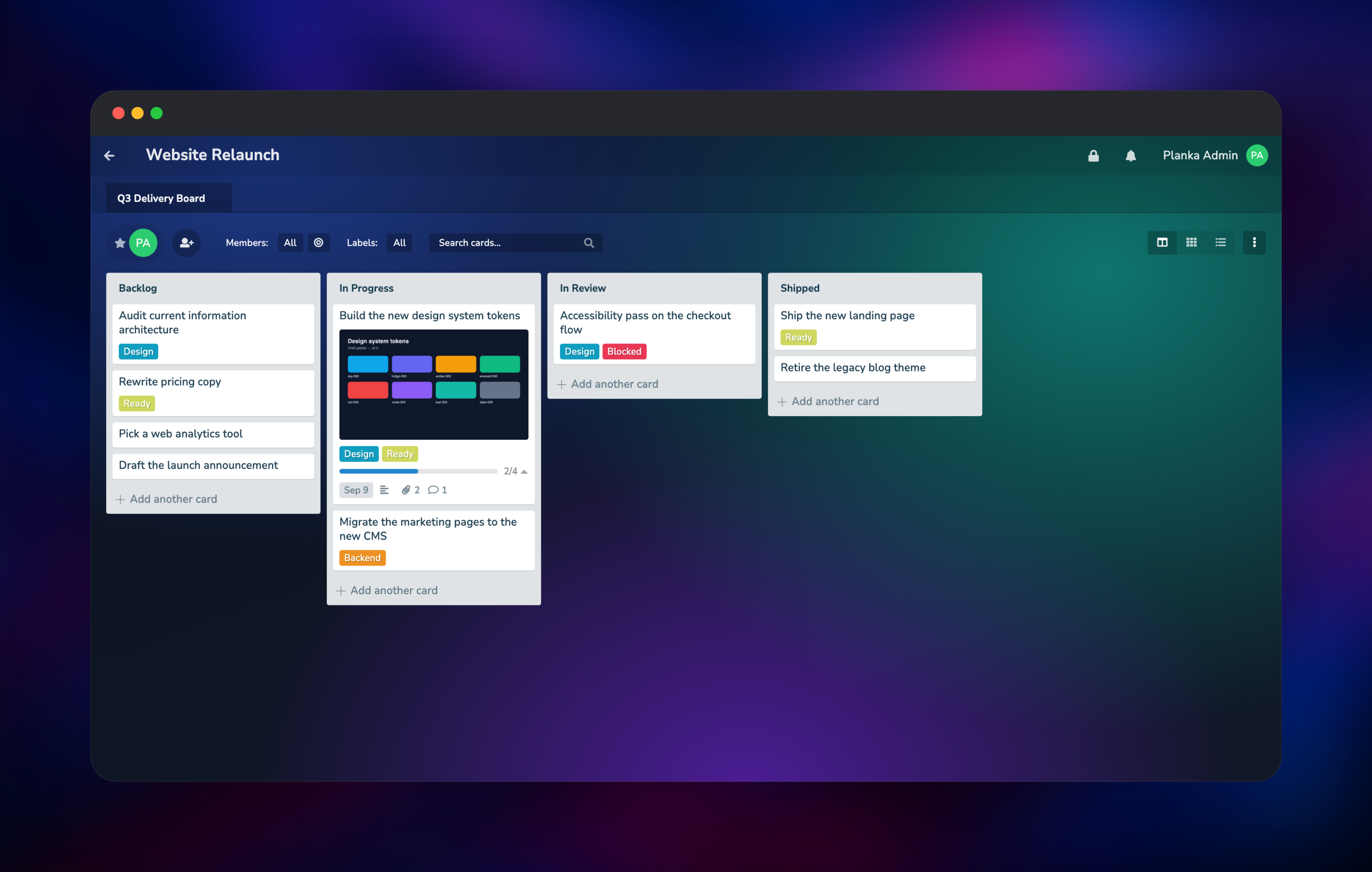
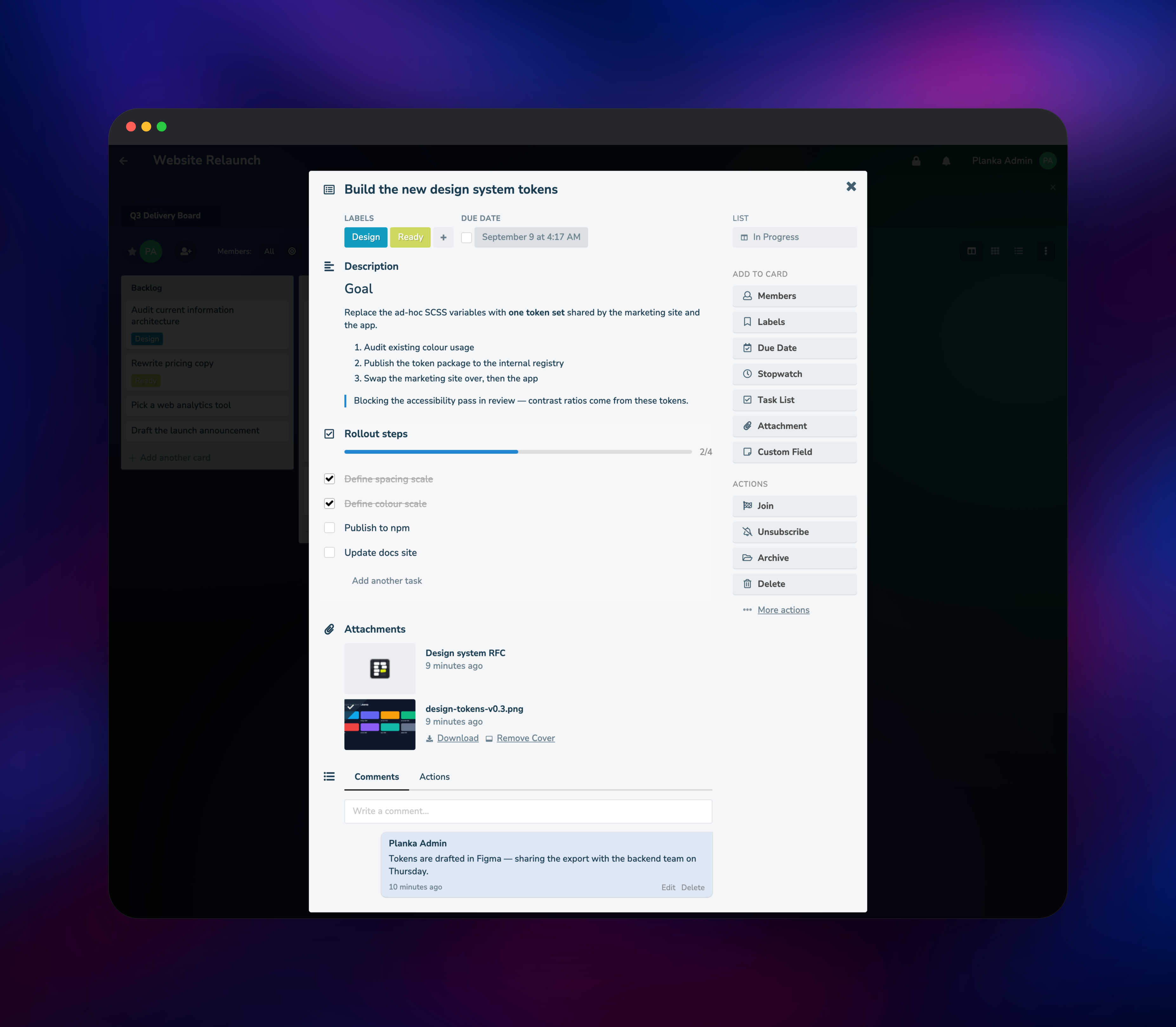
Planka is an open-source kanban board that behaves like Trello: projects hold boards, boards hold lists, and lists hold cards you drag between columns. Every change is pushed to other browsers over a WebSocket, so a card moved on one screen moves on everyone else's immediately. Cards carry markdown descriptions, labels, due dates, checklists, attachments and comments. Teams self-host Planka when they want Trello's shape without handing their roadmap to a third-party SaaS.
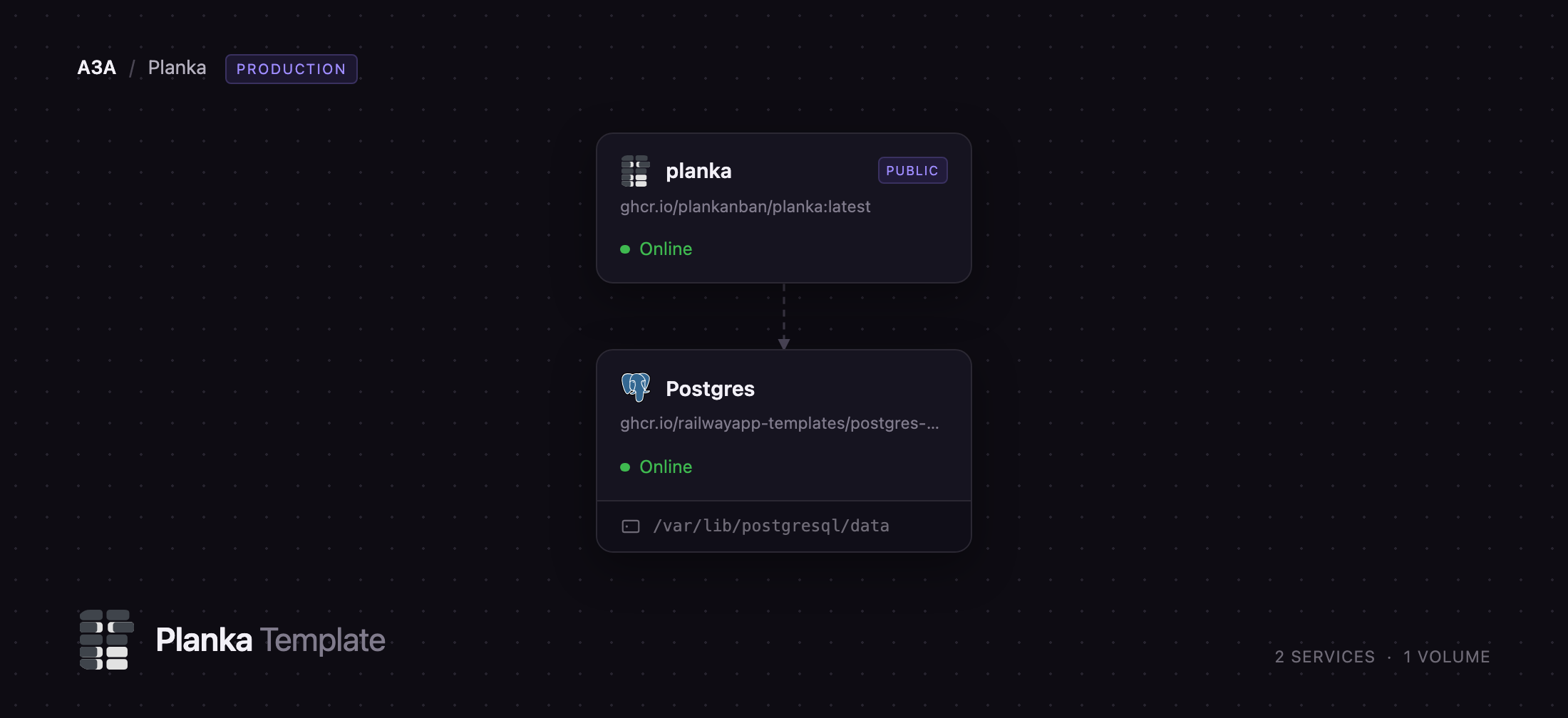
Deploy Planka on Railway and you get the production shape in one click. The planka service runs the official ghcr.io/plankanban/planka image and is the only thing exposed to the internet. A managed Postgres service holds every project, board, card and user, and a Railway object storage bucket holds every uploaded file — attachments, thumbnails, avatars and project backgrounds — so the app service keeps no local state. Nothing in the bucket is publicly readable: Planka streams each file back through its own token-checked routes, so an attachment is reachable only by someone signed in to that board.
Getting Started with Planka on Railway
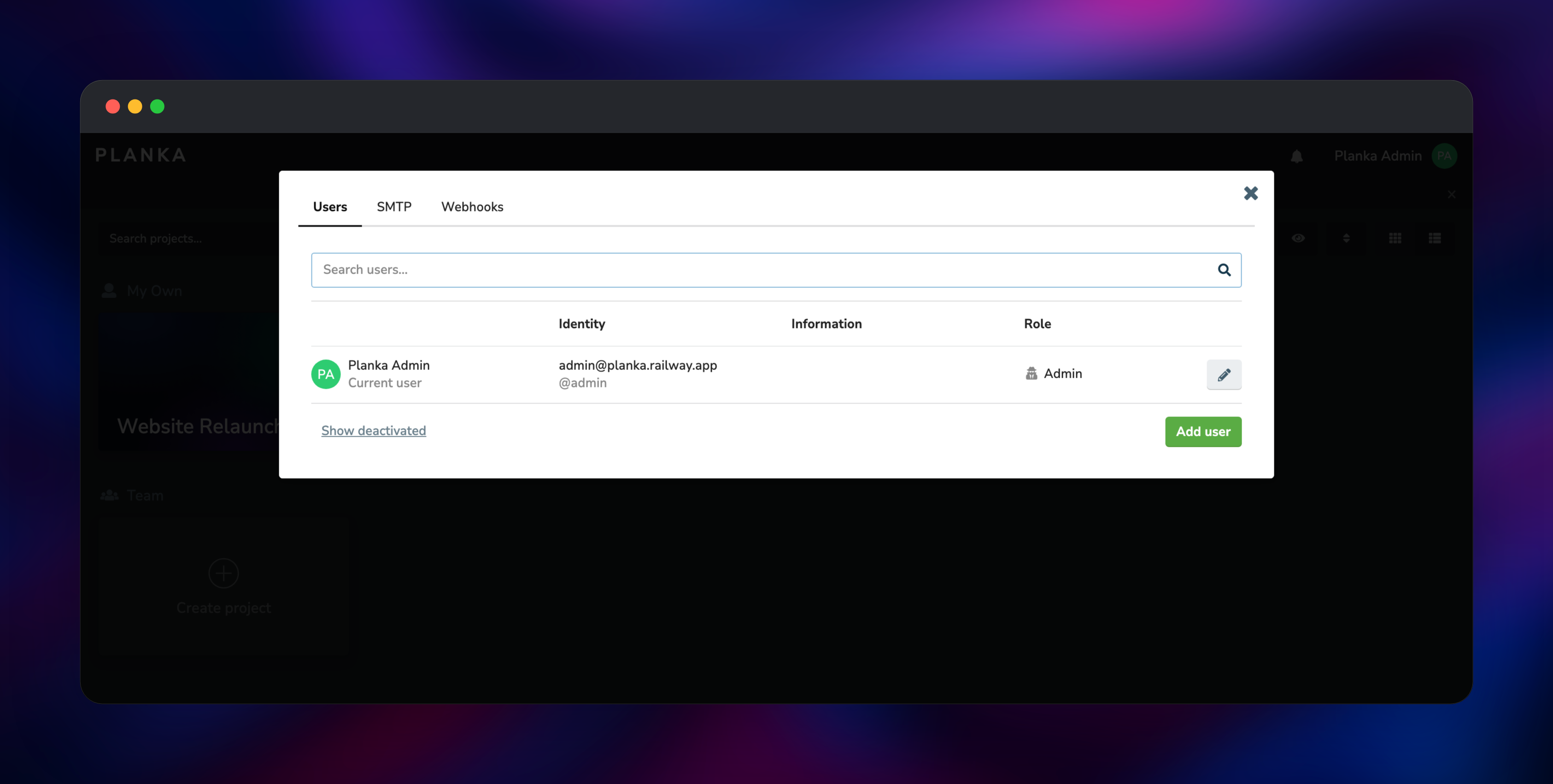
Set DEFAULT_ADMIN_EMAIL and DEFAULT_ADMIN_PASSWORD when you deploy — they become your first administrator, and Planka creates no other users. Open the generated *.up.railway.app URL and sign in. Planka asks each new user to accept its terms once; tick the confirmation and continue. On the dashboard, click Create project, name it, then add a board. Use Add another card under a list, then click the card to write a markdown description, add labels, set a due date, add a checklist and upload a file. Watching an uploaded image render as a thumbnail on the card front is the fastest confirmation that the database and object storage are both wired up. To bring in colleagues, open the avatar menu, choose Administration → Users → Add user, then give each person a board membership; the same panel holds SMTP for email notifications and Webhooks for board events. There is no public sign-up, so an account exists only if an administrator creates it.
About Hosting Planka
Planka is a finished application, not a framework you assemble. Self-hosting suits a team that wants the Trello workflow but needs the data on infrastructure it controls — client work under NDA, internal roadmaps, or any board where a per-seat bill scales badly against people who mostly read it.
- Projects, boards, lists and cards with drag-and-drop between columns
- Realtime updates over WebSocket, with per-card activity and notifications
- Markdown descriptions, checklists with progress bars, due dates, card covers
- Colour-coded labels, per-board membership, filtering by member or label
- Attachments with automatic thumbnails, and link attachments with fetched favicons
- Two-factor authentication, API keys, webhooks, an admin panel
Three pieces make it up. planka is the Node.js application, serving the React front end and the JSON API on port 1337. Postgres is the system of record; Planka runs its migrations at startup, so the schema is created and upgraded with no manual step. The bucket takes all binary content, which lets the app service run with no volume.
Why Deploy Planka on Railway
Railway removes the parts of self-hosting that are not about kanban.
- Managed PostgreSQL with backups, provisioned and wired up automatically
- Object storage for attachments included, so there is no volume to size
- HTTPS and a public domain on deploy, custom domains available
- Private networking keeps the database off the internet
- Redeploys pick up upstream releases without touching data
Common Use Cases
- Product and sprint boards — backlog, in-progress and review columns, checklists tracking each ticket
- Client and agency work — one project per client, boards shared only with that account's people
- Editorial calendars — cards with due dates and covers moving from draft to published
- Personal and homelab planning — a private instance with no per-seat cost
Dependencies for Planka
- planka —
ghcr.io/plankanban/planka:latest, published from plankanban/planka. Serves the API and front end on port 1337. - Postgres —
ghcr.io/railwayapp-templates/postgres-ssl:18. Planka requires PostgreSQL and applies its own migrations on every start. - Object storage bucket — S3-compatible storage for attachments, thumbnails, avatars and backgrounds; without it uploads would need a volume.
Environment Variables Reference
| Variable | Purpose |
|---|---|
BASE_URL | Public URL, and the allowed browser origin for the API and WebSocket — must match your domain |
SECRET_KEY | Signs every access token; changing it signs everyone out |
DATABASE_URL | PostgreSQL connection string |
DEFAULT_ADMIN_EMAIL | Administrator created on first boot; keeping it set protects that account |
DEFAULT_ADMIN_PASSWORD | Password for that account, re-applied on every restart — change it here, not in-app |
S3_ENDPOINT, S3_BUCKET, S3_REGION, S3_ACCESS_KEY_ID, S3_SECRET_ACCESS_KEY | Object storage credentials |
TRUST_PROXY | true, so client IPs and HTTPS detection work behind Railway's edge |
SMTP_* | Optional; setting any of them replaces the SMTP form in the admin panel, so leave them unset to configure mail in the UI |
Deployment Dependencies
- Source and image: github.com/plankanban/planka,
ghcr.io/plankanban/planka - Docs: docs.planka.cloud
- Runtime: Node.js 24, PostgreSQL 16 or newer
Hardware Requirements for Self-Hosting Planka
| Minimum | Recommended | |
|---|---|---|
| CPU | 1 vCPU | 2 vCPU |
| RAM | 512 MB | 1–2 GB |
| Storage | Database only; attachments live in object storage | Grows with attachments |
| Runtime | Node.js 24, PostgreSQL 16+ | Node.js 24, PostgreSQL 18 |
Planka is light: ten people on one board rarely push it past a few hundred MB of memory.
Self-Hosting Planka with Docker
Upstream ships a Compose file. This YAML is the minimum that runs Planka with its own PostgreSQL:
services:
  planka:
    image: ghcr.io/plankanban/planka:latest
    ports: ["3000:1337"]
    environment:
      - BASE_URL=http://localhost:3000
      - DATABASE_URL=postgresql://postgres@postgres/planka
      - SECRET_KEY=replace-me
      - DEFAULT_ADMIN_EMAIL=admin@example.com
      - DEFAULT_ADMIN_PASSWORD=change-me
  postgres:
    image: postgres:16-alpine
    environment:
      - POSTGRES_DB=planka
      - POSTGRES_HOST_AUTH_METHOD=trust
Generate the signing key with OpenSSL first — the published example is a known string, and anyone holding it can mint a token for any account:
openssl rand -hex 32
To move uploads off the filesystem, set the five S3_* variables plus S3_FORCE_PATH_STYLE=true. On Railway all six are filled in for you.
How Much Does Planka Cost to Self-Host?
Planka Community is free, under the PLANKA Community (Fair Use) licence: personal use, use inside your own organisation and non-profit use are all permitted, while running it as a hosted service for other people commercially needs a paid licence. PLANKA Pro adds guest and worker roles, calendar and map views, UI customisation and single sign-on — OIDC moved out of Community in 2.2.0. On Railway you pay only for the compute, database and storage used.
FAQ
What is Planka? An open-source kanban board with realtime collaboration, built on Node.js and PostgreSQL — a self-hosted Trello alternative for teams that want project data on their own infrastructure.
What does this Railway template deploy?
The planka application on a public HTTPS domain, a managed Postgres database on the private network, and an object storage bucket for uploads — wired together on deploy.
Why does the template include PostgreSQL and object storage? Planka has no built-in database; projects, boards, cards, comments and users live in PostgreSQL. Attachments, thumbnails, avatars and backgrounds are binary, and keeping them in object storage means the app service holds no state and can be redeployed without losing uploads.
How do I add users to a self-hosted Planka instance? There is no public sign-up. Open the avatar menu, choose Administration → Users → Add user, then add each person to the boards they need.
Does self-hosted Planka support single sign-on? Not in Community from 2.2.0 on — OIDC is part of PLANKA Pro. Community has password login plus optional two-factor authentication per user.
Can I use a custom domain with Planka on Railway?
Yes. Add the domain to the planka service, set BASE_URL to the new https:// address, and redeploy. BASE_URL is also the allowed browser origin, so realtime updates break if the two disagree.
How do I back up a self-hosted Planka instance? Back up the PostgreSQL database and the bucket together — the database holds the records, the bucket holds the files they point at. Railway's managed PostgreSQL has automated backups.
Template Content
planka-uploads
Bucket


