
Deploy Playwright Node.js Browser Automation
[Jun'26] Playwright with TypeScript, Express, OpenAPI & validation stack
playwright-nodejs
Just deployed

Deploy and Host Playwright with Node.js on Railway
Playwright with Node.js is a browser automation and web scraping template built with Express, TypeScript, and Playwright Chromium. It provides a production-oriented API for scraping demo pages, running smoke tests, checking service health, and exploring endpoints through Swagger/OpenAPI documentation.
About Hosting Playwright with Node.js
Hosting Playwright with Node.js involves running a Node.js API that can launch and control a headless Chromium browser in a server environment. This template is designed for deployment-friendly browser automation workloads, including scraping test pages, validating site availability, and exposing structured API endpoints for automation tasks. It includes Express routing, controller and service layers, request validation, logging, rate limiting, security middleware, and a Docker image that installs Playwright browser dependencies reliably for production-style deployments.
How to Use
After deploying this template, the app is already running on Railway. You can open the generated Railway domain to test the starter app immediately.
If you want to customize the source code, use one of the workflows below.
Via Railway CLI
Use this workflow if you want to edit the project locally and redeploy changes directly from your machine using Railway CLI.
- Deploy the template.
- Clone the repository from Source Repo or Upstream Repo in the Railway dashboard.
- Enter the project directory:
cd
- Link your local project directory to the deployed Railway project:
railway link
- Check the linked project, environment, service, and repository information:
railway status
- Edit the code locally.
- Redeploy your local changes to Railway:
railway up
Railway will upload the current local directory and deploy it to the linked service.
Via Git / GitHub
Use this workflow if you want to manage changes through GitHub and let Railway automatically redeploy after every push.
- Deploy the template.
- Open Source Repo or Upstream Repo from the Railway dashboard.
- Fork the repository to your own GitHub account.
- Clone your fork locally:
git clone
cd
- Edit the code locally.
- Commit and push your changes to your fork:
git add .
git commit -m "Customize Node.js starter"
git push origin main
- In Railway, change the service Source Repo to your fork if Railway does not automatically create or link it.
- After the service is connected to your fork, future pushes to the repository can trigger automatic redeployments.
Common Use Cases
- Web scraping APIs that collect structured data from public test pages or e-commerce demo pages
- Browser automation services for smoke tests, QA checks, and workflow validation
- Playwright-backed API endpoints for internal tools, demos, or automation experiments
Dependencies for Playwright with Node.js Hosting
- Node.js 20+
- npm
- Playwright Chromium
- Express
- TypeScript
- Docker, recommended for container-based deployment
Deployment Dependencies
Implementation Details
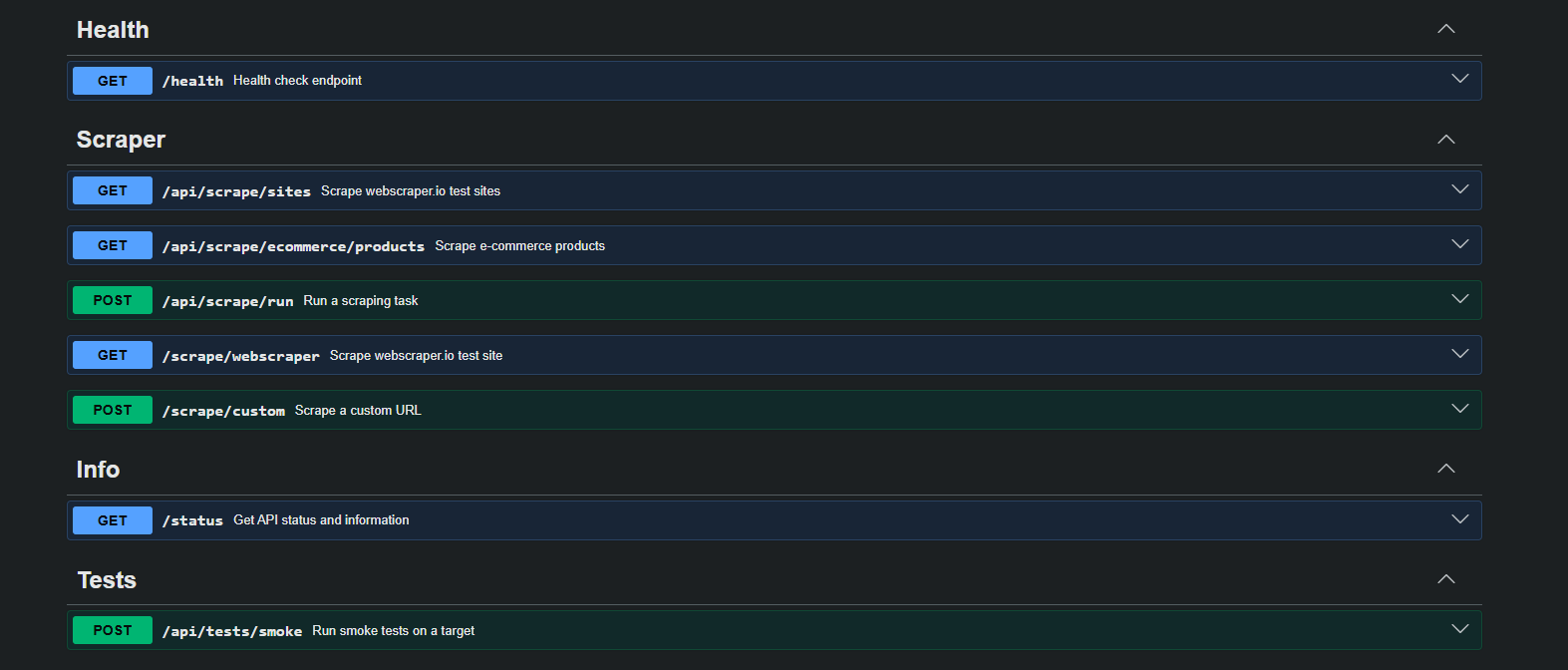
This template exposes a production-oriented API with Swagger documentation and health monitoring.
Useful routes after deployment:
/                 -> redirects to /docs
/health           -> service health check
/docs             -> Swagger UI
/openapi.json     -> OpenAPI JSON
/api/scrape/sites -> scrape available test site links
/api/scrape/ecommerce/products?limit=10 -> scrape demo e-commerce products
/api/scrape/run   -> run a scrape task
/api/tests/smoke  -> run a smoke test
Example scrape request:
POST /api/scrape/run
Content-Type: application/json

{
  "target": "ecommerce",
  "limit": 10
}
Recommended environment variables:
NODE_ENV=production
PORT=3000
HOST=0.0.0.0
LOG_LEVEL=info
CORS_ORIGIN=*
SCRAPER_BASE_URL=https://webscraper.io/test-sites
SCRAPER_ECOMMERCE_URL=https://webscraper.io/test-sites/e-commerce/allinone
PLAYWRIGHT_HEADLESS=true
PLAYWRIGHT_TIMEOUT_MS=30000
SCRAPER_MAX_LIMIT=50
RATE_LIMIT_WINDOW_MS=60000
RATE_LIMIT_MAX=60
For production use, configure CORS_ORIGIN, set LOG_LEVEL to warn or error, monitor /health, and commit package-lock.json for deterministic builds.
Why Deploy Playwright with Node.js on Railway?
Railway is a singular platform to deploy your infrastructure stack. Railway will host your infrastructure so you don't have to deal with configuration, while allowing you to vertically and horizontally scale it.
By deploying Playwright with Node.js on Railway, you are one step closer to supporting a complete full-stack application with minimal burden. Host your servers, databases, AI agents, and more on Railway.
Template Content
playwright-nodejs
codestorm-official/playwright-with-nodejs