
Deploy Python Telegram Bot
[Jul'26] 1-Click Telegram bot setup with commands, echo & menu buttons

Just deployed
/var/lib/postgresql/data
python-telegram-bot
Just deployed

Redis
Just deployed
/data
Deploy and Host Python Telegram Bot on Railway
Python Telegram Bot is a starter Telegram bot built with python-telegram-bot. It includes ready-to-use commands, echo replies, persistent chat menu buttons, fallback handling for unknown commands, environment-based configuration, and optional PostgreSQL and Redis integration.
This template is ideal for quickly launching a Telegram bot that works immediately after adding your bot token. For more advanced use cases, you can connect PostgreSQL to persist user data and Redis to enable lightweight caching and per-user message counters.
About Hosting Python Telegram Bot
Hosting a Python Telegram Bot means running a long-lived Python process that connects to Telegram, listens for incoming messages, and responds through the Telegram Bot API.
This template uses environment variables for configuration, so sensitive values such as your Telegram bot token, database connection string, and Redis connection string stay separate from the codebase. After deployment, the bot starts automatically and keeps running as a Railway service.
The bot uses long polling, so you do not need to configure a webhook or public domain. Once the BOT_TOKEN variable is added, the bot can respond to commands, normal text messages, and menu button interactions.
PostgreSQL and Redis are optional. If DATABASE_URL and REDIS_URL are available, the bot will connect to them on startup. If they are missing, empty, or unreachable, the bot logs a warning and continues running with that backend disabled. This makes the template simple for quick testing, but still flexible enough for production-oriented bot development.
How to Edit
After deploying this template, the app is already running on Railway. You can open the generated Railway domain to test the starter app immediately.
If you want to customize the source code, use one of the workflows below.
Via Railway CLI
Use this workflow if you want to edit the project locally and redeploy changes directly from your machine using Railway CLI.
- Deploy the template.
- Clone the repository from Source Repo or Upstream Repo in the Railway dashboard.
- Enter the project directory:
cd python-telegram-bot
- Link your local project directory to the deployed Railway project:
railway link
- Check the linked project, environment, service, and repository information:
railway status
- Edit the code locally.
- Redeploy your local changes to Railway:
railway up
Railway will upload the current local directory and deploy it to the linked service.
Via Git / GitHub
Use this workflow if you want to manage changes through GitHub and let Railway automatically redeploy after every push.
- Deploy the template.
- Open Source Repo or Upstream Repo from the Railway dashboard.
- Fork the repository to your own GitHub account.
- Clone your fork locally:
git clone
cd python-telegram-bot
- Edit the code locally.
- Commit and push your changes to your fork:
git add .
git commit -m "Customize Python Telegram bot"
git push origin main
- In Railway, change the service Source Repo to your fork if Railway does not automatically create or link it.
- After the service is connected to your fork, future pushes to the repository can trigger automatic redeployments.
Common Use Cases
- Launching a simple Telegram bot with commands and menu buttons
- Creating a support, community, or personal automation bot
- Building a base project for custom Telegram bot features
- Storing Telegram user data with PostgreSQL
- Adding lightweight Redis caching to bot responses
- Tracking simple per-user message activity
- Creating a Railway-ready Telegram bot starter with optional data stores
Dependencies for Python Telegram Bot Hosting
- Python 3.10 or newer
python-telegram-botpython-dotenvasyncpgredis- Telegram bot token from
@BotFather - PostgreSQL, optional
- Redis, optional
Deployment Dependencies
- Telegram BotFather - Create a Telegram bot and get your
BOT_TOKEN - python-telegram-bot Documentation - Library documentation
- Telegram Bot API - Official Telegram Bot API reference
- PostgreSQL - Optional persistent data store
- Redis - Optional cache and counter store
Implementation Details
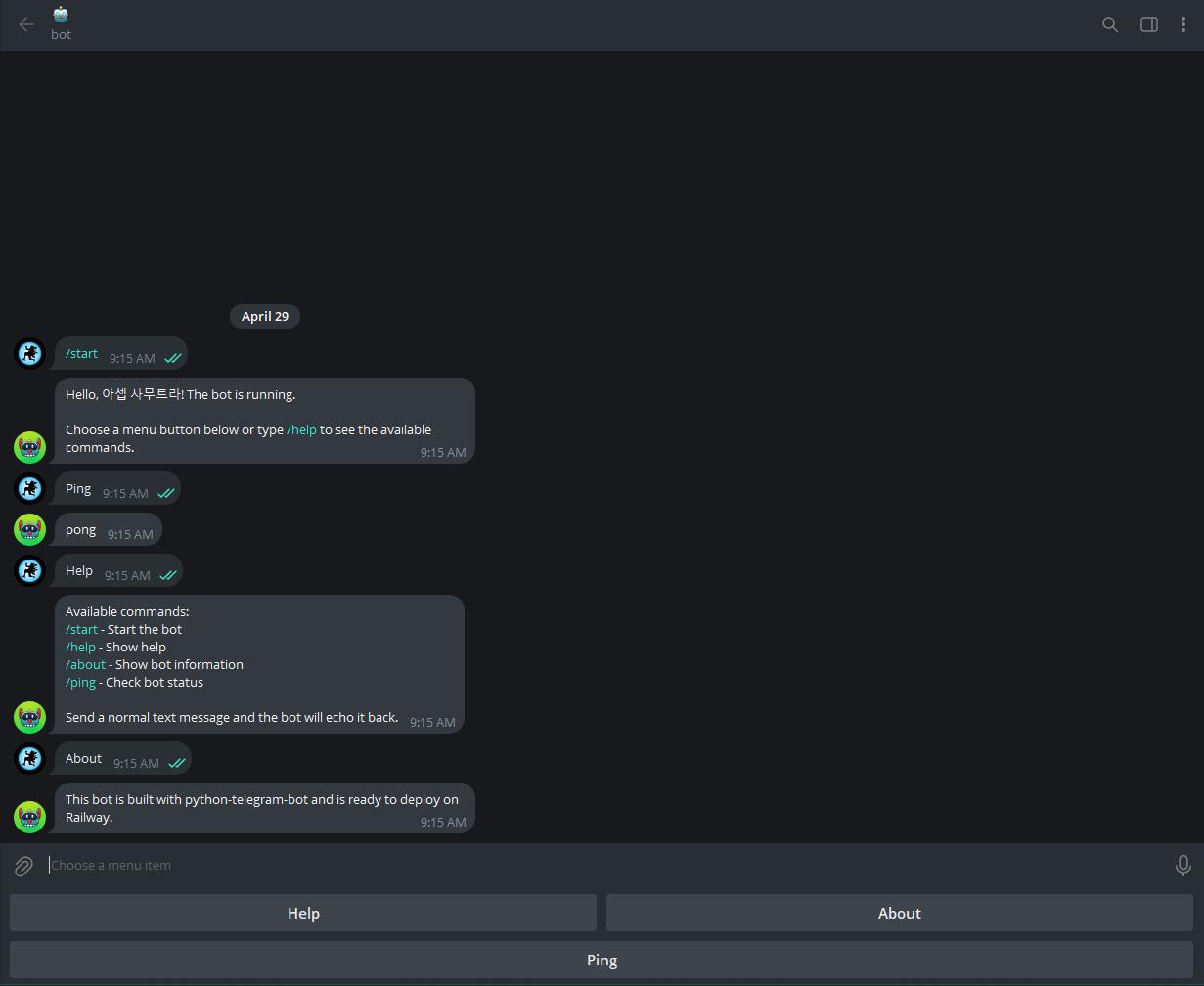
This template includes a persistent reply keyboard that appears after /start and stays available in supported Telegram clients.
| Button | Action |
|---|---|
Help | Show available commands |
About | Show short bot information |
Ping | Check whether the bot is running |
The bot also includes these commands:
| Command | Description |
|---|---|
/start | Show the welcome message |
/help | Show available commands |
/about | Show short bot information |
/ping | Check whether the bot is running |
Optional PostgreSQL Integration
PostgreSQL is used to persist Telegram user data.
When DATABASE_URL is configured, the bot creates a users table automatically on first run. The /start command inserts a new user or updates an existing user with the latest username, first name, last name, and last seen timestamp.
If PostgreSQL is not configured, the bot still runs normally. The /start command still replies to the user, but user data is not persisted.
Optional Redis Integration
Redis is used for lightweight caching and per-user message counters.
When REDIS_URL is configured:
/pingcan return a cached response for a short period.- Echoed text messages increment a per-user message counter.
- Redis-backed data survives across bot updates while Redis is available.
If Redis is not configured, the bot still runs normally. The /ping command replies with a plain pong response, and the message counter falls back to in-memory behavior.
Data Store Behavior
PostgreSQL and Redis are optional by design.
If either backend is missing, empty, or unreachable, the bot logs a warning and continues running. This allows the same template to work for:
- Minimal Telegram bot deployment
- Local development
- Railway deployment with only
BOT_TOKEN - More advanced deployment with PostgreSQL and Redis attached
Connections are pooled and reused across updates, then closed cleanly on shutdown.
Environment Variables
| Name | Required | Default | Description |
|---|---|---|---|
BOT_TOKEN | Yes | - | Bot token from @BotFather |
DATABASE_URL | No | - | PostgreSQL connection string for user persistence |
REDIS_URL | No | - | Redis connection string for caching and counters |
LOG_LEVEL | No | INFO | Logging level, such as DEBUG, INFO, or ERROR |
Why Deploy Python Telegram Bot on Railway?
Railway is a singular platform to deploy your infrastructure stack. Railway will host your infrastructure so you do not have to deal with configuration, while allowing you to vertically and horizontally scale it.
By deploying Python Telegram Bot on Railway, you are one step closer to supporting a complete full-stack application with minimal burden. Host your bot service, databases, cache, AI agents, and more on Railway.
Template Content
python-telegram-bot
codestorm-official/python-telegram-botBOT_TOKEN
Redis
redis:8.2.1