
Deploy QloApps
Hotel management software with a built-in booking website

MySQL
Just deployed
/var/lib/mysql
qloapps
Just deployed
/data

mailpit
Just deployed
/data
Deploy and Host QloApps on Railway
QloApps is a free, open-source hotel management suite bundling three products a property normally buys separately: a Property Management System for the front desk, a commission-free booking engine, and a public hotel website with a room-search widget on the homepage. Built by Webkul on the PrestaShop 1.6 core, it suits independent hotels, guest houses, hostels and small chains that want direct bookings without paying an OTA 15–20% per reservation. Arrivals, departures, room allocation, rates, refunds and invoices live in the same back office as the storefront that took the booking.
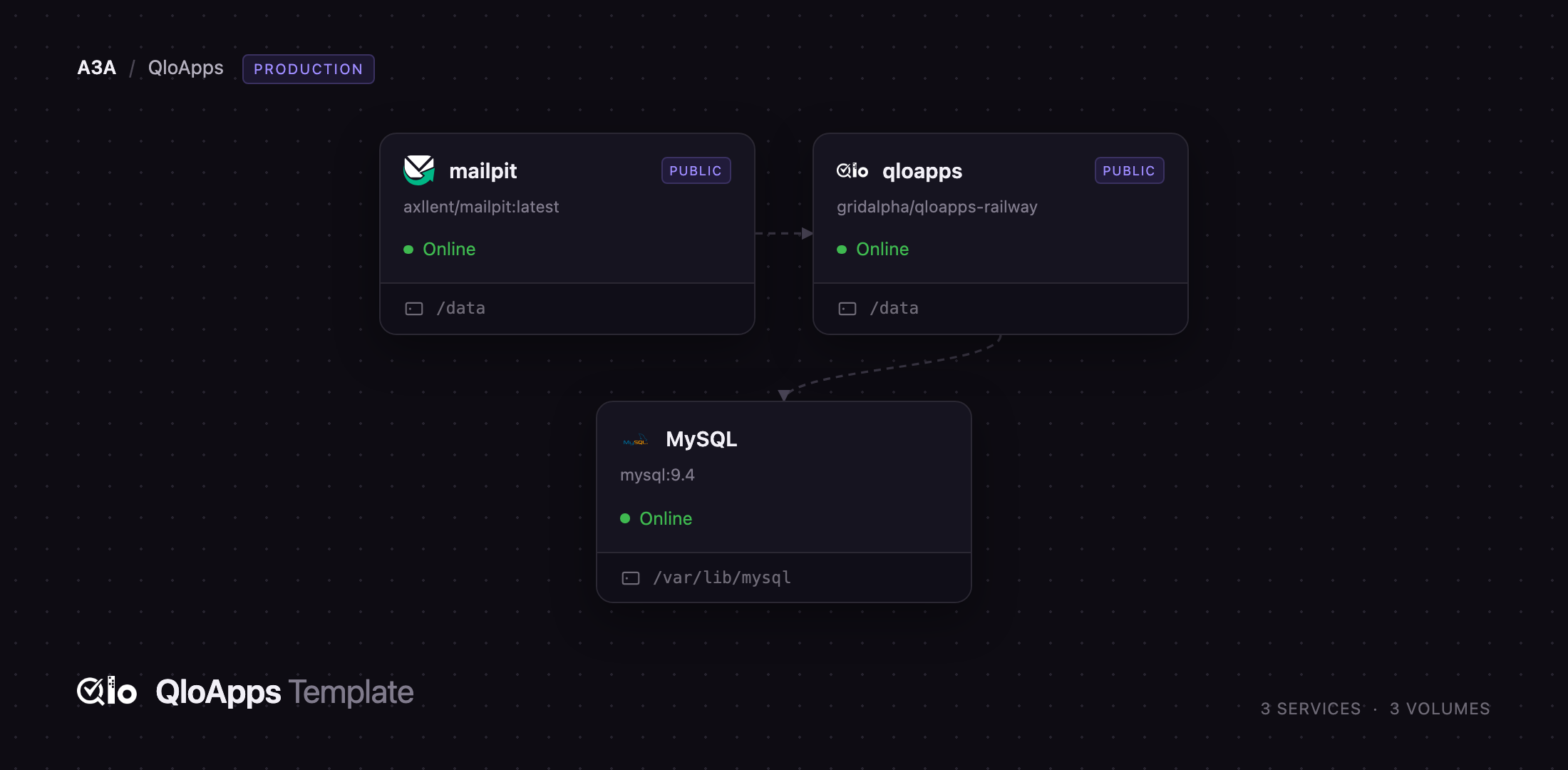
Deploy QloApps on Railway and you get a working hotel out of the box. The template runs
three services: qloapps, the Apache/PHP application serving the public site and the back
office; MySQL, the managed database holding rooms, rates, guests and orders; and
mailpit, a private SMTP server capturing booking confirmations and password resets so
you can watch mail working before choosing a relay. The app reaches both over the private
network; only the storefront and the inbox get public URLs. A volume at /data holds room
photography, uploads, invoices, module code and the shop's settings file, so everything
survives a redeploy.
Getting Started with QloApps on Railway
Set QLO_ADMIN_EMAIL and QLO_ADMIN_PASSWORD before you deploy; those become the hotel
manager account, and nothing else is required. The first boot creates the database role,
installs the schema and seeds a demo property called Hotel Prime with four room types,
photographs and pricing — about a minute, after which /healthz answers.
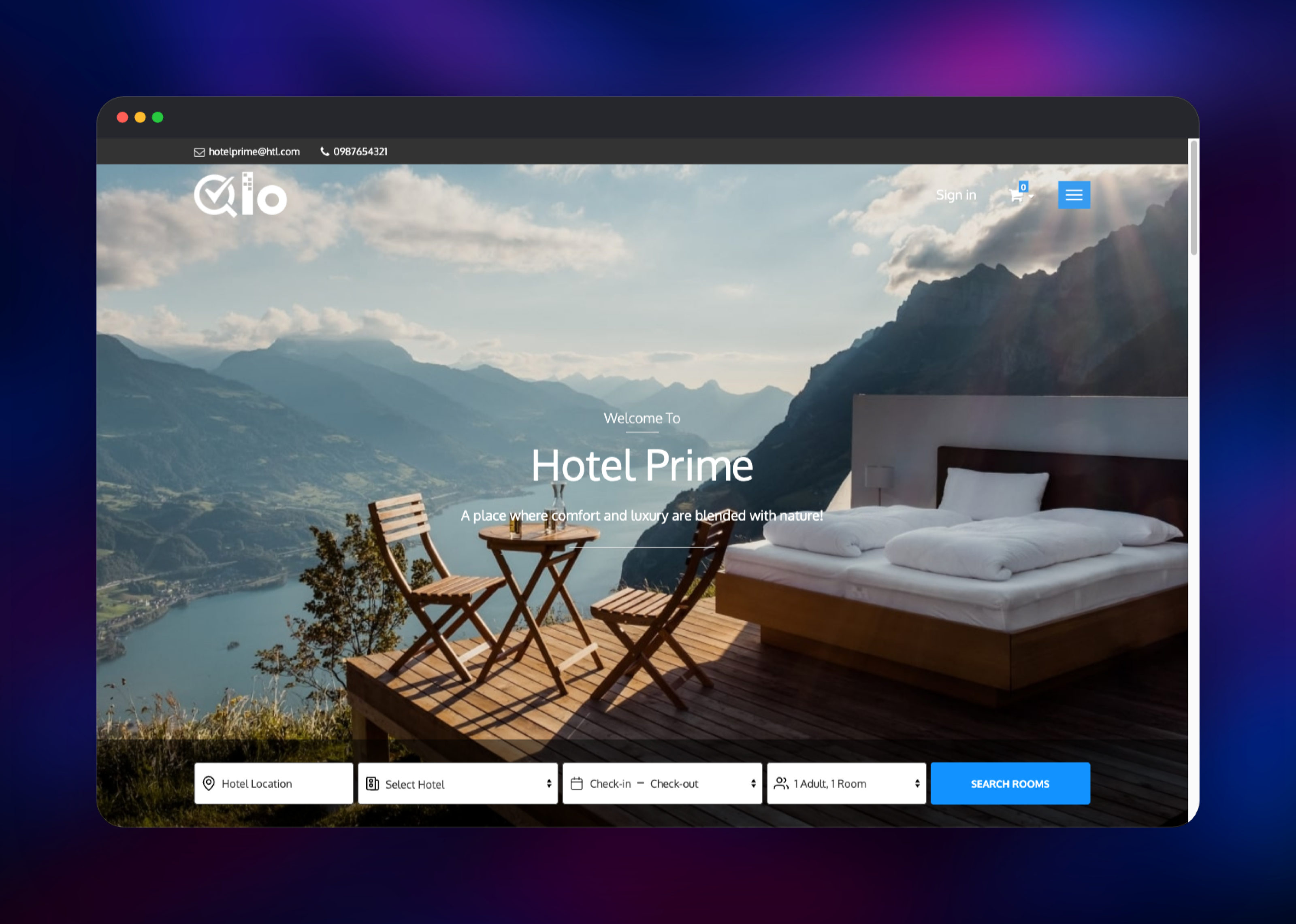
Open the public URL and you land on a real hotel website with a working availability
search. For the back office, append QLO_ADMIN_DIR — /backoffice/ by default — and sign
in. QloApps refuses to serve one at /admin, so change it to something private.
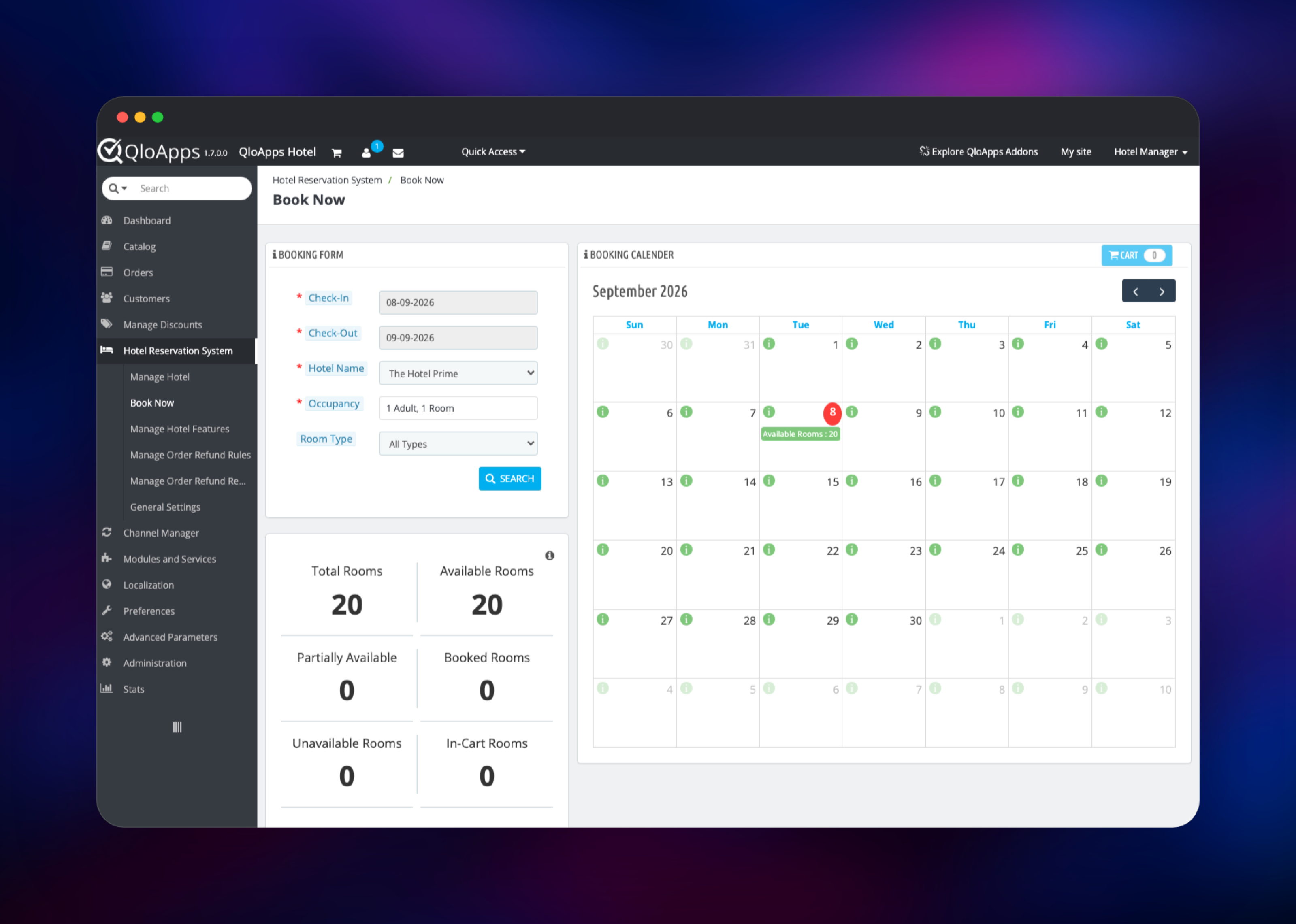
Your first useful action is Hotel Reservation System → Manage Hotel: replace the demo
property with your own name, address and contact details, then open Catalog → Manage
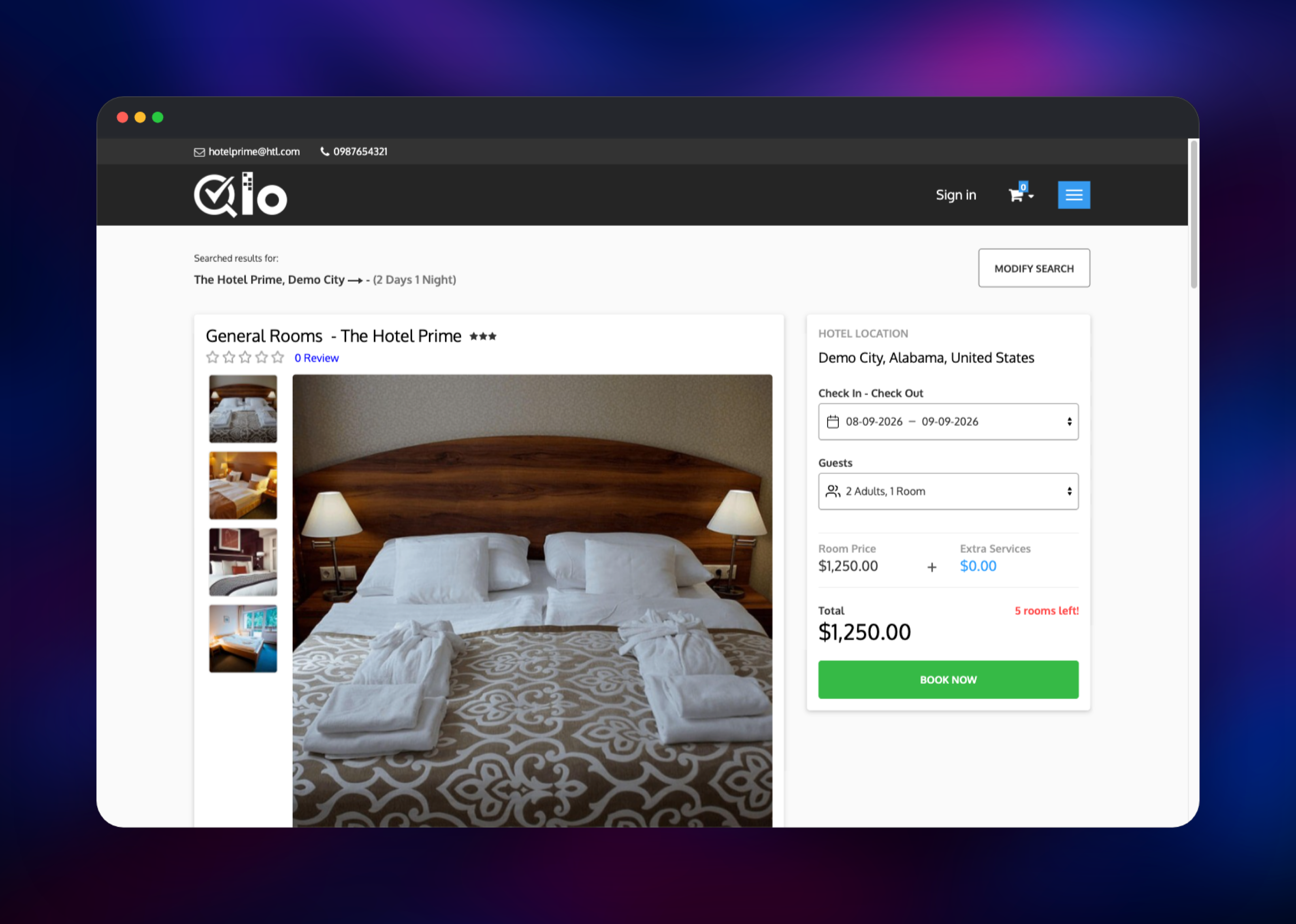
Room Types for real rooms and rates. Book a room from the storefront to confirm the whole
path works — it appears at once under Customers → Booking Carts, and the confirmation
email lands in the Mailpit inbox on its own URL, protected by MP_UI_AUTH. Point
QLO_SMTP_HOST, QLO_SMTP_PORT, QLO_SMTP_USER and QLO_SMTP_PASSWORD at your provider
to send real mail; set QLO_INSTALL_FIXTURES=0 before the first deploy for an empty shop.
About Hosting QloApps
QloApps replaces the usual three-vendor stack — website builder, booking widget and PMS — with one application and one database, inheriting PrestaShop's catalogue, tax, currency and invoice engine, applied to rooms and nights.
- Room-type catalogue with occupancy rules, bed types, amenities and galleries
- Availability calendar and front-desk booking screen for walk-in guests
- Advance payment, cancellation and refund rules; invoices and credit slips
- Multi-property, multi-currency, multi-language and per-country tax rules
- PrestaShop's modules and themes, plus a channel manager for OTAs
The architecture is deliberately small. qloapps serves the storefront, the back office
and the API from one origin, because the session cookie has to be same-origin. MySQL
stores everything transactional, and the app never connects as its superuser: each boot
creates a dedicated qloapps database and a role granted only on it, then runs as that
role, so a third-party module cannot reach anything else.
Why Deploy QloApps on Railway
Railway removes the server administration a PHP application normally drags along.
- Managed MySQL with backups, no
my.cnfto tune - Private networking between the app, database and mail server
- HTTPS and a domain on the first deploy, custom domains in a click
- One volume for photography, invoices and uploads
- Health checks, logs and scaling, nothing to configure
Common Use Cases
- Independent hotels and B&Bs taking commission-free direct bookings instead of paying an OTA on every reservation
- Hostels and guest houses needing occupancy and rate management without a per-room PMS subscription
- Small chains running several properties from one back office
Dependencies for QloApps
- qloapps — built from gridalpha/qloapps-railway,
packaging QloApps 1.7.0 on
php:8.3-apachewith the extensions it requires (gd,intl,zip,soap,bcmath,pdo_mysql,mysqli,exif,opcache). It installs the shop headlessly, so there is no wizard and no window in which the site has no owner. - MySQL —
mysql:9.4. Rooms, rates, reservations, guests, invoices and every configuration value live here. - mailpit —
axllent/mailpit:latest, SMTP on private port 1025 with a web inbox. It never forwards mail, so confirmations are captured until you set a relay.
Environment Variables Reference
| Variable | Purpose |
|---|---|
QLO_ADMIN_EMAIL | Email address of the hotel manager account |
QLO_ADMIN_PASSWORD | Password for that account; at least 8 characters |
QLO_ADMIN_DIR | Back office directory; cannot be admin |
QLO_INSTALL_FIXTURES | 1 installs the demo property, 0 starts empty |
QLO_PUBLIC_DOMAIN | Set this when you attach a custom domain |
QLO_SMTP_HOST | SMTP server; point at your relay to send real mail |
MP_UI_AUTH | user:password for the Mailpit inbox |
Deployment Dependencies
Source: https://github.com/gridalpha/qloapps-railway — upstream: https://github.com/Qloapps/QloApps and https://qloapps.com/documentation/
Hardware Requirements for Self-Hosting QloApps
| Resource | Minimum | Recommended |
|---|---|---|
| CPU | 1 vCPU | 2 vCPU |
| RAM | 1 GB app, 512 MB MySQL | 2 GB app, 1 GB MySQL |
| Storage | 5 GB volume | 10 GB+ once photography grows |
| Runtime | PHP 8.1–8.4, MySQL 5.7+ | PHP 8.3, MySQL 9 |
Apache runs prefork because mod_php requires it, and each worker holds a full PHP interpreter. The image sizes the pool from the container's memory limit, so a bigger plan raises concurrency.
Self-Hosting QloApps
To run it locally, clone the deployment repository and build the image:
git clone https://github.com/gridalpha/qloapps-railway.git
cd qloapps-railway
docker build -t qloapps .
Then start MySQL and the application. The entrypoint creates the database and its scoped role itself, so the only credential you supply is the admin connection string:
docker network create qlonet
docker run -d --name qlo-mysql --network qlonet \
  -e MYSQL_ROOT_PASSWORD=change-me mysql:9.4
docker run -d --name qloapps --network qlonet -p 8080:8080 -v qlo-data:/data \
  -e PORT=8080 -e MYSQL_URL="mysql://root:change-me@qlo-mysql:3306/mysql" \
  -e QLO_DB_PASSWORD="a-long-random-string" \
  -e QLO_ADMIN_EMAIL="manager@yourhotel.com" \
  -e QLO_ADMIN_PASSWORD="a-strong-password" qloapps
The site is then on http://localhost:8080, the back office on /backoffice/. Upstream's
webkul/qloapps_docker bundles its own MySQL and needs a human to finish a browser
installer, which is why this template builds its own image.
Is QloApps Free to Self-Host?
QloApps is free and open source under the Open Software License 3.0 — no per-room fee, no per-booking commission, no licence key. Webkul sells optional add-ons such as a channel manager, payment gateways and themes, but the core PMS, booking engine and website are complete without them. Self-hosting costs only the infrastructure the three services use.
FAQ
What is QloApps?
An open-source hotel management system combining a Property Management System, a commission-free booking engine and a hotel website in one application, built on the PrestaShop 1.6 core by Webkul under the OSL 3.0 licence. It is free to self-host.
What does this Railway template deploy?
Three services: the QloApps application on Apache with PHP 8.3, a managed MySQL 9.4
database, and a Mailpit SMTP server with a web inbox, plus a volume at /data for
photography, uploads, invoices and the shop's settings file.
Why does the template include a database and a mail server?
QloApps keeps every room, rate, reservation and configuration value in MySQL, so it cannot
run without one. It also mails on its core flow — booking confirmations, account welcomes,
password resets — and PHP's mail() does not work in a container, so a template with no
SMTP would look fine while dropping every message.
How do I log in to the QloApps back office after deploying?
Append your QLO_ADMIN_DIR value to the public URL — /backoffice/ unless you changed
it — and sign in with QLO_ADMIN_EMAIL and QLO_ADMIN_PASSWORD. QloApps blocks a back
office in a directory named admin, which is why the path is not /admin.
Can I use my own domain with self-hosted QloApps?
Yes. Attach the domain to the qloapps service and set QLO_PUBLIC_DOMAIN to that
hostname; the shop URL and every generated link are re-applied from it on the next boot.
Template Content


