
Deploy Rallly
Doodle alternative. Open-source group scheduling and meeting polls
rallly
Just deployed

Just deployed
/var/lib/postgresql/data

mailpit
Just deployed
/data
rallly-storage
Bucket
Just deployed
Deploy and Host Rallly on Railway
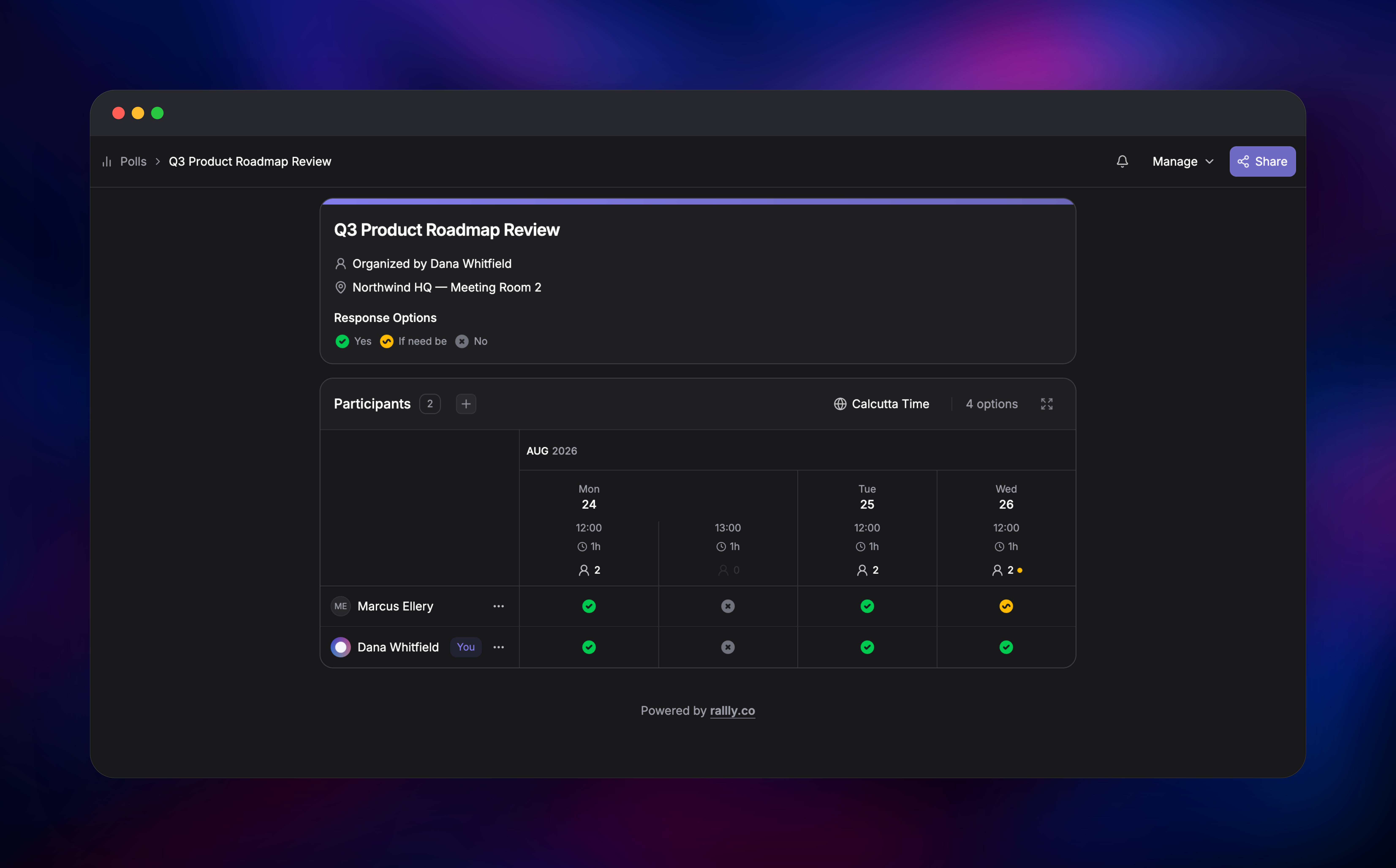
Rallly is an open-source group scheduling tool that ends the "when works for everyone?" email thread. An organiser proposes several dates and times, shares one link, and participants mark each slot Yes, If need be, or No — no signup needed. The grid shows the winning slot at a glance, and finalising the poll emails everyone a calendar invite. Teams and clubs use it as a self-hosted Doodle alternative because participant names, emails and availability never leave infrastructure they control.
Deploy Rallly on Railway and the upstream production stack arrives wired together: the lukevella/rallly web service on port 3000, managed PostgreSQL holding every poll, vote and login session, an object storage bucket for avatars and branding images, and a Mailpit service receiving Rallly's mail over the private network. That last one is not decoration — Rallly has no password at signup, you sign in with a six-digit code sent to your inbox, so an instance without working SMTP is one nobody can log into. Self-host Rallly here and mail works on first boot, with a clean path to a real provider.
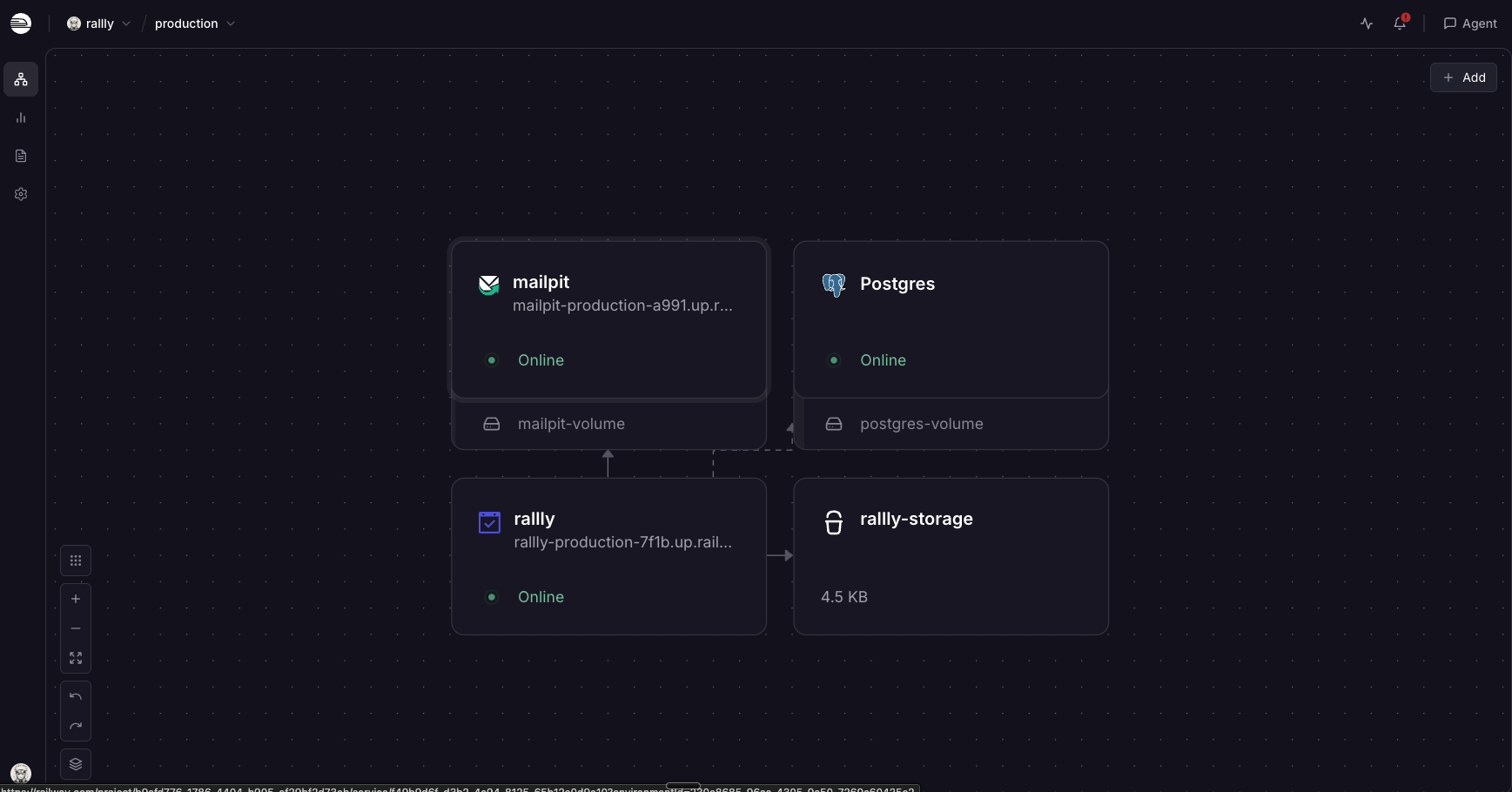
Getting Started with Rallly on Railway
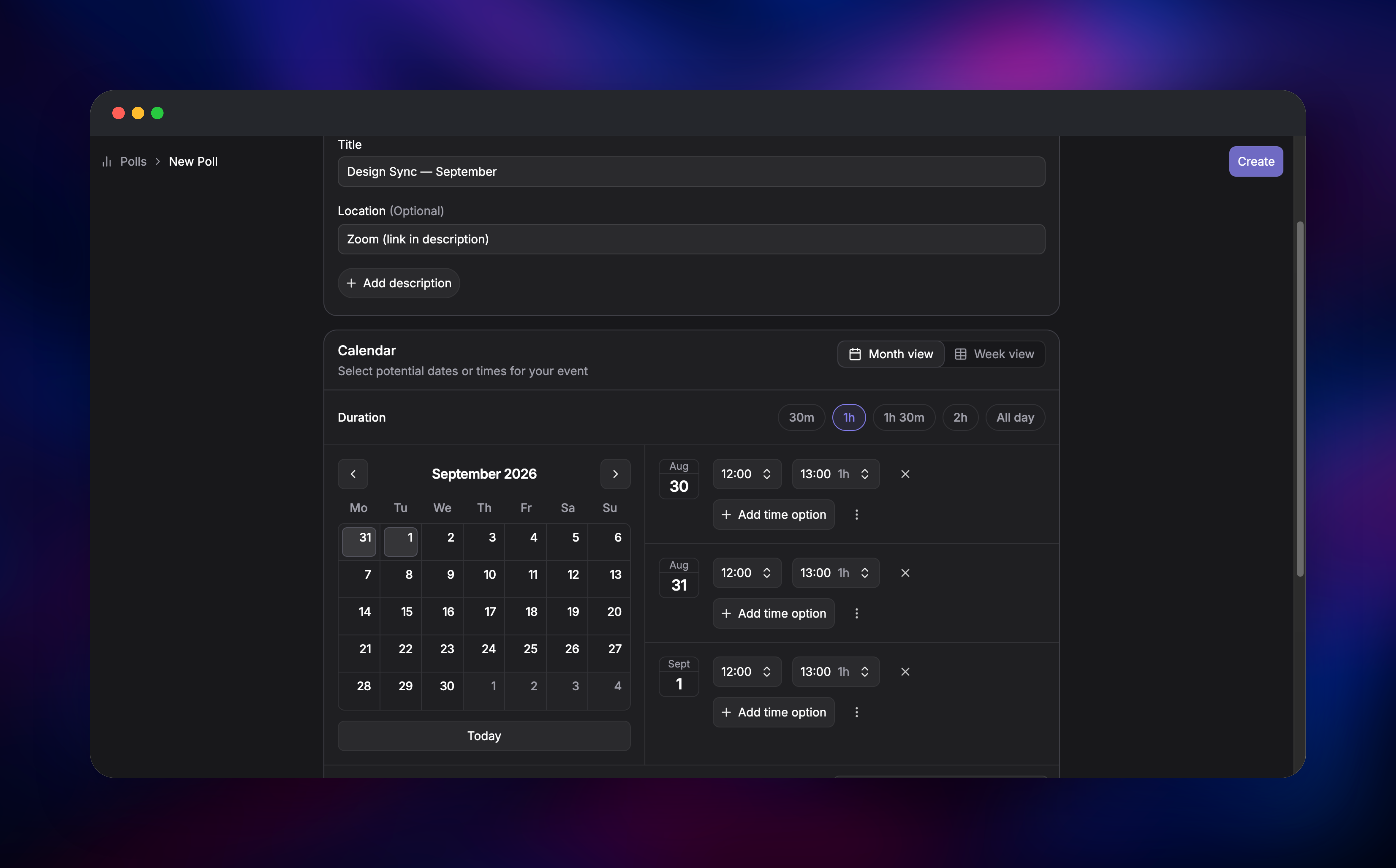
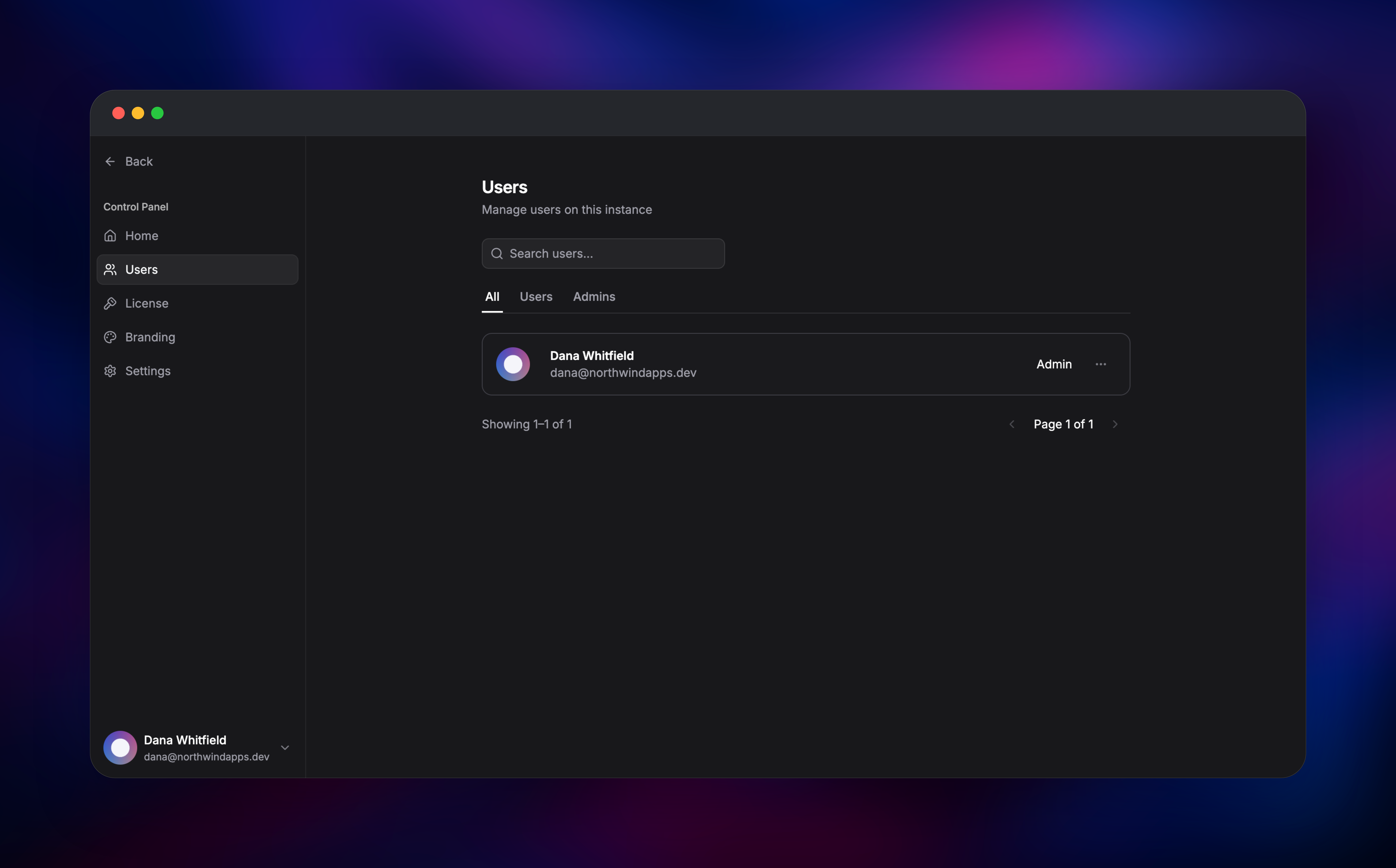
Before deploying, set INITIAL_ADMIN_EMAIL to the address that will own the instance — Rallly only grants admin to that address, and it must be set before that user signs up. When the deployment goes green, open the generated domain and choose "Get started". Rallly emails a six-digit code instead of asking for a password, and on a fresh instance that mail lands in Mailpit: open its domain in a second tab, sign in with the credentials in MP_UI_AUTH, and read the code there. Finish the account wizard, then create your first poll by picking dates on the calendar and adding time options to each. Open the share link in a private window and vote as a guest — that confirms responses, notification emails and the grid work end to end. Finally visit /control-panel, where your address is offered a "Make me an admin" button unlocking the user list, licence page and settings.
About Hosting Rallly
Scheduling tools see sensitive metadata: who is meeting whom, how often, about what. Hosting Rallly yourself keeps all of it in your own database, which is why organisations under GDPR or client-confidentiality obligations move off hosted poll services.
Key features:
- Date and time polls with per-slot Yes / If need be / No voting
- Guest participation with no account required, via one share link
- Automatic time zone conversion so participants see local times
- Poll finalisation that emails everyone an ICS calendar invite
- Comments, notification muting and live updates as votes arrive
- Email code sign-in, optional OIDC SSO, admin control panel
The architecture is deliberately small: one Next.js web process, no worker tier, and all state including auth sessions in PostgreSQL — so containers redeploy without logging anyone out.
Why Deploy Rallly on Railway
Railway removes the server work self-hosting a scheduling app usually implies:
- Managed PostgreSQL, connected by reference, with backups
- HTTPS domain and TLS certificate issued automatically
- Object storage for avatars, with no volume to mount or size
- Private networking between the app, database and mail service
- Usage-based pricing — a low-traffic instance is a few dollars a month
Common Use Cases
- Finding a sprint planning or retro slot across a team in several time zones
- Scheduling client calls or interviews without exposing a corporate calendar
- Coordinating volunteer rotas, committee meetings or club practice sessions
- Running scheduling on your own domain, with participant data in-house
Dependencies for Rallly
- Rallly —
lukevella/rallly:latest(v4.12.3); migrates at boot, serves on port 3000 - PostgreSQL — Railway managed; polls, votes, comments, users, sessions
- Object storage — Railway managed bucket, S3-compatible; avatars and branding
- Mailpit —
axllent/mailpit:latest; SMTP on private port 1025, inbox UI on 8025 behind basic auth
Environment Variables Reference
| Variable | Purpose |
|---|---|
NEXT_PUBLIC_BASE_URL | Public instance URL; must match the domain exactly |
SECRET_PASSWORD | Session encryption key, minimum 32 characters |
DATABASE_URL | PostgreSQL connection string |
INITIAL_ADMIN_EMAIL | The only address that may claim the admin role |
ALLOWED_EMAILS | Who may register or sign in; *@yourcompany.com works |
SUPPORT_EMAIL / NOREPLY_EMAIL | Address shown to users; the sender |
SMTP_* | Where Rallly sends mail |
S3_* | Bucket, endpoint, region and credentials for uploads |
OIDC_* | Single sign-on against your identity provider |
MP_SMTP_RELAY_* | Point Mailpit at Resend, Postmark, Mailgun or SES |
ALLOWED_EMAILS is what actually restricts who can create an account: it is enforced on every authentication endpoint. REGISTRATION_ENABLED=false only hides the signup screen and leaves the API open — tidiness, not a lock.
Deployment Dependencies
- Source: https://github.com/lukevella/rallly (AGPL-3.0), docs at https://support.rallly.co
- Reference stack: https://github.com/lukevella/rallly-selfhosted
- Images:
lukevella/rallly,axllent/mailpit; runtime Node.js 24, PostgreSQL 14+
Hardware Requirements for Self-Hosting Rallly
| Resource | Minimum | Recommended |
|---|---|---|
| CPU | 1 vCPU | 2 vCPU |
| RAM | 512 MB | 1–2 GB, plus ~256 MB for Postgres |
| Storage | 1 GB database | 5 GB database, plus bucket space |
| Runtime | Node.js 24, PostgreSQL 14+ | Node.js 24, PostgreSQL 16+ |
Rallly is light: short bursts of database reads when a poll opens. Run a single replica — with no external key-value store, rate limits are tracked per process.
Self-Hosting Rallly with Docker
The published image is configured entirely through environment variables:
docker run -d --name rallly -p 3000:3000 \
  -e DATABASE_URL=postgres://user:pass@host:5432/rallly \
  -e SECRET_PASSWORD=at-least-32-random-characters \
  -e NEXT_PUBLIC_BASE_URL=http://localhost:3000 \
  -e SUPPORT_EMAIL=you@example.com \
  -e SMTP_HOST=mail -e SMTP_PORT=1025 \
  lukevella/rallly:latest
Generate the session key with openssl rand -hex 32, and never set a custom start command — the image entrypoint migrates the database first, so replacing it runs the app against an unmigrated schema. To build from source, with Node 24 and pnpm:
git clone https://github.com/lukevella/rallly.git && cd rallly
cp apps/web/.env.sample apps/web/.env   # set SECRET_PASSWORD, DATABASE_URL, SMTP_*
pnpm install && pnpm db:deploy && pnpm build && pnpm start
How Much Does Rallly Cost to Self-Host?
Rallly is open source under AGPL-3.0 and free to self-host. Unlicensed instances are a one-registered-user tier on an honour system: past one registered user the control panel shows an upgrade reminder, but nothing stops working. Guests never count, so one organiser with unlimited voters is free. Perpetual v4 licences — Plus (5 users), Organization (50) and Enterprise (50+, white-labelling) — raise the seat count and activate in the Control Panel. On Railway you pay only for what the instance uses.
FAQ
What is Rallly?
An open-source scheduling tool for finding a meeting time across a group: the organiser proposes date and time options, participants vote through a share link without registering, and the winning slot becomes a calendar invite. It is the self-hosted answer to Doodle.
What does this Railway template deploy?
The Rallly web app on a public HTTPS domain, managed PostgreSQL, an object storage bucket for avatars and branding, and a Mailpit service that receives Rallly's mail so sign-in works on first boot.
Why does the template include PostgreSQL and object storage?
Polls, votes, comments, users and login sessions all live in PostgreSQL, so the app redeploys without logging anyone out. The bucket keeps avatar and branding uploads off the container filesystem.
How do I send real emails instead of using the built-in test inbox?
Set Mailpit's relay variables (MP_SMTP_RELAY_HOST, _PORT, _USERNAME, _PASSWORD, _STARTTLS, plus MP_SMTP_RELAY_ALL=true) to credentials from Resend, Postmark, Mailgun or SES. Mailpit forwards every message on while keeping a searchable copy, so Rallly's config is unchanged.
How do I stop strangers from signing up on my Rallly instance?
Set ALLOWED_EMAILS to a comma-separated list of addresses or wildcards such as *@yourcompany.com. It is checked on every authentication request, so unlisted addresses cannot register.
How do I make myself an admin on a self-hosted Rallly instance?
Set INITIAL_ADMIN_EMAIL to your address before signing up, create the account, then visit /control-panel and press "Make me an admin". Any other user gets a not-found page.
Can I add single sign-on to self-hosted Rallly?
Yes — set OIDC_DISCOVERY_URL, OIDC_CLIENT_ID and OIDC_CLIENT_SECRET. Keep email login on until SSO works, or nobody can get in.
Template Content


