Deploy Redis UI
Manage and explore Redis visually with a powerful web UI, ready in 1 click.
redis-insight
Just deployed
/data
Deploy and Host Redis UI on Railway
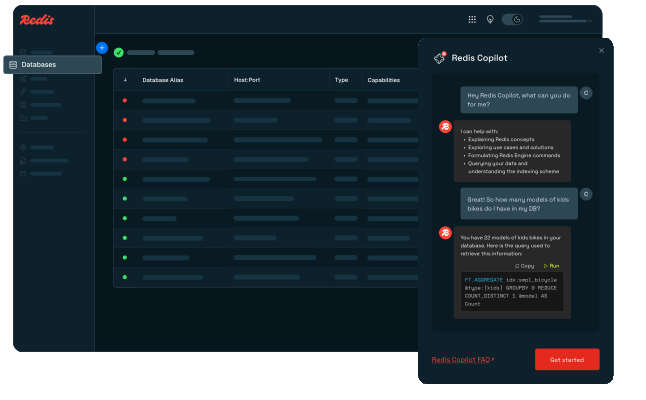
Redis UI provides a modern web interface powered by Redis Insight for exploring, monitoring, and managing Redis databases. Inspect keys, browse data structures, run commands, analyze memory usage, and troubleshoot Redis workloads directly from your browser.
About Hosting Redis UI
This template deploys Redis Insight as a standalone Redis management interface with persistent application storage.
You can connect it to Redis instances running in the same Railway project, Redis databases hosted elsewhere, or other compatible Redis deployments.
Redis Insight provides a visual alternative to working exclusively through redis-cli, making it easier to inspect data structures, investigate memory usage, execute commands, and understand what is happening inside your Redis database.
Persistent storage keeps saved database connections and Redis Insight application state available across restarts and redeployments.
Common Use Cases
- Browse Redis keys and values visually
- Inspect Strings, Hashes, Lists, Sets, Sorted Sets, Streams, and other data structures
- Run Redis commands through a built-in CLI
- Monitor Redis memory usage
- Investigate key expiration and TTL
- Debug application cache data
- Analyze Redis performance
- Manage multiple Redis databases from one interface
- Connect to Redis running inside or outside Railway
- Troubleshoot development and production Redis workloads
Redis UI vs Redis CLI
| Feature | Redis UI | Redis CLI |
|---|---|---|
| Graphical interface | ✅ Yes | ❌ No |
| Browse keys visually | ✅ Yes | ⚠️ Commands |
| Built-in command line | ✅ Yes | ✅ Yes |
| Memory analysis | ✅ Visual | ⚠️ Manual |
| Multiple connections | ✅ Easy management | ⚠️ Manual |
| Data structure inspection | ✅ Visual | ✅ Commands |
| Best Fit | Development, debugging, monitoring | Scripting and direct administration |
Redis UI does not replace redis-cli; instead, it provides a visual management layer that makes day-to-day Redis inspection and troubleshooting easier.
Persistent Storage
Redis Insight application data is persisted at:
/data
Persistent storage can include:
- Saved Redis connections
- Application configuration
- Redis Insight preferences
- Local application state
This ensures the management interface keeps its configuration after service restarts or redeployments.
Your actual Redis database data remains stored on the Redis server itself and is not stored inside the Redis UI volume.
Connecting to Redis
After deployment:
- Open the public Railway domain assigned to Redis UI.
- Choose Add Redis Database.
- Enter your Redis connection details.
- Test the connection.
- Save the database.
- Start browsing and managing Redis data.
For a Redis instance running inside the same Railway project, use its private networking hostname and port whenever possible.
Typical Redis connection information includes:
Host
Port
Username
Password
TLS settings
You can also use Redis UI to manage external Redis deployments as long as the server is reachable from the service.
Health Check
The template can use Redis Insight's application health endpoint:
/api/health/
This allows Railway to verify that the Redis UI service is running and responding correctly.
Security Considerations
Redis UI provides administrative access to connected Redis databases.
For production environments:
- Keep Redis itself on private networking whenever possible.
- Do not expose Redis port
6379publicly unless required. - Use authentication on Redis databases.
- Use strong credentials.
- Restrict access to the Redis UI public endpoint when managing sensitive databases.
Redis UI should be treated as an administrative tool because connected users may be able to inspect, modify, or delete Redis data depending on the credentials provided.
Dependencies for Redis UI Hosting
- Redis Insight — web-based Redis management interface
- Persistent Volume — stores Redis Insight application state
- Redis Server — the Redis database you want to manage
- Railway Public Networking — HTTPS access to the management interface
- Railway Private Networking — recommended for connecting to Redis services inside the same project
Redis itself is not included in this standalone template.
Deployment Dependencies
- Redis Insight: https://redis.io/insight/
- Redis Documentation: https://redis.io/docs/
- Redis GitHub: https://github.com/redis/redis
- Redis Insight GitHub: https://github.com/RedisInsight/RedisInsight
- Railway Networking: https://docs.railway.com/networking
- Railway Volumes: https://docs.railway.com/volumes
Why Deploy Redis UI on Railway?
Railway is a singular platform to deploy your infrastructure stack. Railway will host your infrastructure so you don't have to deal with configuration, while allowing you to vertically and horizontally scale it.
By deploying Redis UI on Railway, you get a persistent browser-based Redis management interface that can connect to Redis databases inside or outside your project, making it easier to inspect data, debug applications, run commands, and monitor your Redis workloads.
Template Content
redis-insight
redis/redisinsight:latest