
Deploy Redmine
Project management and issue tracker with wikis, Gantt and time logs

mailpit
Just deployed
/data
redmine
Just deployed
/data

Just deployed
/var/lib/postgresql/data
Deploy and Host Redmine on Railway
Redmine is the open-source project management and issue tracking application teams have been running since 2006. Every project gets its own issue tracker, wiki, forum, document store, calendar, Gantt chart and time log, behind a role-based permission system fine-grained enough to run engineering, support and client-facing projects side by side in one installation. It is a plain Ruby on Rails app on a SQL database, so teams that self-host Redmine keep their issue history, attachments and audit trail on their own infrastructure.
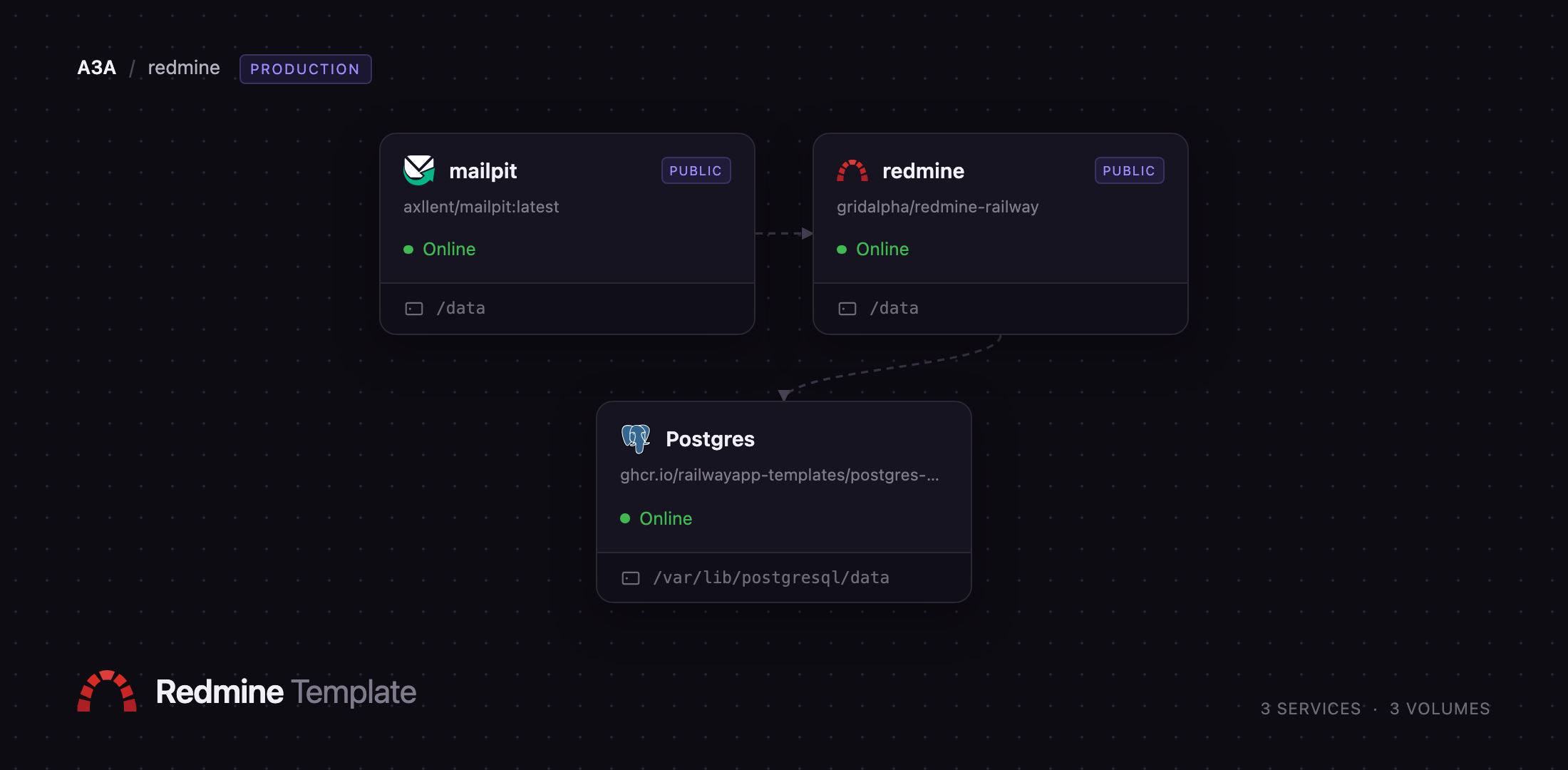
This template lets you deploy Redmine on Railway with the pieces a real installation needs already wired together. The redmine service runs the Rails app behind Railway's HTTPS edge, Postgres stores every project, issue and permission, and mailpit gives it a private-network SMTP endpoint plus a browser inbox, so notification email works as soon as the deploy finishes. Attachments, plugins and themes live on a volume at /data. On first boot the app migrates the database, loads Redmine's default trackers, roles and statuses, sets the administrator password from a generated variable and points itself at its public domain — no setup wizard, and no admin/admin window to close.
Getting Started with Redmine on Railway
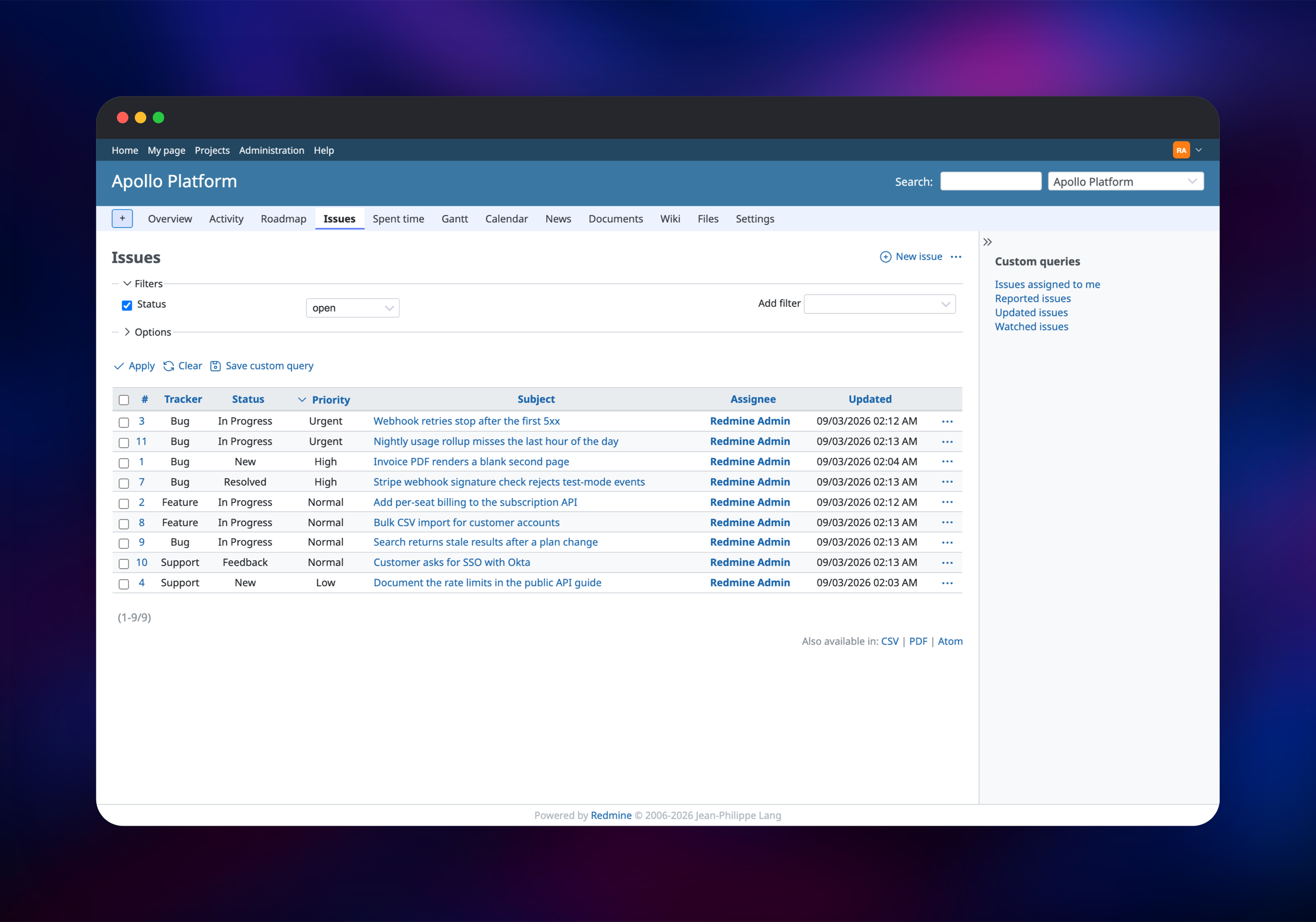
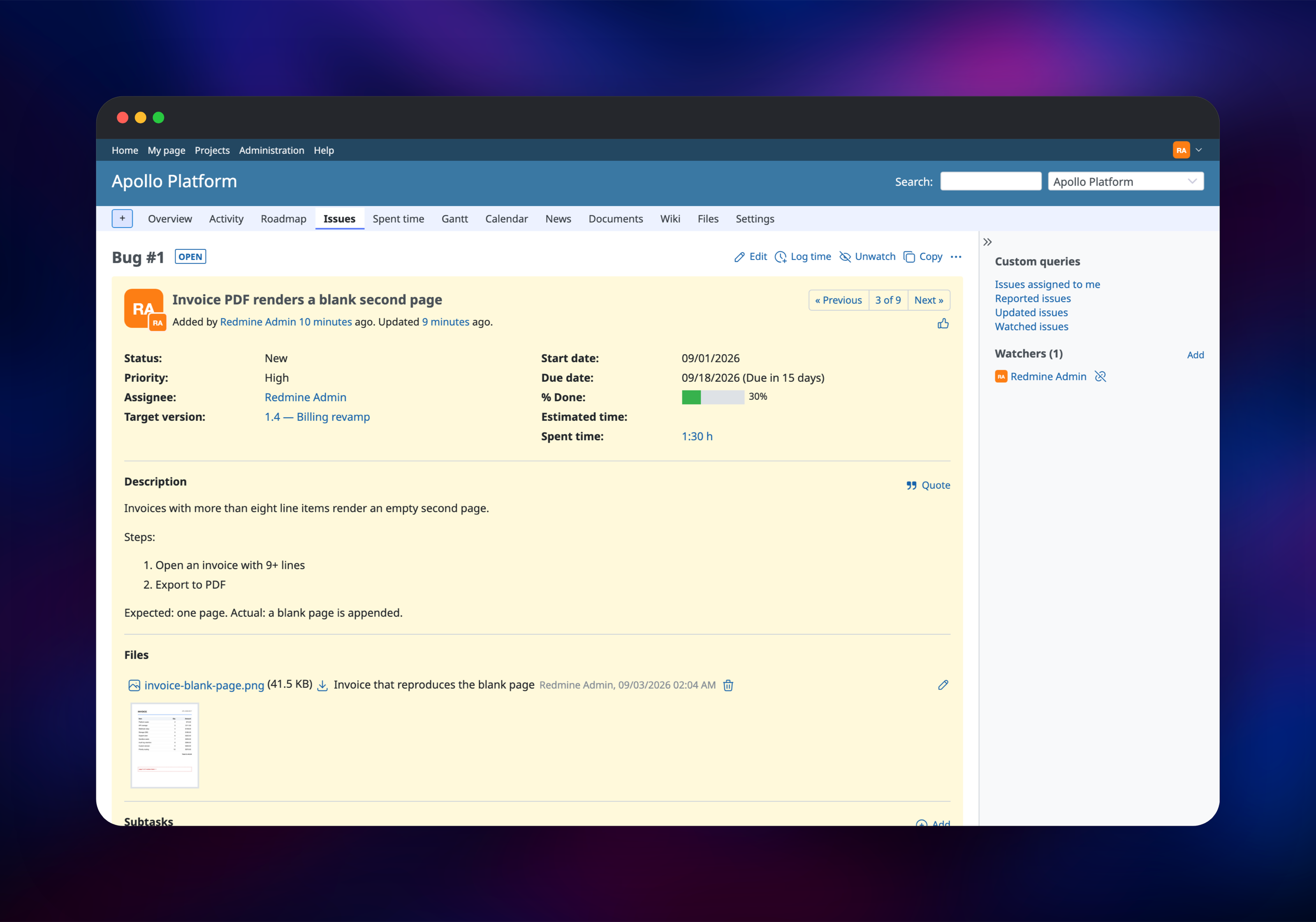
Open the redmine service's public URL and you land on the sign-in page, because the template ships with Authentication required on and self-registration off. Sign in as admin with the password Railway generated into that service's REDMINE_ADMIN_PASSWORD variable. Create team accounts under Administration → Users, then Projects → New project: name it, tick the modules you want — issue tracking, Gantt, wiki, time tracking, repository — and save. Create your first issue with a tracker, priority, assignee and dates, and attach a file to confirm uploads land on the volume. To check mail, use Administration → Settings → Email notifications → Send a test email, then open the mailpit URL and sign in with its MP_UI_AUTH credentials.
About Hosting Redmine
Redmine tracks many kinds of work across many projects at once. Trackers let one project hold bugs, features and support requests under different workflows; custom fields extend issues, projects and time entries without a schema change; and a permission matrix maps roles onto modules per project, so a client sees their own project and nothing else. Teams self-host it when data residency, per-seat cost or years of history rule out a hosted tracker.
Key features:
- Projects and subprojects with per-project modules and permissions
- Configurable trackers, statuses, workflows, priorities and custom fields
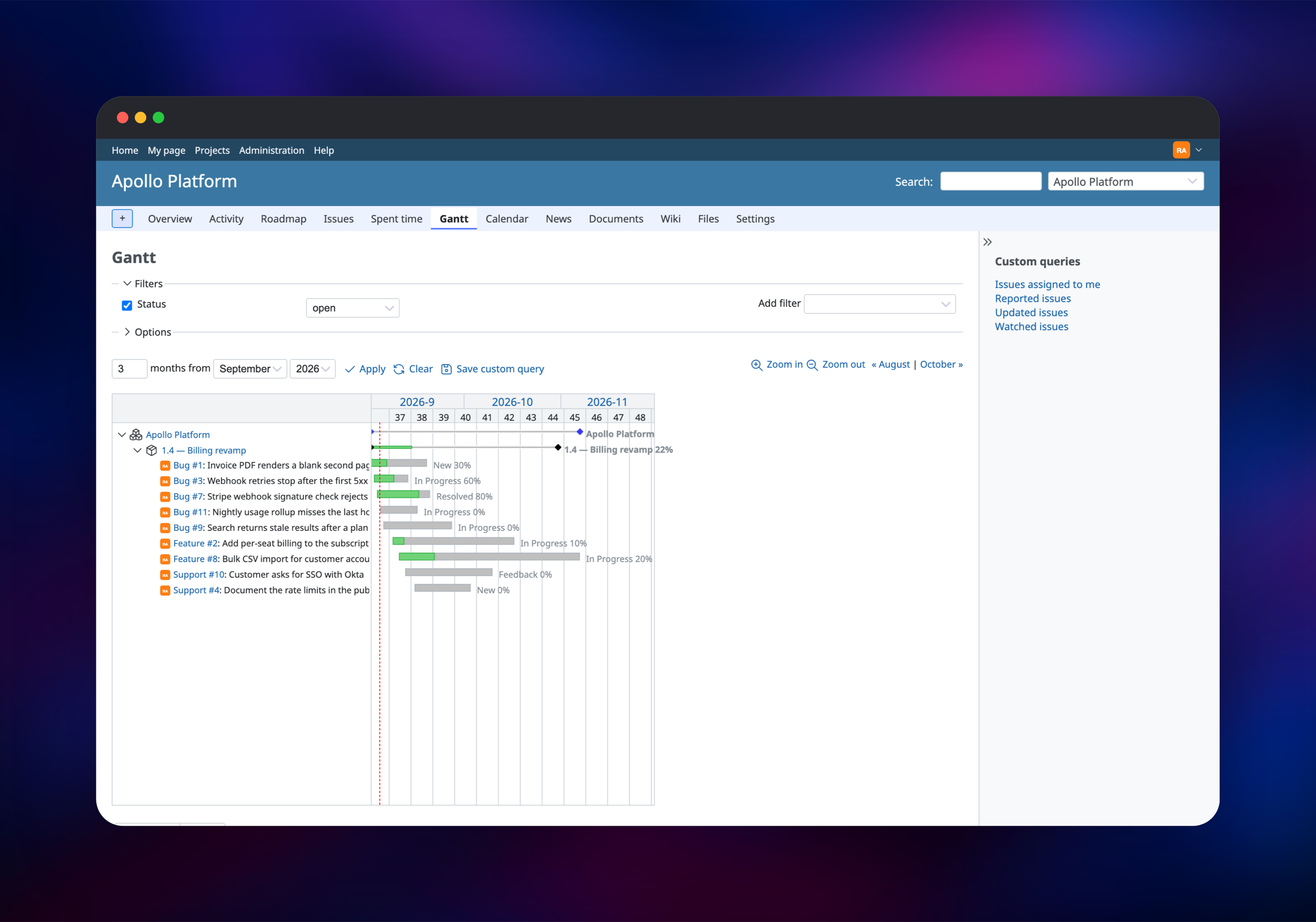
- Gantt charts, calendar, roadmap and version milestones
- Time tracking, per-project wiki, forums, documents and full-text search
- Repository browser for Git, Subversion, Mercurial and Bazaar
- REST API, OAuth2, webhooks, TOTP two-factor auth, CSV import, LDAP
The architecture is three services. redmine is the Rails app and the only one serving users; its volume holds attachments, plugins and themes. Postgres is the system of record and stays private. mailpit accepts SMTP privately and captures what Redmine sends, so notifications are testable straight away — swap its address for your provider's when you go live.
Why Deploy Redmine on Railway
Railway removes the server administration a Rails app usually brings:
- Postgres, mail and the app deploy together, already connected
- HTTPS, a public domain and health checks are handled for you
- Attachments persist on a managed volume across redeploys
- Migrations and first-run setup happen at boot
- Scale CPU and memory from the dashboard
Common Use Cases
- Engineering teams tracking bugs, features and releases across products, with Gantt charts and version milestones driving the roadmap
- Agencies giving each client a project and a role limiting them to their own issues
- Internal IT and support desks triaging through a Support tracker and email notifications
Dependencies for Redmine
- Redmine — the official
redmineimage with a first-run bootstrap and mail configuration layered on: gridalpha/redmine-railway - PostgreSQL — Railway's managed Postgres, holding all application data
- Mailpit —
axllent/mailpit, SMTP plus a web inbox for outgoing notifications
Environment Variables Reference
| Variable | Service | Purpose |
|---|---|---|
REDMINE_ADMIN_PASSWORD | redmine | Administrator password, applied before boot |
SECRET_KEY_BASE | redmine | Signs session cookies; changing it logs everyone out |
REDMINE_DATABASE_CIPHER_KEY | redmine | Encrypts SCM/LDAP passwords and 2FA secrets |
REDMINE_LOGIN_REQUIRED | redmine | 1 requires sign-in; 0 allows anonymous browsing |
REDMINE_SELF_REGISTRATION | redmine | 0 off, 1 automatic, 2 email activation, 3 manual |
REDMINE_SMTP_ADDRESS | redmine | SMTP host; defaults to the bundled Mailpit |
MP_UI_AUTH | mailpit | user:password guarding the mail inbox |
Deployment Dependencies
Hardware Requirements for Self-Hosting Redmine
| Resource | Minimum | Recommended |
|---|---|---|
| CPU | 1 vCPU | 2 vCPU |
| RAM | 1 GB | 2–4 GB |
| Storage | 5 GB volume | 10 GB+, per attachments |
| Runtime | Ruby 4.0, Rails 8.1, PostgreSQL 13+ | same, on its own database service |
Memory is driven mostly by Puma workers, each roughly 300–500 MB. Leave WEB_CONCURRENCY at 2 for a small team and raise it alongside RAM.
Self-Hosting Redmine
The quickest way to run Redmine yourself is the official image beside a Postgres container. Start the database:
docker run -d --name redmine-db --network redmine-net \
  -e POSTGRES_USER=redmine -e POSTGRES_PASSWORD=changeme \
  -e POSTGRES_DB=redmine postgres:18
Then Redmine against it, with a volume for attachments:
docker run -d --name redmine --network redmine-net -p 3000:3000 \
  -e REDMINE_DB_POSTGRES=redmine-db \
  -e REDMINE_DB_USERNAME=redmine \
  -e REDMINE_DB_PASSWORD=changeme \
  -e REDMINE_DB_DATABASE=redmine \
  -e SECRET_KEY_BASE=$(openssl rand -hex 64) \
  -v redmine-files:/usr/src/redmine/files redmine:latest
The container migrates on start, then serves port 3000 with the default admin / admin credentials, which Redmine forces you to change at first sign-in. Outgoing mail needs a config/configuration.yml mounted in; the Railway template generates that file from environment variables instead.
How Much Does Redmine Cost to Self-Host?
Redmine is free and open source under the GPL v2 — no paid edition, no seat licence, no feature gating. Vendors such as Planio, Easy Redmine and RedmineUP sell hosted or extended versions, but the upstream project costs nothing. On Railway you pay for compute, memory and volume storage only, so a small team's instance costs a few dollars a month and scales with usage, not headcount.
FAQ
What is Redmine? Redmine is a free, open-source, web-based project management and issue tracker written in Ruby on Rails, handling many projects with per-project wikis, forums, Gantt charts, time tracking and role-based access control.
What does this Railway template deploy? Redmine on a persistent volume, managed PostgreSQL, and Mailpit for outgoing email. Migrations, Redmine's default configuration data and the administrator account are all handled on first boot.
Why does the template include a database and a mail service? Redmine keeps everything except attachments in SQL, and PostgreSQL is the recommended backend for multi-user installations. Mail is not optional either — password resets, account activation and issue notifications all send email — so Mailpit makes that path work at once and lets you read messages before you switch relay.
How do I connect Redmine to my own SMTP provider?
Set REDMINE_SMTP_ADDRESS, REDMINE_SMTP_PORT, REDMINE_SMTP_USERNAME and REDMINE_SMTP_PASSWORD on the redmine service, plus REDMINE_SMTP_STARTTLS=true for port 587 or REDMINE_SMTP_SSL=true for 465. Mail configuration is rewritten on the next deploy.
How do I use the REST API in self-hosted Redmine?
It is already enabled. Each user's key lives under My account → API access key, and requests authenticate with that key or HTTP Basic credentials — GET /issues.json?limit=25, for example. Set REDMINE_REST_API_ENABLED to 0 to turn it off.
Can I install Redmine plugins and themes on Railway?
Yes. The volume keeps plugins/ and themes/, so a plugin uploaded into /data/plugins survives redeploys and its migrations run at startup. Plugins needing extra gems are installed at boot from their own Gemfile. Set REDMINE_LOGIN_REQUIRED to 0 to let anonymous visitors browse public projects.
Template Content


