
Deploy Rocket Chat | Open Source Slack, Teams Alternative
Self Host Rocket.Chat. Real-time team comm, messaging, video calls & more
Rocket.Chat
Just deployed

MongoDB
Just deployed
/data/db
Deploy and Host Rocket.Chat on Railway

Deploy Rocket.Chat on Railway to get a production-ready, self-hosted team communication platform with real-time messaging, video conferencing, and omnichannel customer engagement. Self-host Rocket.Chat with full control over your data, compliance, and security — no vendor lock-in.
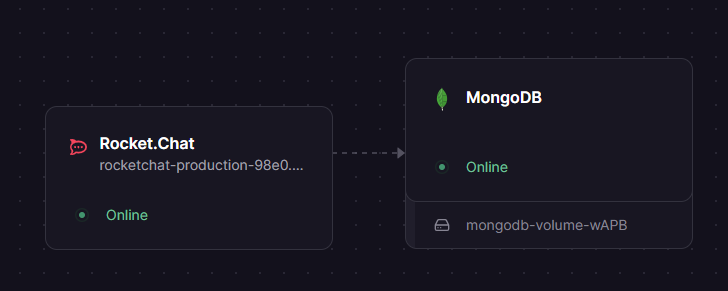
This Railway template deploys two services: Rocket.Chat (the application server running on Node.js/Meteor) and MongoDB (with replica set enabled for real-time change streams). Everything is pre-configured with private networking between services, persistent storage for MongoDB, and a public domain for your Rocket.Chat instance.
Getting Started with Rocket.Chat on Railway
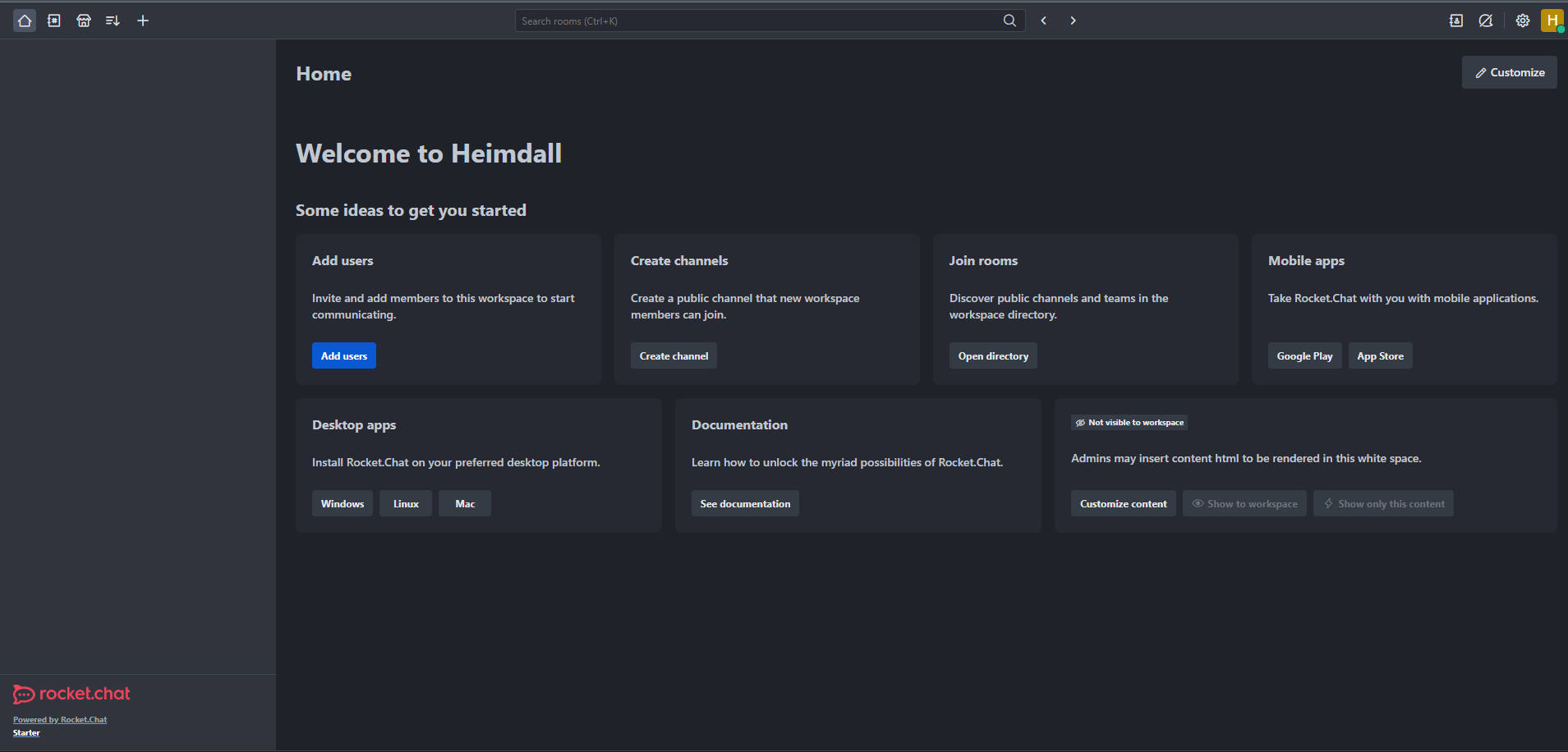
After deployment completes, open your Rocket.Chat URL. You'll see the Setup Wizard — create your admin account, set your organization name, and configure your workspace. Once the wizard finishes, you land on the home screen where you can create channels, invite team members, and start messaging immediately.
Navigate to Administration > Workspace to configure SMTP for email notifications, enable two-factor authentication, and set up OAuth providers. Create your first channel by clicking the + button in the sidebar. To enable omnichannel LiveChat for customer support, go to Administration > Omnichannel and toggle it on.
About Hosting Rocket.Chat
Rocket.Chat is an open-source communications platform built on Node.js and Meteor, designed for mission-critical operations. It provides a Slack-like experience with full data sovereignty — you own your infrastructure, your messages, and your encryption keys.
- Real-time messaging with channels, threads, discussions, and direct messages
- Video and voice calls built-in (no plugins required)
- Omnichannel support — manage WhatsApp, Instagram, SMS, and email from one inbox
- End-to-end encryption for sensitive conversations
- LDAP/SAML/OAuth for enterprise single sign-on
- Federation to connect with other Rocket.Chat instances or Matrix networks
- REST and Realtime APIs for custom integrations and bots
- DoD IL4/IL5 certified for government and defense deployments
Why Deploy Rocket.Chat on Railway
Railway eliminates the ops burden of running Rocket.Chat in production:
- One-click deploy with MongoDB replica set pre-configured
- Private networking between Rocket.Chat and MongoDB — no exposed database ports
- Persistent volumes for MongoDB data durability
- Automatic TLS certificates on your public domain
- Scale vertically or horizontally as your team grows
- No Docker Compose files, no Nginx config, no certificate management
Common Use Cases for Self-Hosted Rocket.Chat
- Internal team communication — replace Slack with a self-hosted alternative that keeps conversations on your infrastructure
- Customer support — omnichannel LiveChat aggregates WhatsApp, email, and web chat into a single agent dashboard
- Regulated industries — healthcare (HIPAA), finance, and government teams that require data residency and audit trails
- Developer collaboration — integrate with GitHub, GitLab, Jira, and CI/CD pipelines via webhooks and the REST API
Rocket.Chat vs Mattermost
| Feature | Rocket.Chat | Mattermost |
|---|---|---|
| Video calls | Built-in | Requires plugin |
| Omnichannel | WhatsApp, email, SMS, Instagram | Not available |
| Federation | Matrix bridge + native | Limited |
| E2E encryption | Yes | Enterprise only |
| License | MIT | AGPL / proprietary |
| Mobile apps | iOS + Android | iOS + Android |
Rocket.Chat offers broader out-of-the-box functionality — especially omnichannel and video calls — while Mattermost focuses on developer workflows and DevOps integrations.
Dependencies for Rocket.Chat on Railway
- Rocket.Chat —
rocket.chat:latest(8.2.1) — Node.js/Meteor application server - MongoDB —
mongo:7.0— database with replica set for change streams
Environment Variables Reference for Rocket.Chat
| Variable | Value | Description |
|---|---|---|
ROOT_URL | https://${{RAILWAY_PUBLIC_DOMAIN}} | Public URL for the Rocket.Chat instance |
PORT | 3000 | HTTP listening port |
MONGO_URL | mongodb://${{MongoDB.RAILWAY_PRIVATE_DOMAIN}}:27017/rocketchat?replicaSet=rs0 | MongoDB connection string with replica set |
DEPLOY_METHOD | docker | Deployment method identifier |
NODE_OPTIONS | --max-old-space-size=1024 | V8 heap limit for Node.js |
Deployment Dependencies
- Runtime: Node.js 22.x (bundled in the Docker image)
- Database: MongoDB 7.0+ with replica set enabled
- Docker Hub: rocket.chat | mongo
- GitHub: RocketChat/Rocket.Chat
- Docs: docs.rocket.chat
Hardware Requirements for Self-Hosting Rocket.Chat
| Resource | Minimum | Recommended |
|---|---|---|
| CPU | 1 vCPU | 2+ vCPU |
| RAM | 2 GB (app + DB) | 4 GB |
| Storage | 5 GB | 20+ GB |
| Runtime | Node.js 22.x | Bundled in image |
For deployments exceeding 500 concurrent users, consider 4+ vCPU and 8+ GB RAM. MongoDB benefits from additional RAM for its working set cache.
Self-Hosting Rocket.Chat with Docker
Run Rocket.Chat locally with Docker Compose:
services:
  rocketchat:
    image: rocket.chat:latest
    ports:
      - "3000:3000"
    environment:
      ROOT_URL: http://localhost:3000
      PORT: "3000"
      MONGO_URL: mongodb://mongodb:27017/rocketchat?replicaSet=rs0
      DEPLOY_METHOD: docker
    depends_on:
      - mongodb

  mongodb:
    image: mongo:7.0
    command: ["mongod", "--replSet", "rs0", "--bind_ip_all"]
    volumes:
      - mongo_data:/data/db

volumes:
  mongo_data:
After starting, initialize the MongoDB replica set:
docker exec -it mongodb mongosh --eval "rs.initiate()"
Then open http://localhost:3000 and complete the setup wizard.
Is Rocket.Chat Free to Self-Host?
Rocket.Chat is open-source under the MIT license — free to use, modify, and distribute. The Community edition includes real-time messaging, video conferencing, file sharing, two-factor authentication, and unlimited users, channels, and messages. Premium plans (Starter, Pro, Enterprise) add features like read receipts, engagement dashboards, and priority support. When self-hosting on Railway, you only pay for Railway infrastructure — no Rocket.Chat licensing fees.
FAQ
What is Rocket.Chat and why self-host it? Rocket.Chat is an open-source team communication platform — a self-hosted alternative to Slack and Microsoft Teams. Self-hosting gives you full control over your data, compliance with regulations like GDPR and HIPAA, and eliminates per-user SaaS fees.
What does this Railway template deploy for Rocket.Chat?
This template deploys two services: the Rocket.Chat application server (rocket.chat:latest) and a MongoDB database (mongo:7.0) configured as a single-node replica set. MongoDB uses private networking and persistent storage — it is not publicly accessible.
Why does Rocket.Chat require MongoDB with a replica set? Rocket.Chat uses MongoDB change streams for real-time message delivery, typing indicators, and presence updates. Change streams require a replica set — even for single-node deployments. Without it, real-time features don't work.
How do I enable SMTP email notifications in self-hosted Rocket.Chat?
Go to Administration > Settings > Email > SMTP. Set the SMTP host, port, username, and password for your email provider. Alternatively, set OVERWRITE_SETTING_SMTP_Host, OVERWRITE_SETTING_SMTP_Port, OVERWRITE_SETTING_SMTP_Username, and OVERWRITE_SETTING_SMTP_Password as environment variables.
Can I integrate Rocket.Chat with Slack, GitHub, or Jira? Yes. Rocket.Chat supports incoming and outgoing webhooks, a REST API, and over 50 pre-built integrations including GitHub, GitLab, Jira, Trello, and Zapier. Configure integrations under Administration > Integrations.
How do I upgrade Rocket.Chat on Railway?
Update the Docker image tag in the Railway service settings (e.g., from rocket.chat:8.2.1 to rocket.chat:8.3.0). Railway will automatically pull the new image and redeploy. MongoDB migrations run automatically on startup.
Template Content
Rocket.Chat
rocket.chat:latestMongoDB
mongo:8.0
