
Deploy Chatwoot | Open-Source Customer Support Platform
Deploy Chatwoot (Intercom alternative). Live chat, email, WhatsApp, etc.
PgVector
Just deployed
/var/lib/postgresql
Chatwoot
Just deployed
/app/storage
SideKiq
Just deployed
/app/storage

Redis
Just deployed
/data
Deploy and Host Chatwoot on Railway
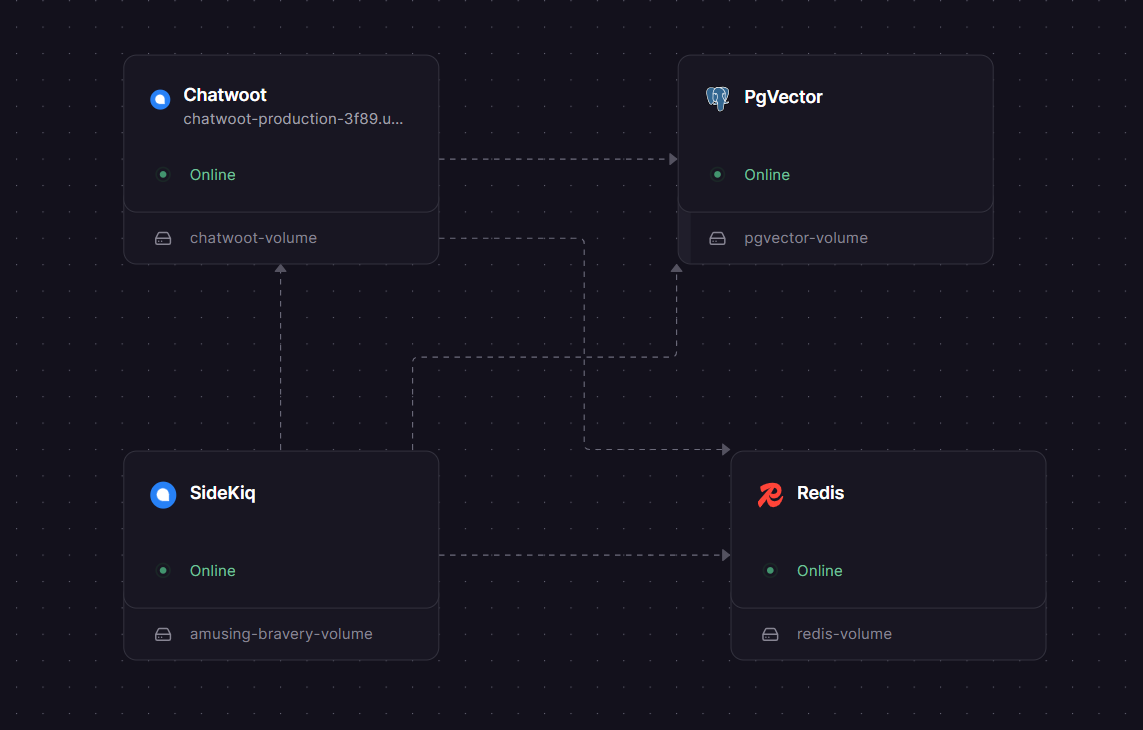
Self-host Chatwoot — the open-source, AI-powered customer support platform — on Railway with a production-ready four-service stack. This template deploys the full Chatwoot Community Edition (chatwoot/chatwoot:latest) with a dedicated Rails web server, a Sidekiq background worker, a pgvector-enabled PostgreSQL database, and Redis — everything wired together automatically via Railway's private networking.
Chatwoot gives your team a unified inbox for live chat, email, WhatsApp, Instagram, Facebook, Telegram, and more — all from a single dashboard. It's the self-hosted alternative to Intercom, Zendesk, and Freshdesk that lets you own your customer data completely. The source code is available at github.com/chatwoot/chatwoot.
Getting Started with Chatwoot on Railway
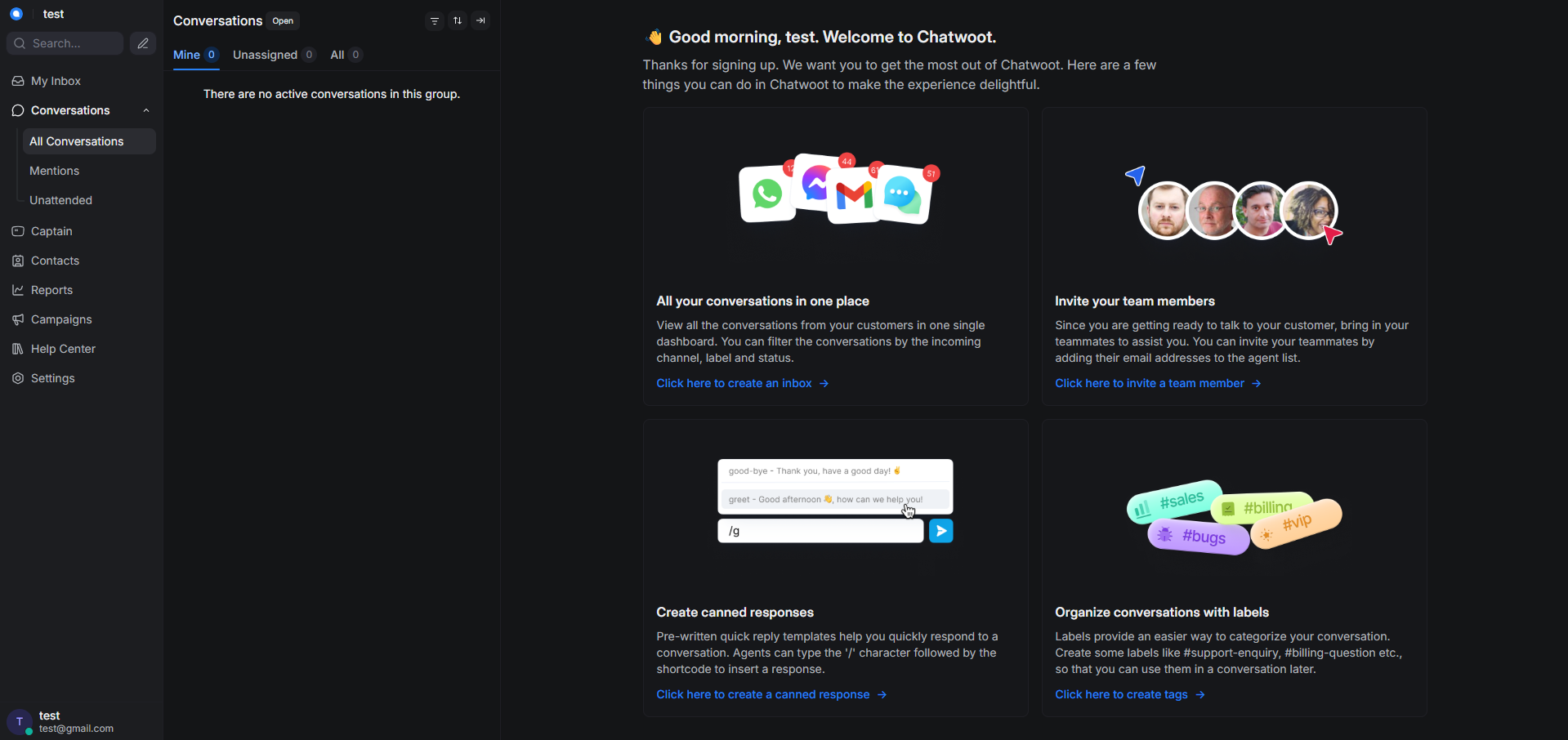
Once Railway finishes deploying all four services, navigate to the public URL assigned to your chatwoot (web) service. You'll be greeted by the onboarding wizard — create your admin account, name your workspace, and set up your first inbox (live chat widget, email, or social channel). Invite agents via Settings → Agents → Invite Agent; they'll receive a confirmation email to activate their account.
To embed the live chat widget on your site, go to Settings → Inboxes, select your website inbox, and copy the JavaScript snippet into your page's ``. For WhatsApp or social channels, connect them under Settings → Inboxes → Add Inbox and follow the provider-specific OAuth flow.
> Email setup required: Chatwoot sends transactional emails for agent invites, password resets, and conversation notifications. The template does not include an SMTP server — you must connect one. For getting started, a managed provider is strongly recommended: Brevo (300 emails/day free) and Resend (3,000/month free) both take under 10 minutes to configure. Add SMTP_ADDRESS, SMTP_PORT, SMTP_USERNAME, SMTP_PASSWORD, and MAILER_SENDER_EMAIL to both the web and Sidekiq services once you have credentials.
About Hosting Chatwoot
Chatwoot is an open-source customer support platform built with Ruby on Rails and Vue.js. It centralises customer conversations from every channel your team uses into a shared inbox, replacing the fragmented tab-switching between email, social DMs, and chat tools.
Key features:
- Omnichannel inbox — live chat, email, WhatsApp, Instagram, Facebook, Telegram, Line, SMS
- AI-powered agent (Captain) — reply suggestions, conversation summaries, and knowledge base answers powered by OpenAI (Enterprise/Premium)
- Team collaboration — shared inboxes, private notes, @mentions, canned responses, labels, and auto-assignment
- Automation & workflows — rule-based triggers to auto-assign, label, or respond to conversations
- Help center portal — built-in knowledge base for self-service support
- Extensive API & webhooks — build custom integrations or connect to Slack, Shopify, Dialogflow, and more
- CSAT & reporting — conversation, agent, inbox, and team performance reports
Architecture: The web service runs Puma (Rails) on port 3000 and handles all HTTP traffic and WebSocket connections. Sidekiq runs as a separate service on the same Docker image, processing background jobs — email delivery, avatar fetching, scheduled tasks, event dispatch — via a shared Redis queue. Both services connect independently to the pgvector PostgreSQL database. Encryption keys and SECRET_KEY_BASE must be identical across both services.
Why Deploy Chatwoot on Railway
Railway handles the infrastructure complexity that makes self-hosting Chatwoot challenging elsewhere:
- No manual Docker Compose or nginx reverse proxy setup
- Private networking between Web, Sidekiq, Postgres, and Redis out of the box
- Auto-generated secrets for encryption keys and database passwords
- Managed TLS and public domain assigned instantly
- Zero-downtime redeploys with pre-deploy database migration hooks
- Scale Web and Sidekiq services independently as volume grows
Common Use Cases
- Startups replacing Intercom — get the same omnichannel inbox without per-seat pricing that compounds as the team grows
- GDPR/HIPAA-sensitive businesses — self-hosting keeps all conversation data in your own infrastructure, within your chosen region
- Developer teams building support into their product — embed the JS widget, use the REST API to create conversations programmatically, and extend via webhooks
- Agencies managing multiple clients — Chatwoot supports multiple accounts and inboxes from a single installation
Chatwoot vs Intercom vs Zendesk
| Chatwoot CE | Intercom | Zendesk | |
|---|---|---|---|
| Open source | ✅ MIT | ❌ | ❌ |
| Self-hostable | ✅ | ❌ | ❌ |
| Starting price | Free (infra only) | ~$39/seat/mo | $19/seat/mo |
| Omnichannel | ✅ | ✅ | ✅ |
| Built-in AI agent | Enterprise only | ✅ | Add-on |
| Data ownership | Full | Vendor-hosted | Vendor-hosted |
| ✅ | ✅ | ✅ |
Chatwoot's core advantage is cost predictability and data ownership. Intercom and Zendesk pricing scales aggressively with seat count and conversation volume; Chatwoot's infrastructure cost on Railway stays flat unless you explicitly scale.
Dependencies for Chatwoot
- chatwoot/chatwoot:latest — official Docker image, used for both the web and Sidekiq services
- pgvector — Railway's pgvector-enabled PostgreSQL template (standard Postgres lacks the
vectorextension Chatwoot requires) - Redis — Railway managed Redis 7.x, used as the Sidekiq job queue and ActionCable pub/sub backend
Deployment Dependencies
- Database: PostgreSQL 14+ with the
pgvectorextension - Queue: Redis 7.0+
- Pre-deploy command (web only):
bundle exec rails db:chatwoot_prepare - Docker Hub: hub.docker.com/r/chatwoot/chatwoot
- Official docs: chatwoot.com/docs/self-hosted
Minimum Hardware Requirements for Chatwoot
| Minimum | Recommended | |
|---|---|---|
| CPU | 2 cores | 4+ cores |
| RAM | 4 GB | 8 GB |
| Storage | 20 GB SSD | 60 GB SSD |
| PostgreSQL | 14+ | Latest stable |
| Redis | 7.0+ | 7.x latest |
Self-Hosting Chatwoot Outside Railway
To run Chatwoot on your own VPS with Docker Compose:
# Clone the official Docker setup
git clone https://github.com/chatwoot/chatwoot.git
cd chatwoot
cp .env.example .env
# Edit .env with your POSTGRES, REDIS, SECRET_KEY_BASE, FRONTEND_URL, and SMTP values

# Run database setup
docker compose run --rm rails bundle exec rails db:chatwoot_prepare

# Start all services
docker compose up -d
A minimal companion docker-compose.yml for PostgreSQL + Redis:
services:
  postgres:
    image: pgvector/pgvector:pg16
    environment:
      POSTGRES_DB: chatwoot
      POSTGRES_USER: postgres
      POSTGRES_PASSWORD: yourpassword
    volumes:
      - pgdata:/var/lib/postgresql/data

  redis:
    image: redis:7-alpine
    command: redis-server --requirepass yourredispassword

volumes:
  pgdata:
Is Chatwoot Free?
The Community Edition is completely free under the MIT License — you pay only for infrastructure (Railway usage, SMTP provider, and optionally S3 for file storage). On Railway, a typical small-team instance runs on the Hobby plan.
For teams needing Captain AI, SLAs, or priority support, Chatwoot offers Premium Self-Hosted plans. The cloud-hosted version starts at $19/agent/month (Startups plan) up to $99/agent/month (Enterprise), billed through chatwoot.com. There is no annual billing discount publicly available.
FAQ
What is Chatwoot? Chatwoot is an open-source, self-hosted customer support platform that unifies conversations from live chat, email, WhatsApp, Facebook, Instagram, and more into a single inbox. It's a free alternative to Intercom and Zendesk with full data ownership.
Why does this template use pgvector instead of standard Postgres?
Chatwoot requires the vector PostgreSQL extension for its AI and search features. Railway's standard Postgres template doesn't include it. The pgvector template ships with the extension pre-installed — using standard Postgres will cause the database setup to fail with a PG::FeatureNotSupported error.
Why are SECRET_KEY_BASE and encryption keys shared between Web and Sidekiq? Sidekiq processes jobs that were enqueued by the web server — including decrypting ActiveRecord-encrypted fields. If the keys differ, Sidekiq will throw decryption errors when processing jobs. Always copy the generated values from the web service directly into Sidekiq; don't regenerate them.
Do I need to set up email to use Chatwoot?
Email isn't required to run Chatwoot, but without it agent invitations, password resets, and email-channel conversations won't work. For getting started, connect a managed SMTP provider like Brevo (free tier: 300 emails/day) or Resend (free tier: 3,000/month) by adding the SMTP_* and MAILER_SENDER_EMAIL variables to both the web and Sidekiq services.
Can I use Chatwoot in production?
Yes. Chatwoot has over 50,000 self-hosted production installations. For production on Railway, enable a persistent volume for file storage or switch ACTIVE_STORAGE_SERVICE to amazon with S3-compatible credentials so attachments survive redeploys.
Does Chatwoot support WhatsApp? Yes. Connect WhatsApp Business via the Cloud API (Meta developer account required) or Twilio under Settings → Inboxes → Add Inbox → WhatsApp. Standard WhatsApp message fees from Meta or Twilio apply separately.
Template Content
PgVector
pgvector/pgvector:pg18Chatwoot
chatwoot/chatwoot:latestSideKiq
chatwoot/chatwoot:latestRedis
redis:8.2.1