
Deploy Dialoqbase - AI Chatbot Builder | Open Source Chatbase Alternative on Railway
Self-host DIaloqbase. Chat with your docs - PDF, URL, Git, YT
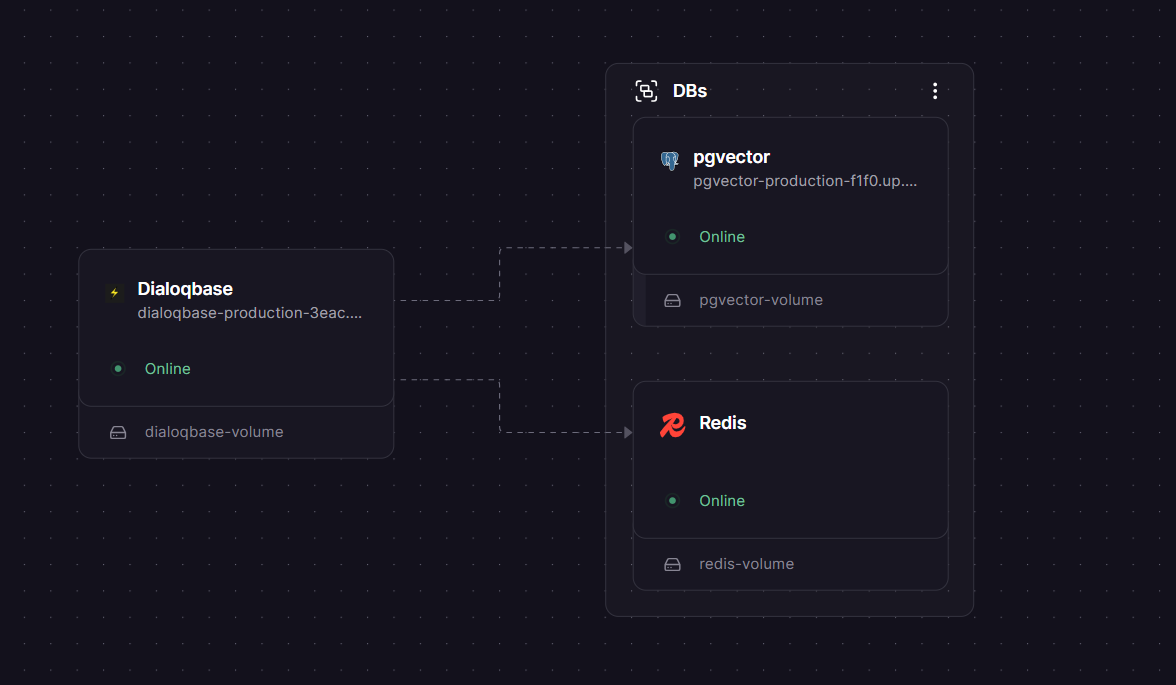
DBs

Redis
Just deployed
/data
pgvector
Just deployed
/var/lib/postgresql

Dialoqbase
Just deployed
/app/uploads
Deploy and Host Dialoqbase
Dialoqbase is an open-source application for building custom chatbots powered by your own knowledge base. It uses LangChain and your choice of LLM provider — OpenAI, Anthropic, Google, Cohere, Fireworks, or local models — to generate accurate, context-aware responses from documents, websites, PDFs, and more. Self-hosting Dialoqbase gives you full control over your data, models, and costs with no per-message fees.
Self Host Dialoqbase stack in one click: the Dialoqbase app server, a PostgreSQL database with the pgvector extension for vector similarity search, and a Redis instance for background document ingestion queuing. All three services are pre-wired with private networking — no manual connection strings needed.
Getting Started with Dialoqbase on Railway
Once the deploy finishes, open the Dialoqbase service in Railway, go to Settings → Networking, and generate a public domain. Visit that URL and log in with the default credentials:
Username: admin
Password: admin
> ⚠️ Change your password immediately after first login via Settings → Profile. The default credentials are public knowledge.
Next, go to Settings → LLM and add your API key for at least one provider (OpenAI, Anthropic, Google, etc.). Then create your first bot: click New Bot, choose a model, and start adding knowledge sources — paste a URL, upload a PDF, or connect a GitHub repo. Once ingestion completes, your bot is ready to answer questions.

About Hosting Dialoqbase
Dialoqbase is a web application that lets teams create and embed context-aware chatbots without building retrieval pipelines from scratch. It handles chunking, embedding, vector storage, and LLM querying in one self-contained app.
Key features:
- Multi-provider LLM support — OpenAI, Anthropic Claude, Google Gemini, Cohere, Fireworks, HuggingFace, Ollama, and local models
- Rich data loaders — websites, PDFs, DOCX, plain text, sitemaps, YouTube, GitHub repos, MP3/MP4
- pgvector-powered search — no separate vector database needed; Postgres handles embeddings and similarity queries
- Bot integrations — embed on any website, or deploy to Telegram, Discord, and WhatsApp
- Multi-user support — admin controls for user registration limits and bot creation quotas
- Queue-based ingestion — Redis-backed Bull queues handle large document processing without blocking the API
The Dialoqbase app talks to Postgres over Railway's private network for fast, secure DB access, and connects to Redis internally for job queue management.
Why Deploy Dialoqbase on Railway
Railway handles all the infrastructure complexity so you can focus on building bots:
- No Docker config, volume management, or compose files to maintain
- Private networking between Dialoqbase, Postgres, and Redis out of the box
- One-click redeploys when you update environment variables or app config
- Managed TLS and custom domain support included
- Persistent volumes for uploaded knowledge base files
- Pay only for what you use — no flat monthly infrastructure fee
Common Use Cases
- Internal knowledge bots — index your company docs, Notion exports, or wikis and let teammates query them in plain English
- Customer support chatbots — train a bot on your product docs and embed it on your support page or in Discord
- Research assistants — ingest PDFs, papers, or YouTube transcripts and chat with the content directly
- Developer tooling — use the API to build custom retrieval-augmented generation (RAG) pipelines backed by your own Postgres
Dependencies for Dialoqbase
- Dialoqbase —
n4z3m/dialoqbase:latest(GitHub) - PostgreSQL + pgvector —
ankane/pgvector(Postgres 15 with pgvector extension pre-installed) - Redis —
bitnami/redis:latest
Environment Variables Reference
| Variable | Description | Required |
|---|---|---|
DATABASE_URL | Private Postgres connection string (references pgvector service) | ✅ Yes |
REDIS_URL | Redis connection URL (references Redis service public TCP proxy) | ✅ Yes |
DB_SECRET_KEY | JWT signing secret — generate with openssl rand -base64 32 | ✅ Yes |
DB_BOT_SECRET_KEY | Bot API signing secret — generate with openssl rand -hex 20 | ✅ Yes |
FASTIFY_ADDRESS | Must be 0.0.0.0 for Railway — allows the server to accept external traffic | ✅ Yes |
NO_SEED | Set to false to run DB seeding on first boot | ✅ Yes |
OPENAI_API_KEY | OpenAI API key | If using OpenAI |
ANTHROPIC_API_KEY | Anthropic Claude API key | If using Claude |
GOOGLE_API_KEY | Google Gemini API key | If using Gemini |
COHERE_API_KEY | Cohere API key | If using Cohere |
FIREWORKS_API_KEY | Fireworks API key | If using Fireworks |
PORT | App port — set to 3000 | ✅ Yes |
Deployment Dependencies
- Runtime: Node.js 18+, managed by the Docker image
- GitHub: https://github.com/n4ze3m/dialoqbase
- Docker Hub:
n4z3m/dialoqbase - Official docs: https://dialoqbase.n4ze3m.com
Dialoqbase vs Flowise vs Chatbase
| Feature | Dialoqbase | Flowise | Chatbase |
|---|---|---|---|
| Open source | ✅ MIT | ✅ Apache 2.0 | ❌ SaaS only |
| Self-hostable | ✅ | ✅ | ❌ |
| Built-in vector DB | ✅ (pgvector) | ❌ (external) | ❌ |
| Visual flow builder | ❌ | ✅ | ❌ |
| Multi-LLM support | ✅ | ✅ | Limited |
| Bot channel integrations | Telegram, Discord, WhatsApp | Limited | Web only |
| Pricing | Free (infra only) | Free + $35/mo cloud | $19/mo+ |
Dialoqbase is the right choice when you want a focused knowledge-base chatbot tool with no visual complexity and no external vector database dependency. Flowise is better if you need visual LangChain flow building. Chatbase suits teams who want zero infrastructure overhead and don't need self-hosting.
Minimum Hardware Requirements for Dialoqbase
| Resource | Minimum | Recommended |
|---|---|---|
| CPU | 1 vCPU | 2 vCPU |
| RAM | 512 MB | 1–2 GB |
| Storage | 1 GB | 5 GB+ (scales with uploads) |
| Node.js | 18+ | 20+ |
> ⚠️ The official docs note that Dialoqbase uses a "nice amount of memory." Add a credit limit to your Railway account before deploying, especially for multi-user or document-heavy workloads.
Self-Hosting Dialoqbase
To run Dialoqbase on your own VPS with Docker Compose:
git clone https://github.com/n4ze3m/dialoqbase.git
cd dialoqbase/docker
# Edit .env — set DB_SECRET_KEY and your LLM API keys
nano .env
docker compose up -d
Open http://localhost:3000 and log in with admin / admin. Change the password immediately.
If you need pgvector separately:
docker run -d \
  --name pgvector \
  -e POSTGRES_PASSWORD=yourpassword \
  -e POSTGRES_DB=dialoqbase \
  -v pgdata:/var/lib/postgresql/data \
  ankane/pgvector
Is Dialoqbase Free?
Dialoqbase is fully open source under the MIT license — free to use, modify, and deploy commercially. There is no cloud-hosted version or paid tier from the maintainer. On Railway, your only cost is infrastructure: the app server, Postgres, and Redis usage billed by Railway at their standard rates. A lightly used instance typically runs well within Railway's Hobby plan limits.
FAQ
What is Dialoqbase? Dialoqbase is an open-source RAG (retrieval-augmented generation) chatbot platform. You feed it documents or URLs, it stores embeddings in Postgres via pgvector, and it answers user questions using your chosen LLM grounded in that content.
What does this Railway template deploy?
Three services: the Dialoqbase app (n4z3m/dialoqbase:latest), a pgvector-enabled Postgres instance for storing embeddings and app data, and a Redis instance for background document ingestion queues. All three are pre-connected via Railway's private network.
Why is pgvector Postgres required instead of Railway's standard managed Postgres?
Dialoqbase uses the pgvector extension to store and query vector embeddings directly in Postgres. Railway's standard managed Postgres does not have this extension. The ankane/pgvector Docker image ships with it pre-installed.
What are the default login credentials?
Username: admin, Password: admin. Change these immediately after first login via Settings → Profile — they are well-known defaults.
Can I use local or open-source models instead of OpenAI? Yes. Dialoqbase supports Ollama (run local models like Llama, Mistral, Mixtral), LocalAI, and HuggingFace models. Set the relevant API endpoint or API key in your environment variables and select the model from the LLM settings page.
Is Dialoqbase production-ready? The maintainer describes it as a side project still in active development, with possible breaking changes and security considerations. It works well for internal tools and prototypes, but review the codebase before deploying in sensitive production environments.
How do I embed a bot on my website? After creating a bot, open it in the dashboard and go to the Embed tab. Copy the provided `
Template Content


