
Deploy Hasura | Instant GraphQL APIs on Railway
Self-host Hasura. Instant realtime GraphQL, REST, Subscriptions, Webhooks

Just deployed
/var/lib/postgresql/data
Graphql-Engine
Just deployed
Deploy and Host Hasura GraphQL Engine
Hasura GraphQL Engine is an open-source server that instantly generates realtime GraphQL and REST APIs directly from your PostgreSQL schema — no manual resolvers, no boilerplate. It ships with role-based access control, event triggers, remote schema stitching, and a browser-based console, making it the fastest path from a Postgres database to a production-ready API layer.
Self-hosting Hasura on Railway takes minutes. This template deploys hasura/graphql-engine:latest alongside a Railway-managed PostgreSQL instance (ghcr.io/railwayapp-templates/postgres-ssl:17) with private networking pre-wired between them. The admin secret is auto-generated, the console is enabled, and both services start in the correct order — so you can run Hasura yourself without touching a config file.
Getting Started with Hasura on Railway
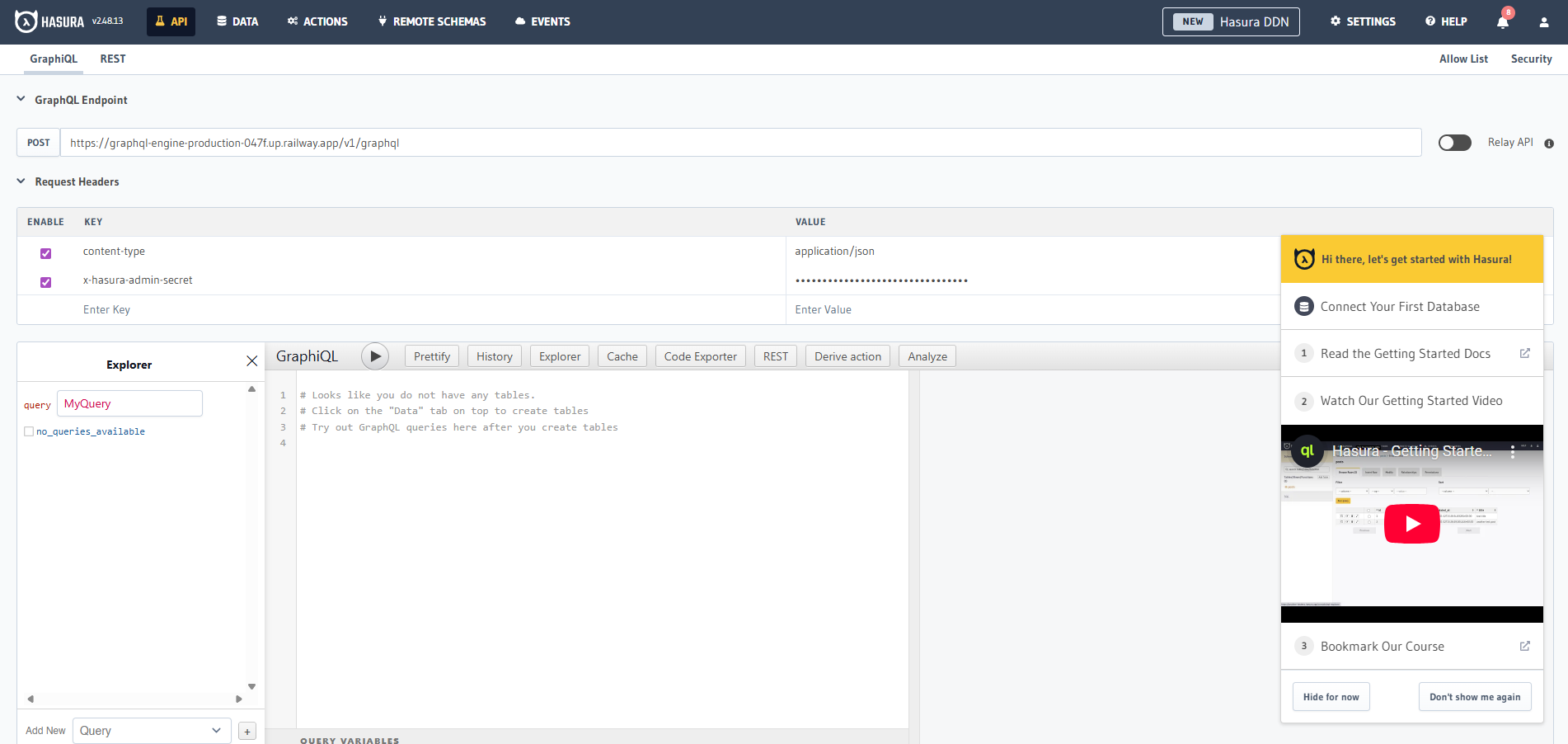
After your Railway deploy finishes, open the public URL assigned to the graphql-engine service and navigate to /console. Log in using the value of HASURA_GRAPHQL_ADMIN_SECRET from the service's Variables tab in Railway. From the Data tab, click Connect Database and paste your PG_DATABASE_URL to register Postgres as a tracked data source — Hasura will immediately generate GraphQL queries, mutations, and subscriptions for every table you track. From there, head to the API tab to run your first query in the built-in GraphiQL explorer.
About Hosting Hasura
Hasura fronts a PostgreSQL database and auto-generates a full GraphQL schema from your tables, views, and relationships. It handles the entire API layer so you can focus on your data model, not writing resolvers.
Key features:
- Instant GraphQL & REST APIs — auto-generated from any Postgres schema, including existing databases
- Realtime subscriptions — convert any query to a live query with a single keyword
- Event triggers — fire webhooks on any insert, update, or delete in Postgres
- Fine-grained access control — role-based rules with dynamic session variables (JWT, webhook, or x-hasura headers)
- Remote schema stitching — merge external GraphQL APIs into a single unified endpoint
- Actions — extend the schema with custom REST business logic
- Migrations via CLI — schema changes tracked in version-controlled files
- ~15MB Docker image — ~50MB RAM at ~1,000 req/s; scales to 1M active subscriptions
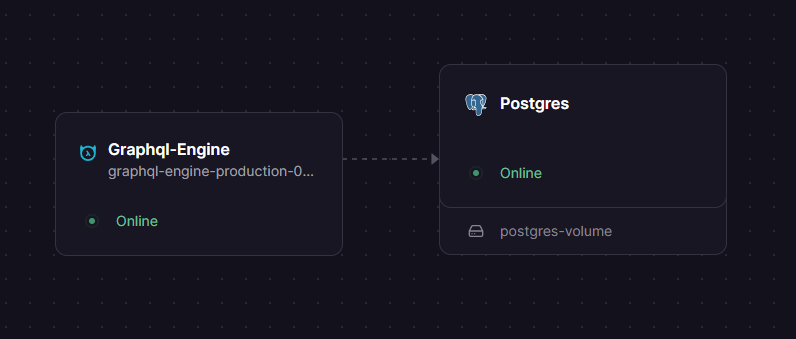
The Railway template runs two services: graphql-engine (stateless, publicly exposed on port 8080) and Postgres (private, volume-mounted at /var/lib/postgresql/data). They communicate over Railway's private network — no public DB exposure required.
Why Deploy Hasura on Railway
Railway removes all infrastructure overhead so you can ship a GraphQL backend the same day.
- No Docker config, volume management, or compose files to maintain
- Private networking between Hasura and Postgres out of the box
- Admin secret auto-generated on first deploy — nothing to rotate manually
- One-click redeployment from the Railway dashboard
- Managed TLS and custom domain support for the Hasura endpoint
- Vertical scaling via a single slider — no cluster config needed
Common Use Cases
- Realtime dashboards and chat apps — use GraphQL subscriptions to push live data to connected clients without polling
- Mobile & web BFF (Backend for Frontend) — expose a typed GraphQL API over an existing Postgres database for React, Vue, or React Native apps without writing a dedicated backend
- Event-driven microservices — use Hasura's event triggers to fire webhooks to Lambda, Cloud Run, or Railway services on any DB mutation
- Rapid MVP development — go from schema to working API in minutes; iterate on the data model without touching API code
Dependencies for Hasura GraphQL Engine
- hasura/graphql-engine:latest — Docker Hub image (hub.docker.com/r/hasura/graphql-engine)
- ghcr.io/railwayapp-templates/postgres-ssl:17 — Railway's SSL-patched Postgres 17 image; provides persistent storage via volume at
/var/lib/postgresql/data
Environment Variables Reference
| Variable | Description | Required |
|---|---|---|
HASURA_GRAPHQL_METADATA_DATABASE_URL | Postgres connection URL for Hasura's internal metadata schema | ✅ |
HASURA_GRAPHQL_ADMIN_SECRET | Admin password for the Console and Metadata API | ✅ |
HASURA_GRAPHQL_ENABLE_CONSOLE | Set "true" to enable the web console; "false" for headless prod | ✅ |
HASURA_GRAPHQL_CORS_DOMAIN | Restrict CORS to specific frontend domains | Optional |
HASURA_GRAPHQL_DEV_MODE | Set "true" for detailed error messages during development | Optional |
Deployment Dependencies
- Docker image:
hasura/graphql-engine:latest - GitHub: github.com/hasura/graphql-engine (Apache 2.0)
- Docs: hasura.io/docs/2.0/index
- Requires PostgreSQL 12+
Hasura vs PostGraphile vs Supabase
| Feature | Hasura | PostGraphile | Supabase |
|---|---|---|---|
| Open source | ✅ Apache 2.0 | ✅ MIT | ✅ Apache 2.0 |
| Self-hostable | ✅ | ✅ | ✅ (partial) |
| GraphQL subscriptions | ✅ | ✅ | ❌ (REST realtime only) |
| Event triggers / webhooks | ✅ Built-in | ❌ Plugin required | ✅ Edge Functions |
| Multiple DB sources | ✅ | ❌ Postgres only | ❌ Postgres only |
| Console / dashboard | ✅ | ❌ | ✅ |
| Auth system | External (JWT/webhook) | Postgres row-level security | Built-in |
| Pricing (cloud) | Free tier + usage-based Pro | N/A | Free tier + Pro from $25/mo |
Hasura is the strongest choice when you need event triggers, multi-database federation, or an external auth provider. PostGraphile excels at raw query performance for complex Postgres schemas. Supabase bundles auth and storage but lacks native GraphQL subscriptions.
Minimum Hardware Requirements for Hasura
| Resource | Minimum | Recommended |
|---|---|---|
| CPU | 0.5 vCPU | 1–2 vCPU |
| RAM | 128 MB | 512 MB+ |
| Storage (Postgres volume) | 1 GB | 10 GB+ |
| Postgres version | 12 | 15+ |
Hasura's Docker image is ~15MB and idles at under 50MB RAM. Under load (~1,000 req/s), expect ~50MB RAM for the engine itself; size your Postgres instance based on data volume and query concurrency.
Self-Hosting Hasura
With Docker (quickest path):
docker run -d -p 8080:8080 \
  -e HASURA_GRAPHQL_METADATA_DATABASE_URL="postgres://user:pass@localhost:5432/mydb" \
  -e HASURA_GRAPHQL_DATABASE_URL="postgres://user:pass@localhost:5432/mydb" \
  -e HASURA_GRAPHQL_ENABLE_CONSOLE=true \
  -e HASURA_GRAPHQL_ADMIN_SECRET=changeme \
  hasura/graphql-engine:latest
With Docker Compose (Hasura + Postgres together):
version: "3.8"
services:
  postgres:
    image: postgres:17
    restart: always
    volumes:
      - db_data:/var/lib/postgresql/data
    environment:
      POSTGRES_PASSWORD: pgpassword
  graphql-engine:
    image: hasura/graphql-engine:latest
    ports:
      - "8080:8080"
    depends_on:
      - postgres
    environment:
      HASURA_GRAPHQL_METADATA_DATABASE_URL: postgres://postgres:pgpassword@postgres:5432/postgres
      PG_DATABASE_URL: postgres://postgres:pgpassword@postgres:5432/postgres
      HASURA_GRAPHQL_ENABLE_CONSOLE: "true"
      HASURA_GRAPHQL_ADMIN_SECRET: changeme
volumes:
  db_data:
Visit http://localhost:8080/console after startup.
Is Hasura Free?
The core Hasura GraphQL Engine (hasura/graphql-engine) is free and open source under the Apache 2.0 license. Self-hosting it — including on Railway — costs only what you pay for the underlying infrastructure (compute + Postgres storage).
Hasura Cloud offers a managed hosted option with a free tier, and a Professional plan with usage-based pricing (starting around $1.50/hour per project). Enterprise plans covering Hasura Cloud and self-hosted Enterprise Edition (with advanced security, caching, and support) are available via contract. If you're deploying with this Railway template, you're running the open-source Community Edition — no license key, no Hasura bill.
FAQ
What is Hasura GraphQL Engine? Hasura is an open-source GraphQL server that auto-generates a complete, type-safe GraphQL API from a connected PostgreSQL database — including queries, mutations, subscriptions, and real-time live queries — without writing any resolvers.
Can I connect Hasura to an external Postgres database instead?
Yes. If you already have a Postgres database (e.g. on Neon, Supabase, or RDS), you can remove the Postgres service from this template and set HASURA_GRAPHQL_METADATA_DATABASE_URL and PG_DATABASE_URL to your external connection strings directly.
Does Hasura support JWT authentication?
Yes. Set the HASURA_GRAPHQL_JWT_SECRET environment variable to a JSON config object pointing to your auth provider's JWKS URL (Auth0, Clerk, Firebase, etc.). Hasura will validate tokens on every request and expose the claims as x-hasura-* session variables for use in permission rules.
Can I use Hasura in production?
Yes. Set HASURA_GRAPHQL_ENABLE_CONSOLE="false" and HASURA_GRAPHQL_DEV_MODE="false" for a hardened production setup. Add HASURA_GRAPHQL_CORS_DOMAIN to restrict API access to your frontend domain.
Does Hasura support REST APIs?
Yes. Hasura ships a REST endpoint at /api/rest/... in addition to the GraphQL endpoint at /v1/graphql. You can create named REST routes from any GraphQL operation via the Console or Metadata API.
Template Content
Graphql-Engine
hasura/graphql-engine:latest