
Deploy Nextcloud | Open Source Google Drive, Dropbox Alternative
Self-Host Nextcloud on Railway — File Storage, Calendars, and Contacts
DBs

Just deployed
/var/lib/postgresql/data

Redis
Just deployed
/data
Nextcloud
Just deployed
/var/www/html
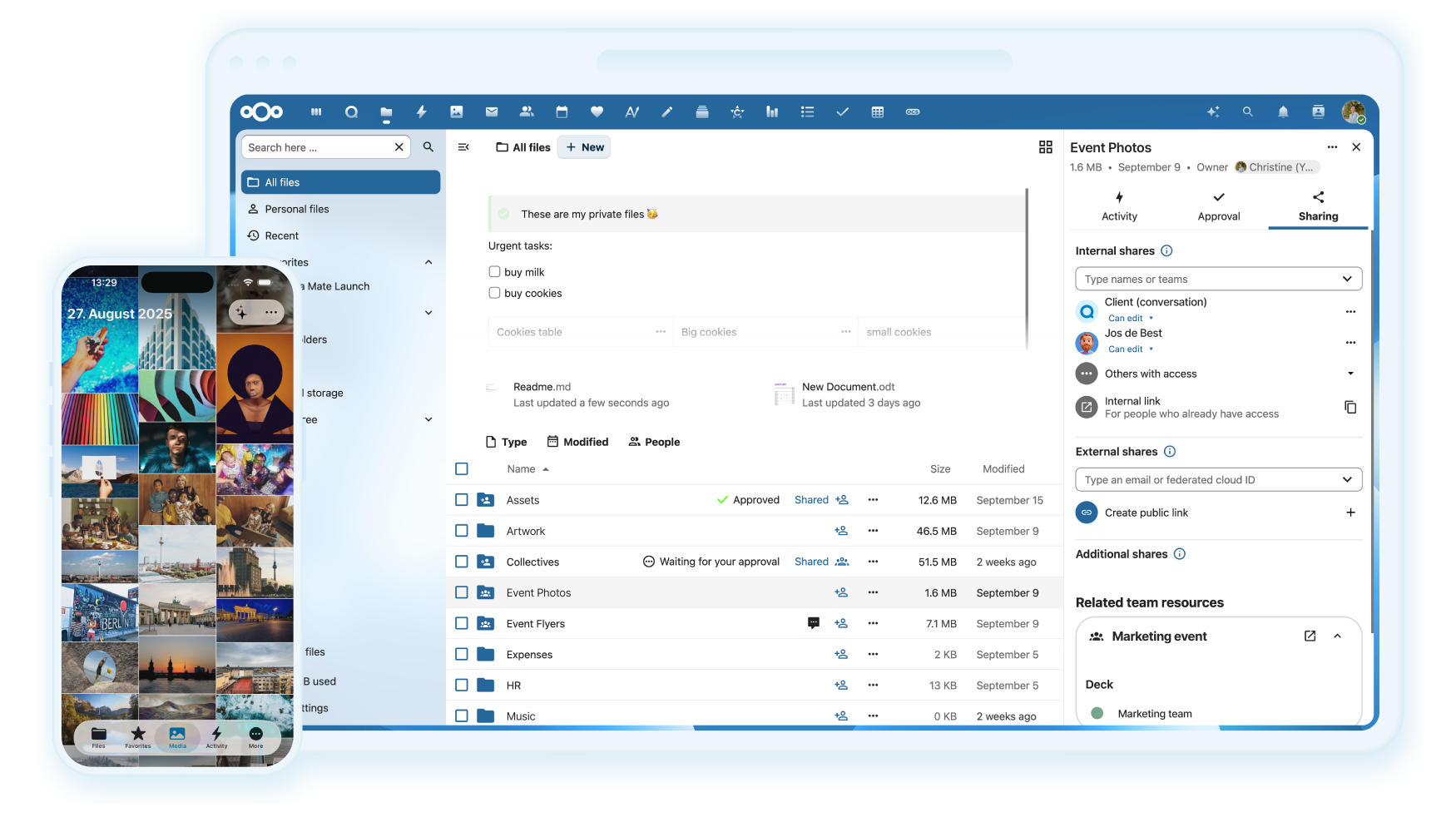
Deploy and Host Nextcloud on Railway
This Railway template deploys a fully self-hosted Nextcloud instance — an open-source Google Drive alternative — with a production-ready stack: the nextcloud:apache Docker image, a managed PostgreSQL database for structured data, and a managed Redis instance for file locking and session caching. All three services are pre-wired via Railway's private network, with secrets auto-generated on deploy.

Getting Started with Nextcloud on Railway
Once the deploy completes, open the public URL generated for your Nextcloud service. You'll land on the Nextcloud login page — use the NEXTCLOUD_ADMIN_USER and NEXTCLOUD_ADMIN_PASSWORD values set in your environment variables to sign in. From there, head to Settings → Administration → Overview to confirm all systems are green. Install apps from the App Store (top-right menu) to add calendars, contacts, video calls via Nextcloud Talk, or collaborative editing via Nextcloud Office. To add users, go to the Users panel in the top-right menu.

About Hosting Nextcloud
Nextcloud is a free, open-source content collaboration platform — a self-hosted alternative to Google Drive, Dropbox, and Microsoft 365. It puts you in full control of your files, contacts, calendars, and communications without sending data to third-party cloud providers.
Key features:
- File sync and share with desktop and mobile clients (Windows, macOS, Linux, iOS, Android)
- Nextcloud Office — collaborative document editing powered by LibreOffice
- Nextcloud Talk — end-to-end encrypted video calls and chat
- Calendar, Contacts, Mail apps built-in
- 300+ apps in the Nextcloud App Store (two-factor auth, password manager, AI assistant, and more)
- WebDAV, CalDAV, CardDAV support for broad client compatibility
- Brute-force protection, server-side encryption, and audit logging
Architecture: Nextcloud (Apache + PHP) connects to Postgres over Railway's private network for metadata, user accounts, and file index. Redis handles distributed file locking and PHP session caching — without it, concurrent file access causes corruption. All traffic between services stays internal; only Nextcloud exposes a public HTTP port.
Why Deploy Nextcloud on Railway
Self-managing Nextcloud on a VPS means provisioning Postgres, Redis, and a reverse proxy separately, wiring them together, generating secrets, and maintaining SSL — before you even open the app. Railway eliminates all of that. Private networking between the three services is automatic. Secrets for Postgres and Redis are generated and injected at deploy time via ${{secret()}} references. The Railway dashboard gives you a live env vars UI, rolling deploys, and volume management without SSH.
The one notable Railway-specific gotcha with this image — an Apache MPM conflict — is already solved in this template via a custom start command:
bash -c "a2dismod mpm_event 2>/dev/null; a2enmod mpm_prefork && apache2-foreground"
You don't need to configure this — it's baked in.
Common Use Cases
- Personal cloud storage — replace Dropbox or Google Drive; sync files across devices while keeping data on infrastructure you control
- Small team collaboration — shared file storage with granular permissions, calendar, contacts, and video meetings for teams of 5–50 people
- GDPR / data sovereignty compliance — organisations in the EU or regulated industries that cannot store user data on US-based cloud providers
- Media backup server — auto-upload photos and videos from phones; browse, tag, and share from a private gallery without feeding data to Apple or Google
Dependencies for Nextcloud
- Nextcloud —
nextcloud:apache(Docker Hub) — main application, exposes port 80 - PostgreSQL — Railway managed Postgres — stores users, file metadata, shares, and app config
- Redis — Railway managed Redis — file locking, PHP session handler, and opcode/APCu cache
Environment Variables Reference
| Variable | Description | Required |
|---|---|---|
NEXTCLOUD_ADMIN_USER | Admin account username created on first boot | ✅ |
NEXTCLOUD_ADMIN_PASSWORD | Admin account password (auto-generated with special chars) | ✅ |
NEXTCLOUD_TRUSTED_DOMAINS | Space-separated list of allowed domains. Must include your Railway public domain | ✅ |
NEXTCLOUD_DATA_DIR | Directory for user file storage inside the container. Default: /var/www/html/data | ✅ |
Deployment Dependencies
- Docker image:
nextcloud:apache— hub.docker.com/_/nextcloud - Official docs: docs.nextcloud.com
- Runtime: PHP 8.x (bundled in image), Apache 2.4 with
mpm_prefork - Storage: Railway volume mounted at
/var/www/html(required for persistence)
Minimum Hardware Requirements for Nextcloud
| Minimum | Recommended | |
|---|---|---|
| CPU | 1 vCPU (64-bit) | 2+ vCPUs |
| RAM | 512 MB per process | 2–4 GB (personal/small team) |
| Storage | 10 GB (app + DB) | 50 GB+ depending on files stored |
| PHP | 8.1+ (bundled) | Latest bundled in image |
| Database | PostgreSQL 13+ | PostgreSQL 15+ |
For small teams of 10–50 users, 2 GB RAM and 2 vCPUs is the practical minimum for comfortable performance. Scale Railway's service memory settings upward as your user count grows.
Self-Hosting Nextcloud
To run Nextcloud outside Railway with Docker:
docker run -d \
  -p 8080:80 \
  -v nextcloud_data:/var/www/html \
  -e POSTGRES_HOST=db \
  -e POSTGRES_DB=nextcloud \
  -e POSTGRES_USER=nextcloud \
  -e POSTGRES_PASSWORD=yourpassword \
  -e NEXTCLOUD_ADMIN_USER=admin \
  -e NEXTCLOUD_ADMIN_PASSWORD=adminpassword \
  -e REDIS_HOST=redis \
  --name nextcloud \
  nextcloud:apache
Companion services (Postgres + Redis) via Docker Compose:
services:
  db:
    image: postgres:16
    environment:
      POSTGRES_DB: nextcloud
      POSTGRES_USER: nextcloud
      POSTGRES_PASSWORD: yourpassword
    volumes:
      - db_data:/var/lib/postgresql/data

  redis:
    image: redis:7-alpine
    command: redis-server --requirepass yourredispassword

volumes:
  nextcloud_data:
  db_data:
Is Nextcloud Free?
Nextcloud is fully open-source (AGPL-3.0) and free to self-host. There are no licensing fees. On Railway, you pay only for infrastructure (compute, storage, and egress). Nextcloud GmbH offers an Enterprise subscription for organisations that need professional support, compliance packages, and the High Performance Backend for Nextcloud Talk — pricing is quote-based. The community Docker image used in this template is free with no feature gates.
Nextcloud vs Google Drive vs Dropbox
| Nextcloud (self-hosted) | Google Drive | Dropbox | |
|---|---|---|---|
| Open source | ✅ | ❌ | ❌ |
| Self-hostable | ✅ | ❌ | ❌ |
| Data sovereignty | ✅ Full control | ❌ Google servers | ❌ Dropbox servers |
| Free tier | ✅ Unlimited (your storage) | 15 GB | 2 GB |
| Collaborative editing | ✅ Nextcloud Office | ✅ Google Docs | ❌ |
| Video calls | ✅ Nextcloud Talk | ✅ Meet | ❌ |
| Mobile apps | ✅ iOS + Android | ✅ | ✅ |
Nextcloud is the right choice when data control matters — GDPR compliance, sensitive files, or simply not wanting your data processed by a third party. It requires more setup than SaaS alternatives, which is exactly what this Railway template eliminates.
FAQ
What is Nextcloud? Nextcloud is an open-source, self-hosted file sync and collaboration platform. It's functionally comparable to Google Drive or Dropbox but runs entirely on infrastructure you control, with no data leaving your servers.
What does this Railway template deploy?
Three services: the Nextcloud application (nextcloud:apache), a Railway-managed PostgreSQL database, and a Railway-managed Redis instance. All secrets are auto-generated and services are pre-connected via Railway's private network.
Why is PostgreSQL included instead of SQLite? Nextcloud defaults to SQLite for single-user installs, but SQLite does not support concurrent write access reliably. PostgreSQL is required for any multi-user setup and is the recommended database for all production deployments.
Why is Redis included? Redis provides distributed file locking. Without it, two users (or two devices for the same user) writing to the same file simultaneously can corrupt data. Redis also acts as the PHP session handler, improving performance across all requests.
Why does this template use a custom start command?
Railway's container runtime loads an Apache MPM module that conflicts with the one built into the nextcloud:apache image, causing an immediate crash loop. The custom start command (a2dismod mpm_event 2>/dev/null; a2enmod mpm_prefork && apache2-foreground) resolves the conflict before Apache starts. This is already configured in the template — no action needed.
Can I use a custom domain?
Yes. Add your domain in Railway's networking settings, then add it to the NEXTCLOUD_TRUSTED_DOMAINS environment variable (space-separated alongside the Railway-generated domain) and redeploy.
Template Content
Nextcloud
nextcloud:apacheNEXTCLOUD_ADMIN_USER
Create username to access Nextcloud
NEXTCLOUD_ADMIN_PASSWORD
Create password to access Nextcloud
Redis
redis:8.2.1
