
Deploy Semaphore UI
Web UI for running Ansible, Terraform and Bash automation
semaphore
Just deployed
/var/lib/semaphore

Just deployed
/var/lib/postgresql/data
Just deployed
/var/lib/semaphore
Deploy and Host Semaphore UI on Railway
Semaphore UI is an open-source web interface and REST API for running Ansible playbooks, OpenTofu and Terraform plans, Terragrunt stacks, Bash scripts and PowerShell. Teams self-host Semaphore UI when playbooks have outgrown one engineer's laptop: it keeps inventories, SSH keys and cloud credentials in an encrypted key store, records who ran what and when, streams live output to the browser and exposes every operation over an API.
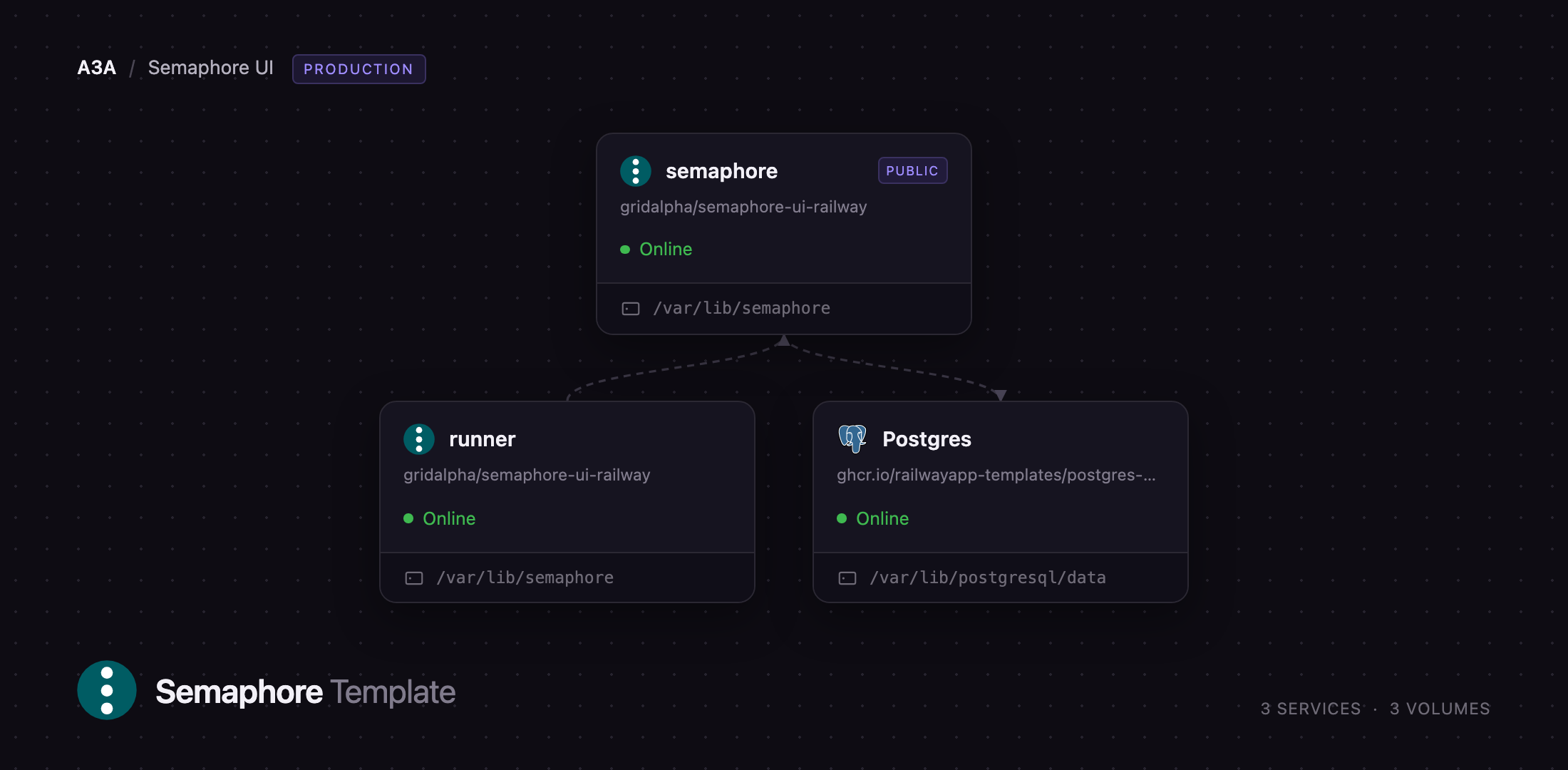
Deploy Semaphore UI on Railway and you get the production shape, not a single box. Three services come up together: the semaphore server, serving the web UI and API on a public domain; a dedicated runner, the process that checks out your repository and runs the playbook; and managed Postgres, holding projects, templates, history and the encrypted key store. The server never executes automation itself, so a runaway playbook cannot take the UI down. Both application services keep a volume — the server's holds the encryption keys generated on first boot, the runner's the credential it is issued at registration.
Getting Started with Semaphore UI on Railway
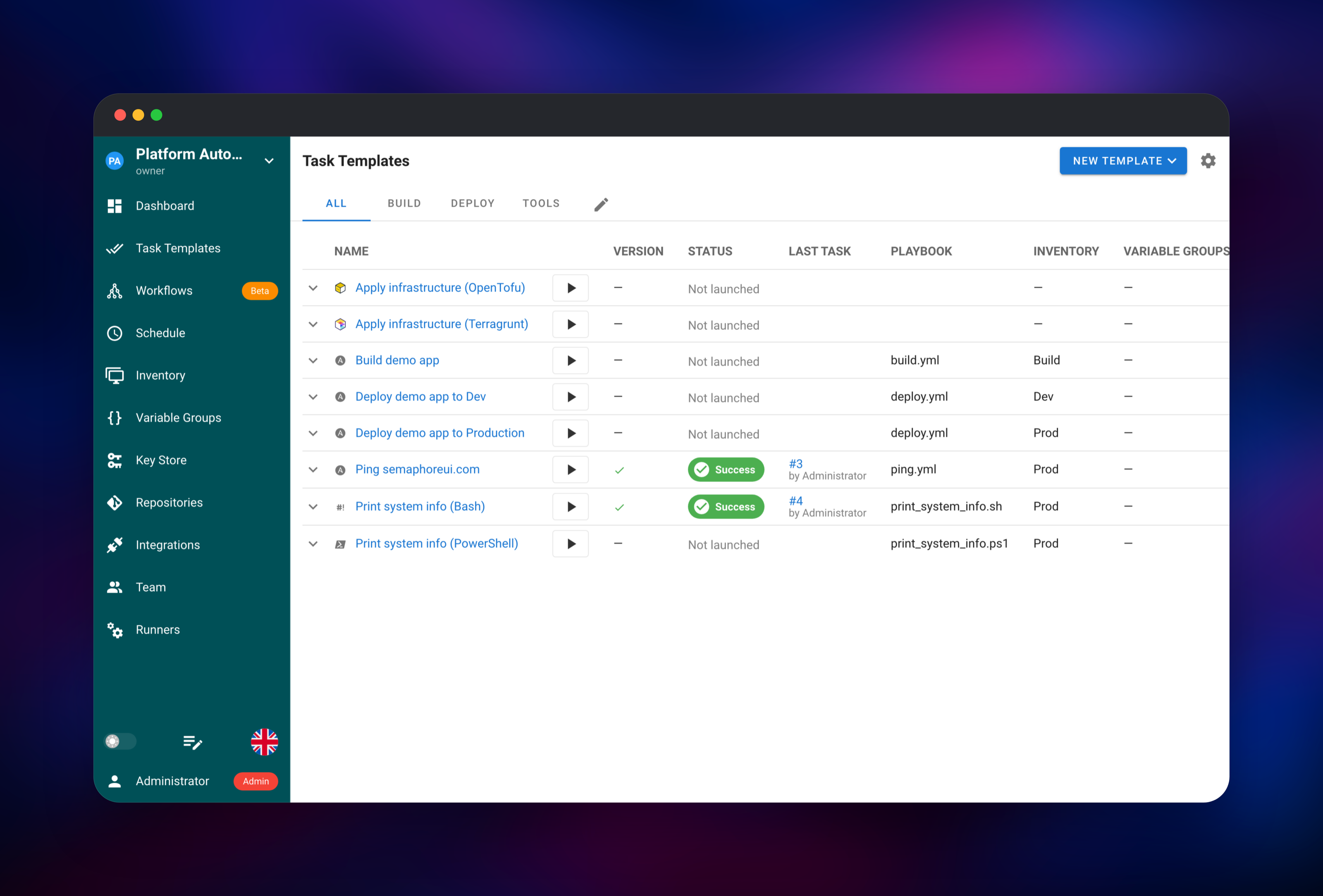
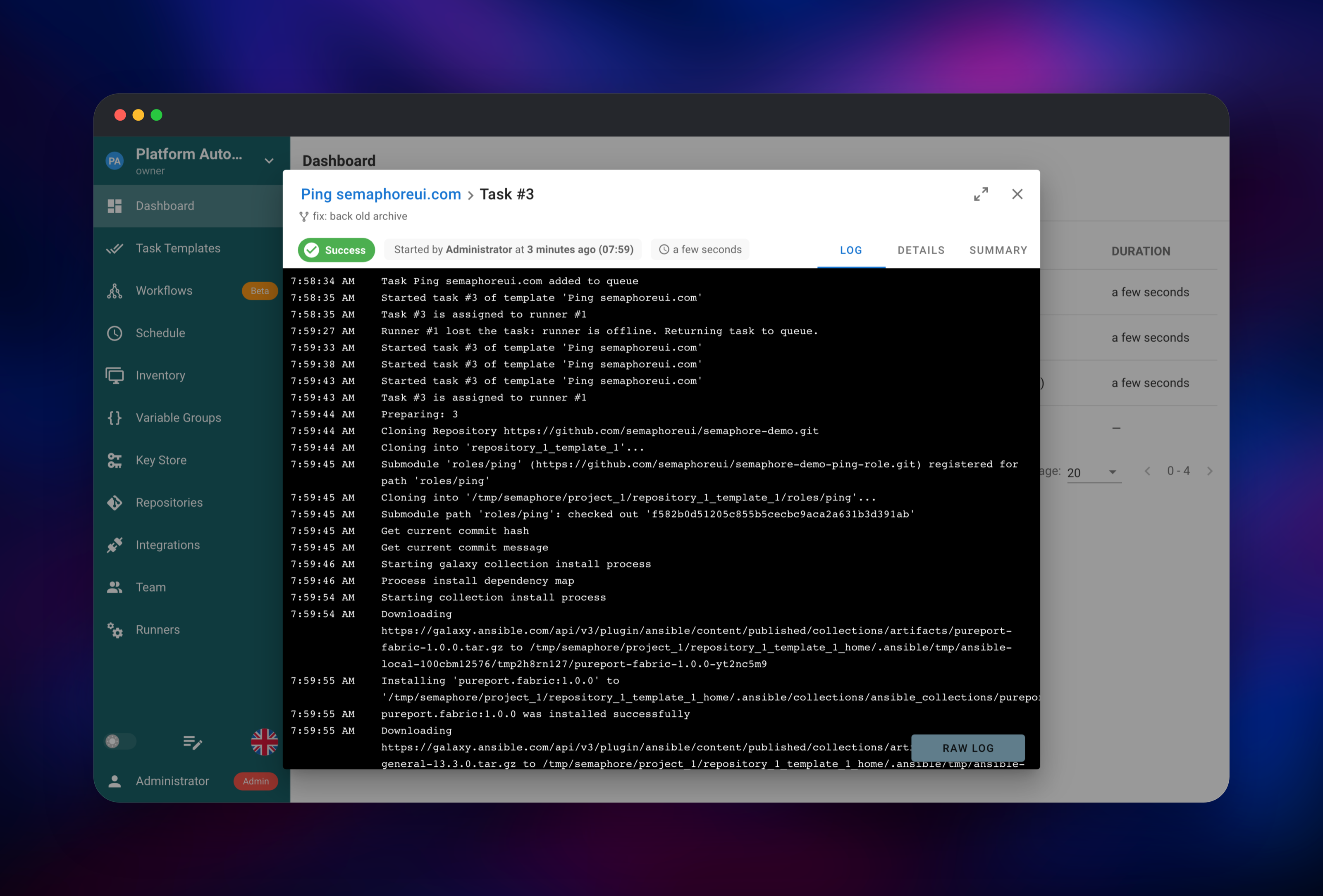
Set SEMAPHORE_ADMIN and SEMAPHORE_ADMIN_PASSWORD before deploying: they become the first administrator, created once the server finishes its migrations. When the deploy goes green, open the public URL and sign in. Semaphore has no public sign-up: admins create every other account, so the instance is closed from the first request. You land on the New Project screen; the fastest way to prove the stack works is to name a project and press Create Demo Project, which seeds a real repository, two inventories and eight task templates. Open Task Templates, press the run arrow beside Ping semaphoreui.com and confirm: the log should show the task assigned to a runner, cloning the repository, installing the playbook's Galaxy collections and printing a real ping result — one run that exercises the database, the scheduler, the runner and the private network. Then swap in your own repository, credentials under Key Store and hosts under Inventory.
About Hosting Semaphore UI
Ansible is excellent at describing work and poor at sharing it: playbooks end up on one machine, with one person's SSH agent, and nobody else can see what ran. Semaphore UI closes that gap without a heavyweight orchestrator — one Go binary with an embedded Vue front end.
- Multiple tools — Ansible, OpenTofu, Terraform, Terragrunt, Bash and PowerShell templates in one image
- Encrypted key store — SSH keys and cloud credentials encrypted at rest, the key held outside it
- Schedules and webhooks — cron schedules plus incoming hooks from GitHub, GitLab or Bitbucket
- Alerting and SSO — failure notifications by email, Slack, Teams or Gotify; LDAP, OIDC and TOTP
The semaphore service holds the API, web assets, scheduler and task queue; it reaches Postgres over the private network and hands each queued task to a registered runner, which clones the repository, installs what the run needs and streams output back.
Why Deploy Semaphore UI on Railway
Railway removes the parts of self-hosting Semaphore that are not about automation.
- Managed PostgreSQL, wired to the app before first boot
- Private networking between server, runner and database
- HTTPS and a public domain with no reverse proxy to configure
- Volumes, so encryption keys and runner registrations survive a redeploy
- Add another runner service when one worker is not enough
- Upgrades are a redeploy from the source repository
Common Use Cases
- Shared infrastructure runbooks — a button for playbooks that lived on one laptop, with an audit trail
- Scheduled maintenance — nightly patching, certificate renewal or backup checks as cron jobs
- Terraform and OpenTofu without a laptop — plans and applies from one place, credentials in the key store
Dependencies for Semaphore UI
- semaphore — web UI and API, from
Dockerfile.serverin gridalpha/semaphore-ui-railway ondocker.io/semaphoreui/semaphore:v2.19.12. Public, port 3000, volume/var/lib/semaphore. - runner — execution tier, from
Dockerfile.runnerondocker.io/semaphoreui/runner:v2.19.12. Private, with a volume. - Postgres — managed PostgreSQL: projects, templates, history, users, key store.
Both images are pinned to the same tag: the runner speaks the server's internal API, so the two upgrade together.
Environment Variables Reference
| Variable | Service | Purpose |
|---|---|---|
SEMAPHORE_ADMIN | semaphore | Username of the first administrator |
SEMAPHORE_ADMIN_PASSWORD | semaphore | Password for that administrator |
SEMAPHORE_WEB_ROOT | semaphore | Public URL; enables secure cookies |
SEMAPHORE_RUNNER_REGISTRATION_TOKEN | both | Token a runner presents when registering |
SEMAPHORE_USE_REMOTE_RUNNER | semaphore | Send every task to the runner |
Deployment Dependencies
- Source: · Upstream: · Docs:
- Bundled: Ansible 13.5.0, OpenTofu 1.11.0, Terraform 1.11.3, Terragrunt 0.78.0,
git,openssh-client,sshpass
Hardware Requirements for Self-Hosting Semaphore UI
| Resource | Minimum | Recommended |
|---|---|---|
| CPU | 1 vCPU per service | 2 vCPU server, 2+ vCPU runner |
| RAM | 512 MB server, 512 MB runner | 1 GB server, 2 GB runner |
| Storage | 1 GB per volume | 5 GB per volume, plus database |
| Runtime | Go on Alpine, PostgreSQL 13+ | PostgreSQL 16+ |
The server idles under 256 MB. Sizing matters on the runner, which holds checkouts and provider binaries and forks a process per task — raise its memory before SEMAPHORE_RUNNER_MAX_PARALLEL_TASKS.
Self-Hosting Semaphore UI
The quickest local trial is the embedded database in one container:
docker run -d --name semaphore -p 3000:3000 \
  -e SEMAPHORE_DB_DIALECT=bolt \
  -e SEMAPHORE_ADMIN=admin -e SEMAPHORE_ADMIN_PASSWORD=changeme \
  -v semaphore-data:/var/lib/semaphore \
  semaphoreui/semaphore:v2.19.12
For anything real, use PostgreSQL and split the runner out, as this Compose fragment shows:
services:
  semaphore:
    image: semaphoreui/semaphore:v2.19.12
    environment:
      SEMAPHORE_DB_DIALECT: postgres
      SEMAPHORE_DB_HOST: db
      SEMAPHORE_USE_REMOTE_RUNNER: "true"
      SEMAPHORE_RUNNER_REGISTRATION_TOKEN: shared-token
  runner:
    image: semaphoreui/runner:v2.19.12
    environment:
      SEMAPHORE_WEB_ROOT: http://semaphore:3000
      SEMAPHORE_RUNNER_ENABLED: "true"
      SEMAPHORE_RUNNER_REGISTRATION_TOKEN: shared-token
  db:
    image: postgres:16
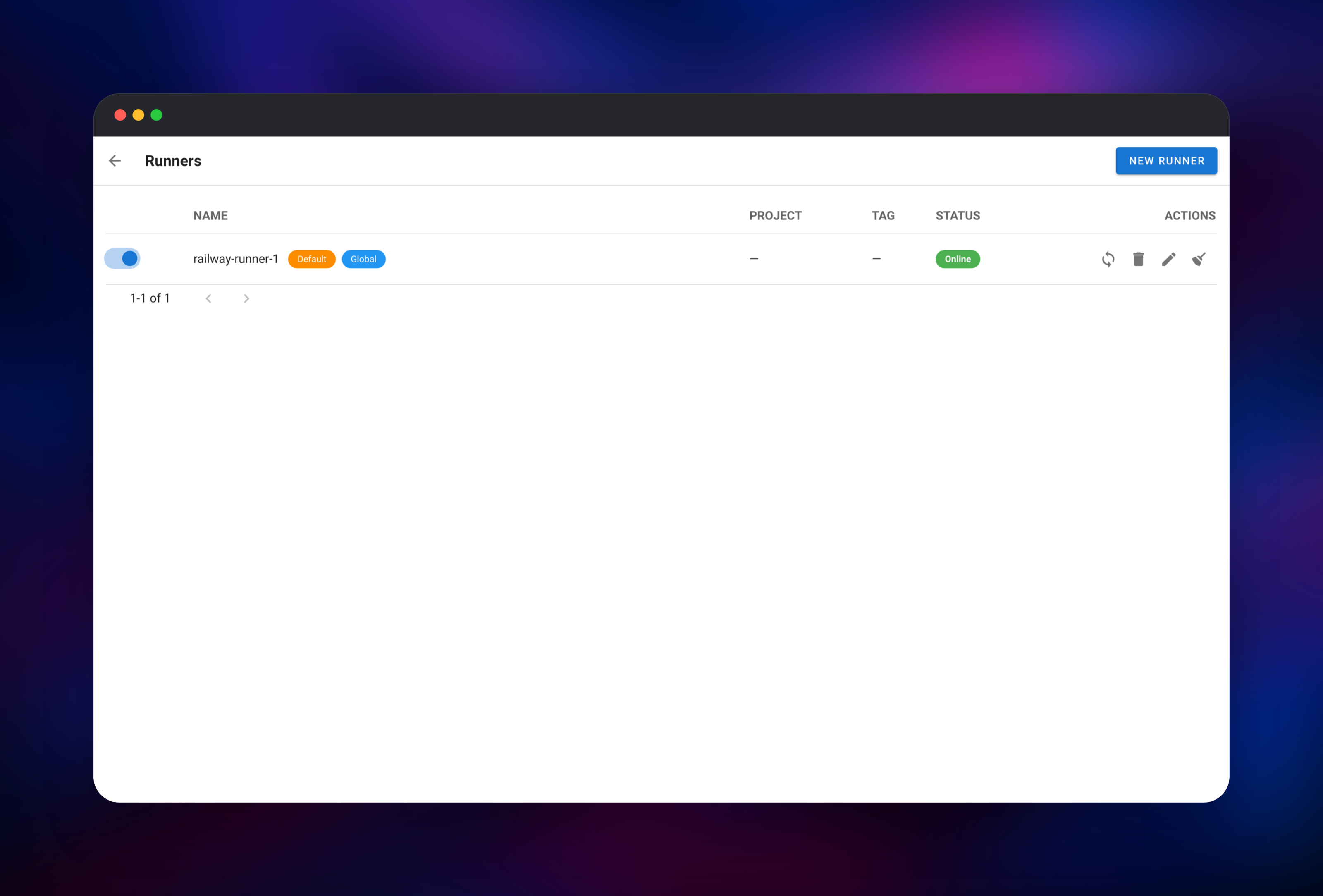
A runner registered by hand arrives switched off and not marked default, so untagged tasks report no runners available until you enable it in Admin → Runners. The template does that on first boot.
How Much Does Semaphore UI Cost to Self-Host?
Semaphore UI is free and open source under the MIT licence — no seat limits, no account required. A paid Pro edition adds clustering, visual workflows and enterprise secret backends; nothing here depends on it. On Railway you pay only for the compute, database and volumes the three services use.
FAQ
What is Semaphore UI? An open-source web UI and REST API for running Ansible, OpenTofu, Terraform, Terragrunt, Bash and PowerShell automation, with inventories, an encrypted key store, scheduling and teams. Formerly Ansible Semaphore; unrelated to Semaphore CI.
What does this Railway template deploy? The Semaphore server on a public HTTPS domain, one remote runner that executes every task, and managed PostgreSQL. Server and runner each have a volume; only the server is public.
Why does the template include a separate runner service? Splitting execution off the control plane is Semaphore's own production shape: a heavy playbook cannot slow the UI, and the container running your automation holds no admin credentials.
Why does this template need PostgreSQL? Semaphore keeps projects, templates, inventories, history, users and the encrypted key store in a relational database. The embedded database suits a single-user trial; PostgreSQL is what upstream recommends for a shared instance.
How do I add more runners to self-hosted Semaphore UI?
Add another service from Dockerfile.runner with its own volume, a distinct SEMAPHORE_RUNNER_NAME and the same registration token; it registers itself on first boot. Do not raise the replica count on an existing runner — replicas share one volume and one identity.
Can I trigger Semaphore UI from a Git push or CI? Yes. Each task template can expose an incoming webhook under Integrations, matched on headers or payload fields, and every operation is available over the REST API with a user token.
Will my SSH keys and secrets survive a redeploy? Yes — they are encrypted in the database with a key kept on the server's volume, generated once on first boot. Keep that volume, and back up the database before major upgrades.
Template Content