
Deploy Sim Studio
Visual builder for AI agents and automated workflows
Just deployed
realtime
Just deployed

Redis
Just deployed
/data
Just deployed
/app/apps/sim/uploads

Just deployed
/var/lib/postgresql/data
migrations
Just deployed
Deploy and Host Sim on Railway
Sim is an open-source AI workspace where you build agents and automations on a visual canvas instead of in glue code. You drag in blocks — an LLM agent, an HTTP call, a JavaScript function, a Gmail or Slack action — wire them together, and run the result on a schedule, from a webhook, or through an API endpoint. Every run is traced block by block, so you can see what an agent decided and why. Teams reach for it when a chat window is not enough: they want the model to read a CRM, file a ticket, and repeat it tomorrow unattended.
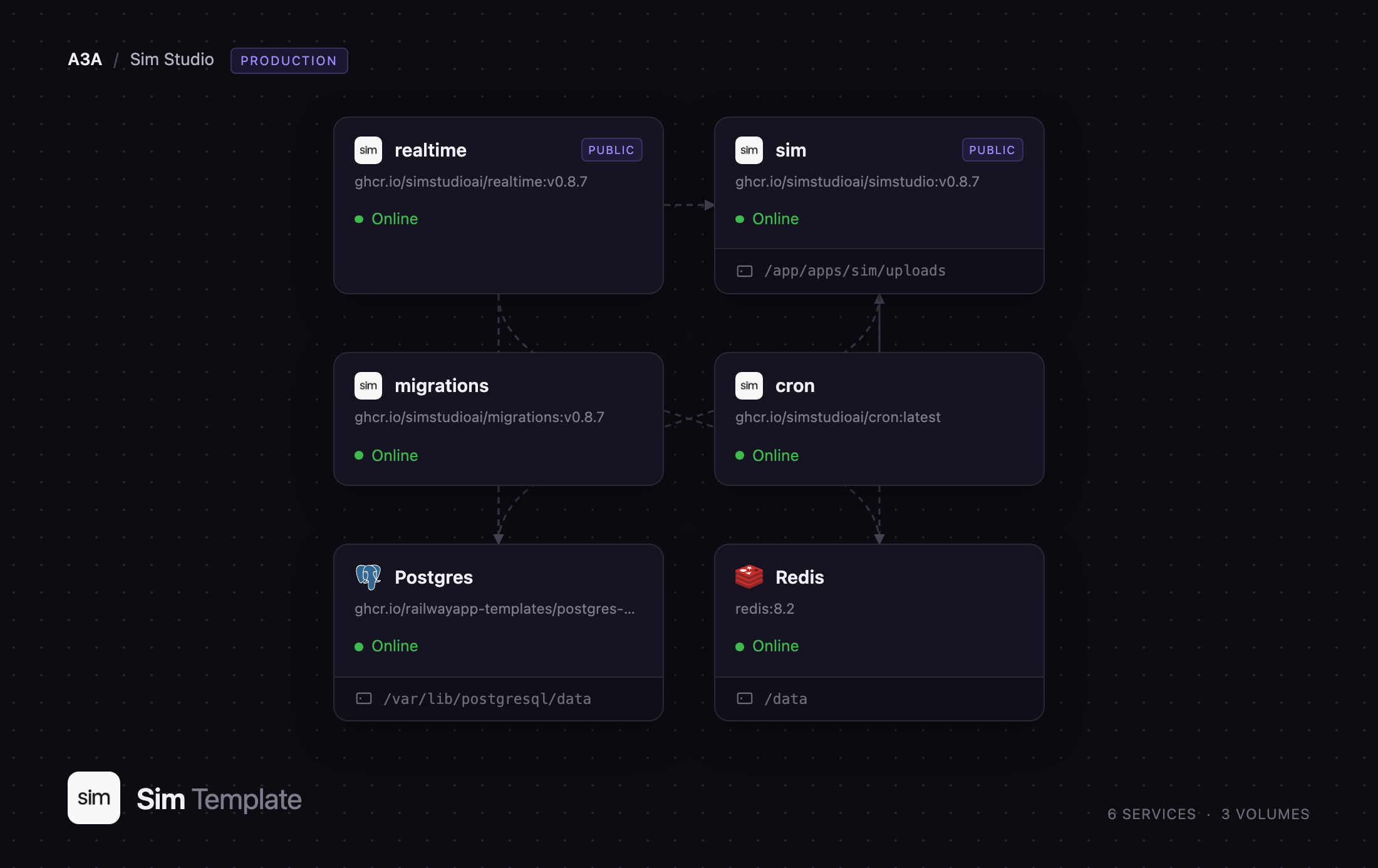
Deploy Sim on Railway and you get the full production topology, not a single container. The template runs the Next.js application, a realtime service powering the collaborative canvas over WebSockets, a one-shot migration runner that prepares the schema before the app takes traffic, and a scheduler firing Sim's background jobs every minute. Behind them sit PostgreSQL — workflows, runs, users, and knowledge-base embeddings through pgvector — and Redis, carrying pub/sub, live execution status, and the Socket.IO adapter. A volume holds uploaded files. To self-host Sim without wiring six services together by hand, start here.
Getting Started with Sim on Railway
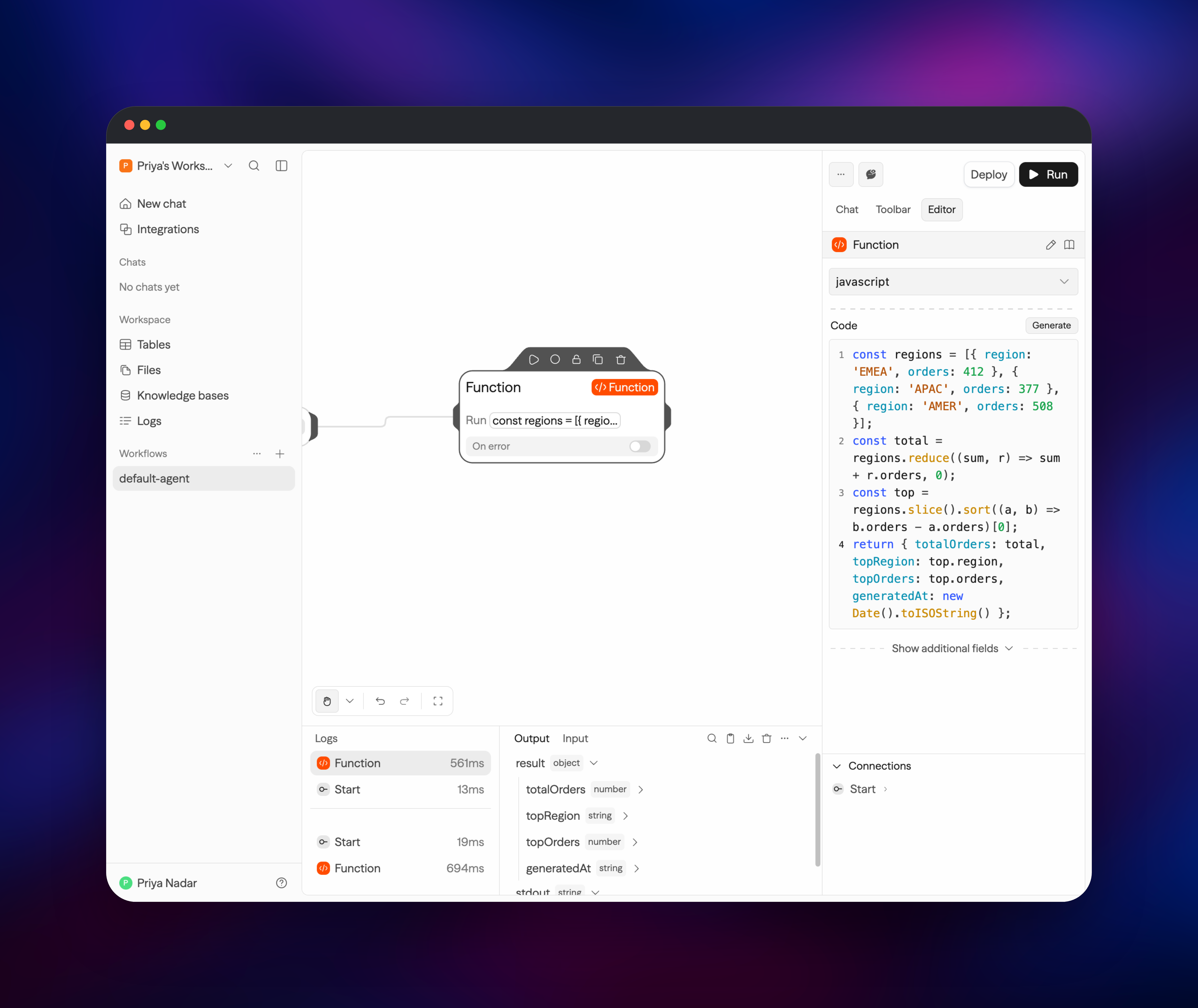
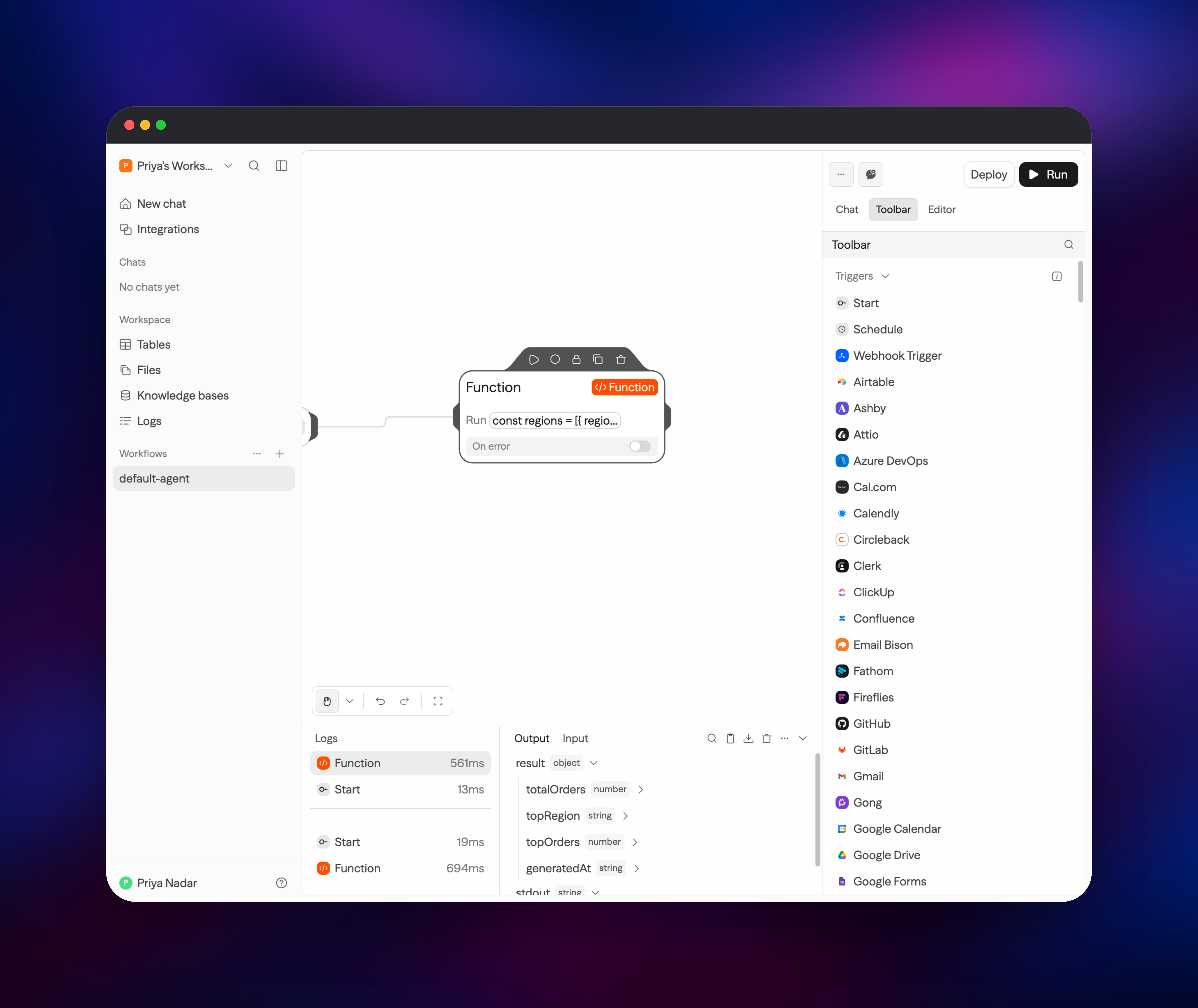
Open the application URL once the deploy is green and you land on the sign-in screen. Registration is open on a fresh deployment so you can claim the first account — Sign up with a password containing a special character and you land in your own workspace. Immediately afterwards set DISABLE_REGISTRATION to true on the app service; the lock is enforced server-side, not just hidden in the UI. A starter workflow called default-agent waits in the sidebar. Open it, click Toolbar, search for Function, and drop the block on the canvas — it wires itself to the Start block. Paste a few lines of JavaScript in and hit Run: the terminal shows each block's duration and output, the fastest way to confirm the stack is healthy. Add a model key on the Agent block, or set OPENAI_API_KEY on the app service to share one workspace-wide. When a workflow is ready, Deploy turns it into an API endpoint or a chat interface.
About Hosting Sim
Sim closes the gap between "the model gave a good answer" and "the work got done". A workflow is a directed graph of blocks: triggers start it, agent blocks call an LLM with tools attached, function blocks run sandboxed JavaScript, and integration blocks talk to SaaS APIs over OAuth. Teams self-host it when prompts, customer data, and API credentials must not leave their own infrastructure.
Key capabilities:
- Visual workflow builder with real-time multiplayer editing
- Agent blocks backed by OpenAI, Anthropic, Google, Mistral, Azure, Bedrock, or a local Ollama server
- 1,000+ integrations, plus generic HTTP and MCP support
- Knowledge bases with pgvector embeddings for retrieval-augmented answers
- Workspace tables and files, plus schedule, webhook and API triggers
The Railway architecture splits the roles upstream runs in production. The app serves the UI and API and runs workflows in an isolated V8 sandbox. The realtime service owns the collaborative canvas and holds its own public domain, because browsers connect to it directly. The migrations service runs once per deploy and exits, so schema changes land before the new app container takes traffic. The cron service calls the app every minute to fire schedules, poll Gmail, IMAP, RSS and Drive triggers, and sync knowledge-base connectors — without it, nothing scheduled runs.
Why Deploy Sim on Railway
Railway removes the setup work self-hosting an AI workspace normally involves.
- Six services, one click — no Compose file, no Kubernetes chart
- Managed PostgreSQL with pgvector and managed Redis included
- Private networking; only the app and realtime are public
- A persistent volume for uploaded files, mounted correctly
- Automatic HTTPS on both public domains
- Scaling without touching the topology
Common Use Cases
- Sales and CRM upkeep — enrich inbound leads, write them to HubSpot, digest them to Slack
- Support triage — classify incoming mail, draft a reply from a knowledge base, open a ticket
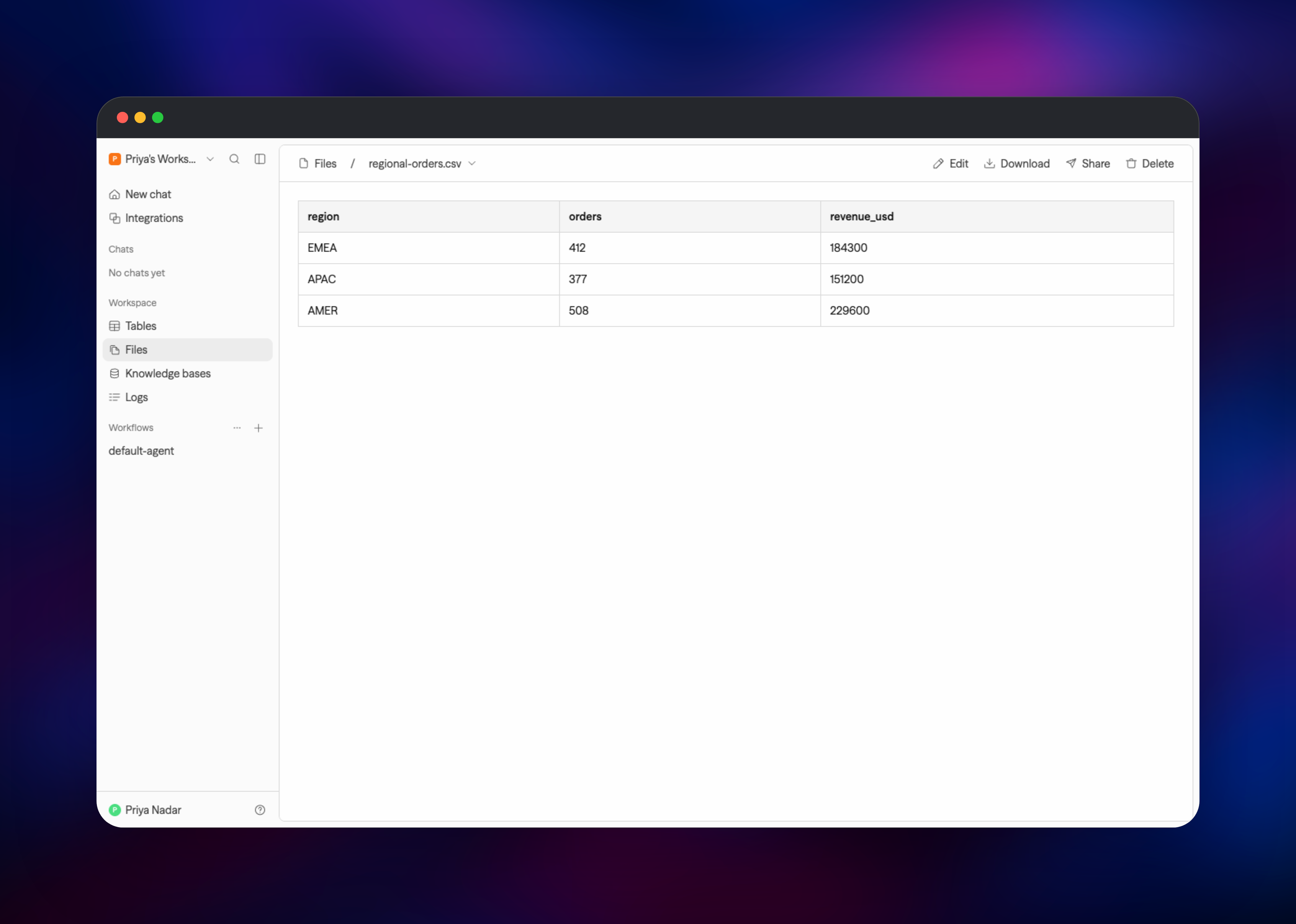
- Internal reporting — query an API on a schedule, reshape it in a function block, write to a workspace table
Dependencies for Sim
ghcr.io/simstudioai/simstudio— Next.js application, UI and API, port 3000ghcr.io/simstudioai/realtime— Socket.IO collaboration server, port 3002ghcr.io/simstudioai/migrations— Drizzle migration runner, runs once and exitsghcr.io/simstudioai/cron— supercronic scheduler- PostgreSQL 17+ with the
vectorextension — workflows, runs, users, embeddings - Redis 7+ — pub/sub, caches, Socket.IO adapter, live execution status
The application, realtime and migration images share one database schema — keep all three on the same release tag when you upgrade. The scheduler shares none and floats independently.
Environment Variables Reference
| Variable | Purpose |
|---|---|
BETTER_AUTH_SECRET | Session signing key; must match on app and realtime |
INTERNAL_API_SECRET | Authenticates app-to-realtime calls; must match on both |
ENCRYPTION_KEY | Encrypts stored credentials — exactly 64 hex characters |
CRON_SECRET | Bearer token the scheduler presents to the job endpoints |
NEXT_PUBLIC_APP_URL | Public app origin, used for webhooks and OAuth callbacks |
DISABLE_REGISTRATION | Set to true after you create the first account |
ENCRYPTION_KEY cannot be rotated without losing every stored credential; treat it as permanent.
Deployment Dependencies
- Source repository: https://github.com/simstudioai/sim
- Documentation: https://docs.sim.ai
- Images: https://github.com/orgs/simstudioai/packages
Hardware Requirements for Self-Hosting Sim
| Resource | Minimum | Recommended |
|---|---|---|
| CPU | 2 vCPU | 4 vCPU |
| RAM | 4 GB | 8 GB |
| Storage | 10 GB | 25 GB+ for files/embeddings |
| Runtime | Docker / OCI | Docker / OCI |
The application is the memory-hungry component; upstream caps it at 8 GB in production. Realtime, the scheduler and Redis are small, while PostgreSQL grows with run history.
Self-Hosting Sim with Docker
Sim ships a production Compose file. Clone the repo and start it with Docker Compose v2:
git clone https://github.com/simstudioai/sim.git && cd sim
for k in BETTER_AUTH_SECRET ENCRYPTION_KEY INTERNAL_API_SECRET CRON_SECRET; do
  echo "$k=$(openssl rand -hex 32)" >> .env
done
docker compose -f docker-compose.prod.yml up -d
Sim is then on http://localhost:3000. Behind your own domain, set the public origin so webhooks and OAuth callbacks resolve correctly:
echo 'NEXT_PUBLIC_APP_URL=https://sim.example.com' >> .env
docker compose -f docker-compose.prod.yml up -d
A Helm chart lives in helm/sim for Kubernetes. On Railway none of this applies — services, secrets, volume, and networking are already wired.
How Much Does Sim Cost to Self-Host?
Sim is free and open source under Apache 2.0, with no edition gate on the workflow builder, the integrations, or the execution engine. The hosted service at sim.ai sells Free, Pro, Max, and Enterprise plans with credit allowances; self-hosting has none of those limits. On Railway you pay only for the compute, memory, and storage the six services use. Your LLM provider is the real variable cost — a local Ollama server removes even that.
FAQ
What is Sim? Sim is an open-source AI workspace for building, running, and monitoring AI agents and automations on a visual canvas. Instead of writing orchestration code you compose blocks — LLM agents, HTTP calls, sandboxed functions, SaaS integrations — and trigger them on a schedule, a webhook, or an API call.
What does this Railway template deploy? Six services: the Sim application, a realtime collaboration server, a one-shot migration runner, a background-job scheduler, PostgreSQL, and Redis. Secrets are generated, private networking is wired up, and a volume is attached for uploaded files.
Why does the template include PostgreSQL and Redis? PostgreSQL is Sim's system of record — workflows, run logs, users, workspace tables, and knowledge-base embeddings via pgvector. Redis carries pub/sub for live execution status, the Socket.IO adapter that lets realtime scale past one replica, and short-lived caches. Live status streaming has no fallback without Redis.
Why does the realtime service get its own public URL?
Your browser opens the canvas connection directly to it, and the handshake authenticates with a one-time token rather than a session cookie, so a separate domain is safe. The app finds it through NEXT_PUBLIC_SOCKET_URL, read at runtime — you never rebuild an image to change a domain.
Do I need an OpenAI API key to use self-hosted Sim?
No. Function blocks, HTTP blocks, and integrations need no model at all. For agent blocks, paste a key into the block or set a provider key on the app service so the whole workspace can use it. Pointing OLLAMA_URL at a local model server works too.
Template Content


