
Deploy Skyvern
Self-hosted Skyvern: LLM browser automation, workflows, credential vault
skyvern
Just deployed
/data

Just deployed
/var/lib/postgresql/data
skyvern-ui
Just deployed

gateway
Just deployed
Deploy and Host Skyvern on Railway
Skyvern is an open-source agent that automates browser workflows with LLMs and computer vision instead of brittle selectors. You describe a goal in plain English — log into this portal, download last month's invoices — and Skyvern drives a real Chromium browser to do it, re-reading the page each step so a redesigned form does not break the run. Operations teams and RPA developers use it instead of Playwright scripts.
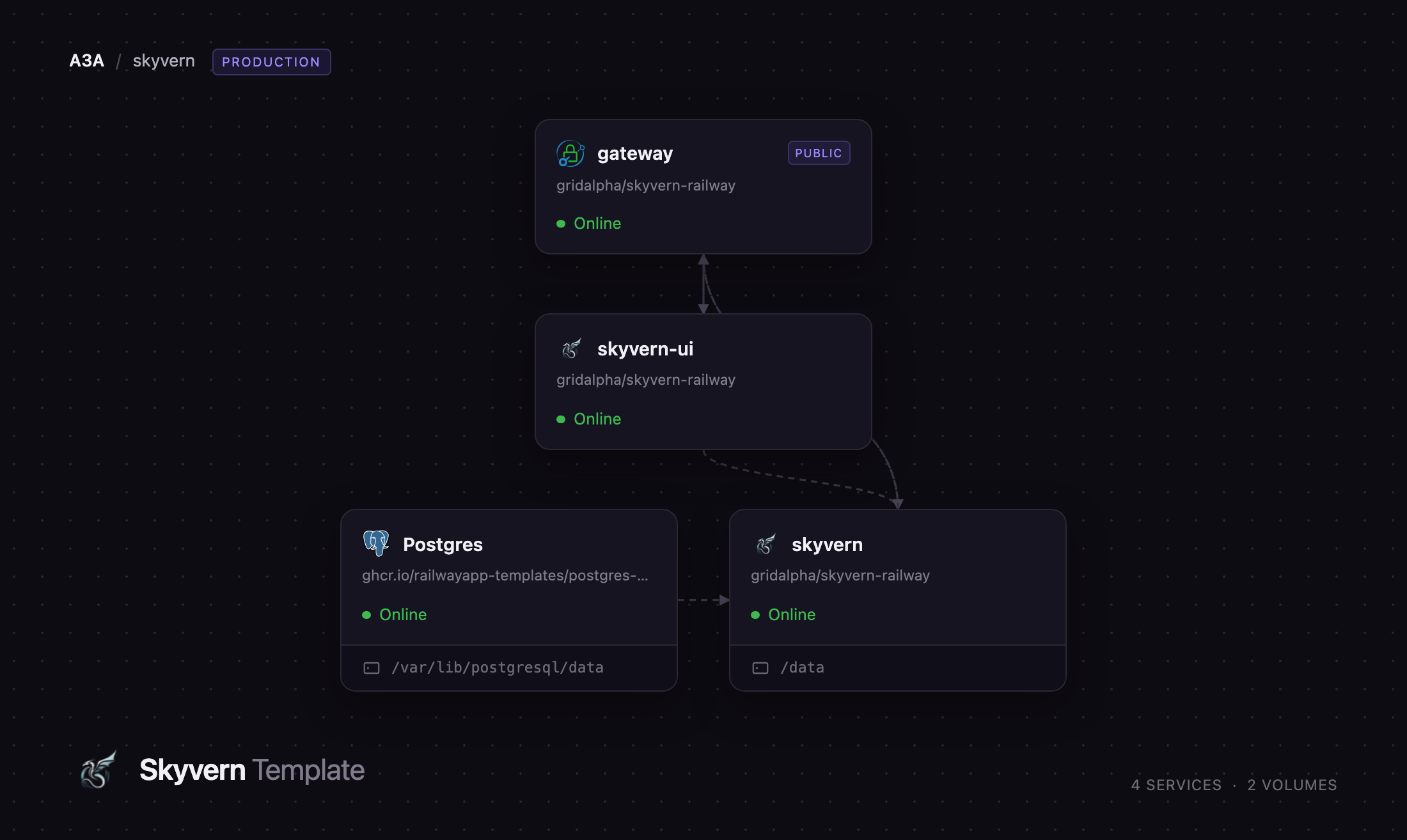
Deploy Skyvern on Railway and you get the whole self-hosted stack: the FastAPI backend with its Chromium runtime, the React workflow builder, PostgreSQL, and a Caddy gateway publishing one password-protected URL in front of it. The gateway is the only service with a public domain — the API, the UI and the browser runtime stay private — and it routes the API, the live-view WebSockets and the run artifacts on one origin. A volume holds artifacts, recordings, downloads and the credential vault.
Getting Started with Skyvern on Railway
Set GATEWAY_PASSWORD at deploy time, plus one model provider key if you want the agent to run tasks. The public URL prompts for HTTP basic auth — username admin, password as supplied. Skyvern's open-source build ships no login of its own, so this password is what stands between the internet and an agent that can spend your model credits.
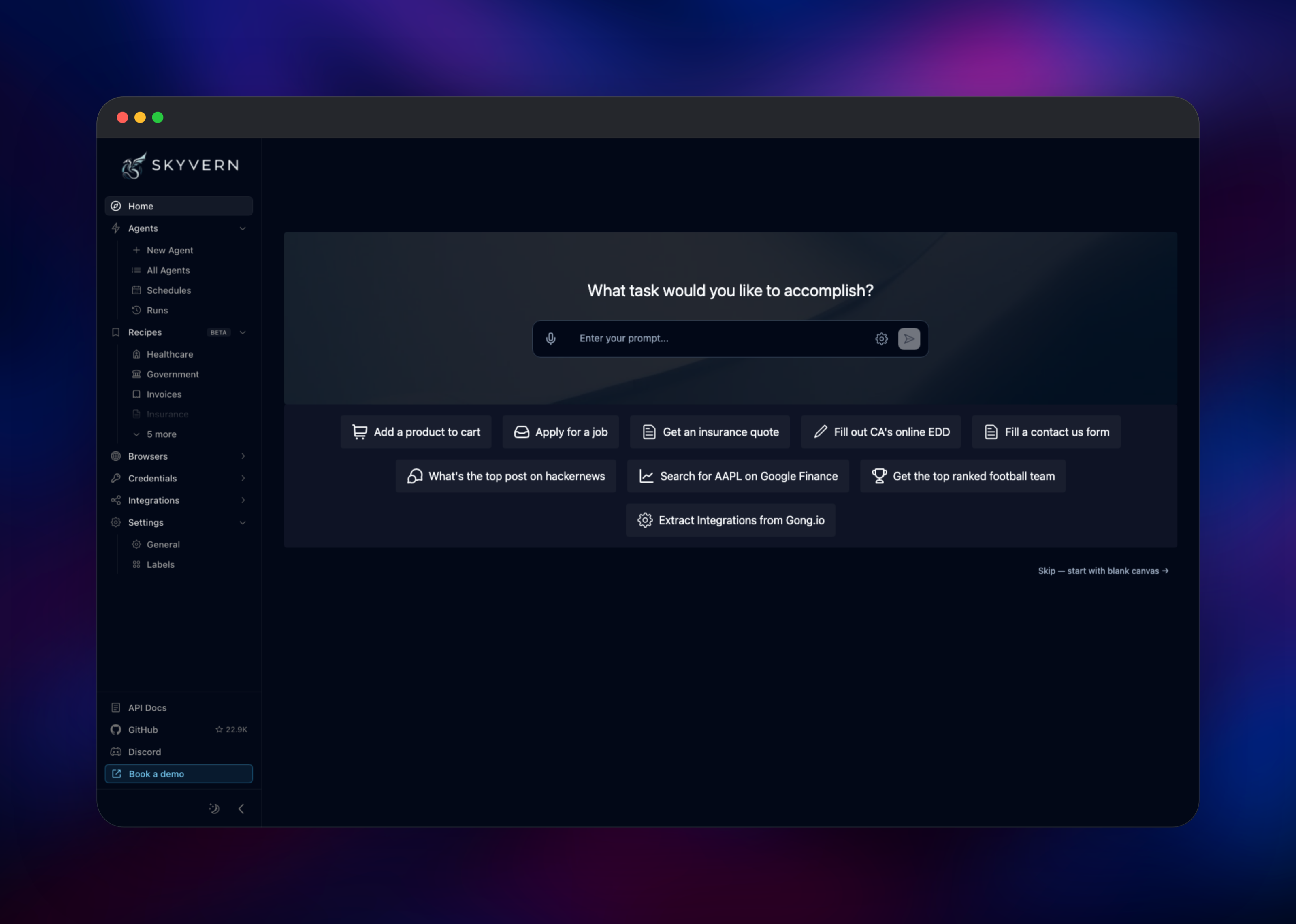
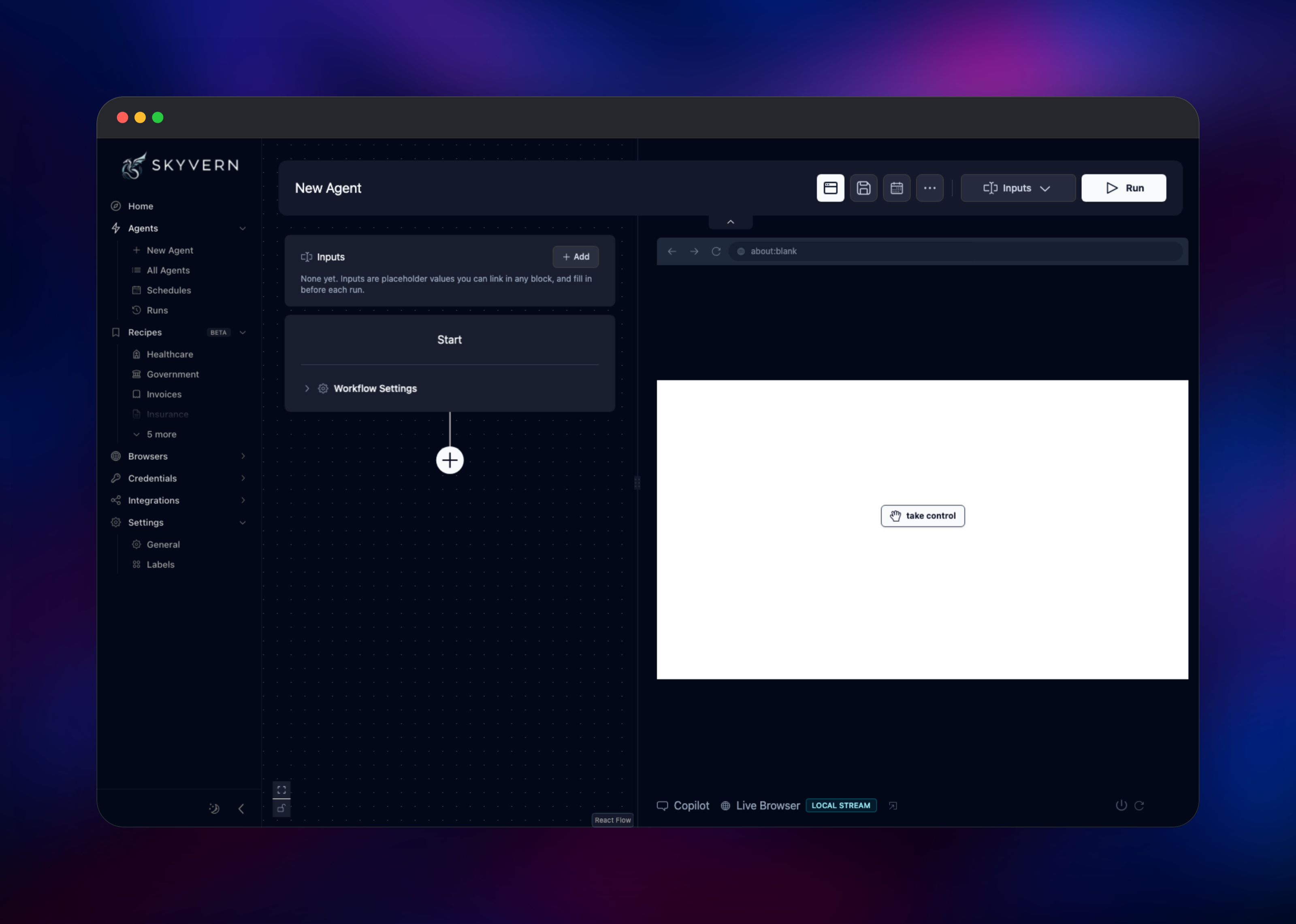
Past the prompt is the home screen, with a prompt box and starter tasks. Pick "What's the top post on hackernews" to watch a run end to end, or Skip — start with blank canvas to open the builder and assemble navigation, extraction, file-download and code blocks visually. The right-hand panel streams the real Chromium instance running in your service, with a take control button for when a run hits a CAPTCHA or a two-factor prompt.
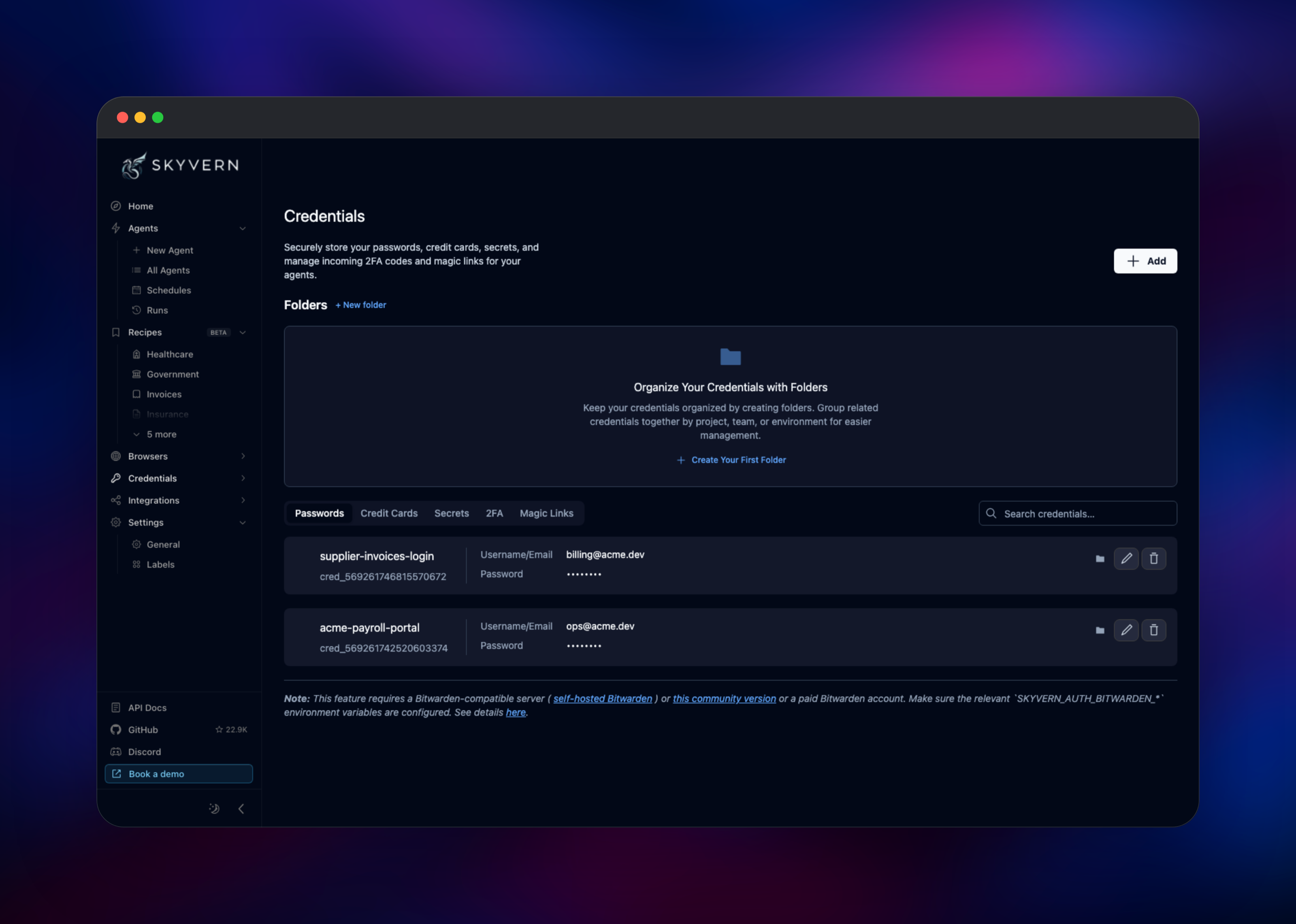
Before automating anything that needs a login, store the site username and password under Credentials. Values are encrypted at rest and referenced by name in a workflow, so no secret is pasted into a prompt. To check the deployment is healthy, run a starter task and watch the run page fill with per-step screenshots — they come off the volume through the artifact service, so they prove storage, the browser and streaming all work.
About Hosting Skyvern
Traditional browser automation bakes a site's DOM into the script, so a class rename breaks it. Skyvern screenshots the page each step, asks a vision model what to click or type next, and executes that — so one workflow generalises across many sites sharing a shape, such as a hundred insurance quote forms. Self-hosting matters because the agent handles real credentials: the vault, the artifacts and the browser session stay in infrastructure you control.
Key capabilities:
- Prompt-driven and visual workflows with loops, branching and code blocks
- Persistent browser sessions that keep cookies and logins alive across runs
- An encrypted credential vault with TOTP, plus Bitwarden and 1Password
- A live browser stream with human takeover for CAPTCHAs and step-up auth
- A REST API and Python SDK, webhooks, and scheduled runs
- Provider-agnostic: OpenAI, Anthropic, Gemini, Azure, Bedrock, OpenRouter, Groq or Ollama
Four services carry this. skyvern is the API and agent runtime: a virtual display so Chromium renders as on a desktop, every browser action, and artifacts on the volume. skyvern-ui serves the React app and mints the session tokens the frontend uses. Postgres stores workflows, runs, steps and credential metadata. gateway is Caddy: public URL, basic auth, path routing.
Why Deploy Skyvern on Railway
Railway removes the setup self-hosting Skyvern normally involves.
- Postgres, the browser runtime and the persistent volume are provisioned together
- Password-protected public access is configured before the first request
- Private networking keeps the API, the UI and Chromium off the internet
- Health checks and automatic restarts on all four services
- One-click redeploys pick up new upstream releases
Common Use Cases
- Pulling invoices, statements or claim documents out of portals that publish no API
- Filling long multi-step applications — quotes, job applications, onboarding
- Automating internal admin panels and legacy tools with no integration
Dependencies for Skyvern
- skyvern —
public.ecr.aws/skyvern/skyvern:latest, extended by gridalpha/skyvern-railway. FastAPI backend, Chromium on a virtual display, and the artifact service returning screenshots to the UI. Owns the volume. - skyvern-ui —
public.ecr.aws/skyvern/skyvern-ui:latest, same repository. React workflow builder plus its session-token server. - gateway —
caddy:2-alpine. One origin, basic auth, and proxying for the API, artifacts and live-view WebSockets. - Postgres — Railway's managed PostgreSQL, holding workflows, runs, steps and credential metadata.
Environment Variables Reference
| Variable | Service | Purpose |
|---|---|---|
GATEWAY_PASSWORD | gateway | Password for the public URL. Set this. |
GATEWAY_USERNAME | gateway | Basic-auth username, defaults to admin |
OPENAI_API_KEY | skyvern | Enables OpenAI; the matching provider flag is set for you |
ANTHROPIC_API_KEY | skyvern | Alternative provider — set exactly one key |
LLM_KEY | skyvern | Overrides the default model for your provider |
SECRET_KEY | skyvern | Signs the organization API token; keep it stable |
ENCRYPTOR_AES_SECRET_KEY | skyvern | Encrypts the credential vault; keep it stable |
MAX_STEPS_PER_RUN | skyvern | Caps model spend per run |
Deployment Dependencies
- Source project: Skyvern-AI/skyvern (AGPL-3.0)
- Documentation: docs.skyvern.com
- Runtime: Python 3.11, Playwright Chromium, Node 24, PostgreSQL 18
Hardware Requirements for Self-Hosting Skyvern
Chromium dominates the footprint; concurrent runs each open their own browser context, so raise RAM before CPU.
| Resource | Minimum | Recommended |
|---|---|---|
| CPU | 2 vCPU | 4 vCPU |
| RAM | 4 GB | 8 GB |
| Storage | 5 GB volume | 20 GB volume |
| Database | PostgreSQL 14+ | PostgreSQL 18 |
Self-Hosting Skyvern
Upstream ships a Docker Compose stack. Clone the repository and start it, in a shell:
git clone https://github.com/Skyvern-AI/skyvern.git
cd skyvern
docker compose up -d
The UI is then on http://localhost:8080, the API on http://localhost:8000. To configure a model provider without editing files, use the interactive setup:
pip install skyvern
skyvern init llm
skyvern run all
Compose shares a bind mount between the API and UI containers and starts a VNC bridge for its live view. The template replaces both: the artifact reader sits beside the volume that owns the data, and the live view uses the Chrome DevTools screencast.
Is Skyvern Free to Self-Host?
Skyvern is open source under AGPL-3.0, with no licence fee or seat limit on the self-hosted build; a managed cloud with usage-based pricing exists alongside it. Self-hosting on Railway costs infrastructure only, plus what your model provider charges per run — usually the larger number. A run is about one vision-model call per browser step, so cap MAX_STEPS_PER_RUN while experimenting.
FAQ
What is Skyvern? An open-source AI agent that completes tasks in a real web browser from a natural-language description, using vision models rather than hard-coded selectors, so it survives page changes.
What does this Railway template deploy? Four services: the API with its Chromium runtime, the React workflow builder, managed PostgreSQL, and a Caddy gateway that publishes one password-protected URL and keeps the rest private.
Why does the template include PostgreSQL and a volume? PostgreSQL holds workflows, run history and step records. The volume holds what a run writes to disk — screenshots, recordings, HAR files, downloads and the credential vault — so it survives redeploys.
Do I need an OpenAI key to self-host Skyvern?
Not to deploy it — the stack starts and the UI works with no provider configured. A run needs a vision-capable model, so set one of OPENAI_API_KEY, ANTHROPIC_API_KEY, GEMINI_API_KEY, OPENROUTER_API_KEY or GROQ_API_KEY.
How do I secure a self-hosted Skyvern instance?
The open-source build has no login of its own, which is why the gateway enforces basic auth in front of everything. Set a strong GATEWAY_PASSWORD, and add a custom domain on the gateway service for your own hostname.
Can Skyvern log into websites on my behalf? Yes. Store site credentials in the built-in vault, or connect Bitwarden or 1Password, and reference them by name from a workflow. Skyvern handles TOTP codes, and the live browser view lets you take over when a site needs something the agent cannot supply.
How do I call self-hosted Skyvern from my own code?
Every action in the UI is a REST endpoint, wrapped by the Python SDK. Send the organization API key from the Settings page as an x-api-key header; requests also pass the gateway's basic auth.
Template Content
skyvern
gridalpha/skyvern-railwayOPENAI_API_KEY
Set this to run tasks with OpenAI. Have kept this non optional to bring attention to these 5 env vars. Whichever you want to use keep it, and remove the rest
skyvern-ui
gridalpha/skyvern-railwaygateway
gridalpha/skyvern-railway

