
Deploy Stirling PDF
Adobe Acrobat alternative. Merge, split, compress, OCR, redact & sign

Just deployed
stirling-pdf
Just deployed
/configs
Deploy and Host Stirling-PDF on Railway
Stirling-PDF is an open source, self-hosted web toolkit for the PDF jobs people normally open Adobe Acrobat or a free upload site for: merge and split, rotate, compress, OCR scans, redact, watermark, sign forms, and convert to and from Word, Excel, PowerPoint and images. Around fifty tools share one browser UI and nearly all have a REST endpoint too, so one instance serves the person fixing a contract and the script stamping invoices overnight — and nothing uploaded leaves infrastructure you control.
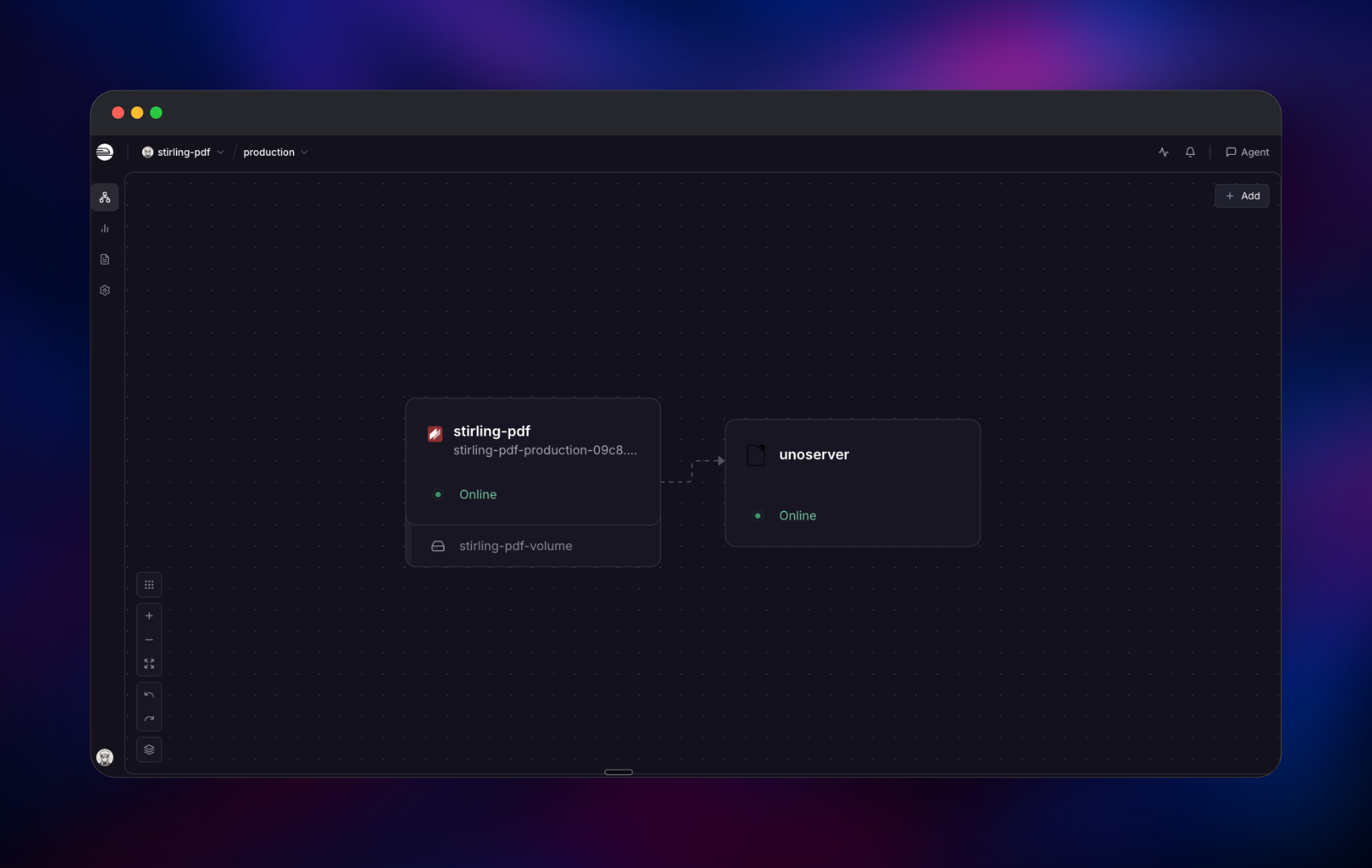
Deploy Stirling-PDF on Railway and the fiddly parts are wired already. The template runs the official stirlingtools/stirling-pdf:latest image — the build with LibreOffice, Tesseract, OCRmyPDF, Ghostscript and qpdf baked in — on port 8080 behind managed HTTPS, with a 5 GB volume at /configs for the user database, settings, signing keys and saved signatures. Beside it runs unoserver, a private LibreOffice conversion service. An admin account is created with a generated password, and /api/v1/info/status health-gates each redeploy.
Getting Started with Stirling-PDF on Railway
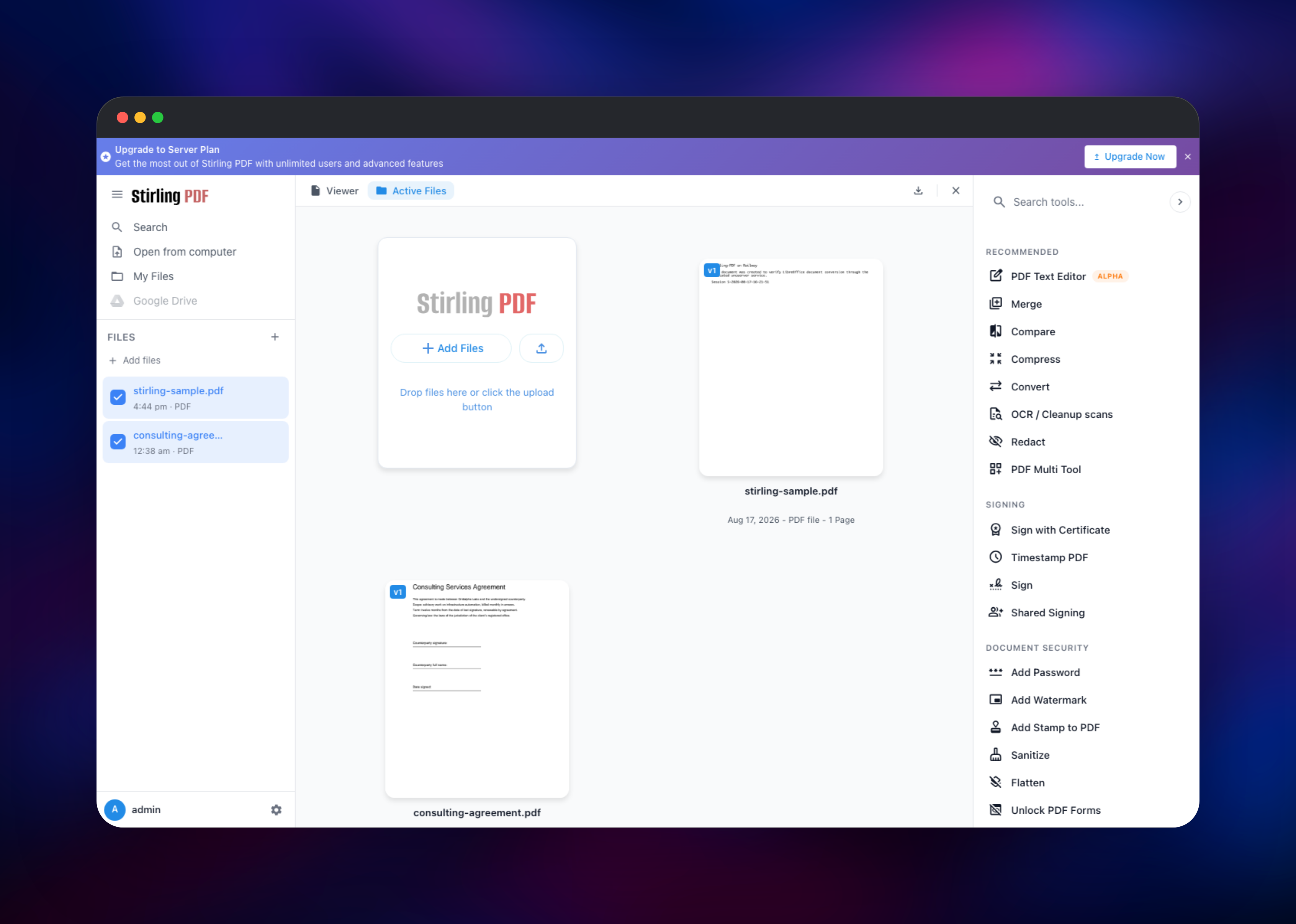
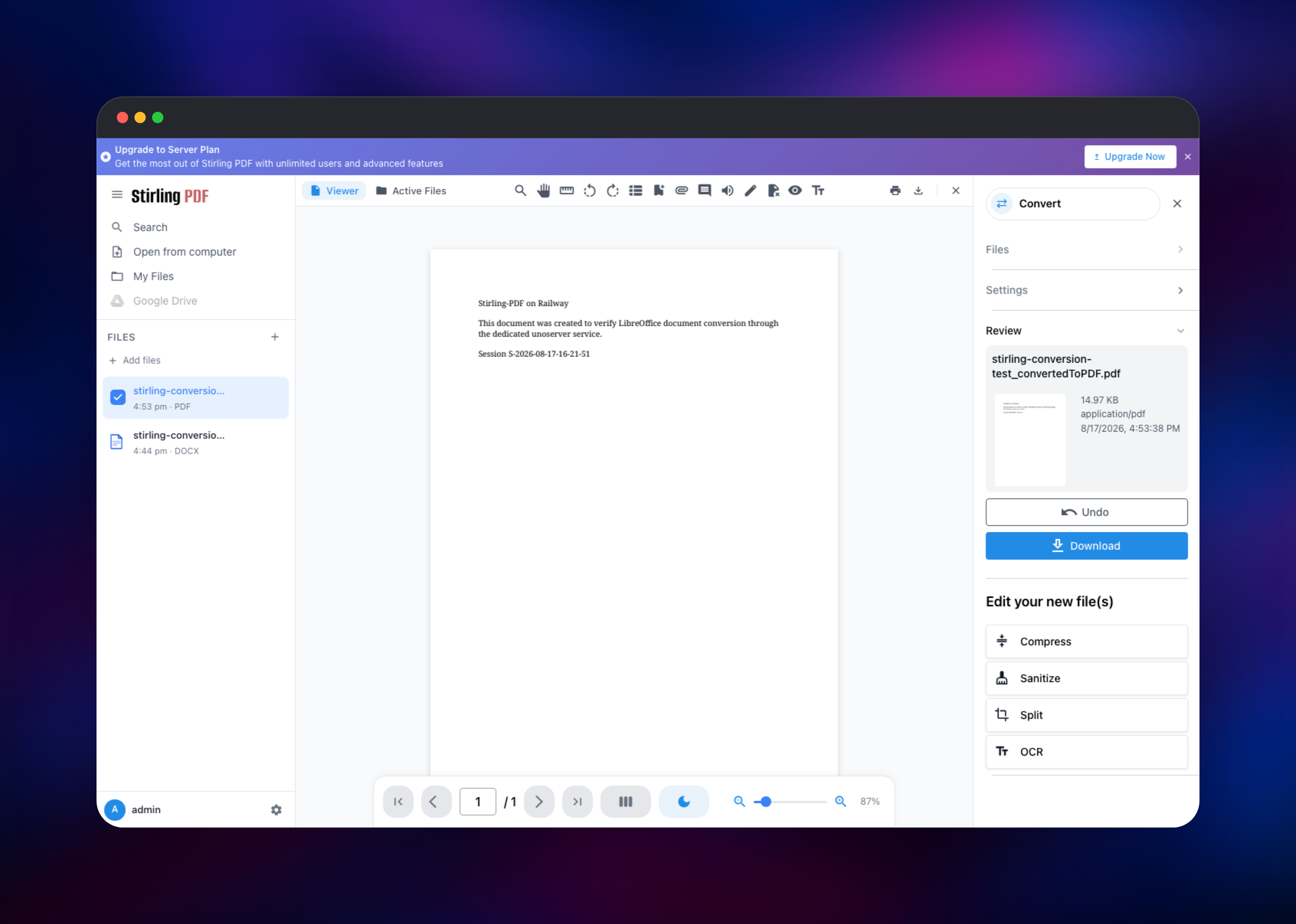
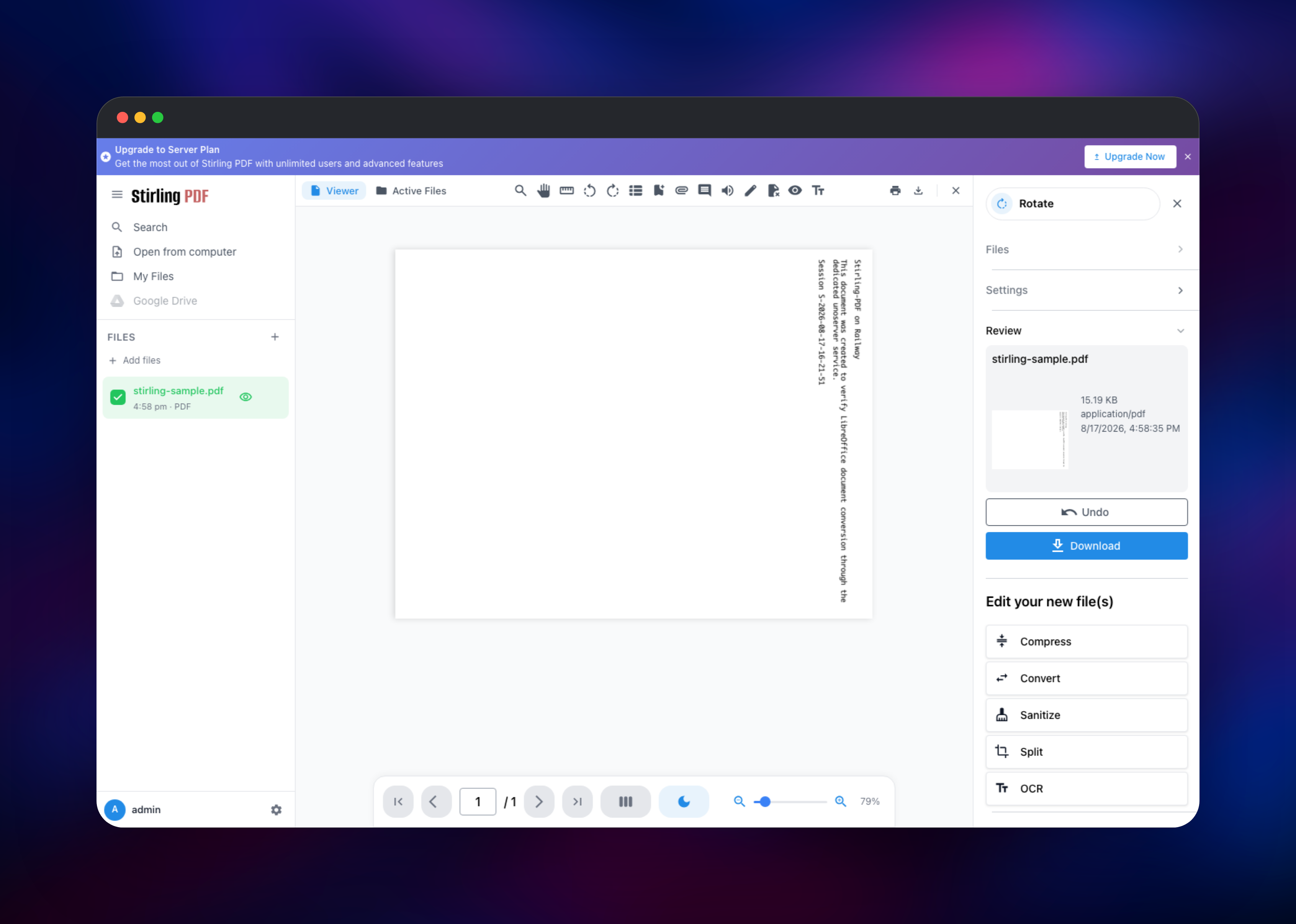
The deployed URL opens on /login, because sign-in is on before anyone else can reach the instance. Log in as admin with the password Railway generated for SECURITY_INITIALLOGIN_PASSWORD, shown in the Variables tab; those initial-login variables are read only while the user table is empty, so treat the first sign-in as the moment to set credentials you mean to keep. There is no public sign-up route by design — add teammates under Settings, and upstream's open-core licence covers 5 users per server free. For a first action, drag a PDF in and run Rotate or Merge; the result appears with Undo and a download button. To prove the conversion tier works, upload a .docx and convert it to PDF — that job runs on the private unoserver service, whose logs show the export. /api/v1/info/status returns "status":"UP", and the API is documented at /swagger-ui/index.html.
About Hosting Stirling-PDF
PDF work is where sensitive documents pile up. Public converters want all of it uploaded and desktop licences charge per seat, while a self-hosted instance gives a whole team the same operations on hardware you own.
- Roughly 50 tools: merge, split, rotate, crop, compress, repair, page numbers, watermarks
- OCR through Tesseract and OCRmyPDF, using the language data shipped in the image
- Office conversion both ways via LibreOffice, plus HTML and eBook conversion
- Redaction, password changes, certificate signing, and a REST endpoint per tool
How the services fit together. stirling-pdf is a Spring Boot backend with the frontend embedded, serving UI and API on 8080; all state sits on its volume — the H2 user database, settings.yml, JWT keys, the signing certificate and saved signatures. unoserver runs LibreOffice on port 2003 with no volume and no public domain, reached in upstream's "remote UNO" mode, which sends file contents over the private network, so no shared filesystem is needed.
Why Deploy Stirling-PDF on Railway
One deploy replaces a VPS, a reverse proxy and a hand-written compose file.
- No Docker, JVM tuning or volume mounts to work out
- The LibreOffice worker stays private, reachable only by the app
- A volume keeps accounts, keys and signatures across redeploys
- Managed HTTPS, custom domains and health checks out of the box
- Admin account with a generated password on first boot
- Conversion capacity scales by adding a service
Common Use Cases for Self-Hosted Stirling-PDF
- Giving an office the merge, split, compress and OCR workflow they were pasting into free web tools, without documents leaving your network
- Automating document plumbing from a backend: page numbers, watermarks and flattened forms over the REST API
- Making a scanned archive searchable with OCR, or preparing contracts: redact, then sign with your own certificate
Dependencies for Stirling-PDF
- Stirling-PDF —
stirlingtools/stirling-pdf:latest, from github.com/Stirling-Tools/Stirling-PDF. UI and API on port 8080, 5 GB volume at/configs, health check/api/v1/info/status. - unoserver —
ghcr.io/stirling-tools/stirling-unoserver:latest, upstream's standalone LibreOffice worker. Private, port 2003, no volume.
No database, cache or bucket is included, deliberately: external Postgres, the S3 storage backend and the clustered artifact store are Pro-licence features upstream, so either would be provisioned and then ignored while the app used its embedded H2 database.
Environment Variables Reference
| Variable | Description | Required |
|---|---|---|
SECURITY_ENABLELOGIN | Require sign-in for UI and API | Yes |
SECURITY_INITIALLOGIN_USERNAME | First admin username, admin | Yes |
SECURITY_INITIALLOGIN_PASSWORD | First admin password, read only while the user table is empty | Yes |
SYSTEM_BACKENDURL / SYSTEM_FRONTENDURL | Public URLs for callbacks, invites, QR codes | Yes |
METRICS_ENABLED | Must stay true; powers the health check | Yes |
PROCESS_EXECUTOR_AUTO_UNO_SERVER and PROCESSEXECUTOR_AUTOUNOSERVER | Both switch off the in-container LibreOffice pool; the startup script and the Java config read different spellings | Yes |
PROCESSEXECUTOR_UNOSERVERENDPOINTS_0_* | Worker host, port, protocol, HOSTLOCATION=remote | Yes |
PROCESSEXECUTOR_SESSIONLIMIT_LIBREOFFICESESSIONLIMIT | Concurrent LibreOffice sessions; match the endpoint count | Yes |
Endpoints are indexed, so a second worker is a copy of unoserver plus PROCESSEXECUTOR_UNOSERVERENDPOINTS_1_* and a higher session limit. system.corsAllowedOrigins stays unset on purpose — pinning it to the generated domain would break a custom domain later.
Deployment Dependencies
- Java, LibreOffice, Tesseract, OCRmyPDF and Ghostscript ship in the image
- hub.docker.com/r/stirlingtools/stirling-pdf · docs.stirlingpdf.com
Hardware Requirements for Self-Hosting Stirling-PDF
| Resource | Minimum | Recommended |
|---|---|---|
| CPU | 1 vCPU | 2–4 vCPU (LibreOffice and OCR are CPU-bound) |
| RAM | 2 GB app | 4 GB app, 1–2 GB per worker |
| Storage | ~2 GB image, 1 GB volume | 5 GB volume |
| Runtime | Bundled JDK | Bundled JDK |
The app sizes its JVM heap from the container memory limit, so no -Xmx tuning is needed.
How to Self-Host Stirling-PDF Outside Railway
One container runs Stirling-PDF with conversions in-process:
docker run -d --name stirling-pdf -p 8080:8080 \
  -e SECURITY_ENABLELOGIN=true -e SECURITY_INITIALLOGIN_USERNAME=admin \
  -e SECURITY_INITIALLOGIN_PASSWORD=change-me \
  -v ./configs:/configs stirlingtools/stirling-pdf:latest
To mirror the two-service shape used here, add the worker in docker-compose.yml:
services:
  unoserver:
    image: ghcr.io/stirling-tools/stirling-unoserver:latest
  stirling-pdf:
    image: stirlingtools/stirling-pdf:latest
    ports: ["8080:8080"]
    volumes: ["./configs:/configs"]
    environment:
      PROCESS_EXECUTOR_AUTO_UNO_SERVER: "false"
      PROCESSEXECUTOR_AUTOUNOSERVER: "false"
      PROCESSEXECUTOR_UNOSERVERENDPOINTS_0_HOST: "unoserver"
      PROCESSEXECUTOR_UNOSERVERENDPOINTS_0_PORT: "2003"
      PROCESSEXECUTOR_UNOSERVERENDPOINTS_0_HOSTLOCATION: "remote"
      PROCESSEXECUTOR_SESSIONLIMIT_LIBREOFFICESESSIONLIMIT: "1"
How Much Does Stirling-PDF Cost to Self-Host?
The Stirling-PDF core is open source under the MIT licence and every tool in this template sits in that free tier, so on Railway you pay only for compute, volume and bandwidth. Upstream's open-core licence covers up to 5 users per server at no cost. Larger deployments have paid plans: a Server plan around $99/month adds OAuth2 SSO and external databases, Enterprise adds SAML2 and audit logs.
FAQ
What is Stirling-PDF? An open source, self-hosted web app with around fifty PDF tools — merge, split, compress, OCR, redact, sign, convert — each also a REST endpoint, and the most direct Adobe Acrobat alternative you can run yourself.
What does this Railway template deploy?
A public stirling-pdf app and API on port 8080 with a 5 GB volume at /configs, plus a private unoserver container converting Office documents on port 2003.
Why is there no database service in this template? External Postgres, S3 storage and clustering are Pro-licence features, so the open source build always uses its embedded H2 database on the volume.
Can I add extra OCR languages to self-hosted Stirling-PDF, and is anything disabled?
The image ships a fixed set of Tesseract language data; more needs a custom image or an extra mount. Two tools are off in the official image everywhere: pdf-to-cbr (no rar binary) and url-to-pdf (disabled upstream against request forgery).
Can I run self-hosted Stirling-PDF in production? Yes — a Spring Boot app with a health endpoint, accounts, API keys and metrics.
Template Content
stirling-pdf
stirlingtools/stirling-pdf:latest

