Deploy Stirling PDF
Stirling PDF — self-hosted PDF toolbox: merge, split, OCR, convert, sign
stirling-pdf
Just deployed
Stirling PDF — Railway Deployment Template





> The #1 open-source PDF platform — edit, sign, convert, OCR, merge, split, compress, and more.
> 84,000+ GitHub stars · MIT licensed · 50+ PDF tools · 38+ languages
> Zero dependencies — no database, no Redis, no persistent volumes required.
>
> ⏳ First deploy takes 3-5 minutes — Stirling-PDF is a ~1GB Java/Spring Boot image. Railway downloads it on the first deploy. Subsequent deploys use the cached layer. This is normal — don't cancel the deployment!
Features
- 50+ PDF Tools — Merge, split, convert, compress, OCR, sign, redact, extract, rotate, and more — all in one app.
- No Data Leaves Your Server — Everything runs locally. Files are processed in-memory and deleted after the task.
- Zero Dependencies — Single Java/Spring Boot container. No database, no Redis, no external services needed.
- REST API — All tools are accessible via API for automation and integration into existing workflows.
- Global UI — Interface available in 38+ languages with active community translations.
- Multi-Arch — Official image supports both amd64 and arm64 architectures.
- Free Tier Ready — Fits comfortably on Railway's free tier (~1GB image, configurable RAM).
Screenshots
| Dashboard | PDF Editor | Pipeline Tools |
|---|---|---|
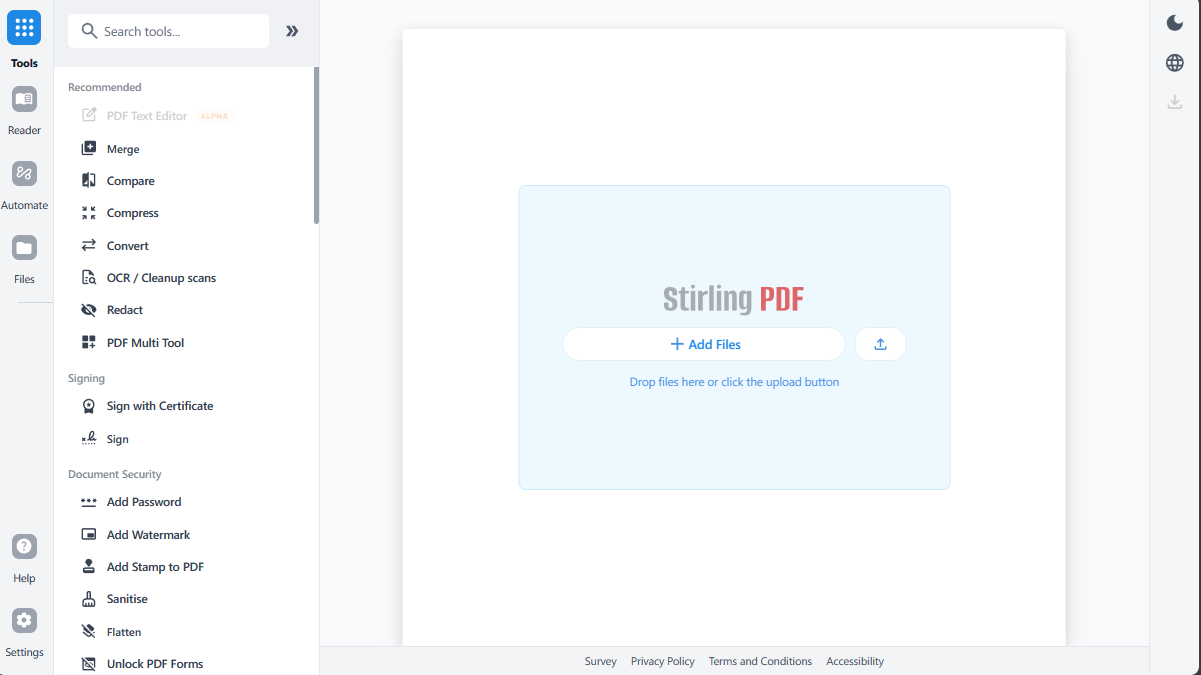 |
Screenshots captured from a live deployment. Replace with your own after deploying.
Prerequisites
One-Click Deploy
Click the button above and Railway will:
- Clone this repository
- Build the Docker container from the official
stirlingtools/stirling-pdfimage - Deploy with automatic HTTPS, health checks, and monitoring
- Assign a wildcard domain (e.g.,
stirling-pdf-production-xxxx.up.railway.app)
Environment Variables
Stirling-PDF is ready to go with zero configuration, but you can customise via these environment variables:
Security & Authentication
| Variable | Default | Description |
|---|---|---|
SECURITY_ENABLELOGIN | true | Enable or disable authentication |
SECURITY_INITIALLOGIN_USERNAME | admin | Custom initial admin username |
SECURITY_INITIALLOGIN_PASSWORD | stirling | Custom initial admin password (change on first login!) |
LOGIN_ATTEMPT_COUNT | 5 | Failed login attempts before account lockout |
LOGIN_RESET_TIME_MINUTES | 10 | Minutes before locked account auto-unlocks |
CSRF_DISABLED | false | Set true to disable CSRF (not recommended for production) |
System Configuration
| Variable | Default | Description |
|---|---|---|
PORT | 8080 | HTTP port (Railway sets this automatically) |
SYSTEM_DEFAULTLOCALE | en-US | Default language/locale (e.g., de-DE, fr-FR, ja-JP) |
TZ | UTC | Server timezone |
SYSTEM_GOOGLEVISIBILITY | false | Allow Google indexing via robots.txt |
UI_LOGOSTYLE | classic | Logo style: classic or modern |
Email (optional — for user invitations)
| Variable | Default | Description |
|---|---|---|
MAIL_ENABLED | false | Enable SMTP email for user invitations |
MAIL_HOST | — | SMTP server host |
MAIL_PORT | 587 | SMTP server port |
MAIL_USERNAME | — | SMTP username |
MAIL_PASSWORD | — | SMTP password |
MAIL_FROM | — | From address for invitation emails |
MAIL_ENABLEINVITES | false | Enable email-based user invitations |
Advanced Configuration
For full configuration options — OAuth 2.0, SAML SSO, external databases, LibreOffice settings, and more — see the Stirling PDF Configuration Guide.
Why Deploy Stirling PDF on Railway?
| Feature | Benefit |
|---|---|
| Zero dependencies | No database, Redis, or volumes needed — just deploy |
| Single container | No complex orchestration or multi-service setup |
| 50+ built-in tools | Replace dozens of separate PDF utilities with one app |
| REST API included | Automate PDF workflows in your existing pipeline |
| File processing is stateless | Files auto-deleted after processing — no cleanup needed |
| Multi-arch support | Runs on any Railway region and hardware |
With Railway, you get automatic HTTPS, global CDN, health monitoring, and scalable infrastructure — without managing servers.
Deploy and Host
About Hosting
Stirling PDF runs as a single Docker container with no external dependencies. It uses file-based storage by default (no database required), making it an ideal zero-dependency deployment for Railway.
The default admin credentials are:
- Username:
admin - Password:
stirling
You will be forced to change the password on first login when authentication is enabled.
Health Endpoint
Railway uses the following endpoint for health checks:
- URL:
/api/v1/info/status - Timeout: 30 seconds
- Start period: 30 seconds (gives Java time to boot)
Common Use Cases
- Personal PDF toolkit — Replace Acrobat with a self-hosted, private alternative
- Team document processing — Share PDF tools across a team without per-seat licenses
- API-driven automation — Integrate PDF conversion, OCR, and signing into CI/CD pipelines
- Document signing workflows — Self-hosted signing without third-party services
Dependencies for Stirling PDF
Deployment Dependencies
- Runtime: Java 17+ (bundled in container)
- Storage: File-based (default) — no database required
- Optional: PostgreSQL or MySQL for external database mode (not needed for basic usage)
Local Development
# Clone this template
git clone https://github.com/INAPP-Mobile/railway-stirling-pdf.git
cd railway-stirling-pdf

# Run with Docker (standalone)
docker run -d -p 8080:8080 stirlingtools/stirling-pdf:latest

# Open http://localhost:8080
License
Stirling PDF is open-core. The core PDF tools are MIT-licensed, with paid enterprise features available. See the LICENSE for details.
Template License: MIT — feel free to fork and adapt.
Resources
Template Content
stirling-pdf
INAPP-Mobile/railway-stirling-pdf

