
Deploy Apache Superset | Open Source Tableau Alternative
Self-host Apache Superset — open-source BI and data visualization
Superset
Superset
Just deployed
Superset-Worker
Just deployed
Superset-Beat
Just deployed
DBs

Redis
Just deployed
/data

Just deployed
/var/lib/postgresql/data

Deploy and Host Apache Superset on Railway

Apache Superset is a modern, open-source data exploration and visualization platform — think Tableau or Looker, but free and self-hostable. It lets analysts and engineers query any SQL-speaking database, build rich interactive dashboards, and schedule alerts and reports without handing data to a SaaS vendor.
Deploy Apache Superset on Railway with a pre-wired PostgreSQL metadata database, a Redis cache and Celery broker, and dedicated worker and beat services. Self-host Superset in minutes, keep full control of your BI stack, and pay only for the compute you use.
Getting Started with Apache Superset on Railway
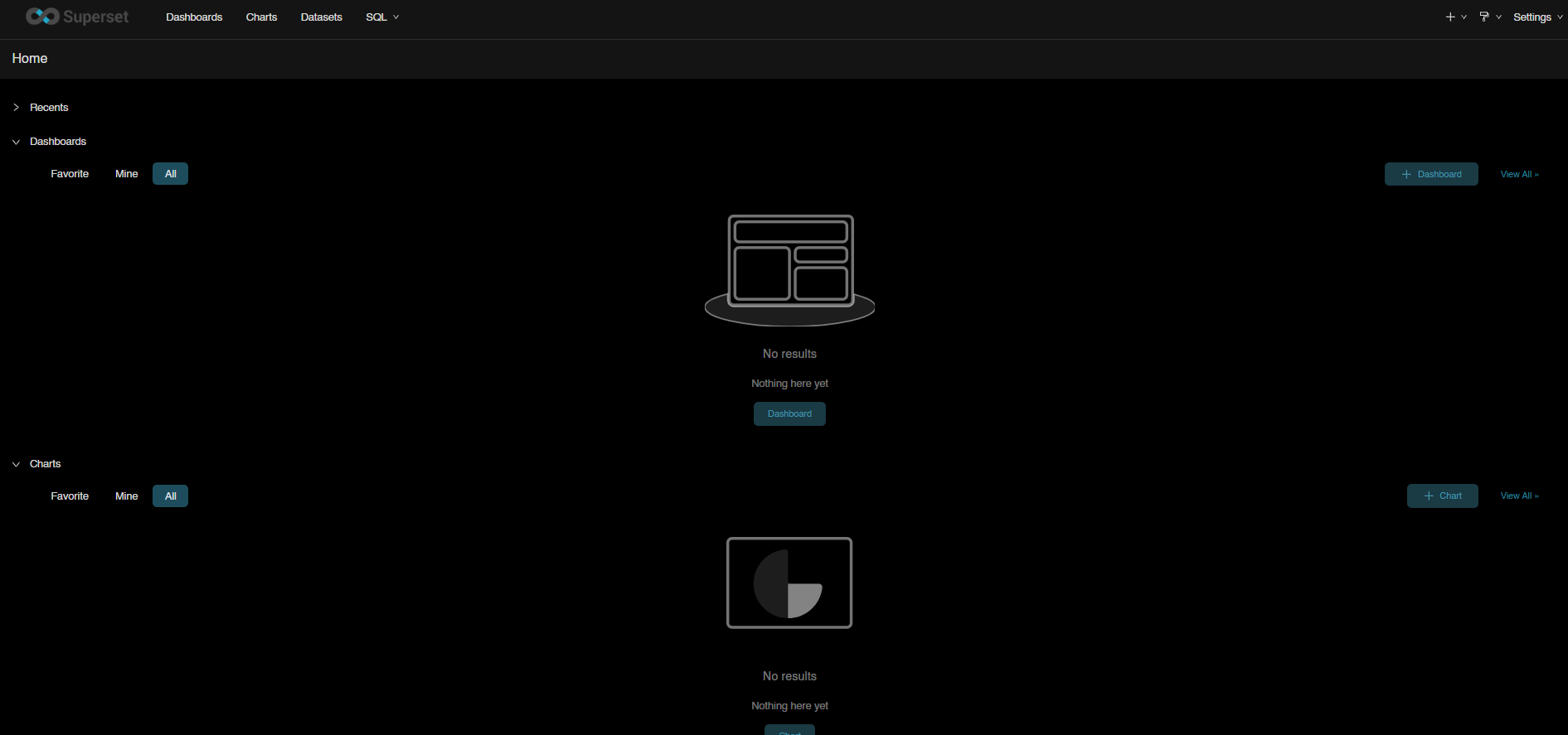
Once the deployment is live, open the generated Railway domain in your browser — you'll land on the Superset login page. Sign in with the admin user admin and the ADMIN_PASSWORD value you set in the environment variables (change this immediately by going to Settings → List Users). Add your first database connection under Settings → Database Connections, import a dataset, and build a chart — your first dashboard is typically live in under ten minutes. The Celery worker and beat services are already running, so scheduled alerts and reports work out of the box.
About Hosting Apache Superset
Apache Superset (v6.0.1) is a web application built on Flask, React, and SQLAlchemy. It ships its own query engine (SQL Lab), a drag-and-drop chart builder with 50+ visualization types, a dashboard layout engine with cross-filters and drill-down, and a role-based access control system.
Key capabilities:
- SQL Lab — interactive SQL IDE with query history, scheduled queries, and async execution via Celery
- 50+ visualizations — time series, geospatial (Deck.gl), pivot tables, heatmaps, Sankey, and more
- Alerts & scheduled reports — CRON-driven email/Slack delivery of dashboards and anomaly alerts
- Semantic layer — virtual datasets, calculated columns, metrics with Jinja templating
- Dashboard RBAC — row-level security, per-dashboard roles, embedded SDK
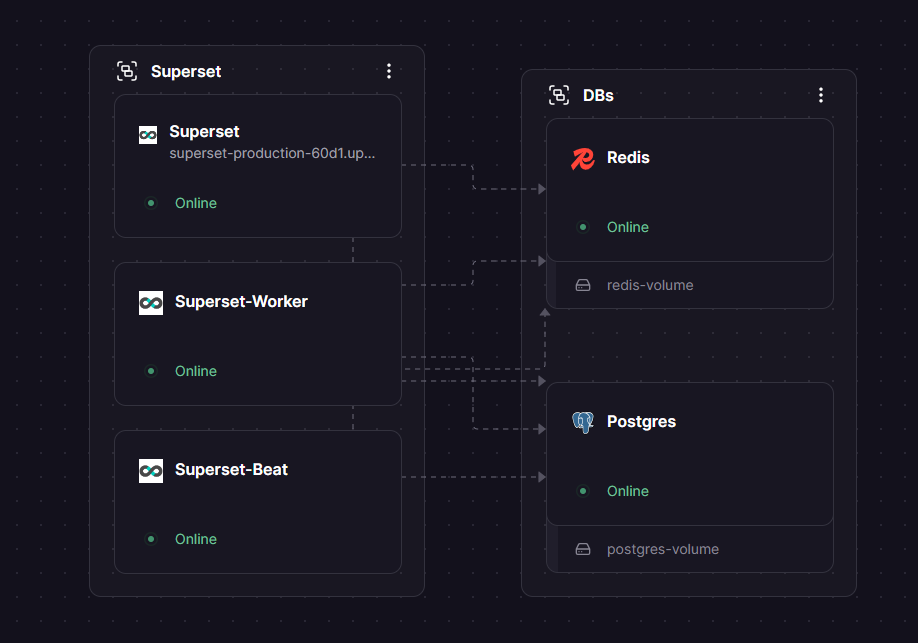
Architecture on Railway uses five services: the Superset gunicorn web app, a Celery worker for async SQL queries and report generation, a Celery beat scheduler for cron jobs, a PostgreSQL metadata database, and a Redis instance for caching and the Celery broker.
Why Deploy Apache Superset on Railway
Railway removes the operational overhead of running a multi-service BI platform:
- Private networking between Superset, Postgres, and Redis — no exposed DB credentials
- One-click TLS domain with the target port already wired to gunicorn on 8088
- Managed PostgreSQL and Redis with daily backups and TCP proxy access
- Per-service logs, metrics, and rolling deploys — redeploy the web without restarting workers
- Usage-based pricing — spin down non-prod environments when idle
Common Use Cases
- Internal analytics hub — a single Superset instance serves dashboards across product, growth, and finance teams
- Embedded analytics — use the
EMBEDDED_SUPERSETfeature flag to embed dashboards inside your own SaaS product - Data warehouse exploration — connect Superset to Snowflake, BigQuery, ClickHouse, or Postgres and let non-engineers write SQL safely
- Scheduled alerts and reports — Celery beat delivers CSV or PNG reports to email or Slack on a CRON schedule
Dependencies for Apache Superset
- Superset (web) —
apache/superset:latest - Superset-Worker —
apache/superset:latest, runscelery worker - Superset-Beat —
apache/superset:latest, runscelery beat - Postgres — Railway-managed PostgreSQL 17 (metadata database)
- Redis — Railway-managed Redis (cache + Celery broker + result backend)
Environment Variables Reference
| Variable | Purpose |
|---|---|
DATABASE_URL | PostgreSQL connection string for Superset metadata |
REDIS_URL | Redis connection string (split into DBs 0–3 for broker, results, cache) |
SUPERSET_SECRET_KEY | Session cookie + CSRF signing key — must be stable across restarts |
ADMIN_PASSWORD | First-boot admin password (bootstrap only) |
SUPERSET_LOAD_EXAMPLES | no for production; yes loads sample dashboards |
SUPERSET_CONFIG_B64 | Base64-encoded superset_config.py decoded at startup |
RAILWAY_RUN_UID | Set to 0 — image needs root to write config on /app/pythonpath |
DATABASE_DIALECT | postgresql — triggers auto-install of psycopg2-binary |
Deployment Dependencies
- Docker image: apache/superset on Docker Hub
- Source: github.com/apache/superset
- Docs: superset.apache.org
- Python runtime: 3.10 (bundled in image)
Hardware Requirements for Self-Hosting Apache Superset
| Resource | Minimum | Recommended |
|---|---|---|
| CPU | 1 vCPU (web) + 0.5 vCPU each (worker, beat) | 2 vCPU (web) + 1 vCPU each (worker, beat) |
| RAM | 1 GB (web) + 512 MB each (worker, beat) | 2 GB (web) + 1 GB each (worker, beat) |
| Storage | 1 GB (ephemeral — metadata lives in Postgres) | 1 GB |
| Runtime | Python 3.10 (in image) | Python 3.10 |
Superset's gunicorn web process uses ~500 MB idle and grows with concurrent dashboard renders. Celery workers spike during report generation — give them at least 1 GB for PDF/screenshot rendering if you enable PLAYWRIGHT_REPORTS_AND_THUMBNAILS.
Self-Hosting Apache Superset on Railway
The official apache/superset image does not ship with superset_config.py (it's mounted from ./docker/ in docker-compose). The Railway template generates it at startup by base64-decoding SUPERSET_CONFIG_B64 into /app/pythonpath/superset_config.py, then running the official init and bootstrap scripts:
# startCommand for the web service
/bin/sh -c 'mkdir -p /app/pythonpath && \
  echo "$SUPERSET_CONFIG_B64" | base64 -d > /app/pythonpath/superset_config.py && \
  /app/docker/docker-init.sh && \
  /app/docker/docker-bootstrap.sh app-gunicorn'
The worker and beat services follow the same pattern but replace docker-init.sh && docker-bootstrap.sh app-gunicorn with docker-bootstrap.sh worker and docker-bootstrap.sh beat respectively.
To run locally with the same architecture using Docker Compose:
git clone https://github.com/apache/superset.git
cd superset
docker compose -f docker-compose-image-tag.yml up
How Much Does Apache Superset Cost to Self-Host?
Apache Superset is 100% free and open-source, licensed under Apache 2.0 — there are no paid tiers, usage limits, or license fees for self-hosting. The only costs are the compute and bandwidth used by your deployment. On Railway, a small Superset stack (web + worker + beat + Postgres + Redis) typically runs for $10–$25 per month on hobby plans, scaling up with data volume and concurrent users.
FAQ
What is Apache Superset? Apache Superset is an open-source business intelligence and data visualization platform originally built at Airbnb. It provides a SQL IDE, chart builder, and dashboard layout engine, and it speaks to 40+ databases via SQLAlchemy.
What does this Railway template deploy? Five services: the Superset gunicorn web app on port 8088, a Celery worker for async tasks, a Celery beat scheduler for CRON jobs, a Railway-managed PostgreSQL metadata database, and a Railway-managed Redis used as both cache and Celery broker.
Why does the Apache Superset Railway template include Redis and Postgres? Superset requires a metadata database (Postgres) to store users, dashboards, charts, and alert schedules. Redis is used for the Flask cache, for Celery's broker and result backend, and for SQL Lab query result caching — without it, async SQL Lab queries and scheduled reports do not work.
How do I log in to self-hosted Apache Superset for the first time?
Sign in with username admin and the ADMIN_PASSWORD you set in the template's environment variables. ADMIN_PASSWORD is only read during the first database bootstrap — rotate it immediately through the Superset UI under Settings → List Users.
Can I connect Apache Superset to Snowflake, BigQuery, or ClickHouse on Railway? Yes. Superset ships with SQLAlchemy drivers for 40+ databases out of the box. Add a new database connection under Settings → Database Connections, paste the SQLAlchemy URI, and test — no Railway config changes needed.
How do I enable scheduled email and Slack reports in self-hosted Apache Superset?
The template already enables the ALERT_REPORTS feature flag and runs the Celery worker and beat. You just need to configure SMTP_HOST, SMTP_USER, SMTP_PASSWORD, and SMTP_MAIL_FROM in the web, worker, and beat services, then redeploy.
Can I load Apache Superset's example dashboards on first boot?
Yes — change SUPERSET_LOAD_EXAMPLES from no to yes and redeploy the web service. Examples take 1–2 minutes to import on first boot and include the World Bank, Covid, and FCC 2018 survey datasets.
Template Content
Redis
redis:8.2.1Superset
apache/superset:latestSuperset-Worker
apache/superset:latestSuperset-Beat
apache/superset:latest