
Deploy SuperTokens
Authentication server for user accounts, logins and sessions

Just deployed
/var/lib/postgresql/data
supertokens
Just deployed
dashboard
Just deployed
Deploy and Host SuperTokens on Railway
Deploy SuperTokens to run your own authentication server instead of renting one. It is an open-source auth core covering email/password and passwordless sign-in, social and enterprise login, sessions with rotating refresh tokens, MFA, roles and multi-tenancy. Your backend keeps its own database and calls the core over HTTP through a first-party SDK, so users, credentials and sessions live on infrastructure you control rather than in an Auth0 or Cognito tenant. Teams self-host SuperTokens when per-monthly-active-user pricing stops making sense, or when data residency rules out a hosted tenant.
This template is a complete self-host SuperTokens setup in one deploy. Three services come up together: supertokens is the core, on port 3567 with an API key already generated; Postgres is the managed database holding every user, session, role and tenant; and dashboard runs SuperTokens' own user management UI, normally available only to teams who wire the SDK into an app themselves. The dashboard reaches the core privately, the core reaches Postgres privately, and both public URLs are HTTPS from the first request.
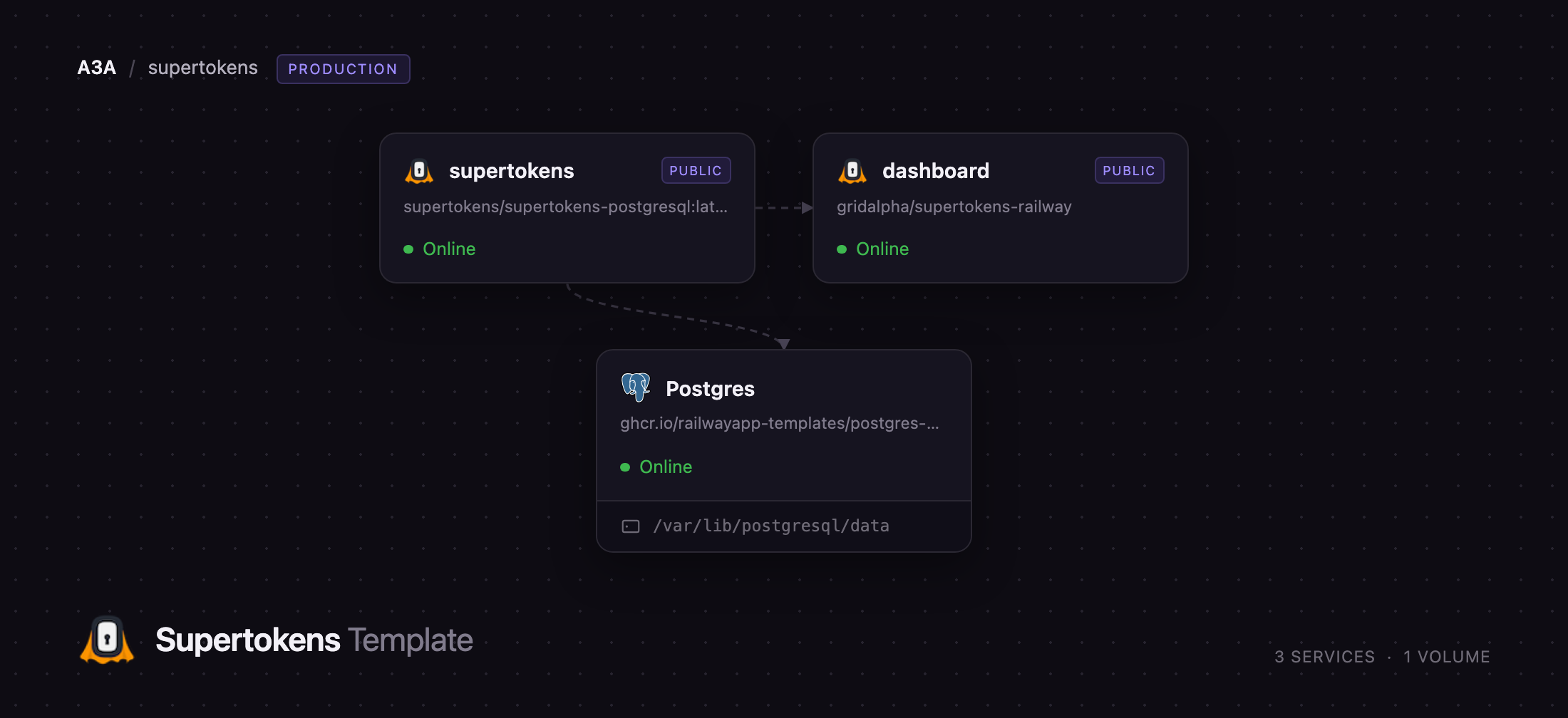
Getting Started with SuperTokens on Railway
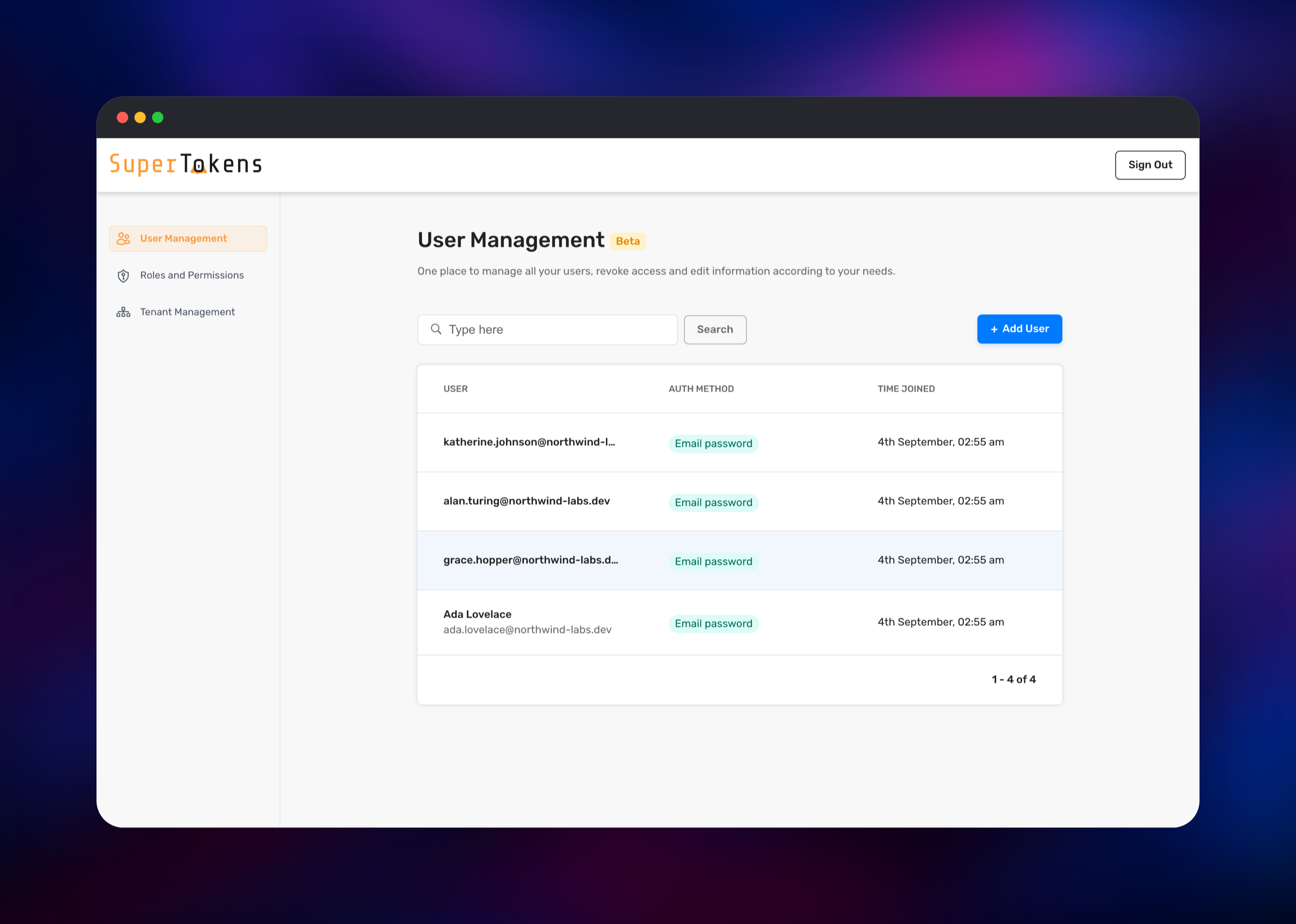
Open the dashboard service's URL and you land on the user management sign-in screen. The first dashboard user is created from DASHBOARD_ADMIN_EMAIL and DASHBOARD_ADMIN_PASSWORD; if you left the password at its generated default, copy it out of the service variables. There are no shipped default credentials and no open registration on either public URL.
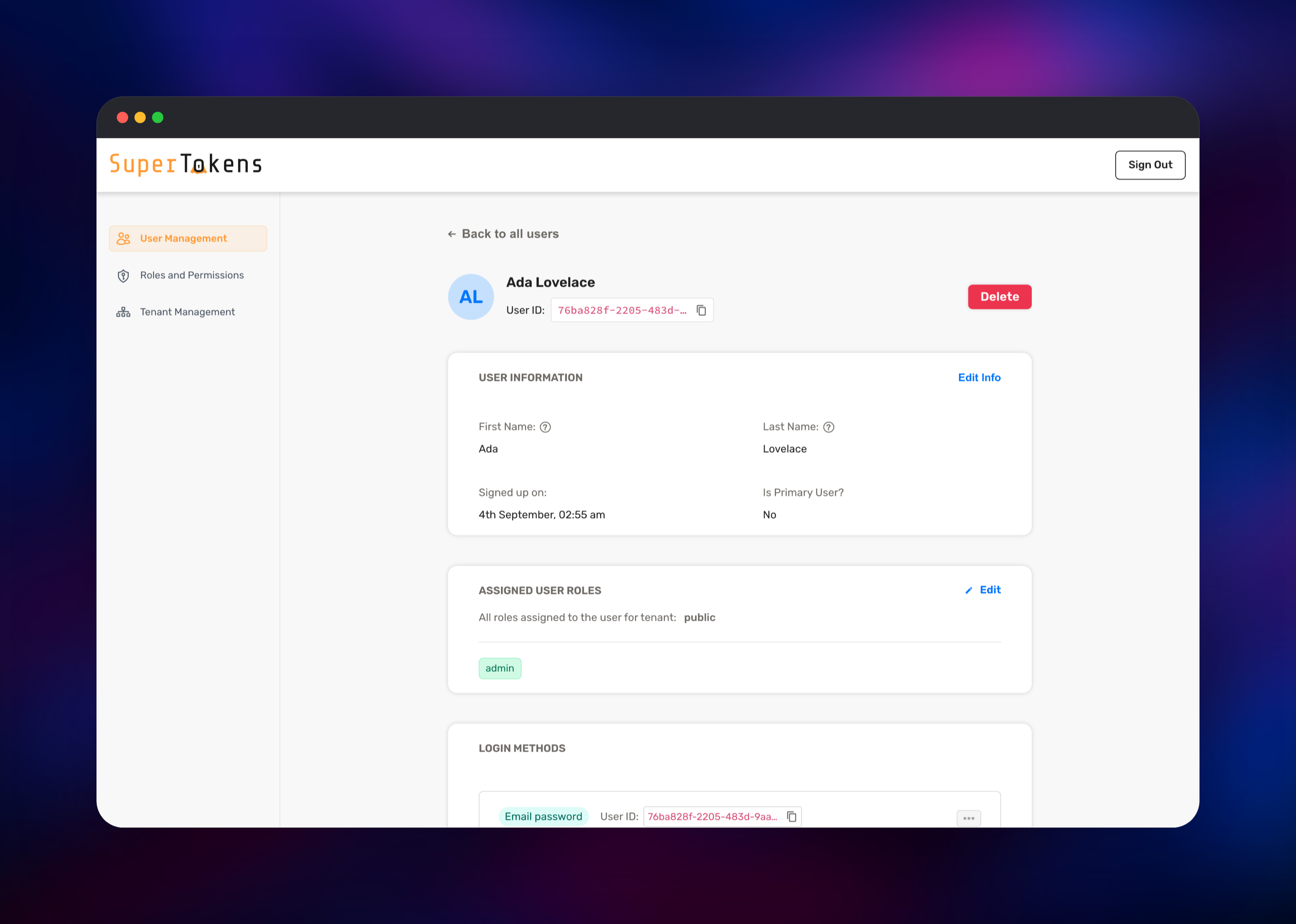
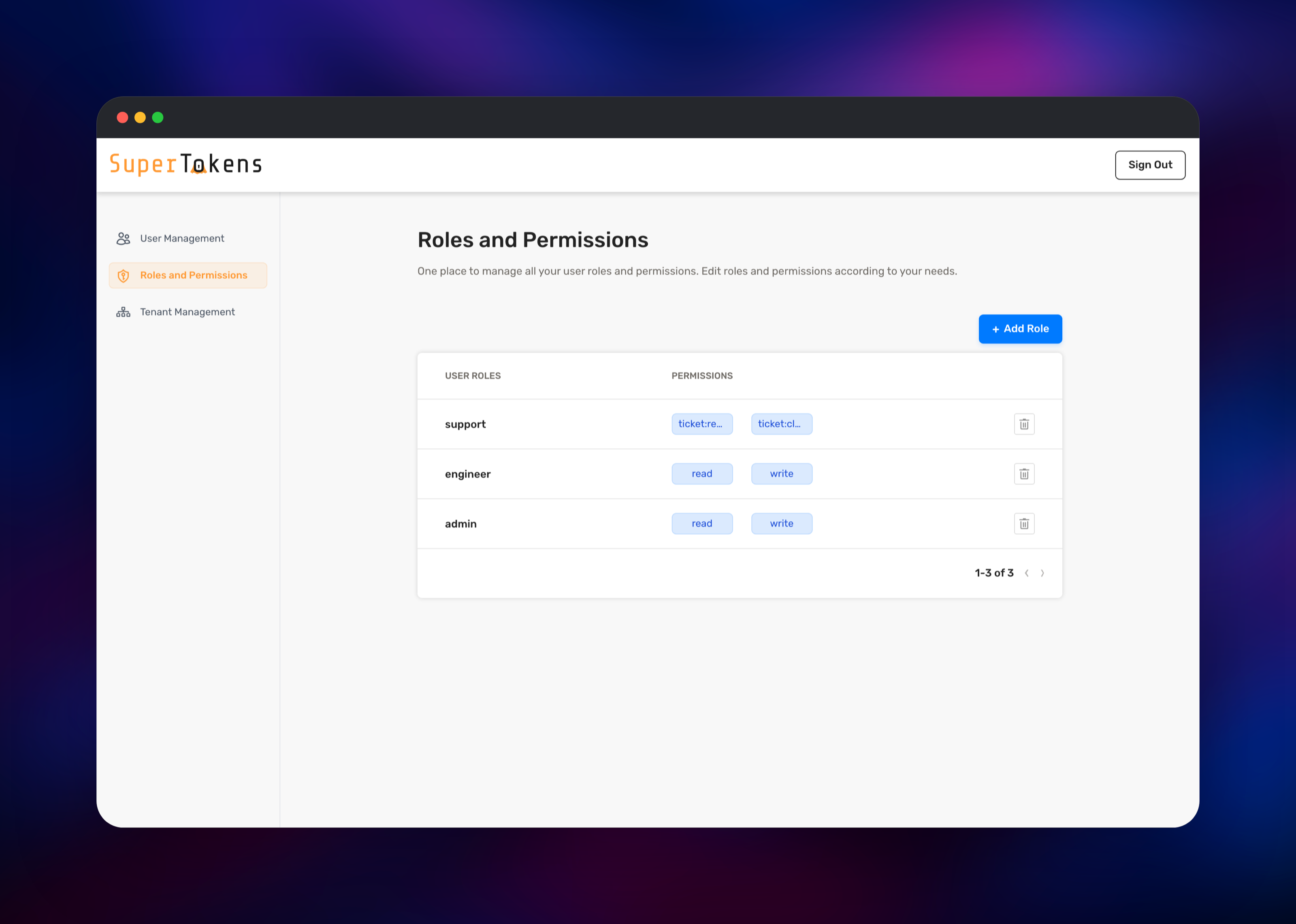
Inside, use Add User to create your first account, then open it to see login methods, metadata, roles and live sessions. Roles and Permissions is where you create a role such as admin and attach permissions to it; Tenant Management covers multi-tenant setups. To check the core itself, open the supertokens URL and add /hello — a plain Hello means the server is up and its database connection works.
Then point your application at it: pass the supertokens public URL as connectionURI and the API_KEYS value as apiKey to supertokens.init(), and every user your app creates shows up in this dashboard.
About Hosting SuperTokens
SuperTokens splits authentication into three pieces: a stateless core, a backend SDK you import into your API, and an optional frontend SDK that renders pre-built login UI. Only the core needs hosting; it owns its Postgres schema and migrates it forward on boot.
Key features:
- Email/password, passwordless (magic link or OTP), social login and enterprise SSO
- Sessions with rotating refresh tokens and token-theft detection
- Multi-factor auth including TOTP, and account linking across login methods
- Roles and permissions, user metadata, and multi-tenancy with per-tenant config
- Pre-built React/Vue/Angular login UI, or headless APIs; SDKs for Node, Python, Go, PHP and Java
The supertokens service answers a JSON API and nothing else — no HTML, no admin screens. Postgres is the only stateful component. dashboard exists because SuperTokens ships its admin UI as a module of the backend SDK, so a self-hosted core has no browser surface until a backend mounts it. This one does that and nothing more: every public end-user route on it is off.
Why Deploy SuperTokens on Railway
Railway removes the infrastructure work between you and a working auth server.
- Managed Postgres provisioned, connected and backed up automatically
- HTTPS URLs for both services, no certificate setup
- Private networking, so only what you choose is public
- Health checks and automatic restarts on both services
- Vertical and horizontal scaling as traffic grows
- Usage-based pricing, no per-monthly-active-user charge
Common Use Cases for Self-Hosted SuperTokens
- Replacing a paid identity provider when MAU-based billing outgrows its value
- Running auth where user data cannot leave your infrastructure
- Adding sessions, roles and MFA to a SaaS product without writing token rotation or hashing
- A multi-tenant B2B app where each customer gets its own tenant, login methods and SSO config
Dependencies for SuperTokens
supertokens/supertokens-postgresql:latest— the core, from supertokens/supertokens-coreghcr.io/railwayapp-templates/postgres-ssl:18— the managed database- gridalpha/supertokens-railway — the Node service serving the dashboard
Postgres is required: the core stores users, password hashes, sessions, roles, metadata and tenants there and holds nothing between restarts. PostgreSQL 13 or newer is supported. The dashboard needs the core's API key, wired as a reference so the two cannot drift apart.
Environment Variables Reference
| Variable | Service | Purpose |
|---|---|---|
POSTGRESQL_CONNECTION_URI | supertokens | Postgres connection string |
API_KEYS | supertokens | Comma-separated keys; every route but /hello requires one |
ACCESS_TOKEN_VALIDITY | supertokens | Access token lifetime in seconds |
PASSWORD_HASHING_ALG | supertokens | BCRYPT or ARGON2 |
DISABLE_TELEMETRY | supertokens | Turns off anonymous usage reporting |
DASHBOARD_ADMIN_EMAIL | dashboard | First dashboard user, created at boot |
DASHBOARD_ADMIN_PASSWORD | dashboard | Password for that user |
SUPERTOKENS_CONNECTION_URI | dashboard | Private address of the core |
Deployment Dependencies
Hardware Requirements for Self-Hosting SuperTokens
| Resource | Minimum | Recommended |
|---|---|---|
| CPU | 1 vCPU | 2 vCPU |
| RAM | 512 MB core + 512 MB Postgres | 1 GB core + 1 GB Postgres |
| Storage | 1 GB for Postgres | 5 GB or more |
| Runtime | JVM, in the image | JVM, in the image |
The core is comfortable in a few hundred megabytes because it keeps no user data in memory. Argon2 hashing is the exception — it is deliberately memory-hungry, so raise RAM before moving PASSWORD_HASHING_ALG off bcrypt.
Self-Hosting SuperTokens with Docker
The core is one container plus a database. To run it against an existing PostgreSQL:
docker run -p 3567:3567 \
  -e POSTGRESQL_CONNECTION_URI="postgresql://user:pass@db-host:5432/supertokens" \
  -e API_KEYS="a-long-random-key-of-at-least-20-characters" \
  -d supertokens/supertokens-postgresql:latest
Then check it the way the deployed service does:
curl http://localhost:3567/hello
curl -H "api-key: a-long-random-key-of-at-least-20-characters" \
  http://localhost:3567/users/count
MySQL and MongoDB builds exist if Postgres is not your database. Never expose a core with no API_KEYS set — without it every management route is open.
How Much Does SuperTokens Cost to Self-Host?
SuperTokens is open source under Apache 2.0 and self-hosting is free for unlimited users, with no monthly-active-user charge. A few advanced features — the OAuth2/OIDC provider, SAML and some enterprise MFA options — need a licence key even when self-hosted; everything in this template works without one. On Railway you pay only for the compute and storage the services use.
FAQ
What is SuperTokens?
An open-source authentication service. You run the core, import a backend SDK into your API, and get sign-in, sessions, MFA, roles and multi-tenancy without handing user data to a third party.
What does this Railway template deploy?
The SuperTokens core on port 3567 with an API key already generated, a managed PostgreSQL database, and a Node service serving SuperTokens' user management dashboard.
Why does the template include a PostgreSQL database?
The core is stateless by design: every user, password hash, session, role and tenant lives in Postgres, so without a database it has nowhere to keep anything.
Is it safe to give the SuperTokens core a public URL?
Yes, provided API_KEYS is set, which this template does. Only /hello and /.well-known/jwks.json answer anonymously; everything else returns 401 Invalid API key. If your app also runs on Railway, point it at the private address and remove the public domain.
How do I connect my application to the deployed SuperTokens core?
Install the backend SDK for your language and pass the core's public URL as connectionURI and the API_KEYS value as apiKey inside supertokens.init(). Set apiDomain and websiteDomain to your own app's URLs, not this deployment's.
Can I run more than one core instance?
Yes — the core is stateless and several instances can share one database behind a load balancer. Let the first deployment finish creating the schema before raising the replica count, so two containers do not run the initial migration at once.
How do I add a second dashboard user to self-hosted SuperTokens?
Call the core's /recipe/dashboard/user endpoint with your API key. Changing DASHBOARD_ADMIN_PASSWORD after the first boot does not reset the existing account — change that password inside the dashboard.
Template Content

