
Deploy Teable
No-code database with a spreadsheet interface and REST API

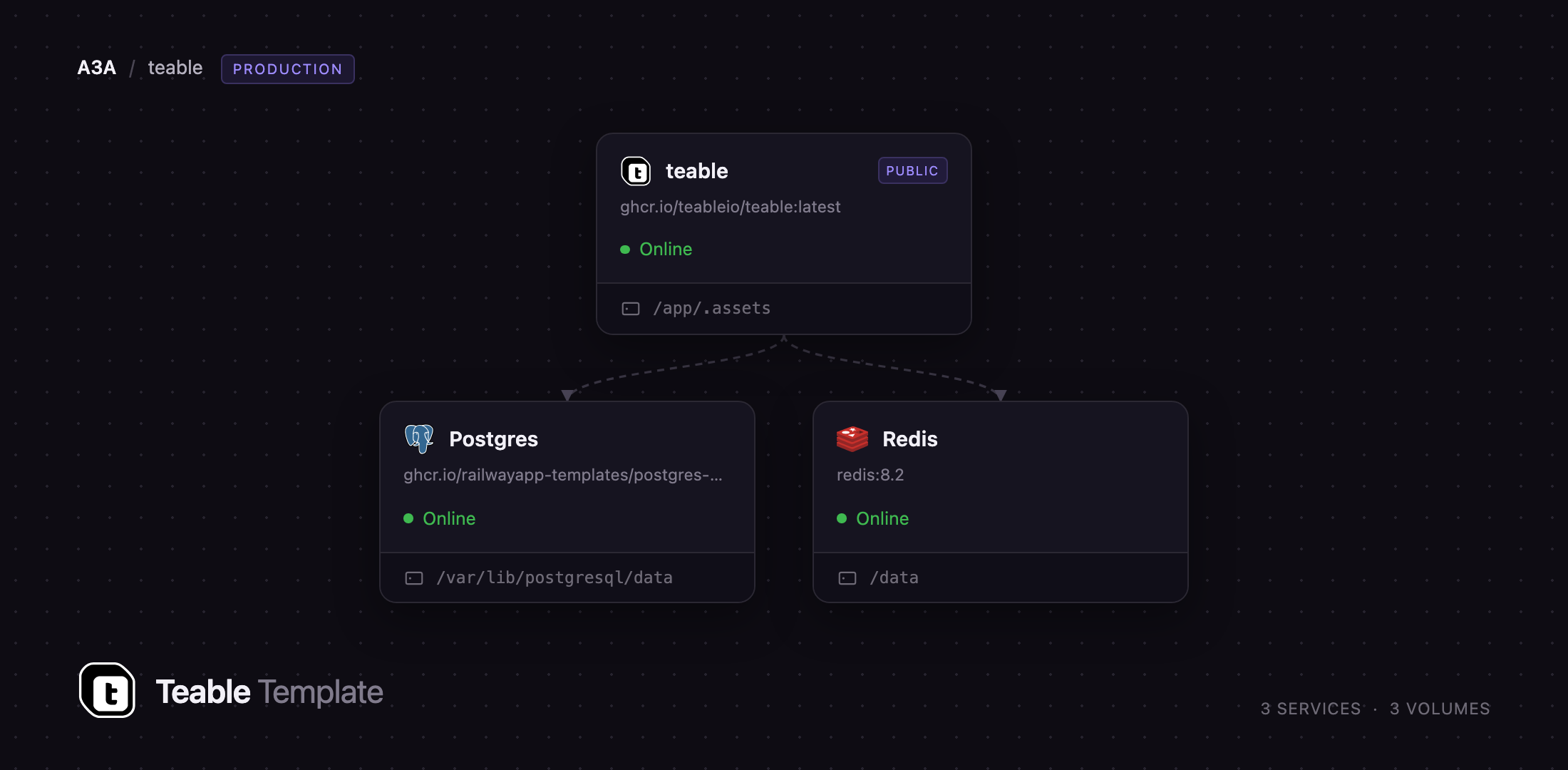
Redis
Just deployed
/data

Just deployed
/var/lib/postgresql/data
teable
Just deployed
/app/.assets

Deploy and Host Teable on Railway
Teable is an open-source no-code database that looks like a spreadsheet and behaves like a real relational database. Every table is stored in PostgreSQL and exposed as a REST API, so a team captures structured data in a familiar grid while developers query the same rows programmatically. Teams reach for it when Airtable's row caps, per-seat pricing, or data-residency rules stop working.
Deploy Teable on Railway and everything is wired together already: the application, a managed PostgreSQL database holding both metadata and your table data, a managed Redis instance backing the cache and realtime layer, and a volume for attachments. You can self-host Teable without writing a compose file, and it ships with a public HTTPS URL and generated secrets rather than the image's placeholder keys.
Getting Started with Teable on Railway
Open the deployed URL once the teable service is green. There are no default credentials — Teable sends you to /auth/signup, and the first account that registers becomes the instance administrator. Register immediately after deploying, before sharing the URL.
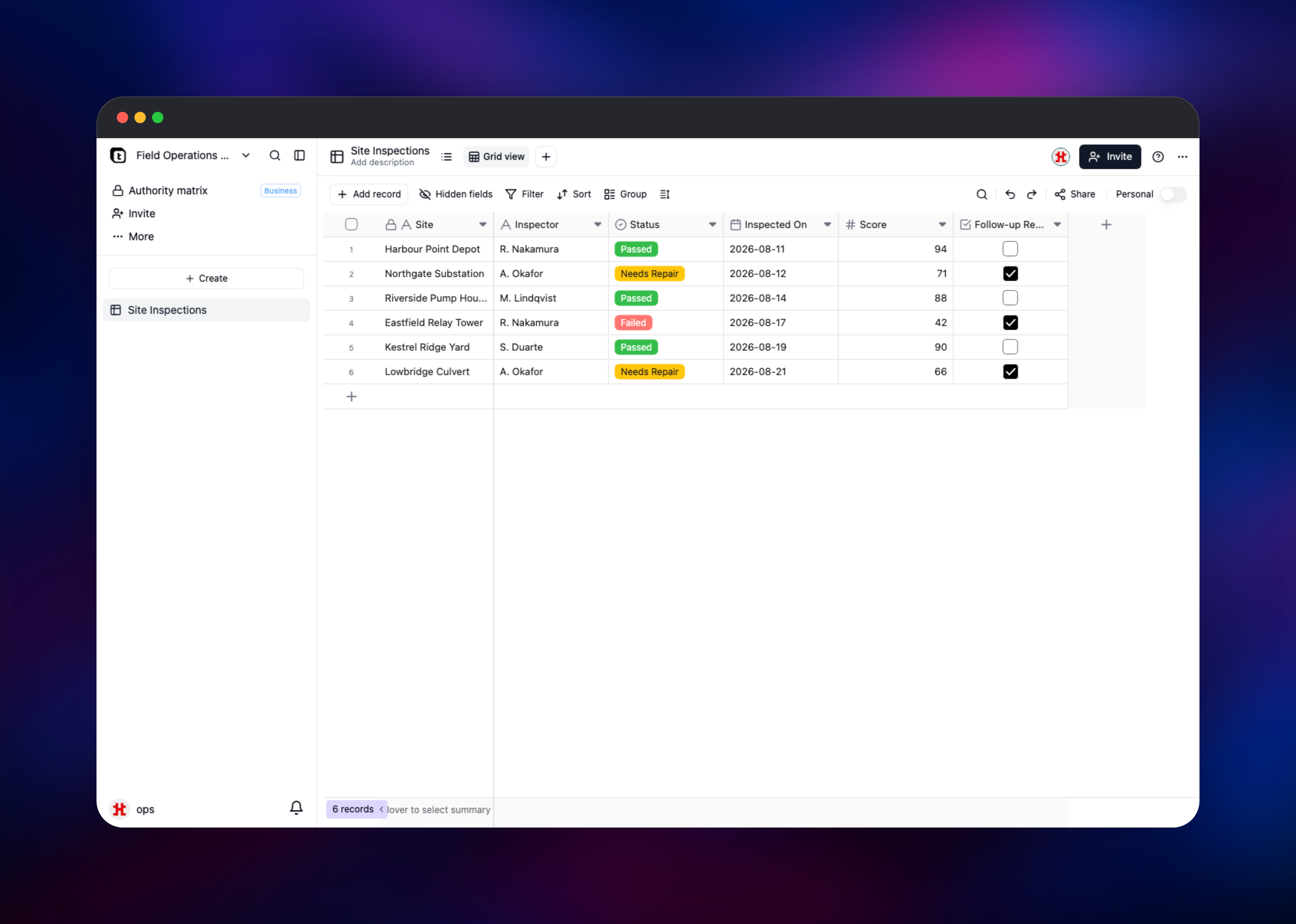
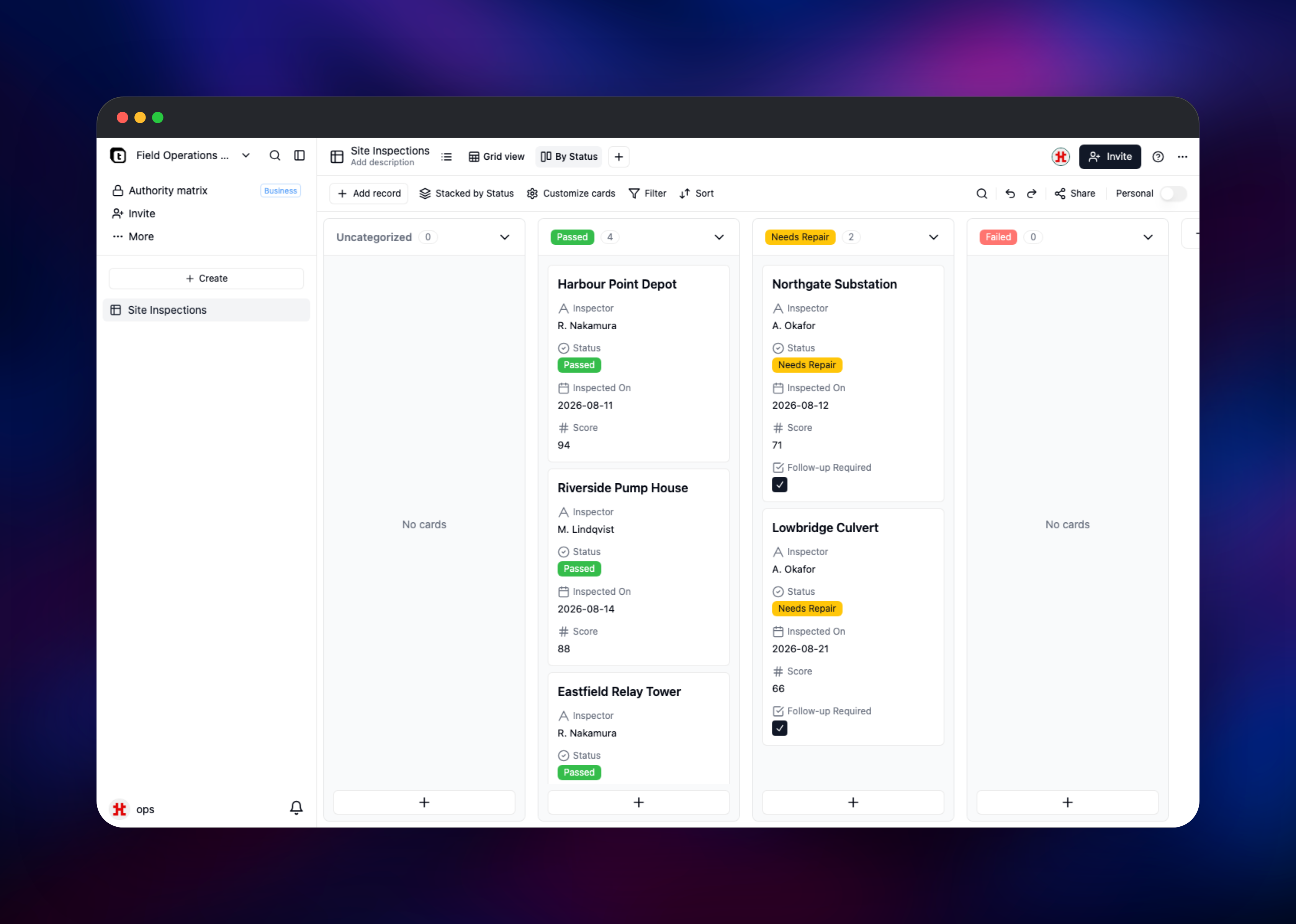
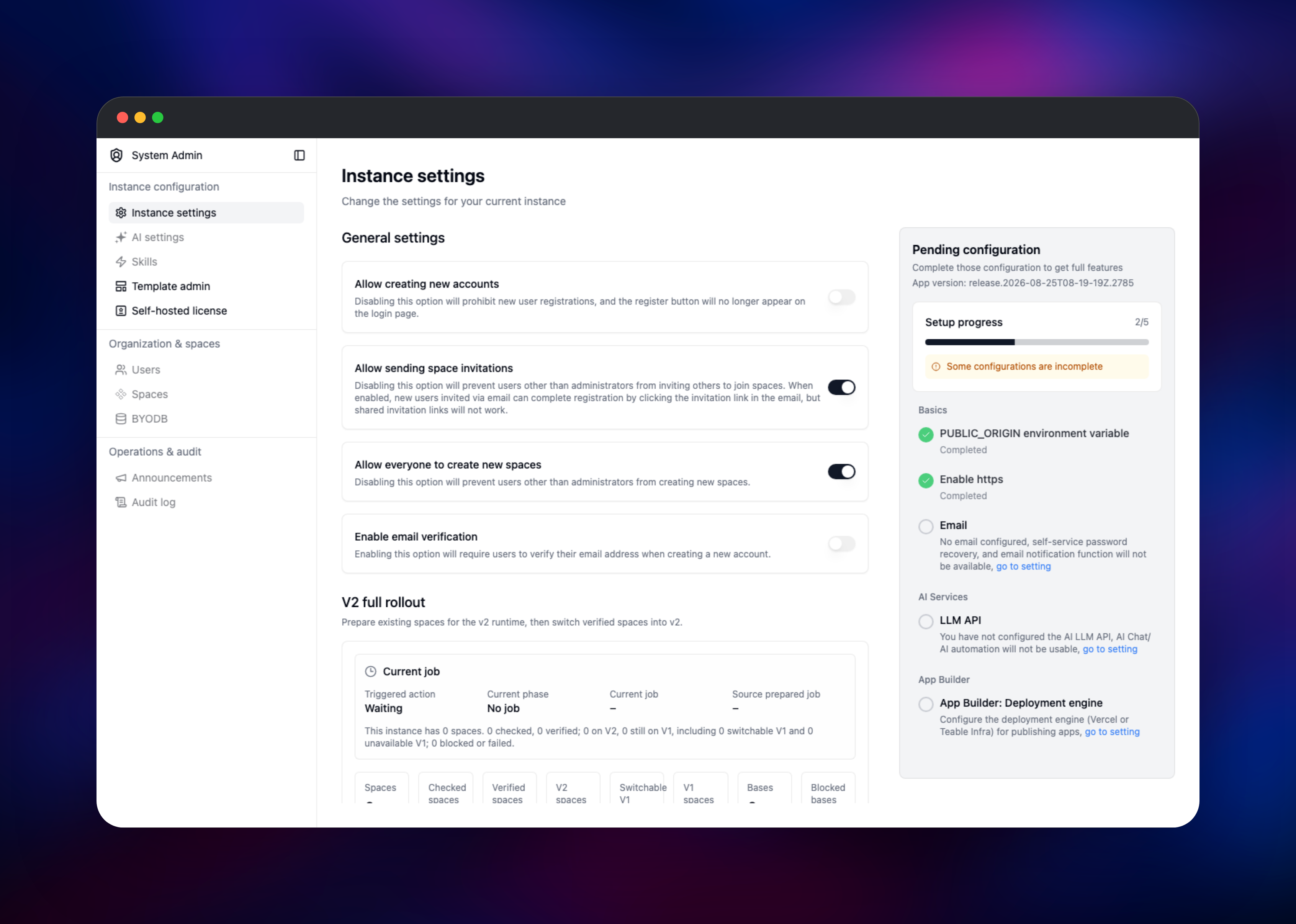
Close public registration next: open System Admin → Instance settings and turn off Allow creating new accounts, after which people join only by invitation. Then create a space and a base inside it, and Teable generates a starter table to rename and add fields to. Adding a few fields and records confirms the deployment works end to end, since every edit is written to PostgreSQL and broadcast over Redis to other tabs. Switching the view from Grid to Kanban checks realtime collaboration, and dropping a file onto an attachment field confirms the volume is writable.
About Hosting Teable
Teable stores your tables as real PostgreSQL tables rather than opaque blobs, so you can point BI tools or your own SQL at the same data the grid edits. Self-hosting suits row volumes that get expensive on a hosted plan, or data that cannot leave your infrastructure.
- Spreadsheet grid with formulas, links between tables, rollups and lookups
- Grid, Kanban, calendar and form views over the same records
- Generated REST API for every table, plus API tokens
- Realtime collaboration with undo/redo and role-based access control
- File attachments, plus CSV and Airtable imports
The teable container serves the web UI and API on port 3000 and is the only service with a public domain. PostgreSQL holds instance metadata and the user-created tables. Redis backs the cache and the pub/sub channel pushing live updates between clients — the app will not start without it. Attachments live on a volume at /app/.assets, served through the app with signed URLs.
Why Deploy Teable on Railway
One deploy replaces a compose file, a proxy and a secrets pass.
- Managed PostgreSQL and Redis provisioned and connected for you
- Private networking between services, with only the app exposed
- Persistent volume for attachments, already mounted
- Automatic HTTPS and a public domain on first deploy
- Generated secrets instead of the image's defaults
Common Use Cases
- Internal operations trackers — inspections, inventory or asset registers that outgrew a spreadsheet
- A backend for a small product — model data in the grid and consume the REST API from a frontend
- Airtable replacement at scale — teams hitting per-record limits or per-seat costs who want the same interface on their own infrastructure
- Structured content management — editorial calendars and catalogues served through the API
Dependencies for Teable
- Teable —
ghcr.io/teableio/teable:latest(teableio/teable) - PostgreSQL — Railway managed; instance metadata and all user table data
- Redis — Railway managed; cache plus the pub/sub channel for realtime collaboration
Environment Variables Reference
| Variable | Description | Required |
|---|---|---|
PUBLIC_ORIGIN | Public base URL of the instance; used to build links | Yes |
PRISMA_DATABASE_URL | PostgreSQL connection string | Yes |
BACKEND_CACHE_PROVIDER | Cache backend; set to redis | Yes |
BACKEND_CACHE_REDIS_URI | Redis connection string | Yes |
SECRET_KEY | Signs JWTs and sessions; replaces a shipped default | Yes |
BACKEND_ACCESS_TOKEN_ENCRYPTION_KEY / _IV | AES-128-CBC pair for API tokens, 16 chars each | Yes |
BACKEND_STORAGE_ENCRYPTION_KEY / _IV | AES-128-CBC pair for attachment URLs, 16 chars each | Yes |
BACKEND_STORAGE_PROVIDER | local for the volume, or s3/minio for object storage | No |
BACKEND_TRUST_PROXY | Set true so client IPs come from X-Forwarded-For | No |
BACKEND_MAIL_HOST | SMTP host; enables invitations and password reset | No |
Both encryption pairs must be exactly 16 characters, since Teable uses them as AES-128-CBC keys. A wrong length does not fail at startup — it surfaces the first time a token is minted or a file uploaded.
Deployment Dependencies
- Source repository: github.com/teableio/teable
- Container image:
ghcr.io/teableio/teable:latest, docs at help.teable.io - Runtime: Node.js 22 (bundled); PostgreSQL 15 or newer
Server Requirements to Self-Host Teable
| Resource | Minimum | Recommended |
|---|---|---|
| CPU | 1 vCPU | 2 vCPU |
| RAM | 2 GB | 4 GB |
| Storage | 5 GB volume | 20 GB+ |
| Database | PostgreSQL 15+ | PostgreSQL 16+ |
Memory use tracks the size of the tables held in cache, not the user count. Attachments grow the volume, so size storage from expected uploads.
How to Self-Host Teable Outside Railway
The image needs PostgreSQL and Redis reachable. A minimal docker-compose.yml:
services:
  teable:
    image: ghcr.io/teableio/teable:latest
    ports:
      - '3000:3000'
    volumes:
      - teable-data:/app/.assets
    environment:
      - PUBLIC_ORIGIN=http://localhost:3000
      - PRISMA_DATABASE_URL=postgresql://teable:pw@db:5432/teable
      - BACKEND_CACHE_PROVIDER=redis
      - BACKEND_CACHE_REDIS_URI=redis://default:pw@cache:6379/0
      - SECRET_KEY=replace-with-a-long-random-string
    depends_on: [db, cache]

  db:
    image: postgres:16
    environment:
      - POSTGRES_DB=teable
      - POSTGRES_USER=teable
      - POSTGRES_PASSWORD=pw
    volumes:
      - teable-db:/var/lib/postgresql/data

  cache:
    image: redis:7
    command: redis-server --requirepass pw
volumes:
  teable-data:
  teable-db:
Bring it up and apply migrations, which the entrypoint runs automatically on start:
docker compose up -d
docker compose logs -f teable
Then open http://localhost:3000 and register the first account.
How Much Does Teable Cost to Self-Host?
Teable's core is open source under AGPL-3.0, so the self-hosted edition costs nothing in licence fees, and on Railway you pay only for the compute, database and volume it uses. Teable also sells a hosted cloud service: a free tier capped at 1,000 rows, Pro from about $10 per seat per month, and Business from about $20. Self-hosting removes the per-seat and per-row limits; some enterprise features need a commercial licence.
Teable vs Airtable vs NocoDB vs Baserow
| Teable | Airtable | NocoDB | Baserow | |
|---|---|---|---|---|
| Open source | Yes (AGPL-3.0) | No | Source-available | Yes (MIT) |
| Self-hostable | Yes | No | Yes | Yes |
| Storage engine | PostgreSQL tables | Proprietary | Existing SQL database | PostgreSQL |
| Best for | Spreadsheet UI over real SQL data | Managed convenience | A UI over a database you run | Open-core app building |
Pick Teable when you want rows in ordinary PostgreSQL tables you can query directly. NocoDB fits better over a SQL database you already run; Baserow suits teams wanting an MIT licence.
FAQ
What is Teable? Teable is an open-source no-code database with a spreadsheet interface. It stores data in PostgreSQL and generates a REST API for every table, making it a self-hostable Airtable alternative.
What does this Railway template deploy?
Three services: the Teable application on a public HTTPS domain, a managed PostgreSQL database, and a managed Redis instance. A volume at /app/.assets holds file attachments, and the application secrets are generated at deploy time.
Why does the template include PostgreSQL and Redis? PostgreSQL is not just a metadata store — your tables are real tables in it, so it holds all of your data. Redis backs the cache and the pub/sub channel pushing realtime edits between users; Teable requires a Redis connection string and will not start without one.
How do I create the admin account in self-hosted Teable? There is no default login. The first account to sign up becomes the instance administrator, so register immediately after deploying, then disable Allow creating new accounts under System Admin → Instance settings.
Does Teable have an API I can use from my own application? Yes. Every table gets REST endpoints for creating, reading, updating and deleting records, and you can generate scoped API tokens from account settings.
Template Content

