Deploy Telegram Bot Studio — Self-Hosted Bot with Admin Panel
Self-host a Telegram bot with admin panel & PostgreSQL. No code needed.

Just deployed
/var/lib/postgresql/data
Telegram Bot Studio
Just deployed
Deploy and Host Telegram Bot Studio on Railway
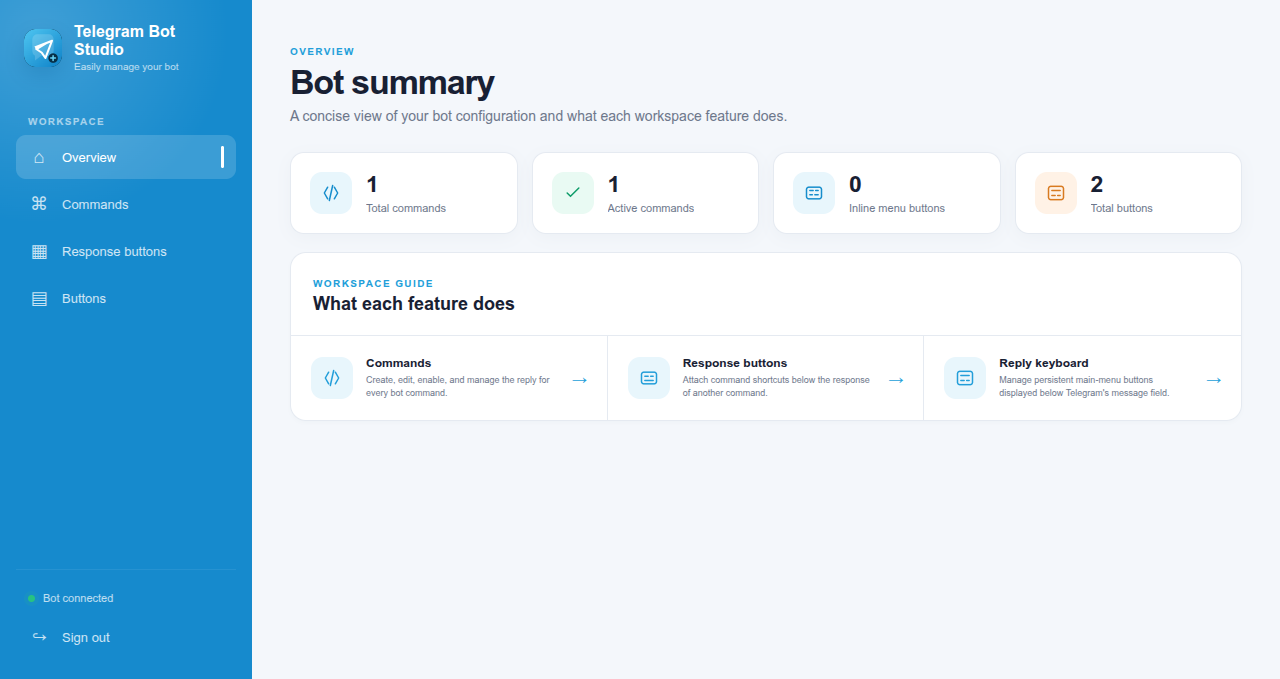
Telegram Bot Studio is a self-hosted Telegram bot starter with a built-in web admin panel — deploy a working bot in minutes, manage it through a password-protected UI, and persist all data in PostgreSQL. No coding required to get running, no servers to configure, no polling infrastructure to manage. Bring your BotFather token, set a panel login, and your bot is live.
Self-host on Railway for ~$5/month — own your bot, your data, and your panel, with no third-party bot-builder subscription and no per-message fees.
What This Template Deploys
| Service | Purpose |
|---|---|
| Telegram Bot Studio v1.0.0 | The bot runtime and web admin panel — connects to Telegram via your bot token and serves a password-protected management UI |
| PostgreSQL 18 (SSL) | Persistent storage — bot configuration, application data, and panel state survive every redeploy |
Both services connect over Railway's private network. PostgreSQL is never exposed publicly. The bot uses Telegram polling by default — no webhook or public-endpoint setup required.
About Hosting Telegram Bot Studio
Running a Telegram bot in production means keeping a long-lived process connected to Telegram's API, persisting configuration and data through restarts, and securing whatever admin interface you use to manage it. Without a managed host, that's a VPS, a process manager, a database, and manual deployment to maintain.
Railway handles all of it. This template deploys the bot connected to a managed PostgreSQL instance over private networking, with the admin panel protected by credentials you set at deploy time. Your bot stays online 24/7 and your data survives every redeploy.
Typical cost: ~$5/month on Railway's Hobby plan for the bot and PostgreSQL. Hosted Telegram bot builders like Manybot and Chatfuel charge monthly subscriptions and cap features behind paid tiers. Self-hosting on Railway gives you full control at flat compute cost.
Deploy in Under 3 Minutes
- Create a bot with @BotFather in Telegram and copy the bot token
- Click Deploy on Railway — the bot and PostgreSQL build automatically (~2 minutes)
- Set
BOT_TOKEN,PANEL_USERNAME, andPANEL_PASSWORDin the Variables tab - Open your Railway-assigned URL and log into the admin panel with your credentials
- Your bot is live on Telegram — manage it from the panel
No coding. No SSH. No webhook configuration.
Common Use Cases
- Telegram bot with an admin panel — no coding required — deploy a managed bot with a web UI instead of writing and hosting bot code from scratch
- Internal notification and alert bots — push deployment alerts, monitoring events, or business notifications to Telegram channels and groups from one managed bot
- Customer support bot on Telegram — run a support or FAQ bot with persistent data and a panel to manage responses without touching code
- Self-hosted alternative to Manybot and Chatfuel — own your bot and data instead of renting a hosted bot builder with monthly fees and feature caps
- Automation and workflow bots — trigger actions, collect form responses, or route messages with data persisted in PostgreSQL across restarts
- Telegram bot starter for developers — a clean, deployable base with auth, a panel, and a database already wired — extend it instead of starting from an empty repo
Configuration
| Variable | Required | Description |
|---|---|---|
BOT_TOKEN | ✅ Required | Telegram bot token from BotFather — connects the app to your bot |
PANEL_USERNAME | ✅ Required | Username for the admin panel login |
PANEL_PASSWORD | ✅ Required | Password for the admin panel — set a strong value before deploying |
DATABASE_URL | ✅ Auto-injected | PostgreSQL connection string via Railway reference variable |
PORT | Auto-set | Railway injects the panel port automatically |
Single instance only: Telegram Bot Studio uses polling by default. Keep the service to one replica — running multiple replicas with the same
BOT_TOKENcauses Telegram polling conflicts and dropped updates.
Telegram Bot Studio vs. Alternatives
| Telegram Bot Studio (Railway) | Manybot | Chatfuel | Custom-coded bot | |
|---|---|---|---|---|
| Monthly cost | ~$5 flat | Free–paid tiers | From $14.99/mo | Hosting + dev time |
| Admin panel UI | ✅ Built-in | ✅ Yes | ✅ Yes | ❌ Build it yourself |
| No coding required | ✅ Yes | ✅ Yes | ✅ Yes | ❌ No |
| Self-hostable | ✅ Yes | ❌ No | ❌ No | ✅ Yes |
| Data ownership | ✅ Your PostgreSQL | ❌ Manybot servers | ❌ Chatfuel servers | ✅ Yes |
| PostgreSQL persistence | ✅ Yes | ❌ No | ❌ No | ⚠️ You configure |
| Per-message fees | ✅ None | ⚠️ Tier-capped | ⚠️ Tier-capped | ✅ None |
| Open source | ✅ Yes | ❌ No | ❌ No | N/A |
Dependencies for Telegram Bot Studio Hosting
- Telegram bot token — create one free with @BotFather
- Railway account — Hobby plan (~$5/month) covers the bot and PostgreSQL
- No webhook, domain, or external service required — polling works out of the box
Deployment Dependencies
- Telegram Bot Studio GitHub — source
- Telegram BotFather — create your bot token
- Telegram Bot API Documentation — bot capabilities reference
- Railway PostgreSQL Documentation
Implementation Details
This template deploys ghcr.io/codestorm-official/telegram-bot-studio:1.0.0 alongside
ghcr.io/railwayapp-templates/postgres-ssl:18 over Railway's private network. The bot connects
to Telegram using long polling — no public webhook endpoint or domain configuration is needed.
PostgreSQL data persists on a volume at /var/lib/postgresql/data and survives every redeploy.
The admin panel is protected by PANEL_USERNAME and PANEL_PASSWORD — set these to strong
values before exposing your Railway URL. Because the bot uses polling, run it as a single
instance: multiple replicas sharing one bot token cause Telegram to reject overlapping
getUpdates calls.
Frequently Asked Questions
Do I need to know how to code to use this? No. Create a bot token with BotFather, set your panel login, and deploy. The admin panel handles management through a web UI — no code required to get a working bot online. Developers who want to extend it can fork the open-source repo.
How do I get a Telegram bot token?
Open @BotFather in Telegram, send /newbot, follow the prompts to
name your bot, and BotFather returns a token. Paste that token into the BOT_TOKEN variable
when deploying.
Do I lose my bot data if Railway redeploys? No. All bot configuration and application data are stored in the Railway-managed PostgreSQL database, which persists on its own volume. Redeploys, updates, and restarts do not affect your data.
Why must I run only one instance? Telegram Bot Studio uses long polling to receive updates. Telegram only allows one active polling connection per bot token — running multiple replicas causes conflicts where updates are dropped or duplicated. Keep the service at a single replica.
How do I secure the admin panel?
Set PANEL_USERNAME and PANEL_PASSWORD to strong values before deploying. The panel requires
these credentials to log in. Never share your Railway URL with the default or weak credentials
set, as the panel controls your bot.
Is this free to run? The software is open-source and free. You pay only Railway compute — approximately $5/month for the bot and PostgreSQL on the Hobby plan. Telegram's Bot API is free; there are no per-message charges.
Why Deploy and Host Telegram Bot Studio on Railway?
Railway is a singular platform to deploy your infrastructure stack. Railway will host your infrastructure so you don't have to deal with configuration, while allowing you to vertically and horizontally scale it.
By deploying Telegram Bot Studio on Railway, you get a self-hosted Telegram bot with a password-protected admin panel and PostgreSQL persistence — always-on at ~$5/month with full ownership of your bot and data, and no subscription or per-message fees.
Template Content
Telegram Bot Studio
codestorm-official/telegram-bot-studio:1.0.0BOT_TOKEN
PANEL_PASSWORD
PANEL_USERNAME