
Deploy temporal-cluster
Open Source Durable Workflow Engine. Retries, schedules & timers

temporal-worker
Just deployed
temporal-ui
Just deployed

Just deployed
temporal-history
Just deployed

Just deployed
/var/lib/postgresql/data
temporal-frontend
Just deployed
temporal-matching
Just deployed

Deploy and Host Temporal on Railway
Temporal is a durable execution engine for code that has to finish. You write an ordinary function — charge a card, provision an account, run a reconciliation — and Temporal records every step, so a crashed process, a redeploy or a third-party API that is down for an hour does not lose the work. Execution resumes from the last completed step. Stripe, Netflix and Datadog run it in production.
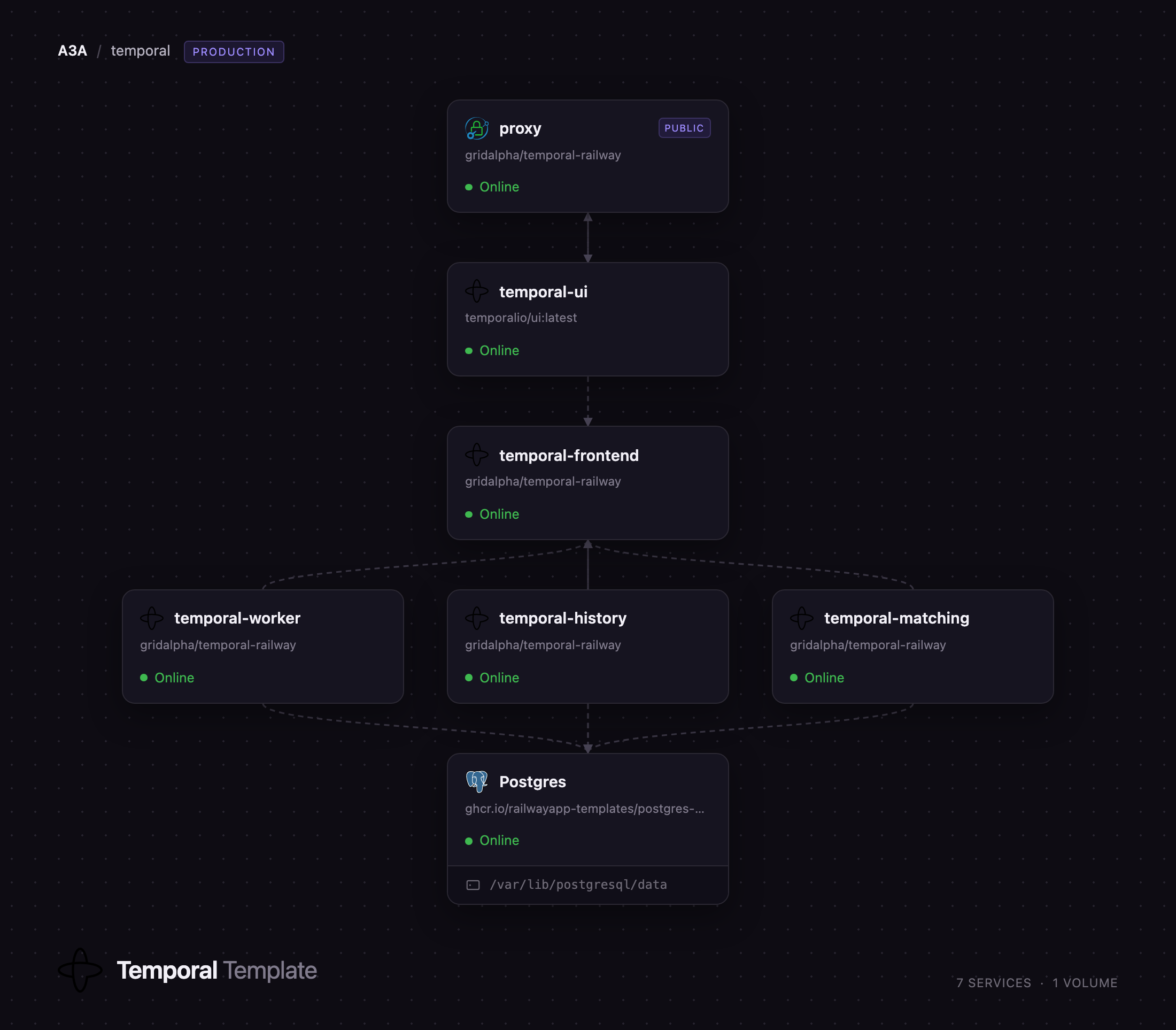
This template runs a full multi-service Temporal cluster, not a single-container development server. The four server roles — frontend, history, matching and worker — each get their own Railway service, the topology Temporal's own Helm chart deploys, so a busy role scales without touching the others. Managed Postgres holds both the execution history and the visibility index, so no Elasticsearch is required, and the Web UI runs privately behind a Caddy gateway terminating HTTP basic authentication. Self-host Temporal on Railway and you get the production shape on the first deploy.
Getting Started with Temporal on Railway
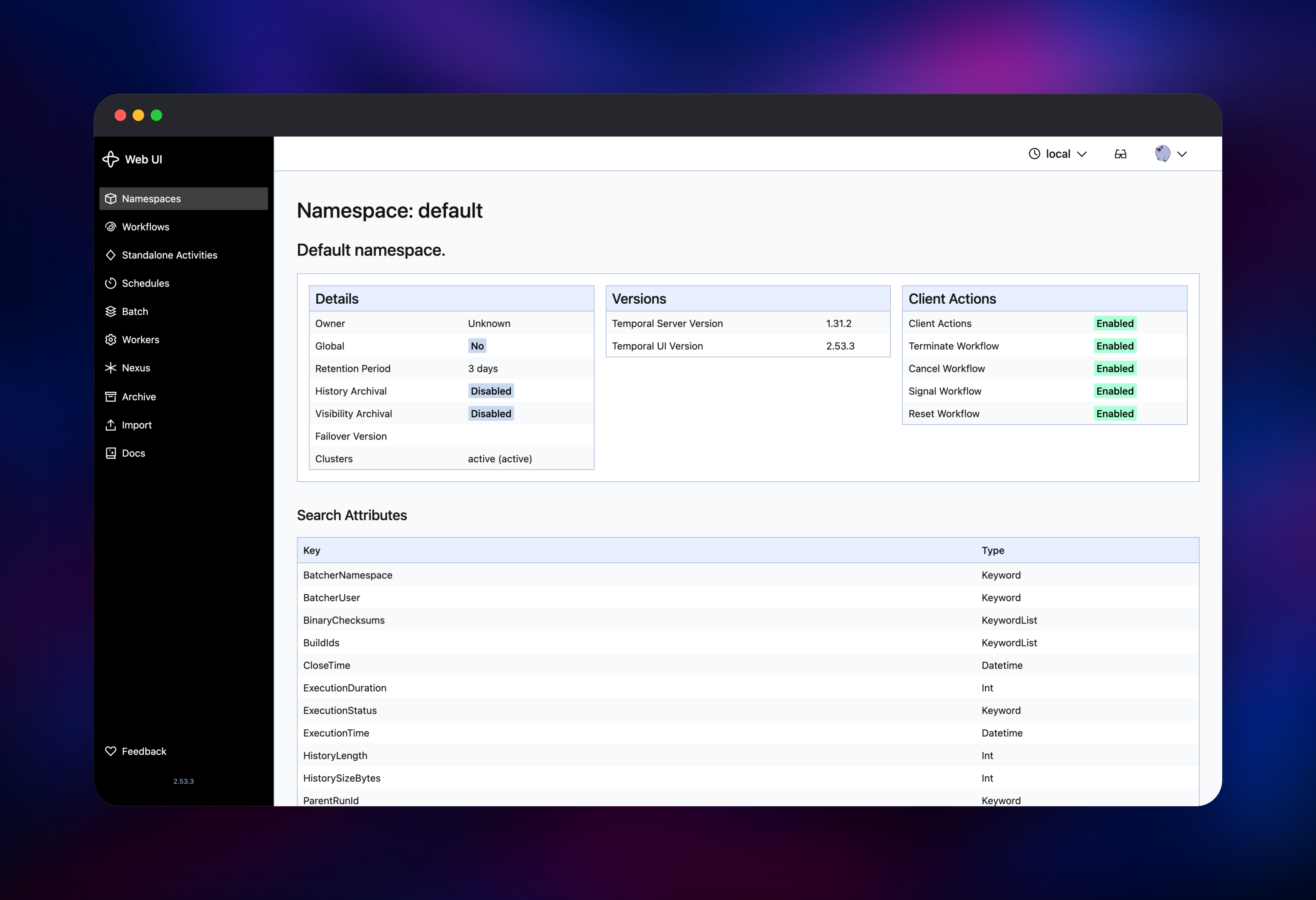
Deploy the template, pick a username and password for the Web UI, and wait for the seven services to go green. First boot runs longer: the frontend creates Temporal's database role, applies both schemas and registers the default namespace while the other roles wait.
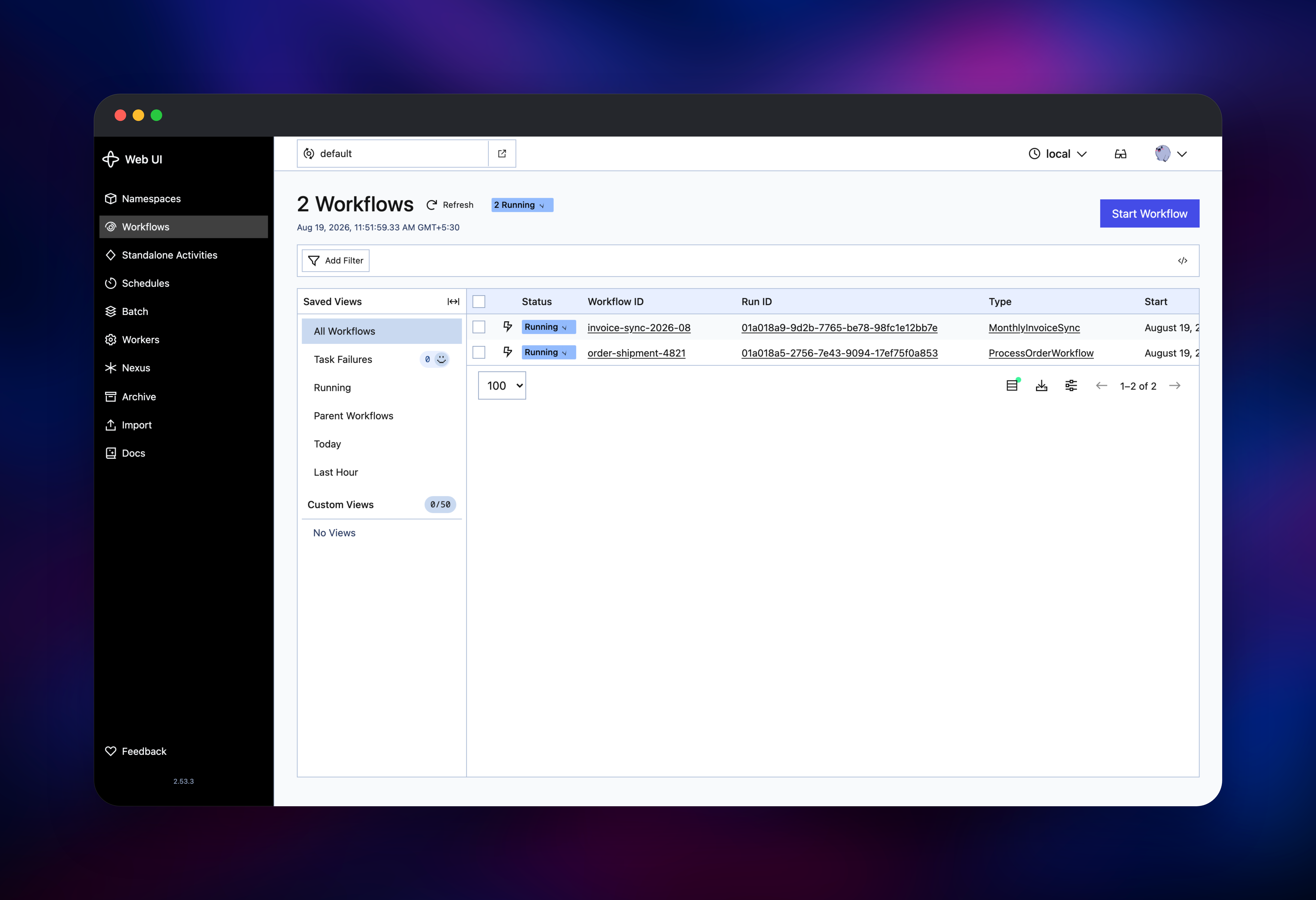
Open the public URL and enter the credentials you chose at deploy time — there is no account to create inside Temporal, since the Web UI has no user database. You land on an empty workflow list for default.
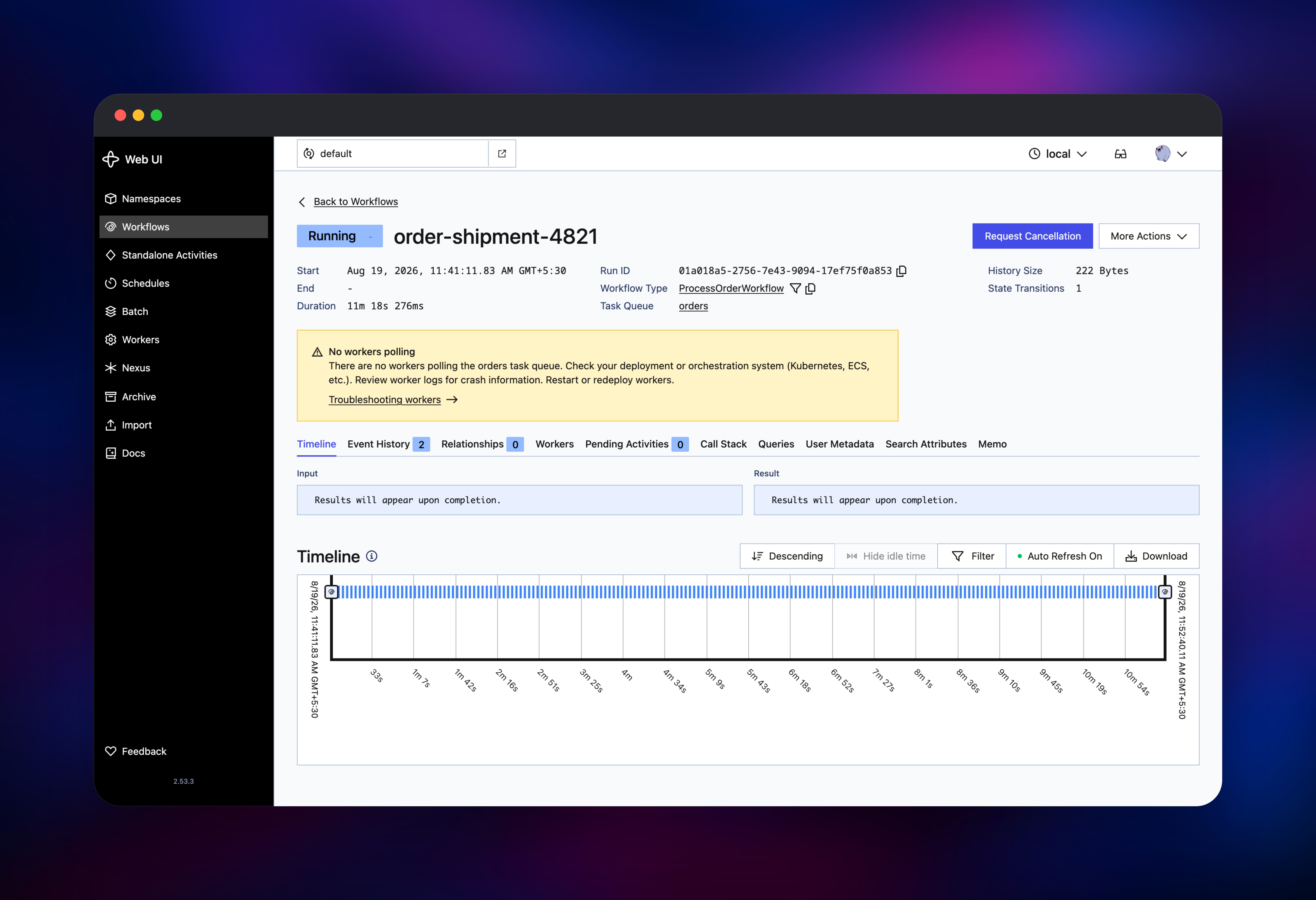
Click Start Workflow to confirm the cluster works end to end: any workflow ID, a task queue such as orders, a type such as ProcessOrderWorkflow. The execution appears as Running with a run ID, and opening it shows the event history and timeline — one click exercising the frontend, the history service and the visibility index.
It stays Running with a "no workers polling" banner, which is correct: Temporal orchestrates, and the code executing your steps is a worker you write. Deploy it as another service here and point the SDK client at temporal-frontend.railway.internal:7233. SDKs exist for Go, Java, TypeScript, Python and .NET.
About Hosting Temporal
Temporal separates what your business logic does from when and whether it succeeds. Your workflow code runs on your own workers; the cluster stores every event, retries failed steps on a policy you configure, keeps timers that survive restarts, and guarantees a started workflow reaches a terminal state — which is what teams want when cron jobs and queue consumers stop being enough.
Key features:
- Durable state — per-workflow event history, so a restart replays instead of restarting
- Automatic retries and timeouts as activity-level policy, not hand-written loops
- Long-running workflows — timers measured in days or months, not held in memory
- Signals, queries, updates and schedules, replacing cron for recurring work
- A Web UI for searching executions and terminating runs
One service per responsibility: temporal-frontend is the API gateway clients and workers connect to; temporal-history owns the shards and event history; temporal-matching hosts the task queues that hand work to workers; temporal-worker runs Temporal's own system workflows; Postgres stores the temporal and temporal_visibility databases; temporal-ui serves the dashboard; proxy holds the only public domain.
Why Deploy Temporal on Railway
Railway removes the operational work that usually makes a Temporal cluster a project of its own.
- Four server roles, Postgres and the UI in one click
- Private networking between roles, so only the gateway is exposed
- Schema and namespace set up automatically on first boot
- Managed Postgres instead of a database you babysit
- Scale any single role independently as load changes
Common Use Cases
- Order and payment flows where a failure between "charged" and "shipped" must never be lost
- Account provisioning spanning third-party APIs, each with its own retry and rollback behaviour
- Long-running AI and data jobs — agent runs, ETL, batch enrichment — needing checkpoints
- Scheduled business processes such as billing and reconciliation, replacing cron
Dependencies for Temporal
temporalio/server:1.31— the server binary, run four times with a different role eachtemporalio/admin-tools:1.31— schema tool, DDL and thetemporalCLI, used at first boottemporalio/ui:latest— the Web UI (temporalio/ui)caddy:2-alpine— basic-authentication gateway in front of the Web UI- Railway managed Postgres 18 — persistence and visibility store
Environment Variables Reference
| Variable | Service | Purpose |
|---|---|---|
TEMPORAL_SERVICES | server roles | Role to run: frontend, history, matching, worker |
NUM_HISTORY_SHARDS | server roles | Shard count, fixed at first boot |
DBNAME / VISIBILITY_DBNAME | server roles | The two Postgres database names |
DEFAULT_NAMESPACE_RETENTION | frontend | Closed history retention |
TEMPORAL_ADDRESS | Web UI | The frontend's private gRPC address |
UI_USERNAME / UI_PASSWORD | proxy | Credentials for the public Web UI |
Deployment Dependencies
- Source: temporalio/temporal (MIT)
- Docker Hub:
temporalio/server,temporalio/admin-tools,temporalio/ui - Docs: docs.temporal.io — self-hosting guide, SDKs, samples
Hardware Requirements for Self-Hosting Temporal
Per Temporal service, with Postgres sized separately.
| Resource | Minimum | Recommended |
|---|---|---|
| CPU | 0.5 vCPU per role | 1–2 vCPU per role |
| RAM | 512 MB per role | 1–2 GB, more for history |
| Storage | 5 GB Postgres volume | 20 GB+, sized by retention |
| Runtime | PostgreSQL 12+ | PostgreSQL 18 |
History is the memory-hungry role, holding context for every shard it owns. Retention drives storage; closed histories are kept three days by default.
Self-Hosting Temporal
A single-container cluster for local development, via the Temporal CLI:
temporal server start-dev --ui-port 8080
The production shape, one container per role against external Postgres:
docker run -d --name temporal-history \
  -e TEMPORAL_SERVICES=history \
  -e DB=postgres12 \
  -e POSTGRES_SEEDS=postgres.internal \
  -e POSTGRES_USER=temporal \
  -e POSTGRES_PWD=your-password \
  -e DBNAME=temporal \
  -e VISIBILITY_DBNAME=temporal_visibility \
  -e NUM_HISTORY_SHARDS=512 \
  -e BIND_ON_IP=:: \
  temporalio/server:1.31
Both databases need their schema applied once first, from the admin-tools image:
temporal-sql-tool --plugin postgres12 --ep postgres.internal -u temporal -p 5432 \
  --db temporal setup-schema -v 0.0
temporal-sql-tool --plugin postgres12 --ep postgres.internal -u temporal -p 5432 \
  --db temporal update-schema -d /etc/temporal/schema/postgresql/v12/temporal/versioned
Is Temporal Free to Self-Host?
Temporal Server is open source under the MIT licence — no paid tiers, seat limits or feature gates, and the SDKs and Web UI are open source too. Temporal Cloud is the managed offering, billed per action and stored event; self-hosting replaces that bill with infrastructure. On Railway you pay only for the compute and storage the seven services use.
FAQ
What is Temporal? An open-source durable execution engine. It runs your workflow code as normal functions while persisting every step, so failures and restarts resume rather than lose work.
What does this Railway template deploy? A complete Temporal cluster: frontend, history, matching and worker as separate services, managed Postgres, the Web UI, and a Caddy gateway putting basic authentication in front of it.
Why does the template include Postgres? Temporal keeps no state on disk. Postgres holds every workflow's event history and, in a second database, the visibility index behind workflow search — Temporal supports Postgres for advanced visibility natively, so Elasticsearch is not needed.
How do I connect a worker to self-hosted Temporal on Railway?
Deploy the worker as another service in the same Railway project and point the SDK client at temporal-frontend.railway.internal:7233. The frontend is intentionally private, so workers live in the project rather than on the internet.
Why is the Temporal frontend not exposed publicly? Its gRPC API ships without authentication, and securing it needs mTLS certificates or a JWT authorizer only you can supply. Keeping it private means anyone who finds the public URL reaches the password-protected Web UI, not the cluster API.
Why does my first workflow stay in Running?
Nothing is executing it yet. Temporal dispatches tasks to workers you run; until one polls the task queue you named, the workflow waits. That is expected on a fresh cluster and confirms the server side is healthy. Note also that NUM_HISTORY_SHARDS is fixed when the cluster is created — this template ships Temporal's recommended 512.
Template Content
temporal-worker
gridalpha/temporal-railwaytemporal-ui
temporalio/ui:latesttemporal-history
gridalpha/temporal-railwaytemporal-frontend
gridalpha/temporal-railwaytemporal-matching
gridalpha/temporal-railway